
Java developer related Questions

What is an alternative to spring boot application annotation?
It is generally recommended to use the @SpringBootApplication annotation, as it is more concise and easier to remember.
The alternative to the @SpringBootApplication annotation is to use the following annotations individually:
@Configuration: This annotation marks a class as a configuration class, which means that it can be used to register beans with the Spring Boot application context. @EnableAutoConfiguration: This annotation enables Spring Boot’s auto-configuration feature, which automatically configures the Spring Boot application based on the dependencies that are present on the classpath. @ComponentScan: This annotation enables component scanning, which means that Spring Boot will automatically scan the specified packages for annotated components, such as @Controller, @Service, and @Repository.
we have to use the above annotation manually,
Let’s say we don’t want to build the application using spring boot then, Micronaut, Quarkus, and Vert. x are the other options available we can go for that.
Which bean scope takes a lot of computational memory?
There are four types of bean scopes,
1) singleton: Returns a single bean instance per Spring IoC container.
the container creates a single instance of that bean; all requests for that bean name will return the same object, which is cached. Any modifications to the object will be reflected in all references to the bean. This scope is the default value if no other scope is specified
2) prototype: Returns a new bean instance each time when requested.
prototype scope will return a different instance every time it is requested from the container. It is defined by setting the value prototype to the @Scope annotation in the bean definition
3) request:
Returns a single instance for every HTTP request call.
4) session: Returns a single instance for every HTTP session.
The answer to this is Prototype bean.
Difference between @inject and @autowire?
The @Inject and @Autowired annotations are both used for dependency injection in Spring.
Origin: The @Inject annotation is part of the Java Contexts and Dependency Injection (CDI) specification, while the @Autowired annotation is specific to the Spring framework.
Required dependencies: By default, the @Inject annotation will throw an exception if the required dependency cannot be found. However, the @Autowired annotation can be configured to allow optional dependencies.
Scope: By default, the scope of beans injected with the @Inject annotation is prototype. However, the scope of beans injected with the @Autowired annotation is singleton.
Additional features: The @Autowired annotation has a number of additional features, such as the ability to specify a qualifier for the dependency and the ability to inject a provider for the dependency.
In general, it is recommended to use the @Inject annotation if you want to write code that is not tied to a specific framework or container.
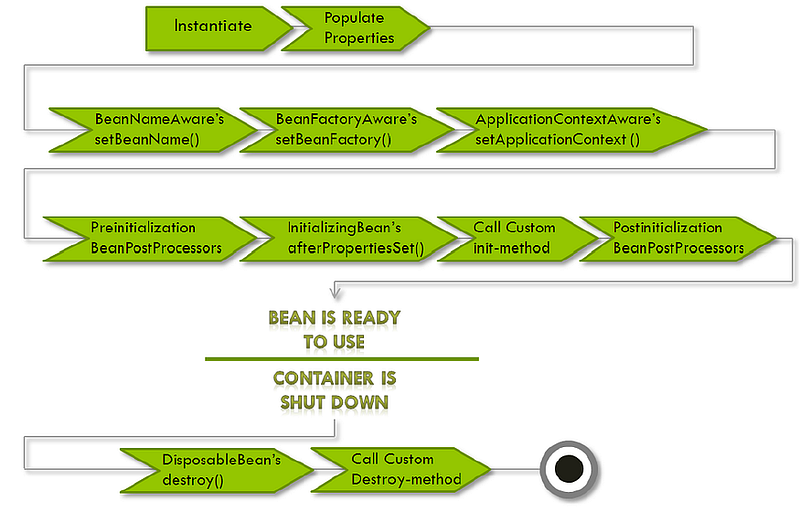
What is bean lifecycle?
Remember on a high level,
Spring follows these steps:
Init() — initializing the bean
Service() — using the bean
Destroy() — cleanup the bean
What kind of exceptions you have seen in the Springboot project?
BeanCreationException: This exception is thrown when Spring fails to create a bean. This can happen for a variety of reasons, such as a missing dependency, a configuration error, or a runtime exception. NoSuchBeanDefinitionException: This exception is thrown when Spring cannot find a bean definition for the specified bean name. This can happen if the bean is not defined in the Spring configuration or if the bean definition is invalid. CircularDependency Exception:
- Occurrence: This exception occurs when there is a circular dependency between beans during the Spring application context initialization.
- Explanation: Spring IoC (Inversion of Control) container manages the beans and their dependencies. Circular dependencies happen when two or more beans depend on each other directly or indirectly, creating a cycle. Spring detects this cycle and throws a
CircularDependencyExceptionto avoid infinite recursion.
DataAccessException:
- Occurrence: This exception is a part of Spring’s exception hierarchy and is used to handle database-related errors.
- Explanation: When performing database operations using Spring’s data access technologies (like JDBC, Hibernate, JPA), exceptions derived from
DataAccessExceptionmay occur. These exceptions encapsulate different database-related errors, such as connectivity issues, SQL syntax errors, or violations of database constraints.
ConstraintViolationException:
- Occurrence: This exception is often associated with database operations, specifically related to data integrity constraints.
- Explanation: When attempting to perform an operation that violates a database constraint (e.g., unique key constraint, foreign key constraint), a
ConstraintViolationExceptionis thrown. This exception signals that the requested operation would result in a violation of the defined constraints in the database schema.
NoHandlerFoundException:
- Occurrence: This exception occurs in the context of Spring MVC when the framework cannot find a suitable handler (controller method) to process a specific HTTP request.
- Explanation: When a client sends an HTTP request, Spring MVC attempts to map that request to a controller method based on the defined request mappings. If it fails to find a suitable handler for a particular request, a
NoHandlerFoundExceptionis thrown. This can happen due to incorrect URL mappings, missing controllers, or other configuration issues.
How to write Springboot custom annotation or any custom annotation in Java?
Java helps you to write custom annotations based on your requirements.
In order to do that you have to follow these steps, Remember these are the questions asked only to experienced Java programmers, not the fresher guys,
To write a Spring Boot custom annotation, follow these steps:
- Create a Java interface and annotate it with the @Retention and @Target annotations. The @Retention annotation specifies how long the annotation should be retained. The @Target annotation specifies where the annotation can be used.
- Define the members of the annotation. The members can be methods, fields, or constructors.
- Implement the annotation. This is optional, but it can be useful for providing additional functionality or validation.
@Retention(RetentionPolicy.RUNTIME)
@Target(ElementType.TYPE)
public @interface MyController {
}
How to connect multiple DB in spring-boot?
To connect to multiple databases in Spring Boot, follow these steps:
- Add the necessary database dependencies to your project. - Configure your database connections in the application.properties or application.yml file. - Create a DataSource bean for each database connection using the @Bean annotation. - Create a TransactionManager bean for each database connection using the @Bean annotation. - Inject the DataSource and TransactionManager beans into your application code using the @Autowired annotation. - Use the DataSource and TransactionManager beans to interact with your databases.
@Configuration
@EnableTransactionManagement
public class MultipleDatabaseConfig {

    @Primary
    @Bean(name = "primaryDataSource")
    @ConfigurationProperties(prefix = "spring.datasource.primary")
    public DataSource dataSource() {
        return DataSourceBuilder.create().build();
    }

    @Bean(name = "secondaryDataSource")
    @ConfigurationProperties(prefix = "spring.datasource.secondary")
    public DataSource dataSource2() {
        return DataSourceBuilder.create().build();
    }

    @Primary
    @Bean(name = "entityManagerFactory")
    public LocalContainerEntityManagerFactoryBean entityManagerFactory(
            EntityManagerFactoryBuilder builder,
            @Qualifier("primaryDataSource") DataSource dataSource) {
        return builder
                .dataSource(dataSource)
                .packages("com.example.domain.primary")
                .persistenceUnit("primary")
                .build();
    }

    @Bean(name = "entityManagerFactory2")
    public LocalContainerEntityManagerFactoryBean entityManagerFactory2(
            EntityManagerFactoryBuilder builder,
            @Qualifier("secondaryDataSource") DataSource dataSource) {
        return builder
                .dataSource(dataSource)
                .packages("com.example.domain.secondary")
                .persistenceUnit("secondary")
                .build();
    }

    @Primary
    @Bean(name = "transactionManager")
    public PlatformTransactionManager transactionManager(
            @Qualifier("entityManagerFactory") EntityManagerFactory entityManagerFactory) {
        return new JpaTransactionManager(entityManagerFactory);
    }

    @Bean(name = "transactionManager2")
    public PlatformTransactionManager transactionManager2(
            @Qualifier("entityManagerFactory2") EntityManagerFactory entityManagerFactory) {
        return new JpaTransactionManager(entityManagerFactory);
    }
}
What happens when you don’t annotate the JPA repository with @repository annotation?
Component Scanning: Your repository might not be automatically detected and registered as a Spring bean, which means you would need to create an explicit bean definition for it in your Spring configuration.
Exception Translation: Spring Data JPA might not provide exception translation for JPA-specific exceptions, making it more challenging to handle these exceptions in a consistent way.
Transaction Management: Spring may not automatically apply transaction management to the repository methods. You would need to manage transactions manually or configure them explicitly for the repository methods using other Spring mechanisms, such as @Transactional annotations.
In practice, it’s a good practice to annotate your JPA repositories with @Repository to take advantage of these benefits and ensure that your repositories are properly managed by Spring. However, not annotating with @Repository doesn’t prevent you from using JPA repositories; i
Why use spring data JPA?
It reduces boilerplate code, enhances productivity, and offers features like automatic query generation, paging, and sorting, making database operations more efficient and developer-friendly.
Why go for native queries?

Using native queries in a Java application with JPA (Java Persistence API) has some advantages and scenarios where it can be beneficial:
Complex Queries: Native queries allow you to write complex SQL queries that might be challenging or impossible to express using JPA’s JPQL (Java Persistence Query Language). If your application requires complex database operations, native queries can be more expressive and efficient.
Performance Optimization: In some cases, native queries can perform better than JPQL queries because they allow you to take advantage of database-specific optimizations or features. You have fine-grained control over the SQL generated for a query.
Legacy Databases: When working with legacy databases, the schema might not align well with JPA entities. In such cases, native queries can help you interact with the database more seamlessly.
Database-Specific Features: If your application relies on database-specific features or functions that are not supported by JPA or JPQL, native queries enable you to leverage those features directly.
Where do we create an instance of entity manager?
Generally, we write entity manager in the service class,
in a Spring-based JPA application, you don’t need to create the EntityManager manually. Spring manages it for you through either Spring Data JPA or by injecting it into your Spring-managed beans using annotations like @PersistenceContext.
How to trace a request in spring-boot?
There are multiple ways in which we can achieve this scenario,
Spring Boot Actuator provides built-in endpoints for monitoring and tracking,
use these endpoints “/actuator/httptrace” and “/actuator/metrics”
However, the industry uses Third-Party Monitoring Tools Spring Cloud Sleuth, Zipkin, or Prometheus for more advanced request tracing and performance monitoring.
Sleuth is used for most of the distributed tracing environment. where we can see a particular request flowing from one end to another.
Add the following dependencies to your pom.xml:
<dependency>
    <groupId>org.springframework.boot</groupId>
    <artifactId>spring-boot-starter-actuator</artifactId>
</dependency>
Configure Actuator in your application.properties:
management.endpoints.web.exposure.include=*Spring Cloud Sleuth with Zipkin
<dependency>
    <groupId>org.springframework.cloud</groupId>
    <artifactId>spring-cloud-starter-sleuth</artifactId>
</dependency>

<dependency>
    <groupId>org.springframework.cloud</groupId>
    <artifactId>spring-cloud-starter-zipkin</artifactId>
</dependency>spring.application.name=my-application
spring.zipkin.base-url=http://zipkin-server:9411Make sure you have a Zipkin server running. You can start one using Docker
docker run -d -p 9411:9411 openzipkin/zipkin
Spring Cloud Sleuth with Prometheus
<dependency>
    <groupId>org.springframework.cloud</groupId>
    <artifactId>spring-cloud-starter-sleuth</artifactId>
</dependency>

<dependency>
    <groupId>io.micrometer</groupId>
    <artifactId>micrometer-registry-prometheus</artifactId>
</dependency>management.endpoints.web.exposure.include=*
management.metrics.export.prometheus.enabled=trueNow, you can access the /actuator/prometheus endpoint to get Prometheus metrics.
@RestController
public class MyController {

    @GetMapping("/example")
    public String exampleEndpoint() {
        return "Hello, World!";
    }
}
Access the /actuator/httptrace endpoint to see HTTP trace details, including the request and response.
Spring Cloud Sleuth with Zipkin Example
@RestController
public class MyController {

    private final Logger logger = LoggerFactory.getLogger(MyController.class);

    @Autowired
    private RestTemplate restTemplate;

    @GetMapping("/example")
    public String exampleEndpoint() {
        logger.info("Processing request in exampleEndpoint");
        // Additional logic here
        String result = restTemplate.getForObject("http://example.com", String.class);
        return "Result: " + result;
    }
}
This example includes Sleuth’s distributed tracing capabilities. Requests and spans will be traced, and you can visualize them in Zipkin
Spring Cloud Sleuth with Prometheus Example
@RestController
public class MyController {

    @Autowired
    private MeterRegistry meterRegistry;

    @GetMapping("/example")
    public String exampleEndpoint() {
        // Additional logic here
        // Record a custom metric
        meterRegistry.counter("my_custom_metric").increment();
        return "Hello, World!";
    }
}
How will you write a program to upload a file in an s3 bucket using Springboot?
Nowadays Springboot + AWS is commonly used to develop cloud-based solutions. One of the scenarios being asked is how can we upload a file in s3 and write code to check the familiarity with it.
import org.springframework.beans.factory.annotation.Autowired;
import org.springframework.web.bind.annotation.*;
import org.springframework.web.multipart.MultipartFile;
import software.amazon.awssdk.services.s3.S3Client;
import software.amazon.awssdk.services.s3.model.PutObjectRequest;
@RestController
@RequestMapping("/api/s3")
public class S3Controller { @Autowired
private S3Client s3Client; @PostMapping("/upload")
public String uploadFile(@RequestParam("file") MultipartFile file) {
try {
String fileName = file.getOriginalFilename();
PutObjectRequest objectRequest = PutObjectRequest.builder()
.bucket("YOUR_BUCKET_NAME")
.key(fileName)
.build(); s3Client.putObject(objectRequest, RequestBody.fromInputStream(file.getInputStream(), file.getSize())); return "File uploaded successfully to S3: " + fileName;
} catch (Exception e) {
return "File upload failed: " + e.getMessage();
}
}
}How to do bulk upload in s3 using Springboot?
To upload the file in bulk we need to use the MultipartFile upload strategy like this below,
import org.springframework.beans.factory.annotation.Autowired;
import org.springframework.web.bind.annotation.*;
import org.springframework.web.multipart.MultipartFile;
import software.amazon.awssdk.services.s3.S3Client;
import software.amazon.awssdk.services.s3.model.PutObjectRequest;
import java.io.IOException;
import java.util.List;
@RestController
@RequestMapping("/api/s3")
public class S3BulkUploadController { @Autowired
private S3Client s3Client; @PostMapping("/bulk-upload")
public String uploadMultipleFiles(@RequestParam("files") List<MultipartFile> files) {
try {
for (MultipartFile file : files) {
String fileName = file.getOriginalFilename();
PutObjectRequest objectRequest = PutObjectRequest.builder()
.bucket("YOUR_BUCKET_NAME")
.key(fileName)
.build(); s3Client.putObject(objectRequest, RequestBody.fromInputStream(file.getInputStream(), file.getSize()));
} return "Bulk upload completed successfully";
} catch (IOException e) {
return "Bulk upload failed: " + e.getMessage();
}
}
}Spring Boot Folder Structure (Best Practices)
Following image shows the well recognized folder stucture for Spring Boot application.
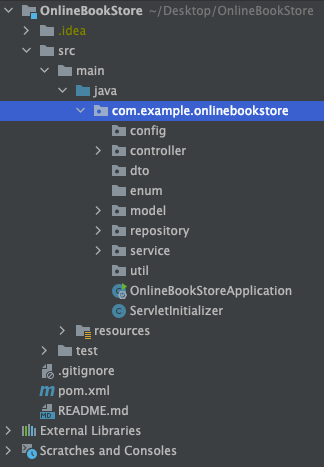
Here I’m going to explain the files that need to include above folders.
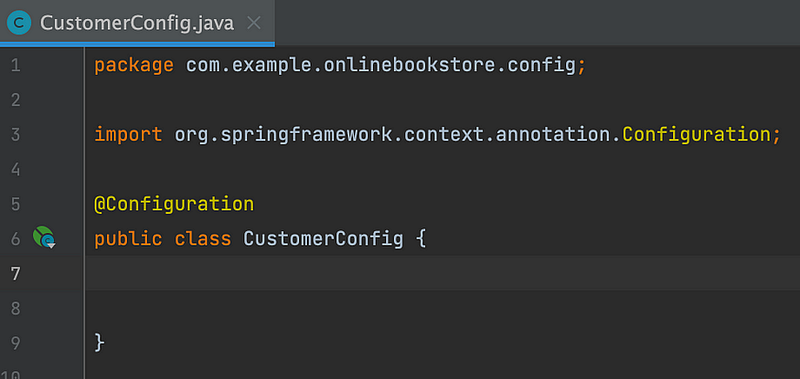
- Config: Contains configuration classes, where you configure application settings, or
AppConfigfor other application-level configurations.
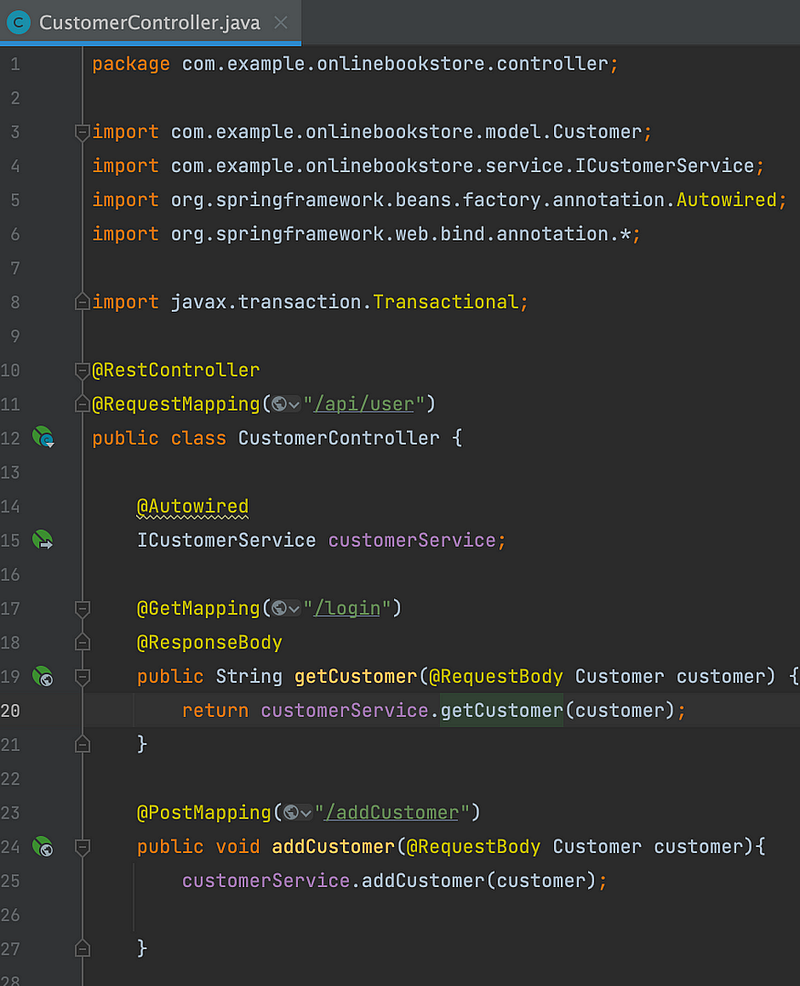
2. Controller: Contains your RESTful controller classes. These classes handle incoming HTTP requests and define the API endpoints.
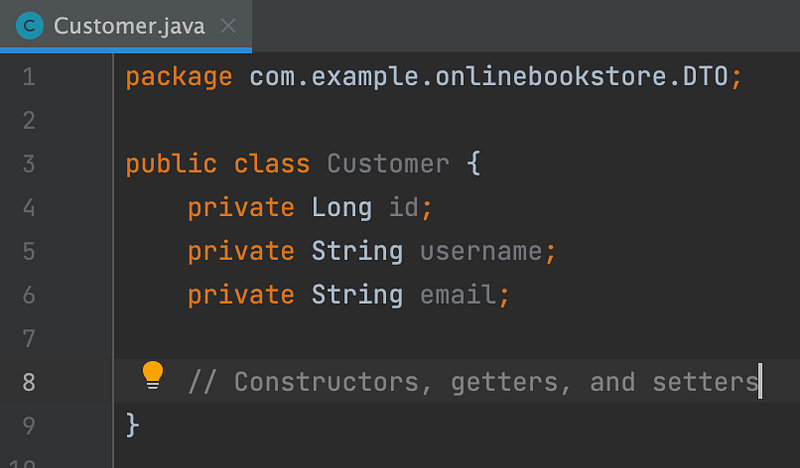
3. DTO (Data Transfer Object): A DTO, is a design pattern used to transfer data between different layers or components of an application. The main purpose of a DTO is to encapsulate data and provide a simple data structure that can be easily passed around the application. DTOs are often used to transfer data between the front-end and back-end of a web application, between microservices, or between different layers of an application, like the service layer and the presentation layer.
Characteristics of a DTO:
- It typically contains only private fields with getters and setters to access the data.
- DTOs do not contain any business logic, and their primary focus is to carry data.
- They are often used to represent a subset of data from an entity or a combination of data from multiple entities.
- DTOs help to reduce the amount of data transferred over the network, improving performance by avoiding excessive data exchange.
Example:
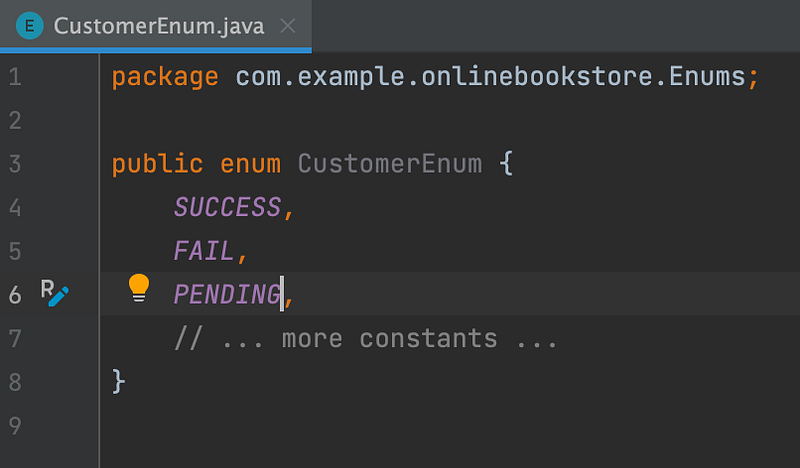
4. Enum (Enumeration class): Enum classes are typically used to represent a set of closely related and pre-defined values. Examples of common use cases for Enum classes include request status like SUCCESS, FAIL, PENDING and more.
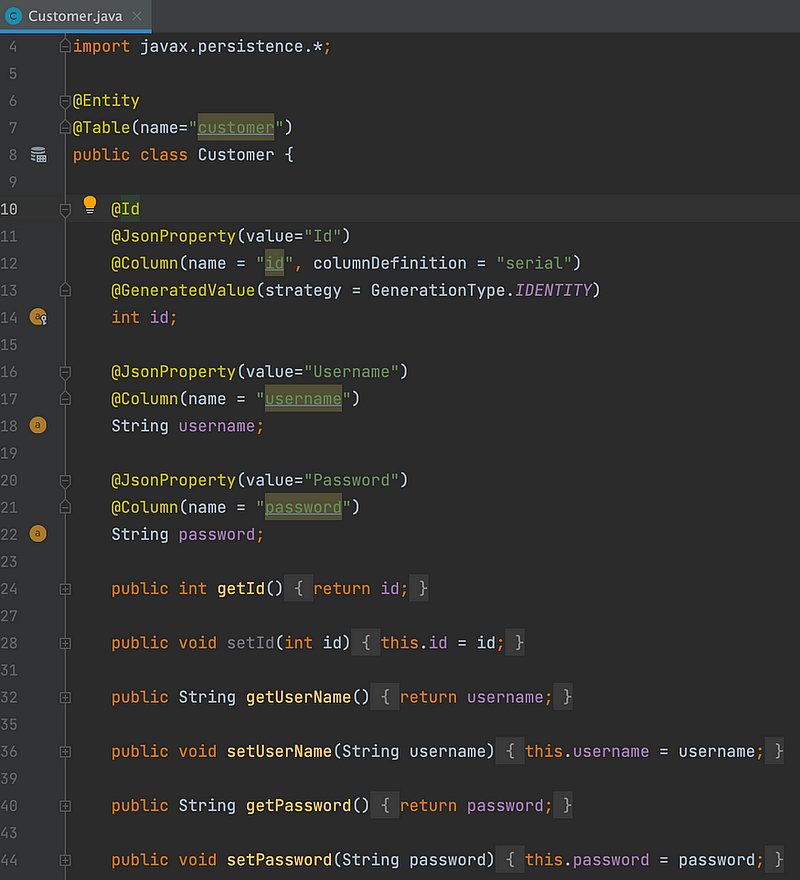
5. Model: The model folder stores data models or entities that represent structure and behaviour of the application domain. These classes are mapped to database tables and define the properties and relationships of the application data.
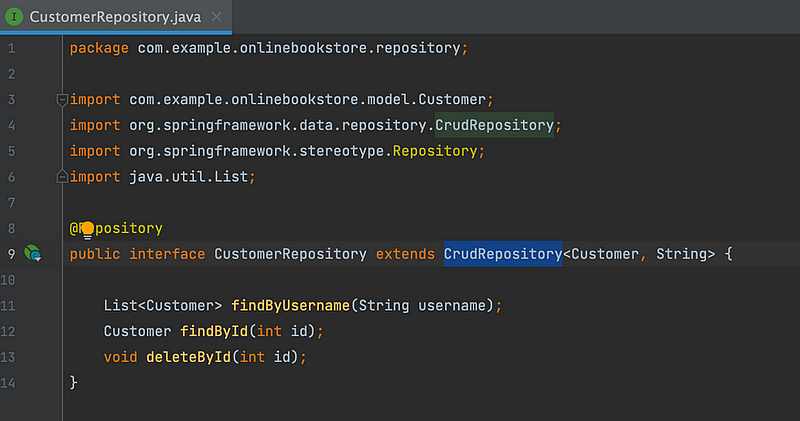
6. Repository: Contains repository classes that deal with data access. These classes typically use an ORM (Object-Relational Mapping) framework or JPA (Java Persistence API) to interact with the database.
7. Service: Contains service classes that implement business logic. Controllers use these services to perform operations on data.
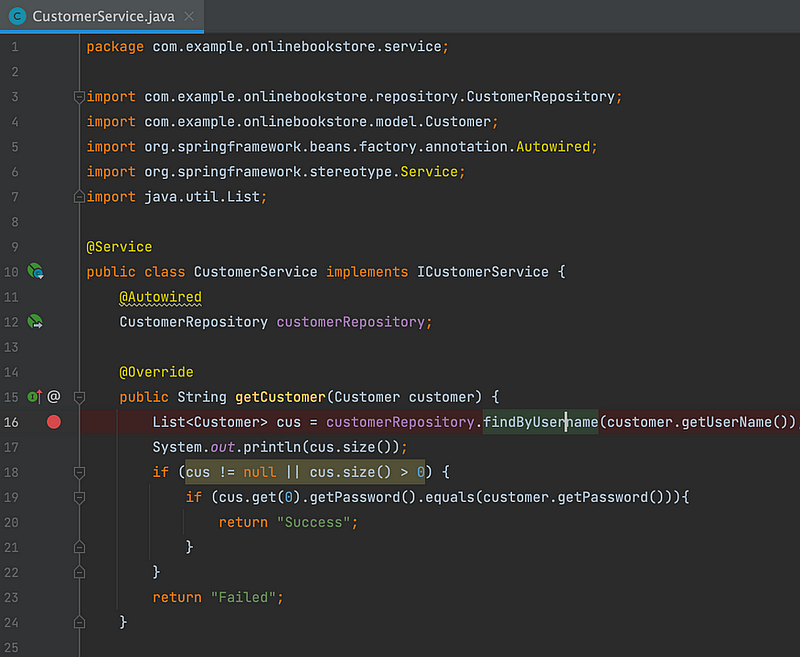
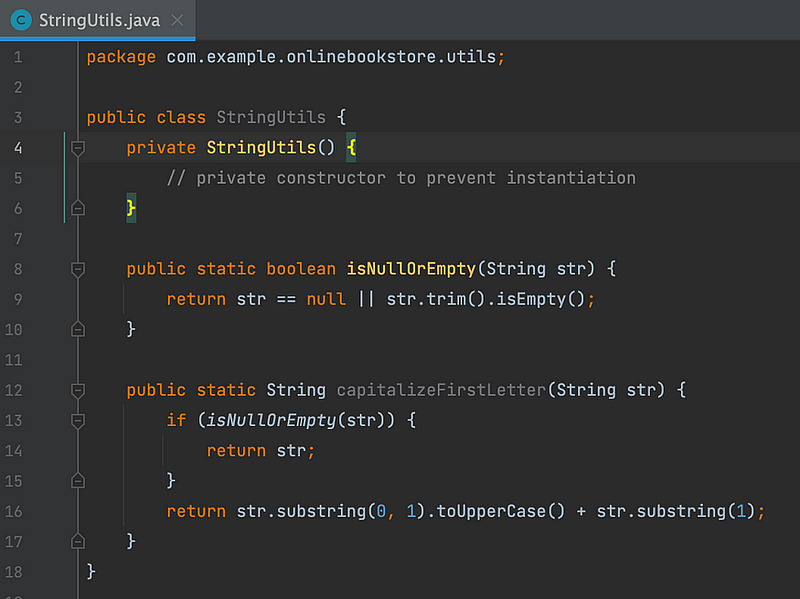
8. Util (Utilities): The “util” folder is not specific to Spring Boot; it is a general practice followed in many programming languages and frameworks. In Spring Boot projects, you might find a “util” package or folder where developers place utility classes to keep the codebase organized and modular.
Other than src/main/java folders there are other folders that need to have in a spring boot application. There are as follows.
- src/main/resources: This folder contains non-Java resources like static files, templates, and configuration files.
- src/test: This folder contains all your test classes. Inside this folder there is another folder which is same to src/main/java folder structure. As an example src/test/java/service folder contains test classes for testing the service classes of src/main/java/service classes.
Let’s work on some questions Set 1

Question: What is Meta Space in Java.
Answer: Metaspace is a native (as in: off-heap) memory manager in the hotspot. It is used to manage memory for class metadata. Class metadata are allocated when classes are loaded. Earlier the Class loading mechanism used the permanent generation known as PermGen space however that has been made redundant with Java 8. Metaspace lies in the native memory and non on the heap however PermGen resides on Heap.
What is Metaspace?
The OpenJDK uses Metaspace to store its class metadata. It can contribute a large part to the non-Java-heap memory…
What if you don’t synchronise a method in Java?
Answer :This can give rise to race condition in a multithreaded environment. Below example is how you can have a race condition. With out synchronising a critical section , different threads may access the share data unpredictable and that might poduce different results. This might result in to race condition.
Any operation happens in multiple steps i.e.
Step1: Reading a Variable from Main Memory.
Step2: Updating or processing that data.
Step3: Saving Data in to main memory.
Thread 1 Executing Step 1 and then 2 and Then Context Switch Happens.
Thread 2 May not read the data that was updated by thread 1 as Step three was not completed by Thread 1.
Thread 2 updates the value. Context Switch happens.
Thread 1 overwrites the value updated by thread 2.
public class Counter
  {
    private int counter=0;
    public void increment ()
          {
            counter++;
          }
      public int getCounter()
        {
      return counter;
          }
public static void main(String args[]) throws InterruptedException {
final Counter counter = new Counter();
Runnable r1 = () -> counter.increment ();
Runnable r2 = () -> counter.increment ();
Thread t1 = new Thread (r1);
Thread t2 = new Thread (r2);
t1.start ();
Thread.sleep(1000);
t2.start ();
Thread.sleep(1000);
System.out.println(counter.getCounter ());
}
}
How was the internal implementation of Java Hash Map changed with JDK 1.8?
Answer: Since Java 8 the internals of HashMap changed in such a way that if , in case of collisions , the size of the linked list is more than 8 , Java iternally make use of Red black trees to store the elements instead of linked list. This make sure that the get operation are O(log(n)) instead of O(n).
What if you return constant hash code of 1 from hash code method.
And you don’t override equals method. i.e you have an employee class and you are storing the object of employee class as a key and the value. What would happen if you hard code the hash code method to return “1”. What would happen if you add element to the hash map and what would be the behavior when you try to get by Key
Answer: HashMap will work fine and will be able to store your key value pairs correctly. The hash function may have collisions but that is due to your poor hash function. The index to save the objects is generated as below. You will be able to save and retrieve the key values from the HashMap. In case of collisions the HashMap will return the object asked by you using the equals method defined in the object class.
index = hashCode(key) & (n-1).public class EmployeeExample {
public static void main(String args[])
{
Map <Employee, Employee> empMap=new HashMap<Employee, Employee>();
Employee emp1=new Employee (101,"vikas","dev", 6789);
Employee emp2=new Employee (102,"Ravi","QA", 8999);
Employee emp3=new Employee (103,"Akshaya","DevOps", 7789);
empMap.put (emp1,emp1 );
empMap.put (emp2,emp2 );
empMap.put (emp3, emp3 );
empMap.put (emp3, emp3 );
System.out.println(empMap.size ());
System.out.println(empMap.keySet ().size ());
empMap.keySet ().stream ().forEach (System.out::println);
empMap.entrySet ().stream ().forEach (System.out::println);
System.out.println(empMap.get (emp1));
}Synchronized member method versus static synchronized method.
Let say you have two synchronized method in the same class , can two different thread simultaneously access different synchronised methods?
Answer: Two threads can access the public synchronized methods if they are invoked on two differnt object. One thread can’t enter in to synchronised block until the other thread has exited the critical section on the same object.
Thread A- Invoking public synchronised method A() on Object A- Allowed.
Thread B — Invoking public synchronised method B() on Object A-Not Allowed until Thread A return.
Thread B-Invoking public synchronised method A() on Object B-Allowed.
The idea here is that all object in java have intrinsic locks which are called monitors. Once a thread acquires a monitor another thread would have to wait for that thread to release the monitor in oder to acquire the lock. One thread can acquire the lock on the same object as many times as needed if this thread has clrealy acqired the lock on that object.
Every time the thread acquires a monitor the lock acquire count on that monitor is incremented and when the lock acquired counter is zero means that the thread has released the lock.
Follow up Question
Let say you have one instance and one static synchronized method , can two different thread execute these methods simultaneously?
Answer: As long as the object on which the lock has been acquired is same , no other thread can access that method in concurrent context. Any thread accessing the Static synchronized method will acquire the lock on the class object so while that thread is executing no other thread can execute any other static synchronized method in the same class but they can execute the other instance methods of the class.
Explain String constant pool.
Answer: String constant pool is a way of optimising the string creation by the JVM. We are highly encouraged to define strings using String s=”Java” as opposed to String s= new String(“Java”). The reason is that strings are immutable and any point of time you are modifying a string a new object is created. Based on the reference equailty all the string literals are stored on the String constant pool and if you try to create the same literal , you are returned the literal from the pool instead of creating new obeject. There is plethora of docmentation for this and I am not surprised why this is till a popular question.
public class Main {
    public static void main(String[] args) {
        String s1 = "abc";
        String s3 = s1;// Both S1 and S3 will point to the same literal on String Pool.
        String s2 = new String("abc");
        //Reference Equailty
        System.out.println(s1 == s2);//false
        System.out.println(s1 == s3);//true
        System.out.println(s2 == s3);//false
        //Value Equality
        System.out.println(s1.equals(s2));//true
        System.out.println(s1.equals(s3));//true
        System.out.println(s2.equals(s3));//true

    }
}
How streams are different from collections?
Answer: This could be a very big answer however there are couple of facts that you need to know about streams.
Streams operation do not modify the underlying collection however they apply the filter and ma operation and provide you with a data structure altogether different from original data structure.
for Exmaple. This will provide you all the even number in the range of 6, 7,8,9,10
IntStream.range(6, 10).filter(n-> n/2==0).collect(toList());
Streams are lazily loaded , just to understand to easily think of the fact that streams resources are only used once you stat collecting those.
for example: The results remain in memory until you call the terminal operation of findFirst on the stream. Stream elements are only processed once you run a terminal oepration.
empList.stream.map(emp-> emp.getSalary()).findfirst();
Internal iteration is a concept when the iteration is managed by the library itself. With streams we don’t need to iterate over a collection however Streams API provides iteration by itself.
questions Set 2

Describe the use of Optional in Java?
Optional has been introduced in Java in order to model the absence of a value. We all know the notorious “NullPointerException” in java and various ways to write the code to avoid that, Optional models the NullPointerExecption and establishes a design pattern around that.
Problems with Nulls
- NullPointerException is the most conspicuous error in java.
- The code with defensive null checks looks cumbersome.
- Its just an overhead and does not relate to business logic.
- It creates a hole in the type system. null carries no type or other information, so it can be assigned to any reference type. This situation is a problem because when null is propagated to another part of the system, you have no idea what that null was initially supposed to be.
For Example.
public class Person {
    private Car car;
    public Car getCar() { return car; }
}
public class Car {
    private Insurance insurance;
    public Insurance getInsurance() { return insurance; }
}
public class Insurance {
    private String name;
    public String getName() { return name; }
}
Consider below piece of code , this code may throw NullPointerExecption as various places and you may have to do a defensive checking of the Nulls.
public String getCarInsuranceName(Person person) {
    return person.getCar().getInsurance().getName();
}
What if you could write the code this way
public class Person {
    private Optional<Car> car;
    public Optional<Car> getCar() { return car; }
}
public class Car {
    private Optional<Insurance> insurance;
    public Optional<Insurance> getInsurance() { return insurance; }
}
public class Insurance {
    private String name;
    public String getName() { return name; }
}
You can create optional in 3 ways.
Empty Optional.
Optional<Car> optCar = Optional.empty();Optional from a Non Null value.
Optional<Car> optCar = Optional.of(car);Optional from Null.
Optional<Car> optCar = Optional.ofNullable(car);Describe the difference between map, flatMap and reduce in Stream.
Map function take an input as an array and transform that an return the array of same length. Map creates a new version of transformed data and does not modify the original data. The below map function takes an argument as a Lambda expression to modify the data which is in this case to return the length of each word in the ArrayList.
List<String> words = Arrays.asList("Modern", "Java", "In", "Action");
List<Integer> wordLengths = words.stream()
                                 .map(String::length)
                                 .collect(toList());
For example, given the list of words [“Hello,” “World”] you’d like to return the list [“H,” “e,” “l,” “o,” “W,” “r,” “d”]. That means you need to find the unique characters in the given list of of words.
//The above example creates a stream of words.
List<String> words = Arrays.asList("Modern", "Java", "In", "Action");
words.stream()
     .map(word -> word.split(""))
     .map(Arrays::stream)
     .distinct()
     .collect(toList());
The problem with this approach is that the lambda passed to the map method returns a String[] (an array of String) for each word. The stream returned by the map method is of type Stream<String[]>. What we want is Stream<String> to represent a stream of characters
Now here is the introduction of flatMap which is used to flatten a stream
Fixing the problem with the flatMap, flatMap will provide you the Stream<String> not the Stream<String[]> as a result and then you can run distinct on that character array which is flattened using all the words in the List.
List<String> uniqueCharacters =
  words.stream()
       .map(word -> word.split(""))
       .flatMap(Arrays::stream)
       .distinct()
       .collect(toList());
Another Example is that if Employee class has an email field and you want to find all the emails associated with each employee you would do something like this.
public class Employee
  {
  private String empId;
  private List<String> emails;
}emplist.stream().flatMap(x-> x.getEmails()).collect(toList);The above code will return you the flattened list of all the emails instead of returning the email arrays for each employee.
Reduce is a stream operation accepts an input array and return an accumulator that. When you want to combine the values of the stream to get a single value is called reduce operation.
int sum = numbers.stream().reduce(0, (a, b) -> a + b);Reduce takes two arguments:
- An initial value, here 0.
- A BinaryOperator
to combine two elements and produce a new value; here you use the lambda (a, b) -> a + b.
Describe the use case for JSON Web token?
In a nutshell JWOT is self contained token that is used by the server application to authenticate the client and also authorize them for different roles with in their domain.
Just think of the JWOT token which has a header a payload and a secret that is only decrypted by the server becasue the server has already signed it. So in each subsequent web call the server is able to maintain a session with the client application. JWOT can be both used for Authentication and Authorization. For More details please refer to my article here.
All About JSON Web Token(Back to School Series)
You want to file a complaint against a bad neighbour who violates the quiet hours rule in your community.
How can you disable Auto configuration in Spring Boot Application?
This is how you can do it from spring documentation.
import org.springframework.boot.autoconfigure.*;
import org.springframework.boot.autoconfigure.jdbc.*;
import org.springframework.context.annotation.*;
@Configuration
@EnableAutoConfiguration(exclude={DataSourceAutoConfiguration.class})
public class MyConfiguration {
}How do Micro services Communicate with each other ?
Micro services could communicate with each other using
→RPC /gRPC
Most of the technology in this space requires an explicit schema such as SOAP or gRPC. SOAP used WSDL as definition language. Using a RPC means you buy in the technology of Serialization and Deserialization.
JAVA RMI is one of the example of remote procedures calls.
→REST Architecture:
Using stateless HTTP protocol for communication among services. You can get more details about Restful here .
All About API (Back to School Series)
In the real world client and servers can talk to each other in various ways. One way could be direct when client is…
→Hypermedia as the engine of application State.(HATEOAS)
Suppose you as a client need to look for some product and catalogs. As a server if I keep providing you all the times the references or links to the client as in where these resources are stored , you would not need to care how does server manages the resources. For example if you are looking for a book and you get a response like this.
<book>
<name> Fountainhead</name>
<link rel="/books" href="authors/catalog"/>
</book>
Later if server changes the location of the book , you would still be getting the book as requested as a client you are abstracted from that information. This is the most interesting concept however this has not been leveraged to its fullest potenital.
<book>
<name> Fountainhead</name>
<link rel="/books" href="authors/catalog/philosophy"/>
</book>
You as a client click on the same link and you will be able to find the resource.
→GraphQL
GraphQl enables the clients to define queries that can avoid the need to make multiple request to retrieve the same information.
→Message Brokers
Micro services can communicate using message brokers and ntofication services.
Describe the API Gateway design pattern for Micro services?
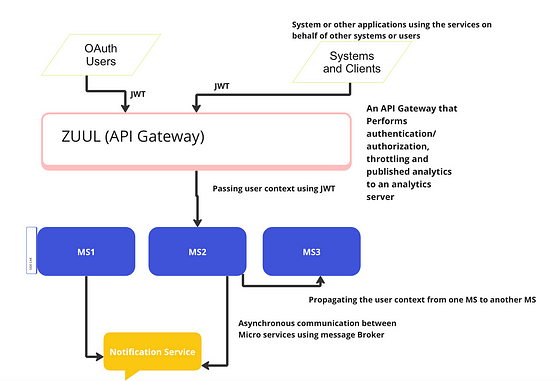
- API gateway is a micro services that is designed in order to segregate business and domain functionalities from aspect like.
2. Security-SSL termination and authentication of different client.
3. Latency- Caching layer is built at API gateway layer in order to speed up the most common request/response patterns.
4. Service Discovery-Service discovery is built at API gateway layer where all microservices registers themselves with the discovery server.
5. Retry/Circuit Breaker- retry logic is also built in to this layer and also circuit breaker pattern.
6. Single point of failure.-API gateway are single point of failures so these are also built a and deployed across various availability zones.
7.Load Balancing- Load Balancing is one of the important offering of the API gateway.
8.Query transformation- API gateway can also help in request query transformation.
9.IP whitelisting- IP white listing can also be done using API gateway.
10. Logging and tracing.- Some side car patterns can be used to provide traceability and observability in API gateway.
11. Rate Limiting- Some client applications charge for each micro service invocation so Rate Limiters are always implemented at API gateway so that certain call OUTBOUND don’t cross the threshold defined in a given time frame.
Describe some Principles of Micro service Deployment?
- Isolated Execution , execution of micro services should not impact the execution of other micro services.
- Focusing on automation is one of the important deployment principle of micro services.
- Infrastructure as a code that means provisioning your clusters for service deployments need to be repeatable.
- Zero down time deployment which means that new version of a micro service can be deployed without interrupting previous running versions.
Describe Circuit breaker design pattern.
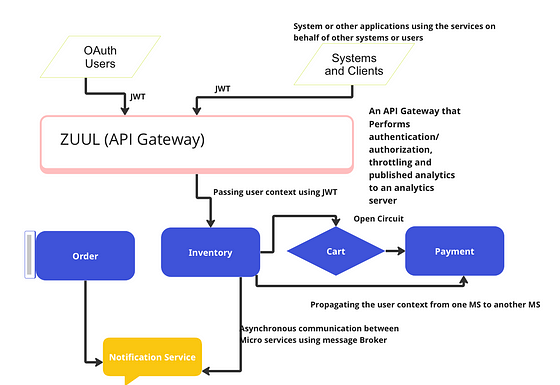
Circuit breaker in micro services is no different from the circuits that we have in our home for electricity. If there is some malfunctioning of an electrical appliance at home the fuse is blown away opening the circuit and we need to replace the fuse in order to close the circuit , that is the same concept used in micro service in order to detect cascaded failures and preventing the system to go on outage.
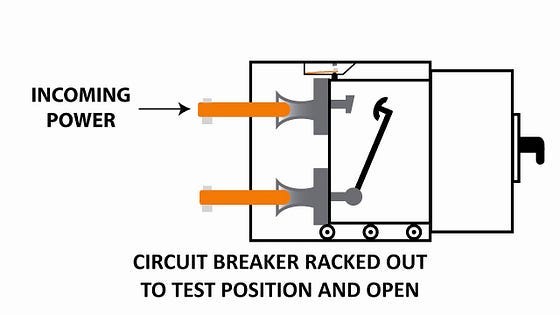
The standard circuits in homes.
Suppose cart service is making a call to payment service and payment service is down. What could happen here.
- CART service will keep making call to the Payment service and exhaust the resources after a while.
- Now Cart service will go down after scores of retries and then the inventory services is calling the Cart service and now Cart service has stopped responding and this is causing Inventory service to fail.
- Similar cascading is happening to the order service as well and with in few hours the entire system is down
Solution
Solution is nothing but using a circuit and if cart service does not get a successful response from Payment service the circuit will be open after certain defined number of retries. Similar circuit will be used by each service in the call chain. In this way the cascaded failures are avoided and Inventory service still respond to other client.
Once the Payment server is up and running , the cart service can send few request to figure out if the Payment is healthy or not. We can use an Exponential back off retry strategy here if needed.
Now the circuit will be Half Open state.
Once cart service is sure that the payment service is able to respond to the request in a consistent manner the circuit will be closed again.
Closed Circuit.(A happy Path)
Open Circuit.
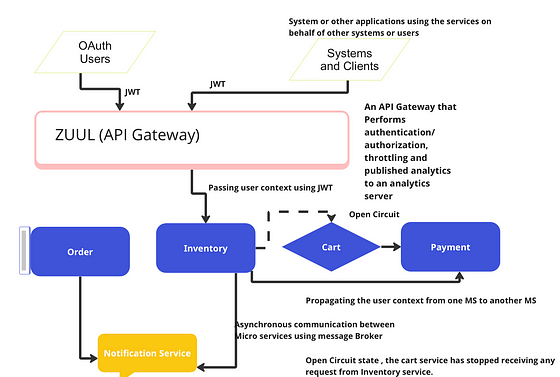
Once the circuit is closed the business as usual process will continue. Lets see what are the benefits of using this construct here.
- If payment service is down , other services are not impacted, we have been able to solve cascaded failures.
- If Payment service is down , Cart and Inventory service can still respond to the customers and the UI remains responsive. Customer can still look at the inventory and the products.
- The resources on the cloud are not wasted on unnecessary calls and retries.
- The availability of the whole system has increased.
Question set 3

What are immutable objects?
An immutable object is the one whose state can’t be changed after once it has been constructed. Immutable objects are inherently thread safe.
Nearly all the atomicity and visibility hazards like seeing a stale value , losing updates or observing an inconsistent state have to do with the vagaries of multiple threads trying to access the same mutable state at the same time. So immutable objects eliminates all such vagaries.
An Object is immutable if
It state can’t be modified after construction.
AND
All of it fields are final.
AND
Its properly constructed , the this reference does not escape during construction.
An Example of an Immutable Class.
@Immutable
public final class Accounts{
  private final Set<String> accounts=new HashSet<String>();
public Accounts()
{
accounts.add("checking");
accounts.add("savings");
accounts.add("business");
}
public boolean isAccount(String name)
{
return accounts.contains(name);
}
}What is Final Keyword?
Final fields can not be modified although the object they refer to can be modified if they are mutable. Final keyword also have a special semantics in Java memory model. Final field provides the initialization safety of an object. An object reference becomes visible to another thread does not mean that the state of the object is visible to the consuming thread.
In order to Guarantee a consistent view of the object’s state synchronization is required.
Immutable objects on the other hand can be safely accessed even if the synchronization is not used to publish the object reference.
In order to guarantee this immutability the Final keyword plays a vital role. As in the last example we saw that the set that we created was Final.
Does the below Object will have race condition in multithreaded access pattern
@Immutable
Class OneVlaueCache {
     private final BigInteger lastNumber;
     private final BigInteger[] lastFactors;
   public OneValueCache(BigInteger i , BigInteger[] factors)
        {
          lastNumber=i;
          lastFactors= Arrays.copyOf(factors, factors.length);
         }
  public BigInteger[] getFactors(BigInteger i)
      {
          if(lastNumber == null || !lastNumber.equals(i))
          return null;
        else return Arrays.copyOf(lastFactors, lastFactors.length);
    }
}
Nope the above object is an immutable one and it is safely constructed using all the field as Final and also construction of the object is safely publishing this object.
Look at the below code , would it be working correctly when accessed by multiple threads
public class Holder {
   private in n ;
public Holder(int n) { this.n=n;}
}
}....
public Holder holder;
public void initialize()
{ holder=new Holder(42);}
}The output of the program is not predicted in a multi threaded environment because the object publication is safe, though you are constructing the object correctly but another thread may see the partially constructed value of the Holder Object.
Because Synchronization was not used to publish the state of the holder, the holder is not properly constructed. Other threads could see the stale value of the holder field and thus see a null reference or other older value even though a value has been placed in the holder.
How do you make sure that you publish an object safely?
In order to publish an object safely
We need to initialize the object reference from a static initializer.
AND
Storing a reference to it into a volatile field or Atomic Reference.
AND
Storing a reference to it in a Final field of properly constructed object.
OR
Storing a reference to it in a field that is guarded by the lock.
How to safely publish the given Holder Object
public class Holder {
   private in n ;
public Holder(int n) { this.n=n;}
}
}We can safely publish this Holder object using the static initializer like this.
public static Holder holder=new Holder(42);Static initializers are executed by the JVM at class initialization time , because of the internal synchronization in the JVM, this mechanism is guaranteed to safely publish any object initialized in this way.
Figure out the problem in the below code
public class UsStates
{
  private String[] states= new String[] {
      "AK", "AL"... };
public String[] getStates() { return states;}
This is a problem in a multi threaded environment as some caller looking at the states can modify the states and this makes this object’s publication as UNSAFE.
Publishing an object for example UsStates in this case also publishes any objects referred to it by its non private field. So the above example is an Unsafe Publication.
Figure out the problem in the Below code.
public class ShoppingCart {
 public ShoppingCart(EventSource source( {
    source.registerListener( new EventListner.....
   }
}
The above code is a classic example of this reference escape. While we are registering the listener any thread can see the maritally constructed EventListener.
How to Fix the above problem in a multi threaded environment.
- Create the Listener as the private final field.
- Private final EventListener listener;
- Construct the listener object inside the constructor.
- Use a factory method to create the instance of the Main Object.
public class ShoppingCart{
  private final EventListener listener;
  private ShoppingCart(){
     listener= new EventListener()
      ....
}
public static ShoppingCart newInstance(EventSource source)
{
ShoppingCart shoppingcart= new ShoppingCart();
source.registerListener(shoppingcart.listener);
return shoppingcart;
}Summary:
- Do not allow the this reference to escape while object construction.
- Immutable objects are always thread safe.
- Its good practice to make all field of a class as final unless they need greater visibility.
- Immutable objects can be used safely by any thread without additional synchronization.
- Safely published effectively immutable objects can be used safely by any thread without additional synchronization.
Question Set 4

Question: List down top limitations of Future in Java.
Answer: Its is not practically possible to combine two asynchronous tasks when these two tasks are independent or the result of second task depends on the first.
Future lack declarative support for waiting for completion of all tasks performed by a set of Futures.
Waiting for the completion if the quickest task in a set of Futures for examples you are running certain strategies in parallel in order to compute the square root of a number , you would want to get the result from the task that does in the least amount of time.
And the most important reacting to the completion of the future and being able to take further action when notified about the completion instead of being blocked while waiting for the result.
Question: Then What is the use Executor Completion Service
If you have a batch of computations to submit to an Executor and you want to retrieve the results as they become available , you could retain the Future associated with each task and repeatedly poll for completion by calling get with a time out of Zero. For serving this use case Completion service comes to rescue.
Completion Service combines the functionalities of anExecutor and the Blocking Queue. You can submit Callable tasks to Completion service and use the Queue like method poll() to get the result as they become available.
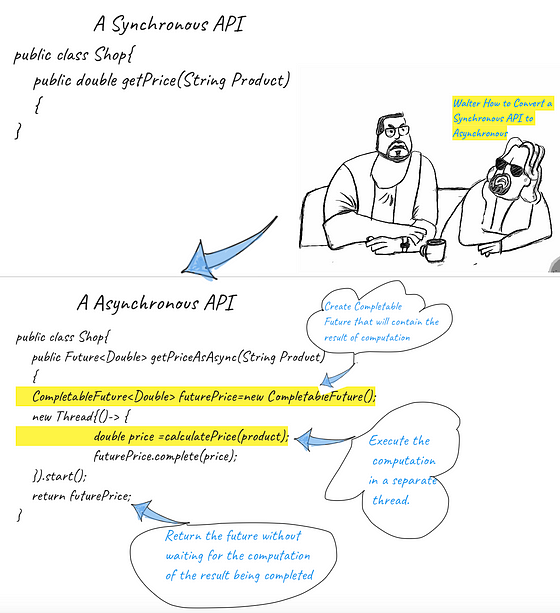
Question: How would you convert a Synchronous API to an Asynchronous API.
Answer:
Question:What is the supplyAsync Method in CompletableFuture
The supplyAsync method accept a supplier as an argument and returns a completable Future that will be asynchronously compeleted with the value obtained by invoking that Supplier.
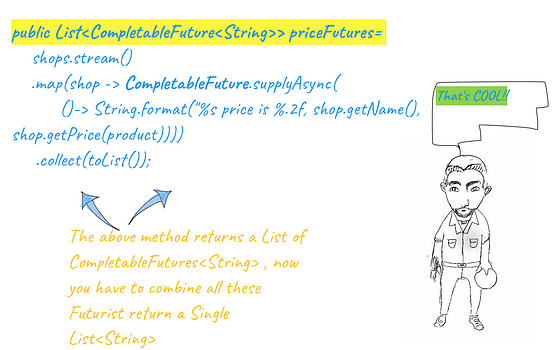
Question:What is the difference between these two snippets in terms of Performance.
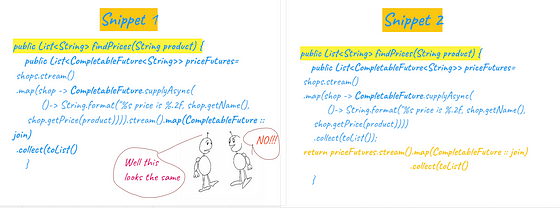
The First Piece of code will work execute the getPrice method for all the shops in a synchronous and sequential way because the second operation will only be completed once the first map operation has completed.
However join method would make sure in the second snippet that the get Price method can still be invoked on the shop to get the prices even if the completable future is not done for all the shops. Its very important to understand this distinction as many a time even if we write the asynchronous code however that executes sequentially die to the way that has been implemented.
Question Set 5

What is Stereotype Annotation in Spring.
Adding spring beans to application context is essential and that is how you make Spring aware of your object instances. With Stereotype annotation Spring provides a way for you to add Beans in to Spring Context. One of the most basic steroptype annotation is @Component. You can use another annotation to tell Spring in which package you want Spring to find the bean class.
@Component
public class Server
{
//Code
}
This is how you would configure this class in Spring.
@Configuration
@ComponentScan(basePackages="main")
public class ServerConfig{
// Code
}
What is the difference between @Bean and stereotype annotation.
Using the @Bean annotation to add instances to Spring context enables us to add any kind of object instance as a bean and multiple instances of the same kind to the Spring Context.
Using stereotype annotation you can create beans only for the application class with a specific annotation like @Component. This is preferred for the classes you define in an application and can annotate.
What is @Autowired annotation in Spring Framework.
Using the @Autowired annotation we mark the object property where we want Spring to inject a value from the context.
@Comonent
public class WebServer{
//
}
public class Server
{
@Autowired
private WebServer webServer; // Spring will inject Webserver instance in to the Server Class from context.
}Follow up Question: Will the below code compile?
@Component
public class Server
{
private String type= "classicServer"
@Autowired
private final WebServer webServer;
}The above code will not compile , we can’t define a final field without an initial value.
The above Problem can be solved by constructor Injection which could be Next Question. What is Constructor Injection?
@Component
public class Server
{
private String type= "classicServer"
private final WebServer webServer;
@Autowired
public WebServer(WebServer server)
{
this.webServer=server;
}
Explain the use case of @primary annotation in spring .
@primary annotation is used to mark one of the beans for implementation as the default. When two classes uses the same interface we need to define what will be the default implementation once that component is initialized.
There are two implementation of NotificationServiceProxy , Email notification and SMS notification, if we want one implementation to default we can annotate that as primary. If you don’t provide a qualifier the primary implementation will be called.
@Component
@Qualifier("email")
public class NotificationService
  implements NotificationServiceProxy {

  @Override
  public void sendComment(Comment comment) {
    System.out.println(
      "Sending push notification for comment: "
          + comment.getText());
  }
}
@Component
@Primary
@Qualifier("sms")
public class NotificationService
implements NotificationServiceProxy {
@Override
public void sendComment(Comment comment) {
System.out.println(
"Sending push notification for comment: "
+ comment.getText());
}
}Can you define a prototype bean inside a Singleton bean
Every time you refer to the bean name you will get a new instance of the prototype bean.Even if your singleton bean is declared once , the application context will have different instance of the prototype bean as many times the singleton is loaded in to memory. So even of the prototype is scoped in Singleton, Application context still will have multiple instances of Prototype bean. Please refer to this article for more explaination.
Singleton and Prototype Spring Bean Scopes, A primer
Spring framework is a de facto framework for dependency injection and has a proven track record in developing scalable…
What are different Web scopes in Spring Web application:
- Request scope — Spring creates an instance of the bean class for every HTTP request. The instance exists only for that specific HTTP request.
- Session scope — Spring creates an instance and keeps the instance in the server’s memory for the full HTTP session. Spring links the instance in the context with the client’s session.
- Application scope — The instance is unique in the app’s context, and it’s available while the app is running.
What are various scopes of Spring beans?
- Spring provides two bean scopes: singleton and prototype.
- With singleton bean scope, Spring manages the object instances directly in its context. Each instance has a unique name, and using that name you always refer to that specific instance. Singleton is Spring’s default.
- With prototype bean scope, Spring considers only the object type. Each type has a unique name associated with it. Spring creates a new instance of that type every time you refer to the bean name.
Can you explain auto configuration in Spring boot?
Spring Boot provides autoconfiguration for your application. Auto configuration is an opinionated approach where in Spring Boot figured out based on the artifacts that which all dependencies will be required to compile and run a project and developer don’t need to declare all the dependencies and the jars and version in the pom.
For example spring-data-jpa dependecy will bring all the jars that are required to run Spring JPA integration.
Just start your app, and you’ll understand why. Yes, I know, you didn’t even write anything yet — only downloaded the project and opened it in your IDE. But you can start the app, and you’ll find your app boots a Tomcat instance by default accessible on port 8080. In your console, you find something similar to the next snippet:
package com.myspringapp.app
@SpringBootApplication
public class ConfigServiceApplication {
  public static void main(String[] args) {
    SpringApplication.run(ConfigServiceApplication.class, args);
  }
}
How can you disable auto configuration in Spring Boot?
For some reason this is one of the interviewer’s favorite question and has been asked to me multiple times. From Spring documentation, the answer is
If you find that specific auto-configure classes are being applied that you don’t want, you can use the exclude attribute of @EnableAutoConfiguration to disable them. If the class is not on the classpath, you can use the excludeName attribute of the annotation and specify the fully qualified name instead.
import org.springframework.boot.autoconfigure.*;
import org.springframework.boot.autoconfigure.jdbc.*;
import org.springframework.context.annotation.*;
@Configuration
@EnableAutoConfiguration(exclude={DataSourceAutoConfiguration.class})
public class MyConfiguration {
}If the class is not on the classpath, you can use the excludeName attribute of the annotation and specify the fully qualified name instead. Finally, you can also control the list of auto-configuration classes to exclude via the spring.autoconfigure.exclude property.
Question Set 6

I want to take some time to write some article to demonstrate basic stream operations. I want to use this space to create a simple data model and demonstrate some of the most asked interview questions on stream operations.
Lets first prepare the Data.
Create Some Classes that hold data.
Model For Trader
package streamoperations;
public class Trader {
        private final String name;
        private final String city;
        public Trader(String n, String c){
            this.name = n;
            this.city = c;
        }
        public String getName(){
            return this.name;
        }
        public String getCity(){
            return this.city;
        }
        public String toString(){
            return "Trader:"+this.name + " in " + this.city;
        }
    }
Model for Transactions:
package streamoperations;
import java.util.Currency;
public class Transaction {
    private final Trader trader;
    private final int year;
    private final int value;
private final  Currency currency;
    public Transaction(Trader trader, int year, int value, Currency currency){
        this.trader = trader;
        this.year = year;
        this.value = value;
        this.currency=currency;
    }
    public Trader getTrader(){
        return this.trader;
    }
    public int getYear(){
        return this.year;
    }
    public int getValue(){
        return this.value;
    }
    public Currency getCurrency(){
        return this.currency;
    }
    public String toString(){
        return "{" + this.trader + ", " +
                "year: "+this.year+", " +
                "value:" + this.value +"}";
    }
}
Data Set up
package streamoperations;import java.util.Arrays;
import java.util.Currency;
import java.util.List;public class SetUp { private static List<Transaction> transactions; SetUp() { Trader raoul = new Trader("Raoul", "Cambridge");
Trader mario = new Trader("Mario", "Milan");
Trader alan = new Trader("Alan", "Cambridge");
Trader brian = new Trader("Brian", "Cambridge");
transactions = Arrays.asList(
new Transaction(brian, 2011, 300, Currency.getInstance("USD")),
new Transaction(raoul, 2012, 1000,Currency.getInstance("EUR")),
new Transaction(raoul, 2011, 400,Currency.getInstance("USD")),
new Transaction(mario, 2012, 710,Currency.getInstance("INR")),
new Transaction(mario, 2012, 700,Currency.getInstance("USD")),
new Transaction(alan, 2012, 950,Currency.getInstance("INR"))
);
}
public static List<Transaction> getTransactions()
{
return transactions;
}
}Question 1: Get transaction in 2011 and sort by value.
public List<Transaction> getTr2011()
    {
        List<Transaction> tr2011 =
                SetUp.getTransactions().stream()
                        .filter(transaction -> transaction.getYear() == 2011)
                        .sorted(comparing(Transaction::getValue))
                        .collect(toList());
        return tr2011;
    }
Question 2:Get all the cities of all the traders.
public List<String> getCities() {
        List<String> cities =
                SetUp.getTransactions().stream()
                        .map(transaction -> transaction.getTrader().getCity())
                        .distinct()
                        .collect(toList());
        return cities;
    }
Question 3: Finds all traders from Cambridge and sort them by name
public List<Trader> getTraders()
    {
        List<Trader> traders =
                SetUp.getTransactions().stream()
                        .map(Transaction::getTrader)
                        .filter(trader -> trader.getCity().equals("Cambridge"))
                        .distinct()
                        .sorted(comparing(Trader::getName))
                        .collect(toList());
        return traders;
    }
Question 4: Returns a string of all traders’ names sorted alphabetically
public String getNames()
    {
        String traderStr =
                SetUp.getTransactions().stream()
                        .map(transaction -> transaction.getTrader().getName())
                        .distinct()
                        .sorted()
                        .reduce("", (n1, n2) -> n1 + n2);
        return traderStr;
    }
Question 5 : Returns a string of all traders’ names sorted alphabetically Using Joining which is more efficient.
String traderStr =
    transactions.stream()
                .map(transaction -> transaction.getTrader().getName())
                .distinct()
                .sorted()
                .collect(joining());
Question 6: Finds all traders from Cambridge and sort them by name
public List<Trader> getTraders()
    {
        List<Trader> traders =
                SetUp.getTransactions().stream()
                        .map(Transaction::getTrader)
                        .filter(trader -> trader.getCity().equals("Cambridge"))
                        .distinct()
                        .sorted(comparing(Trader::getName))
                        .collect(toList());
        return traders;
    }
Question 6: Find out if any trader is from Milan?
public boolean isAnyTraderInMilan()
    {
boolean milanBased =
SetUp.getTransactions().stream()
.anyMatch(transaction -> transaction.getTrader()
.getCity()
.equals("Milan"));
return milanBased;
}Question 7: Prints all transactions’ values from the traders living in Cambridge
public void printTransactionsFromCambridge()
    {
        SetUp.getTransactions().stream()
                .filter(t -> "Cambridge".equals(t.getTrader().getCity()))
                .map(Transaction::getValue)
                .forEach(System.out::println);
    }
Question 8: Get Highest transaction
public Optional<Integer> getHigestTransaction()
    {
        Optional<Integer> highestValue =
                SetUp.getTransactions().stream()
                        .map(Transaction::getValue)
                        .reduce(Integer::max);
        return highestValue;
    }
Question 9: Get Smallest transaction
public Optional<Transaction> getSmallestTransaction()
    {
        Optional<Transaction> smallestTransaction =
                SetUp.getTransactions().stream()
                        .reduce((t1, t2) ->
                                t1.getValue() < t2.getValue() ? t1 : t2);
        return smallestTransaction;
    }
Question 10: Group transactions by currencies.
Map<Currency, List<Transaction>> transactionsByCurrencies =
        transactions.stream().collect(groupingBy(Transaction::getCurrency));
Question 11. Volatile Key Word
Java “Volatile” keyword is there since the dawn of Java. In this article we will discuss the need and motivation for Volatile Keyword and what does it solve
What Do we know about Volatile from literature.
- Volatile keyword establishes that all the reads to the Volatile variable has happened before the write operation.
- Volatile guarantees that every thread would see the most updated value for a variable which has been declared as Volatile.
- Volatile guarantees that the value of a Volatile variable is directly reread from the main memory before we use it.
- Volatile makes sure that value written by a thread is always flushed to the main memory before the byte code instruction completes.
- Volatile is not equivalent to synchronizing a critical section as Volatile does not involve any Locking.
- The key point about the Volatile is that it allows for only one operation on the memory location which will be immediately flushed to the main memory.
- The Volatile is hardware access mode and produces a CPU instruction that says to ignore the cache hardware and instead read or write to the main memory.
What is the use case of Volatile and what does it solve.
A volatile varibale should be used to model a variable where writes to the variable don’t depend on the current state of the variable. This is consequence of volatile Guaranteeing only a single operation.
For example the ++ and. — — operations are not safe to use on a volatile becasue they are equivalent to v=v+1 and v=v-1. The increment example is a classis example of state dependeant update.
For all the use cases which are state dependent a mutual exclusion locks must be used.
Volatile doesn’t use any locks so it can’t create deadlocks.
Volatile makes it easier to program certain use cases which will see in a shortwhile but at the cost of flushing that value constantly to the memory.
public class TaskManager implements Runnable {

    private volatile boolean shutdown=false;

    public void shutdown()
    {
        shutdown=true;
    }
@Override
    public void run() {
        while(!shutdown)
        {
            //processing
        }
    }
}
The above code would make sure following.
- All the time the shutdown flag is false , processing will continue to happen.
- If a thread flips the shutdown , the TaskManager will exit after it has completed the current work unit.
- The more subtle point is derived from the Java memory model: any write to a volatile variable Happens-Before all subsequent read of that variable.
- As soon as the other thread calls shutdown() on the TaskManager the flag is changed to true and the effect of that change is guaranteed to be visible in the next read of that variable i.e. before the next work unit is accepted.
I have tried to summarize some of the key points for Volatile . If you like this article please clap or leave a comment. Thanks a lot again for reading.
Question Set 7

1.Java is a platform-independent programming language. Can you explain why?
Java is a versatile programming language that is the second most popular (second to Python), partly due to its platform-independent status. It’s a platform-independent programming language because developers can run their applications on any platform.
Your candidates should know that programmers don’t need to rewrite data for each platform on which they want to run their programs. They’ll also be able to name several platforms compatible with Java and don’t require data recompiling methods. Some of these include Linux, Mac OS, and Windows.
2. Can you tell us what happens to Java source files in the JVM?
A Java virtual machine executes bytecode using a source file. During the process, the JVM considers the instruction lengths of the underlying hardware platforms, which makes the virtual machine versatile and efficient.
The JVM translates the source files into bytecode files, which enables the virtual machine to generate the bytecode and convert a program into machine-level assembly.
3. How would your engineering manager rate your Spring framework skills?
Ideally, senior Java developers should have advanced Spring framework skills because it offers infrastructure support that helps programmers develop Java applications. But this is only one reason Java developers should know how to use it.
Spring enables simple communication with databases and helps engineers create secure web applications.
It works with enterprise-grade Java programs, no matter their scale, and provides flexible libraries, such as Java-based and XML configuration annotations. Plus, Spring’s compatibility with dependency injection makes it easier for developers to test applications.
Since senior Java developers can take advantage of these benefits, it’s worth testing their Spring framework knowledge. Check out our Spring skill test easily to achieve this.
4. Which programming model does the Spring framework promote?
The programming model that the Spring framework promotes is the plain old Java object (POJO) standard. Experts consider this model one of the best programming practices and acknowledge that it works efficiently with Java 2 Enterprise Edition.
If you want to know if your applicants fully understand the POJO model, ask them if they know if the system restricts Java objects in any way. Their response will help you learn if they understand an essential feature of this model.
5. Could you explain what Spring beans are and tell us which container manages them?
Any object that an IoC container can instantiate, assemble, and manage is a Spring bean. The IoC container has no problem initializing these objects, which applications use for many purposes. They can create a configuration, render a service, or establish database connections.
It’s also ideal if your applicants can distinguish between Spring and Java beans, so they can use them correctly. You’re looking for candidates who know that the Spring IoC doesn’t manage Java beans, which have the following features:
- Developers can serialize Java beans
- Java beans require default no-arg constructors
- Standard containers manage Java beans
6. How does the Spring IoC container work?
This senior Java developer interview question allows you to test your candidate’s knowledge of a core Spring framework component. Candidates should know that the Spring IoC container is essential for creating Java applications in Spring. It creates objects and wires them together, then configures them.
Applicants should also understand that the IoC container manages the objects’ entire lifecycle — from creation to destruction. The container works with dependency injection, requiring an assembler to connect objects with others.
7. Can you tell us about your GitHub skills and how they simplify your work?
One hundred million developers use GitHub, and for a good reason. Since GitHub skills ensure candidates can network, work with other programmers to complete open-source Java projects and fix bugs, they must have top GitHub skills.
8. Could you name a couple of advantages of the Spring framework?
Candidates may refer to some advantages of the Spring framework when responding to a question related to Spring skills. But it’s ideal if they can name a few different advantages when they provide answers to this question.
Some may mention that Spring has a consistent programming model and a large community that offers frequent feedback. Top applicants will know that it’s easy to learn to use Spring and that the framework is open source.
If candidates know that Spring’s multiple-module support helps programmers break large applications into manageable modules to facilitate deployment, they’re ones to consider for your vacancy.
9. Can you tell us what the runtime.gc() and system.gc() methods do?
The runtime.gc() and system.gc() methods initiate garbage collection, which developers use to free up memory space. Candidates who have used these methods will understand that system.gc() is a class method and runtime.gc() is an instance method.
10. What do you understand about an application context? Can you give us a definition?
The top answers to this senior Java developer interview question will mention the similarities between application contexts and a bean factory. They’ll understand they can load bean definitions, wire beans together, and dispense them when the developer requires it.
All senior Java developers should know that the application context is a Spring container. However, candidates should be able to add more to their answer and explain that this container can do a few other things, including to:
- Load file resources with a generic method
- Resolve text messages
- Handle beans lifecycle management
11. Could you explain why Docker skills are handy for senior Java developers?
There are a few advantages of using Docker and having Docker skills. Your candidates can efficiently complete software project deployment without focusing on separate database and operator system runtimes. Docker skills help Java developers use these components together in one container.
Your programmers will also understand that when they’re starting a new application, they can ship it as a docker image and avoid issues with specific operator system dependencies.
12. Could you explain what JDBC is and tell us what it can do?
Senior Java developers should know that JDBC means Java database connectivity. It’s a JavaSoft specification that Java programs use to access database management systems.
Skilled applicants will provide more detail in their answers. They’ll know that the JDBC has a few interfaces and classes that programmers write in Java, helping them to send queries and process the results.
13. Do you understand what reflection is? Can you give us a definition?
This technical senior Java developer interview question allows you to test your candidates’ expertise. Candidates should know that reflection is a process in which code inspects other codes in the same system. They’ll also explain that the code can modify the other at runtime.
The syntax can assess a class’s structure or retrieve information about methods and fields. But you should also listen out for responses that provide some advantages of reflection in Java. For example, developers can inspect interfaces and classes without information about their internals.
14. How much do you know about the continuous integration server function?
The continuous integration server function looks for any compile errors, but this is just the beginning of a good answer. Candidates should explain that this function integrates all the repository changes that different developers commit and builds code several times daily.
In-depth answers will explain that the function typically completes this action after every commit, helping it detect any error and notice what caused it.
If you’re unsatisfied with your candidates’ answers, don’t forget to ask follow-up questions to quiz them on their experience. For instance, you could ask them to describe a project in which the continuous integration feature was handy for spotting and fixing errors.
15. How are classes related to objects in Java?
In your candidates’ responses to this question, you’re looking for an explanation explaining that objects are class instances. Top applicants will explain that classes define the properties or behaviors of many objects and are similar to blueprints.
They could provide an example of objects and classes to elaborate on their answer. For instance, if a developer has trees as a class, they may include elm, birch, and pine as their objects.
16. Do you understand what the sleep() function does in Java?
The sleep() function pauses the current thread’s current execution for a specific time, which is usually a certain number of milliseconds. This function causes the thread to disengage from the central processing unit and halt the execution process.
17. Do you understand what the wait() function does in Java?
Even though the sleep() and wait() functions might seem similar, expert Java developers will know how they differ. The wait() function causes the current thread to wait to execute until a separate thread invokes either the:
- Java.lang.object#notify() method
- Java.lang.object#notifyAll() method
This function’s outcome also includes telling the thread to give up its lock when waiting, which doesn’t happen with the sleep() function.
18. Could you tell us whether Spring beans are thread-safe? Explain your answer.
The simplest answer to this senior Java developer interview question is that Spring beans aren’t thread-safe in default mode, but you should expect candidates to give more information.
Applicantsshould understand that there’s only one instance for each context. Therefore, the data would be inconsistent if it was possible to use any thread to update a class-level variable.
More detailed responses will mention that developers can alter the Spring bean scope to achieve thread safety. Their alterations can impact the performance of the program.
19. Can you explain why Kubernetes skills are an advantage for senior Java developers?
Kubernetes skills are ideal because developers can use them to easily deploy an update to a cloud-based Java application. But there are a couple of other advantages. The Google open-source container system is perfect for large-scale deployments and managing containerized workloads, so candidates with Kubernetes skills can reap these benefits
20. Can you tell us which three steps you would use to simulate a static class in Java?
Since making top-level classes static in Java is impossible, many developers simulate static classes in their projects. If your candidate has done this before, they’ll know the three steps involved in the process, which include to:
- Declare the class as final to avoid class extension
- Make their constructor private to avoid instantiation
- Make all functions and class members static
21. What do you understand about continuous integration?
When developers merge code changes to the main branch as frequently as possible, the process is continuous integration. Not only should applicants provide a definition like this, but they should also understand a couple of advantages of this action.
For example, they might understand that this process ensures no issues happen during an extended timeframe or that they don’t need to wait until application release day to merge changes. It’s also good because it proves that testers can detect bugs earlier and produce better-quality applications or software.
22. Tell us what you know about continuous deployment.
The continuous deployment process involves automatically deploying changes in code to production the second the developer says they’re ready. It includes automated tests to check the stability and quality of the code.
But applicants shouldn’t stop there with their answers. They should provide a few advantages of this process to show their expertise. Most will know that developers get faster feedback when they use continuous deployment and that better collaboration happens between teams with this process
If candidates mention that continuous deployment leads to rapid feature development and better customer satisfaction, they might be a good match for your organization. You can always ask them how continuous deployment has been beneficial in their current role to get more information from them.

23. Could you explain what continuous delivery is in Java?
Continuous delivery is a process for automating building, testing, and deployment processes. It involves preparing code changes that developers can release to a production environment.
24. Can you explain the structure of the Java heap?
Applicants should know that the heap space developers use for dynamic memory allocation has a specific structure and components.
The main structure of Java heap includes the Java virtual machine, to which developers allocate all class instances and array memory. It features a garbage collector, which reclaims the objects’ heap memory.
Living and dead objects also form part of the heap memory space. However, the garbage collector eventually incorporates the dead objects.

25. How many types of Spring IoC containers exist?
Experienced candidates will have no problems responding to this senior Java developer interview question. They’ll know that there are two types of Spring IoC containers, which comprise:
- The bean factor container: this container offers basic dependency injection support and is ideal when there are limited resources
- Spring application context container: this container offers enterprise functionality and helps developers resolve a properties file’s textual messages
Question Set 8
Question: How would you handle a scenario where you have a large dataset that doesn’t fit into memory?
Answer: In this scenario, you can consider using Spark’s built-in mechanisms for handling large datasets, such as leveraging data partitioning and using Spark’s disk-based storage for intermediate results. By partitioning the data and utilizing disk storage, Spark can efficiently process and handle datasets that are larger than the available memory.
Question: Suppose you have a streaming application that consumes data from Kafka and performs real-time processing. How would you ensure fault tolerance in this scenario?
Answer: To ensure fault tolerance in a streaming application, you can consider the following approaches:
- Set an appropriate level of replication factor in Kafka to handle failures and ensure data availability.
- Use Spark Streaming’s checkpointing feature to store the application’s state and enable recovery in case of failures.
- Implement idempotent processing logic in the application to handle duplicate or reprocessed data.
Question: Imagine you need to join two large datasets in Spark, but one of the datasets cannot fit into memory. How would you approach this situation?
Answer: When joining large datasets that do not fit into memory, you can use Spark’s techniques for handling such scenarios, such as:
- Perform a broadcast join by broadcasting the smaller dataset to all Spark executors. This approach works well when one of the datasets is small enough to fit into memory.
- Utilize Spark’s external shuffle service to spill data to disk during the join operation. This helps in handling datasets that are too large to fit in memory.
Question: You have a Spark job that is running slower than expected. How would you identify the performance bottlenecks and optimize the job?
Answer: To identify and optimize performance bottlenecks in a Spark job, you can take the following steps:
- Monitor and analyze Spark job metrics, such as execution time, stages, and task metrics, to identify areas of poor performance.
- Look for data skewness in the input data that might cause uneven workload distribution and consider repartitioning the data to balance the workload.
- Analyze the Spark UI and logs to identify stages with high shuffle read/write or skewed partitions and consider optimizing those stages.
- Tune Spark configuration settings, such as memory allocation, parallelism, and executor/core settings, based on the characteristics of your workload.
Question: You have a large dataset that needs to be processed in parallel across multiple nodes in a Spark cluster. How would you distribute the data efficiently for parallel processing?
Answer: In Spark, you can distribute data efficiently for parallel processing by utilizing RDDs (Resilient Distributed Datasets) or DataFrames/Datasets. RDDs automatically partition the data across the cluster, allowing parallel processing. If using DataFrames or Datasets, you can leverage partitioning and repartitioning techniques to distribute the data based on specific columns or criteria. Additionally, you can use transformations like repartition() or coalesce() to control the number of partitions and optimize data distribution.
Question: Suppose you have a Spark job that involves iterative computations, such as training machine learning models or graph algorithms. How would you optimize the iterative processing in Spark?
Answer: To optimize iterative computations in Spark, you can use techniques like caching and checkpointing. Caching RDDs or DataFrames in memory can reduce the computational overhead by persisting intermediate results across iterations. Additionally, checkpointing periodically stores the RDD lineage to disk, reducing the memory usage and recomputation overhead. By strategically employing these techniques, you can minimize the data shuffling and improve the performance of iterative algorithms.
Question: You have a Spark job that requires broadcasting a large read-only dataset to all the nodes in the cluster. How would you efficiently handle this scenario?
Answer: When broadcasting a large read-only dataset in Spark, you can utilize the broadcast variables. Broadcast variables allow you to efficiently share a large dataset across the cluster by caching it in memory on each executor. This avoids excessive network communication and improves the performance of tasks that require access to the broadcasted data. By leveraging broadcast variables, you can optimize the handling of large read-only datasets.
Question: Imagine you have a Spark job that involves working with custom data types that are not supported out-of-the-box by Spark. How would you handle these custom data types in Spark?
Answer: To handle custom data types in Spark, you can define and register user-defined types (UDTs) using Spark’s API. You need to extend the appropriate classes (e.g., UserDefinedType, AbstractDataType) and implement the necessary methods to serialize and deserialize your custom data type. Additionally, you can define custom UDFs (User-Defined Functions) to process the data using your custom data type. By incorporating these definitions and registrations, Spark can handle and process your custom data types seamlessly.
New way of Spring data REST

In the rapidly evolving landscape of software development, managing database access and operations has seen significant advancements. One such innovation within the Spring Framework ecosystem is Spring Data REST, a powerful tool that automates the creation of RESTful services. With Spring Data REST, even a simple entity class and a repository interface can effortlessly generate complex REST APIs. In this article, we will delve into the fundamental concepts and usage of Spring Data REST. You will discover how to efficiently manage database operations with Spring Data REST, empowering you to swiftly navigate the intricacies of building robust APIs. Join us on this exciting journey as we unravel the capabilities of Spring Data REST, offering a streamlined approach to handling RESTful services with unparalleled ease and efficiency.
In a typical Spring-based application, we create three-layer architecture as below:
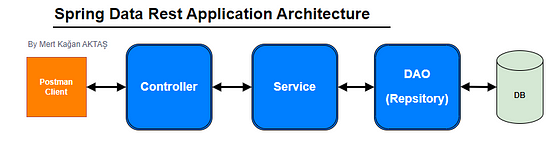
Spring Data JPA is a powerful data access layer technology used to streamline and simplify database operations in Java-based applications. JPA (Java Persistence API) provides an interface for performing fundamental tasks like storing, retrieving, updating, and deleting Java objects in relational databases. Spring Data JPA leverages the features offered by JPA to create a convenience layer used in Spring projects, enabling more efficient and meaningful database operations.
One of the notable advantages of Spring Data JPA is its ability to automatically manage CRUD (Create, Read, Update, Delete) operations. Without the need for writing custom queries, operations can be performed using simple method naming conventions. For instance, methods like findAll and findById allow effortless retrieval of all records from the database or a specific record based on its ID. This approach eliminates unnecessary code complexity and repetition, fostering the development of a more readable and maintainable codebase.
Hmm…Can this apply to REST API’s?
Problem and Solution
What is the Problem?
If we want to create a CRUD REST APIs for an entity then we need to create a controller class and need to manually write REST APIs ( create, update, delete, get, pagination, sorting etc).
If we want to create a CRUD REST APIs for another entity: For example, Department, Project, Company, User, etc. Then, we need to create a controller for all these entities and create REST APIs.
We are repeating the same code again….
Think about the solution : Spring can Create CRUD REST APIs for entity automatically for us.
Solution
Spring Data REST module is the solution. Spring Data REST uses interfaces that extend JpaRepository and provides CRUD REST APIs for entities for FREE — Helps to minimize the boiler-plate controller layer code.
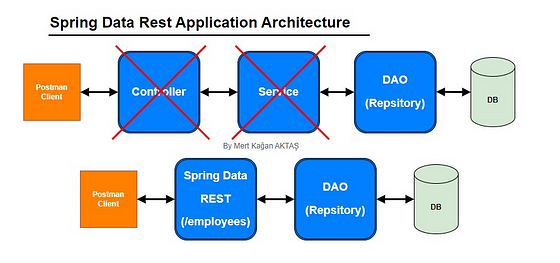
1. Create Spring Boot Project
Spring Boot provides a web tool called https://start.spring.io to bootstrap an application quickly. Just go to https://start.spring.io and generate a new spring boot project.
Use the below details in the Spring boot creation:
Project Name: springDataRest
Project Type: Maven
Choose dependencies: Spring Web, Spring Data JPA, H2 database, Lombok
Package name: com.mertkagan.springDataRest
2. Add Spring Data REST to your Maven POM file
<dependency>
    <groupId>org.springframework.boot</groupId>
    <artifactId>spring-boot-starter-data-rest</artifactId>
</dependency>
Here is the complete pom.xml for your reference:
<?xml version="1.0" encoding="UTF-8"?>
<project xmlns="http://maven.apache.org/POM/4.0.0" xmlns:xsi="http://www.w3.org/2001/XMLSchema-instance"
         xsi:schemaLocation="http://maven.apache.org/POM/4.0.0 https://maven.apache.org/xsd/maven-4.0.0.xsd">
    <modelVersion>4.0.0</modelVersion>
    <parent>
        <groupId>org.springframework.boot</groupId>
        <artifactId>spring-boot-starter-parent</artifactId>
        <version>3.1.4</version>
        <relativePath/> <!-- lookup parent from repository -->
    </parent>
    <groupId>com.mertkagan</groupId>
    <artifactId>springDataRest</artifactId>
    <version>0.0.1-SNAPSHOT</version>
    <name>springDataRest</name>
    <description>springDataRest</description>
    <properties>
        <java.version>17</java.version>
    </properties>
    <dependencies>
        <dependency>
            <groupId>org.springframework.boot</groupId>
            <artifactId>spring-boot-starter-data-jpa</artifactId>
        </dependency>
        <dependency>
            <groupId>org.springframework.boot</groupId>
            <artifactId>spring-boot-starter-web</artifactId>
</dependency> <dependency>
<groupId>org.springframework.boot</groupId>
<artifactId>spring-boot-devtools</artifactId>
<scope>runtime</scope>
<optional>true</optional>
</dependency>
<dependency>
<groupId>com.h2database</groupId>
<artifactId>h2</artifactId>
<scope>runtime</scope>
</dependency>
<dependency>
<groupId>org.projectlombok</groupId>
<artifactId>lombok</artifactId>
<optional>true</optional>
</dependency>
<dependency>
<groupId>org.springframework.boot</groupId>
<artifactId>spring-boot-starter-test</artifactId>
<scope>test</scope>
</dependency>
</dependencies> <build>
<plugins>
<plugin>
<groupId>org.springframework.boot</groupId>
<artifactId>spring-boot-maven-plugin</artifactId>
<configuration>
<excludes>
<exclude>
<groupId>org.projectlombok</groupId>
<artifactId>lombok</artifactId>
</exclude>
</excludes>
</configuration>
</plugin> <plugin>
<groupId>org.apache.maven.plugins</groupId>
<artifactId>maven-compiler-plugin</artifactId>
<version>3.8.1</version>
<configuration>
<source>17</source>
<target>17</target>
</configuration>
</plugin>
</plugins>
</build></project>Application.properties:
spring.datasource.url=jdbc:h2:mem:testdb
spring.datasource.driverClassName=org.h2.Driver
spring.datasource.username=sa
spring.datasource.password=password
spring.jpa.database-platform=org.hibernate.dialect.H2Dialect
3. Create JPA Entity
Let’s create an entity package inside a base package “com.mertkagan.springDataRest”. Within the entity package, create a Employee class with the following content:
package com.mertkagan.springDataRest.entities;import lombok.AllArgsConstructor;
import lombok.Data;
import lombok.NoArgsConstructor;import javax.persistence.*;@Entity
@Table(name = "employees")
@AllArgsConstructor
@NoArgsConstructor
@Data
public class Employee { @Id
@GeneratedValue(strategy = GenerationType.IDENTITY)
private Long id; @Column(name = "first_name")
private String firstName; @Column(name = "last_name")
private String lastName; @Column(name = "email")
private String email;
}
4. Create Spring Data JPA Repository
The next thing we’re gonna do is create a repository to access a Employee’s data from the database.
The JpaRepository interface defines methods for all the CRUD operations on the entity, and a default implementation of the JpaRepository called SimpleJpaRepository.
Let’s create a repository package inside a base package “com.mertkagan.springDataRest”. Within the repository package, create a EmployeeRepository interface with the following content:
package com.mertkagan.springDataRest.repository;import com.mertkagan.springDataRest.entities.Employee;
import org.springframework.data.jpa.repository.JpaRepository;
import org.springframework.data.repository.query.Param;
import org.springframework.data.rest.core.annotation.RepositoryRestResource;public interface EmployeeRepository extends JpaRepository<Employee,Long> {}
Thus, Spring Data Rest will make these endpoints available for free!

I have added Swagger documentation to the project for you. Let’s take a look at our endpoints using Swagger. You can access them by opening http://localhost:8080/swagger-ui/.
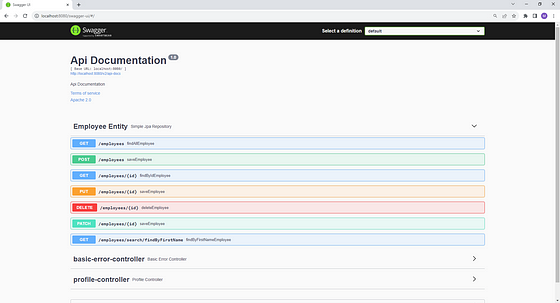
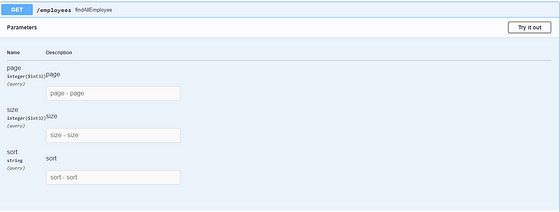
Spring Data REST — How Does It Work?
· Spring Data Rest will scan your Project for JpaRepository.
· Expose REST APIs for each entity type for your JpaRepository.
REST Endpoints
· By default, Spring Data REST will create endpoints based on entity type.
· Simple pluralized form.
· First character of Entity type is lowercase.
· Then just adds an “s” to the entity.

Before we begin our tests, let’s populate our database with a few records. You can achieve this by navigating to http://localhost:8080/h2-console and logging in with the following credentials:
- JDBC Url: jdbc:h2:mem:testdb
- Username: sa
- Password: password
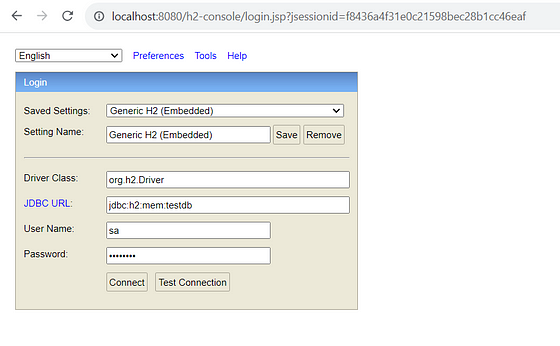
Once logged in, execute the provided SQL script:
INSERT INTO EMPLOYEES (ID, FIRST_NAME, LAST_NAME, EMAIL)
VALUES
(1, 'Gregory', 'Hughes', '[email protected]'),
(2, 'Frank', 'Clarke', '[email protected]'),
(3, 'Susan', 'Moore', '[email protected]');
5. Test REST APIs using Postman
Test GET All Employees:
URL: http://localhost:8080/employees
HTTP Method: GET
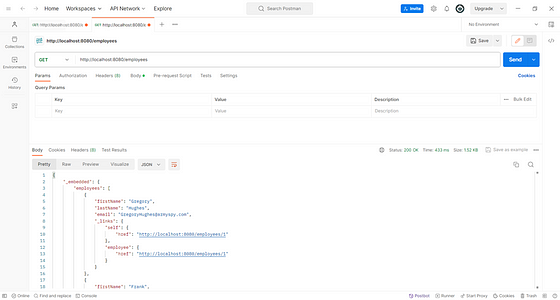
Test GET Employee By ID:
URL: http://localhost:8080/employees/1
HTTP Method: GET
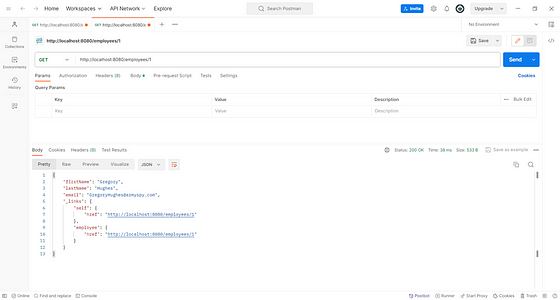
Test POST Employee:
URL: http://localhost:8080/employees
HTTP Method: POST
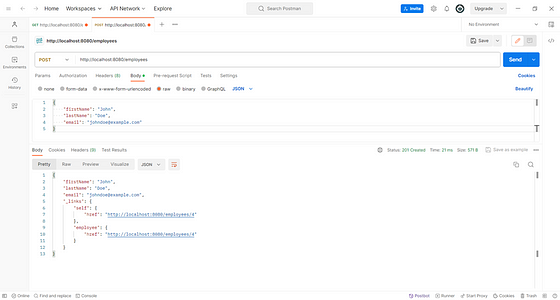
Test PUT Employee:
URL: http://localhost:8080/employees/1
HTTP Method: PUT
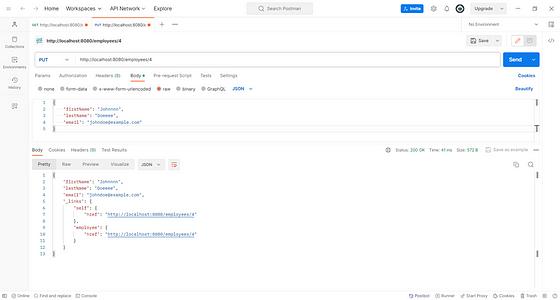
Test DELETE Employee:
URL: http://localhost:8080/employees/4
HTTP Method: DELETE
6. Change REST API Path
package com.mertkagan.springDataRest.repository;import com.mertkagan.springDataRest.entities.Employee;
import org.springframework.data.jpa.repository.JpaRepository;
import org.springframework.data.rest.core.annotation.RepositoryRestResource;@RepositoryRestResource(path="members")
public interface EmployeeRepository extends JpaRepository<Employee,Long> {
}7. Pagination and Sorting Support
Pagination:
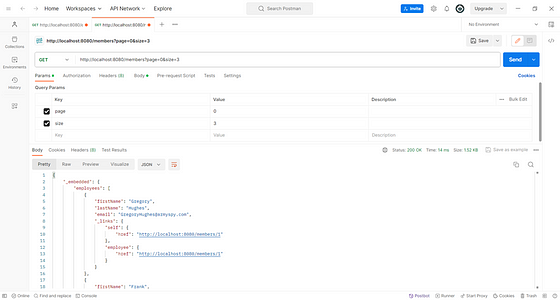
Sorting:
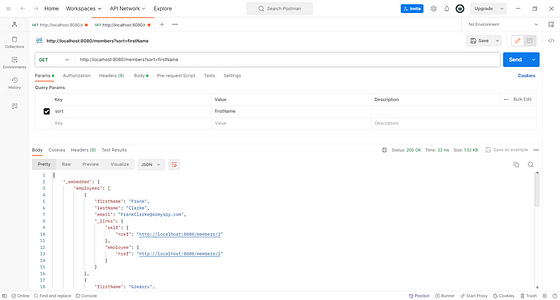
8. REST API for Query Methods
Let’s create a query method in the below repository and test using the postman client:
package com.mertkagan.springDataRest.repository;import com.mertkagan.springDataRest.entities.Employee;
import org.springframework.data.jpa.repository.JpaRepository;
import org.springframework.data.repository.query.Param;
import org.springframework.data.rest.core.annotation.RepositoryRestResource;import java.util.List;@RepositoryRestResource(path="members")
public interface EmployeeRepository extends JpaRepository<Employee,Long> { List<Employee> findByFirstName(@Param("firstName") String firstName);
}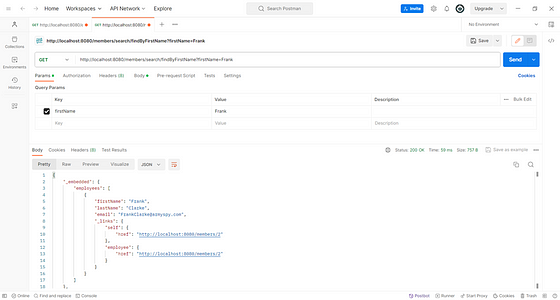
In this tutorial, we have explored the revolutionary simplicity offered by Spring Data REST in creating RESTful APIs. By eliminating the need for traditional controller and service layers, Spring Data REST automates the API creation process, allowing developers to focus on business logic rather than boilerplate code.
Extra Skill to have for you Elastic search

Introduction
Ever wondered how you effortlessly find the perfect pair of shoes online or stumble upon a friend’s post in the vast realm of social media? It’s all thanks to the unsung hero of digital experiences: search systems.
Think back to your latest online purchase — whether it was a stylish pair of shoes or a thoughtful book for a friend. How did you stumble upon exactly what you were looking for? Chances are, you navigated through a sea of options using the search bar! That’s the magic of search systems, quietly shaping our online experiences and making it a breeze to discover the perfect find amidst the digital aisles. In a world teeming with choices, the ability to find what we seek quickly and effortlessly is a testament to the importance of robust and intuitive search systems for the products we love.
In my recent Elasticsearch exploration (check out my primer on its architecture and terminology), we uncovered the engine powering these discoveries. This post delves into search — navigating ElasticSearch queries, comprehending responses, and crafting a basic query to set the stage.
Our goal: build a simple search query, find problems, and improve it with practical examples. Join us in acknowledging the challenges within our current search system and discovering a pathway to refinement in this world of digital aisles.”
Starting where we left off, Elasticsearch
Sample Dataset
To demonstrate different ways we can improve search, let’s set up Elasticsearch and load some data in it. For this post, I will use this News dataset I found on Kaggle. The dataset is pretty simple, it contains around 210,000 news articles, with their headlines, short descriptions, authors, and some other fields we don’t care much about. We don’t really need all 210,000 documents, so I will load up around 10,000 documents in ES and start searching.
These are a few examples of the documents in the dataset —
[
  {
    "link": "https://www.huffpost.com/entry/new-york-city-board-of-elections-mess_n_60de223ee4b094dd26898361",
    "headline": "Why New York City’s Board Of Elections Is A Mess",
    "short_description": "“There’s a fundamental problem having partisan boards of elections,” said a New York elections attorney.",
    "category": "POLITICS",
    "authors": "Daniel Marans",
    "country": "IN",
    "timestamp": 1689878099
  },
  ....
]
Each document represents a news article. Each article contains a link, headline, a short_description, a category, authors, country(random values, added by me), and timestamp(again random values, added by me).
I added country and timestamp fields to make the examples in the following sections more fun, so let’s begin!
Understanding ElasticSearch Queries
Elasticsearch queries are written in JSON. Instead of diving deep into all the different syntaxes you can use to create search queries, let’s start simple and build from there.
The simplest full-text query is the match query. The idea is simple, you write a query and Elasticsearch performs a full-text search against a specific field. For example,
GET news/_search
{
  "query": {
    "match": {
      "headline": "robbery"
    }
  }
}
The above query finds all articles where the word “robbery” appears in the “headline”. These are the results I got back -
{
  "_index" : "news",
  "_id" : "RzrouIsBC1dvdsZHf2cP",
  "_score" : 7.4066687,
  "_source" : {
    "link" : "https://www.huffpost.com/entry/guard-cat-hailed-as-hero_n_62e9a515e4b00f4cf2352a6f",
    "headline" : "Bandit The 'Guard Cat' Hailed As Hero After Thwarting Would-Be Robbery",
    "short_description" : "When at least two people tried to break into a Tupelo, Mississippi, home last week, the cat did everything she could to alert its owner.",
    "category" : "WEIRD NEWS",
    "authors" : "",
    "country" : "US",
    "timestamp" : 1693070640
  }
},
{
  "_index" : "news",
  "_id" : "WTrouIsBC1dvdsZHp2wd",
  "_score" : 7.4066687,
  "_source" : {
    "link" : "https://www.huffpost.com/entry/san-francisco-news-crew-security-guard-shot-killed_n_61a2a9d8e4b0ae9a42af278a",
    "headline" : "News Crew Security Guard Dies After Being Shot While Helping Robbery Coverage",
    "short_description" : "Kevin Nishita was shot in the abdomen while doing his job amid an uptick in organized retail crime.",
    "category" : "CRIME",
    "authors" : "Daisy Nguyen, AP",
    "country" : "US",
    "timestamp" : 1692480894
  }
}
But, what if you want to perform a full-text search on multiple fields? You can do that by a multi_match query,
GET news/_search
{
  "query": {
    "multi_match": {
      "query": "robbery",
      "fields": ["headline", "short_description"]
    }
  }
}
This performs a similar operation, but instead of looking at a single field, it now looks at both headine and short_description of all the documents and performs a full-text search on them.
Understanding the response
This is a sample response from our last query -
{
  "took" : 5,
  "timed_out" : false,
  "_shards" : {
    "total" : 1,
    "successful" : 1,
    "skipped" : 0,
    "failed" : 0
  },
  "hits" : {
    "total" : {
      "value" : 2,
      "relation" : "eq"
    },
    "max_score" : 29.626675,
    "hits" : [
      {
        "_index" : "news",
        "_id" : "RzrouIsBC1dvdsZHf2cP",
        "_score" : 29.626675,
        "_source" : {
          "link" : "https://www.huffpost.com/entry/guard-cat-hailed-as-hero_n_62e9a515e4b00f4cf2352a6f",
          "headline" : "Bandit The 'Guard Cat' Hailed As Hero After Thwarting Would-Be Robbery",
          "short_description" : "When at least two people tried to break into a Tupelo, Mississippi, home last week, the cat did everything she could to alert its owner.",
          "category" : "WEIRD NEWS",
          "authors" : "",
          "country" : "US",
          "timestamp" : 1693070640
        }
      },
      .....
    ]
  }
}
The took field and the timed_out field are pretty easy to understand, they simply represent the time in milliseconds it took for Elasticsearch to return the response, and whether the query was timed out or not.
The _shards field tells how many shards were involved in this search operation, how many of them returned successfully, how many failed, and how many skipped.
The hits field contains the documents returned from the search. Each document is given a score based on how relevant it is to our search. The hits field also contains a field total mentioning the total number of documents returned, and the max score of the documents.
Finally, in the nested field, hits we get all the relevant documents, along with their _id, and their score. The documents are sorted by their scores.
A basic search query
Let’s start building our search query. We can start with a simple query and dissect problems in it -
GET news/_search
{
  "query": {
    "multi_match": {
      "query": "robbery",
      "fields": ["headline", "short_description"]
    }
  }
}
This is a pretty simple query, it just finds all the documents where the word “robbery” appears in any of the given fields, i.e. headline or short_description.
It returns a few results, and we can see all of them have the word “robbery” in it.
{
  .....
  "hits" : {
    "total" : {
      "value" : 3,
      "relation" : "eq"
    },
    "max_score" : 8.164355,
    "hits" : [
      {
        "_index" : "news",
        "_id" : "hjrouIsBC1dvdsZHgWdm",
        "_score" : 8.164355,
        "_source" : {
          "link" : "https://www.huffpost.com/entry/lady-gaga-dog-walker-reward_n_62d82efee4b000da23fafad7",
          "headline" : "$5K Reward For Suspect In Shooting Of Lady Gaga’s Dog Walker",
          "short_description" : "One of the men involved in the violent robbery was mistakenly released from custody in April and remains missing.",
          "category" : "U.S. NEWS",
          "authors" : "STEFANIE DAZIO, AP",
          "country" : "IN",
          "timestamp" : 1694863246
        }
      },
      {
        "_index" : "news",
        "_id" : "RzrouIsBC1dvdsZHf2cP",
        "_score" : 7.4066687,
        "_source" : {
          "link" : "https://www.huffpost.com/entry/guard-cat-hailed-as-hero_n_62e9a515e4b00f4cf2352a6f",
          "headline" : "Bandit The 'Guard Cat' Hailed As Hero After Thwarting Would-Be Robbery",
          "short_description" : "When at least two people tried to break into a Tupelo, Mississippi, home last week, the cat did everything she could to alert its owner.",
          "category" : "WEIRD NEWS",
          "authors" : "",
          "country" : "US",
          "timestamp" : 1693070640
        }
      },
      {
        "_index" : "news",
        "_id" : "WTrouIsBC1dvdsZHp2wd",
        "_score" : 7.4066687,
        "_source" : {
          "link" : "https://www.huffpost.com/entry/san-francisco-news-crew-security-guard-shot-killed_n_61a2a9d8e4b0ae9a42af278a",
          "headline" : "News Crew Security Guard Dies After Being Shot While Helping Robbery Coverage",
          "short_description" : "Kevin Nishita was shot in the abdomen while doing his job amid an uptick in organized retail crime.",
          "category" : "CRIME",
          "authors" : "Daisy Nguyen, AP",
          "country" : "US",
          "timestamp" : 1692480894
        }
      }
    ]
  }
}
Lexical Search
What we’ve engaged in thus far is referred to as ‘lexical search.’ In this type of search, the system seeks precise matches for a given word or phrase within documents. In essence, when a user inputs ‘robbery,’ our search query identifies all documents containing the exact term ‘robbery.’ While this method may appear intuitive initially, its limitations become apparent quite swiftly, as we will soon discover.
Problems in our current search query
Similar words return different results
Let’s take a few examples, let’s see what we get when the user searches for “robbed” —
GET news/_search
{
  "query": {
    "multi_match": {
      "query": "robbed",
      "fields": ["headline", "short_description"]
    }
  }
}
These are the results I get back —
{
    "total" : {
      "value" : 2,
      "relation" : "eq"
    },
    "max_score" : 7.9044275,
    "hits" : [
      {
        "_index" : "news",
        "_id" : "YTrouIsBC1dvdsZHh2jf",
        "_score" : 7.9044275,
        "_source" : {
          "link" : "https://www.huffpost.com/entry/multiple-guns-robbery-wellston-market-missouri_n_62994cbee4b05fe694f296ad",
          "headline" : "Man Robbed Of Assault Rifle At Gunpoint Opens Fire With Second Gun",
          "short_description" : "The accused robber was struck multiple times, and two bystanders were wounded in the St. Louis shootout.",
          "category" : "CRIME",
          "authors" : "Mary Papenfuss",
          "country" : "IN",
          "timestamp" : 1691458552
        }
      },
      {
        "_index" : "news",
        "_id" : "YDrouIsBC1dvdsZH73UQ",
        "_score" : 7.8303137,
        "_source" : {
          "link" : "https://www.huffpost.com/entry/michigan-militia-training-video-gretchen-whitmer_n_5f8b6e26c5b6dc2d17f78e0a",
          "headline" : "Chilling Training Videos Released Of Militia Men Charged In Michigan Gov. Kidnap Plot",
          "short_description" : "\"I’m sick of being robbed and enslaved by the state ... they are the enemy. Period,\" says one suspect in a video.",
          "category" : "POLITICS",
          "authors" : "Mary Papenfuss",
          "country" : "IN",
          "timestamp" : 1692613291
        }
      }
    ]
  }
To keep it simple, these are the headlines of the documents I got back —
1. "Man Robbed Of Assault Rifle At Gunpoint Opens Fire With Second Gun"
2. "Chilling Training Videos Released Of Militia Men Charged In Michigan Gov. Kidnap Plot"
Both of these documents contain the word “robbed” in either the headline or the description. But if the user had searched for “robbery”, then we would see a completely different set of documents in the results -
[
      {
        "_index" : "news",
        "_id" : "hjrouIsBC1dvdsZHgWdm",
        "_score" : 8.164355,
        "_source" : {
          "link" : "https://www.huffpost.com/entry/lady-gaga-dog-walker-reward_n_62d82efee4b000da23fafad7",
          "headline" : "$5K Reward For Suspect In Shooting Of Lady Gaga’s Dog Walker",
          "short_description" : "One of the men involved in the violent robbery was mistakenly released from custody in April and remains missing.",
          "category" : "U.S. NEWS",
          "authors" : "STEFANIE DAZIO, AP",
          "country" : "IN",
          "timestamp" : 1694863246
        }
      },
      {
        "_index" : "news",
        "_id" : "YTrouIsBC1dvdsZHh2jf",
        "_score" : 8.079888,
        "_source" : {
          "link" : "https://www.huffpost.com/entry/multiple-guns-robbery-wellston-market-missouri_n_62994cbee4b05fe694f296ad",
          "headline" : "Man Robbed Of Assault Rifle At Gunpoint Opens Fire With Second Gun",
          "short_description" : "The accused robber was struck multiple times, and two bystanders were wounded in the St. Louis shootout.",
          "category" : "CRIME",
          "authors" : "Mary Papenfuss",
          "country" : "IN",
          "timestamp" : 1691458552
        }
      },
      {
        "_index" : "news",
        "_id" : "RzrouIsBC1dvdsZHf2cP",
        "_score" : 7.4066687,
        "_source" : {
          "link" : "https://www.huffpost.com/entry/guard-cat-hailed-as-hero_n_62e9a515e4b00f4cf2352a6f",
          "headline" : "Bandit The 'Guard Cat' Hailed As Hero After Thwarting Would-Be Robbery",
          "short_description" : "When at least two people tried to break into a Tupelo, Mississippi, home last week, the cat did everything she could to alert its owner.",
          "category" : "WEIRD NEWS",
          "authors" : "",
          "country" : "US",
          "timestamp" : 1693070640
        }
      },
      {
        "_index" : "news",
        "_id" : "WTrouIsBC1dvdsZHp2wd",
        "_score" : 7.4066687,
        "_source" : {
          "link" : "https://www.huffpost.com/entry/san-francisco-news-crew-security-guard-shot-killed_n_61a2a9d8e4b0ae9a42af278a",
          "headline" : "News Crew Security Guard Dies After Being Shot While Helping Robbery Coverage",
          "short_description" : "Kevin Nishita was shot in the abdomen while doing his job amid an uptick in organized retail crime.",
          "category" : "CRIME",
          "authors" : "Daisy Nguyen, AP",
          "country" : "US",
          "timestamp" : 1692480894
        }
      }
    ]
1. "$5K Reward For Suspect In Shooting Of Lady Gaga's Dog Walker"
2. "Man Robbed Of Assault Rifle At Gunpoint Opens Fire With Second Gun"
3. "Bandit The 'Guard Cat' Hailed As Hero After Thwarting Would-Be Robbery"
4. "News Crew Security Guard Dies After Being Shot While Helping Robbery Coverage"So in short, we get different results if the user searches for “robbery” than if the user searches for “robbed”. This is obviously not ideal, if the user has searched for any of these(or anything related to “rob”), we should show all documents that contain different forms of the word “rob”(called “inflected” forms) in the query.
Lack of understanding of what the user wants
“The goal of a designer is to listen, observe, understand, sympathize, empathize, synthesize, and glean insights that enable him or her to make the invisible visible.” — Hillman Curtis
We are trying to retrieve documents aligning with the user’s query, a task that extends beyond the user’s input alone. By delving into additional parameters, we gain a much richer understanding of our user’s preferences and needs.
For example, when a user searches for news, their interest likely extends beyond relevance alone; how recent the news article is often crucial. To enhance our search precision, we can fine-tune the scoring mechanism.
Moreover, we also have a location field in our articles. This field signifies the geographical origin of the news, presenting an opportunity to further refine our results. We can use this to boost articles from the user’s country.
Similar words are not returned
Since we are only returning articles that contain the exact match the user queried for, we are likely missing relevant documents that contain similar words. For example, if I search for “theft”, I get the following articles,
[
      {
        "_index" : "news",
        "_id" : "dzrouIsBC1dvdsZHiGh1",
        "_score" : 8.079888,
        "_source" : {
          "link" : "https://www.huffpost.com/entry/ap-us-church-theft-beheaded-statue_n_629504abe4b0933e7376f2fa",
          "headline" : "Angel Statue Beheaded At Church, $2 Million Relic Stolen",
          "short_description" : "The New York City church says its stolen 18-carat gold relic was guarded by its own security system and is irreplaceable due to its historical and artistic value.",
          "category" : "CRIME",
          "authors" : "Michael R. Sisak, AP",
          "country" : "IN",
          "timestamp" : 1699477455
        }
      },
      {
        "_index" : "news",
        "_id" : "ATrouIsBC1dvdsZHrG2n",
        "_score" : 7.4066687,
        "_source" : {
          "link" : "https://www.huffpost.com/entry/joseph-sobolewski-charge-dropped-mountain-dew-felony_n_617a15e0e4b0657357447ee2",
          "headline" : "Prosecutors Drop Felony Charge Against Man Accused Of 43 Cent Soda Theft",
          "short_description" : "Joseph Sobolewski faced up to seven years in prison after paying $2 for a Mountain Dew that cost $2.29 plus tax.",
          "category" : "U.S. NEWS",
          "authors" : "Nick Visser",
          "country" : "IN",
          "timestamp" : 1698883200
        }
      },
      {
        "_index" : "news",
        "_id" : "ZDrouIsBC1dvdsZH73Uq",
        "_score" : 7.153779,
        "_source" : {
          "link" : "https://www.huffpost.com/entry/missing-lemur-found_n_5f8b2c33c5b6dc2d17f76bdb",
          "headline" : "'There's A Lemur!' 5-Year-Old Helps Crack San Francisco Zoo Theft Case",
          "short_description" : """The arthritic, 21-year-old lemur is "agitated" but safe, zoo staff say.""",
          "category" : "U.S. NEWS",
          "authors" : "",
          "country" : "IN",
          "timestamp" : 1698560597
        }
      }
    ]
The word “robbery” may have a different meaning than the word “theft”, but it’s still a relevant word, and the user may be interested in seeing articles with the word “robbery” as well(although at a lower relevance score than the documents that contain the exact word the user searched for)
There can be many similar words to theft, each having different levels of similarity. For example, “theft” may be more similar to “shoplifting” and less similar to “burglary”. But both can be synonymous to each other in certain contexts and can be of some relevance, though not as relevant as the exact word in the query, i.e. “theft”.
Our current search doesn’t consider the similarity of words in documents and in the query. If a user searches for “theft”, only the articles containing the word “theft” are returned, whereas we should also return articles containing words similar to “theft”(like “burglary” or “robbery”).
Typos are ignored
“If the user can’t use it, it doesn’t work.” — Susan Dray
Another issue is that any typo by a user would return empty results. We know that users may accidentally make typos, and we don’t want to return empty results. For example, searching “robbey” on Google News still returns results related to “robbery”.
Different combinations of words have different meanings
Let’s look at an example, let’s assume the user made this query —
GET news/_search
{
  "query": {
    "multi_match": {
      "query": "new jersey covid virus"
    }
  }
}
For you and me, it’s obvious the user wants to search for news related to “covid” or “virus” in “New Jersey”. But to our search engine, each of these words means the same, and it has no way to understand that the ordering of these words matters(for example, “New” and “Jersey” in “New Jersey”).
Let’s look at the top three results,
{
        "_index" : "news",
        "_id" : "0jrouIsBC1dvdsZH03FH",
        "_score" : 15.199991,
        "_source" : {
          "link" : "https://www.huffpost.com/entry/covid-new-york-new-jersey-trend_n_60611769c5b6531eed0621da",
          "headline" : "Virus Fight Stalls In Early Hot Spots New York, New Jersey",
          "short_description" : "New Jersey has been reporting about 647 new cases for every 100,000 residents over the past 14 days. New York has averaged 548.",
          "category" : "U.S. NEWS",
          "authors" : "Marina Villeneuve and Mike Catalini, AP",
          "country" : "US",
          "timestamp" : 1697056489
        }
      },
      {
        "_index" : "news",
        "_id" : "zzrouIsBC1dvdsZH23Ig",
        "_score" : 12.708103,
        "_source" : {
          "link" : "https://www.huffpost.com/entry/new-variants-raise-worry-about-covid-19-virus-reinfections_n_602193e6c5b689330e31dcc4",
          "headline" : "New Variants Raise Worry About COVID-19 Virus Reinfections",
          "short_description" : "Scientists discovered a new version of the virus in South Africa that’s more contagious and less susceptible to certain treatments.",
          "category" : "WORLD NEWS",
          "authors" : "Marilynn Marchione, AP`",
          "country" : "IN",
          "timestamp" : 1693063095
        }
      },
      {
        "_index" : "news",
        "_id" : "fTrouIsBC1dvdsZH6HQF",
        "_score" : 11.707885,
        "_source" : {
          "link" : "https://www.huffpost.com/entry/new-york-covid-19-religious-gatherings_n_5fbf42b8c5b66bb88c6430ac",
          "headline" : "Supreme Court Blocks New York COVID-19 Restrictions On Religious Gatherings",
          "short_description" : "It was the first major decision since Justice Amy Coney Barrett joined the nation's highest court.",
          "category" : "POLITICS",
          "authors" : "Lawrence Hurley, Reuters",
          "country" : "IN",
          "timestamp" : 1693362371
        }
      },
If you look carefully at the results above, you’ll notice that the second result, “New Variants Raise Worry About COVID-19 Virus Reinfections” is completely unrelated to New Jersey. In fact, after reading the description, it seems to be more related to COVID-19 infections in South Africa!
This is because the words “COVID”, “virus” and “New” are part of the document, because of this, the document gets a higher score. However, this is not at all relevant to the user query. Our search system does not understand that the terms “New” and “Jersey” should be treated as a single term.
Improving our search
Boosting more relevant fields
“Words have a weight so if you are going to say something heavy, make sure to pick the right ones.” — Lang Leav
We can decide to boost certain fields or certain values which might be more useful in understanding what an article is about. For example, the headline of the article might be more meaningful than the description of the article.
Let’s take an example query. Let’s assume the user is trying to search for elections, this would be our Elasticsearch query —
GET news/_search
{
  "query": {
    "multi_match": {
      "query": "elections",
      "type": "most_fields",
      "fields": ["short_description", "headline"]
    }
  }
}
These are the results we get back-
{
        "_index" : "news",
        "_id" : "qDrouIsBC1dvdsZHwW-a",
        "_score" : 15.736175,
        "_source" : {
          "link" : "https://www.huffpost.com/entry/new-york-city-board-of-elections-mess_n_60de223ee4b094dd26898361",
          "headline" : "Why New York City’s Board Of Elections Is A Mess",
          "short_description" : "“There’s a fundamental problem having partisan boards of elections,” said a New York elections attorney.",
          "category" : "POLITICS",
          "authors" : "Daniel Marans",
          "country" : "IN",
          "timestamp" : 1689878099
        }
      },
      {
        "_index" : "news",
        "_id" : "8zrouIsBC1dvdsZH63Si",
        "_score" : 7.729385,
        "_source" : {
          "link" : "https://www.huffpost.com/entry/20-funniest-tweets-from-women-oct-31-nov-6_n_5fa209fac5b686950033b3e7",
          "headline" : "The 20 Funniest Tweets From Women This Week (Oct. 31-Nov. 6)",
          "short_description" : "\"Hear me out: epidurals, but for elections.\"",
          "category" : "WOMEN",
          "authors" : "Caroline Bologna",
          "country" : "IN",
          "timestamp" : 1694723723
        }
      },
      {
        "_index" : "news",
        "_id" : "zzrouIsBC1dvdsZH8nVe",
        "_score" : 7.353842,
        "_source" : {
          "link" : "https://www.huffpost.com/entry/childrens-books-elections-voting_l_5f728844c5b6f622a0c368a1",
          "headline" : "25 Children's Books That Teach Kids About Elections And Voting",
          "short_description" : "Parents can use these stories to educate their little ones about the American political process.",
          "category" : "PARENTING",
          "authors" : "Caroline Bologna",
          "country" : "IN",
          "timestamp" : 1697290393
        }
      },
If you look at the second article “The 20 Funniest Tweets From Women This Week (Oct. 31-Nov. 6)”, you can see it doesn’t even seem to be about elections. However, due to the presence of the word ‘election’ in the description, Elasticsearch deemed it a relevant result. Perhaps, there’s room for improvement. It makes intuitive sense that articles with headings matching the user’s query would be more relevant. To achieve this, we can instruct Elasticsearch to boost the heading field, essentially assigning it greater importance than the short_description field in score calculations.
This is pretty simple to do in our query-
GET news/_search
{
  "query": {
    "multi_match": {
      "query": "elections",
      "type": "most_fields",
      "fields": ["headline^4", "short_description"]
    }
  }
}
Notice the heading^4 that I put in fields. This simply means that the field “heading” is boosted by 4. Let’s look at the results now,
{
        "_index" : "news",
        "_id" : "qDrouIsBC1dvdsZHwW-a",
        "_score" : 37.7977,
        "_source" : {
          "link" : "https://www.huffpost.com/entry/new-york-city-board-of-elections-mess_n_60de223ee4b094dd26898361",
          "headline" : "Why New York City’s Board Of Elections Is A Mess",
          "short_description" : "“There’s a fundamental problem having partisan boards of elections,” said a New York elections attorney.",
          "category" : "POLITICS",
          "authors" : "Daniel Marans",
          "country" : "IN",
          "timestamp" : 1689878099
        }
      },
      {
        "_index" : "news",
        "_id" : "zzrouIsBC1dvdsZH8nVe",
        "_score" : 29.415367,
        "_source" : {
          "link" : "https://www.huffpost.com/entry/childrens-books-elections-voting_l_5f728844c5b6f622a0c368a1",
          "headline" : "25 Children's Books That Teach Kids About Elections And Voting",
          "short_description" : "Parents can use these stories to educate their little ones about the American political process.",
          "category" : "PARENTING",
          "authors" : "Caroline Bologna",
          "country" : "IN",
          "timestamp" : 1697290393
        }
      },
      {
        "_index" : "news",
        "_id" : "_jrouIsBC1dvdsZH3HKZ",
        "_score" : 29.415367,
        "_source" : {
          "link" : "https://www.huffpost.com/entry/shirley-weber-first-black-california-secretary-of-state_n_6014651ec5b6aa4bad33e87b",
          "headline" : "Shirley Weber Sworn In As California's First Black Elections Chief",
          "short_description" : "She vacates her Assembly seat to be the new secretary of state, replacing Alex Padilla, who last week became the first Latino U.S. senator for California.",
          "category" : "POLITICS",
          "authors" : "Sarah Ruiz-Grossman",
          "country" : "IN",
          "timestamp" : 1697300728
        }
      },
      {
        "_index" : "news",
        "_id" : "NzrouIsBC1dvdsZHnWvd",
        "_score" : 26.402336,
        "_source" : {
          "link" : "https://www.huffpost.com/entry/josh-hawley-democrats-dont-accept-elections_n_61ea1949e4b01440a689bedc",
          "headline" : "Sen. Josh Hawley Says, Without Irony, That Democrats Don't Accept Elections They Lose",
          "short_description" : "The Missouri Republican led the charge on Jan. 6 to object to Joe Biden's win -- right after he saluted pro-Trump protesters gathering at the U.S. Capitol.",
          "category" : "POLITICS",
          "authors" : "Josephine Harvey",
          "country" : "IN",
          "timestamp" : 1692046727
        }
      },
We can see now that all the top results contain the word “election” in the heading and thus, the returned articles are more relevant.
Boosting based on functions
While we have boosted certain fields, we also want to introduce two new types of boosts based on what users want when searching for news.
- We want to boost articles from the user’s country. We don’t simply want to filter based on country since that might lead to irrelevant results appearing at the top, but we also don’t want to ignore it completely. In short, we want to give more weight to articles from the user’s country.
- We want to boost more recent news. We don’t simply want to sort based on recency since that also might lead to irrelevant results appearing at the top, instead, we want to balance recency with relevance.
Let’s see how to do this.
In Elasticsearch, we can use the function_score query to apply custom scoring functions, including boosting. The function_score query allows you to modify the score of documents based on various functions. To put it simply, we can boost certain documents based on conditions.
Let’s start by boosting the user’s country. Let’s assume the user’s country is “US” and plug it into the query when sending it to Elasticsearch. To achieve this, we need to add a function_score block, which allows custom scoring functions to be applied to the results of a query. We can define multiple functions for a given query, specifying conditions on matching the document and the boost value.
We can define a function to boost user’s country —
{
  "filter": {
    "term": {
      "country.keyword": "US"
    }
  },
  "weight": 2
}
This boosts articles by 2 where the country is “US”.
Next, let’s try to boost recent news on top. We can do this by using field_value_factor. The field_value_factor function allows us to use a field from a document to influence its score which is precisely what we want. Let’s see how it looks —
{
  "field_value_factor": {
    "field": "timestamp",
    "factor": 2
  }
}
The term factor specifies the multiplier or factor by which the values of the specified field should influence the score. With this function, documents with more recent timestamps will be given higher scores.
Our full query becomes —
GET news/_search
{
  "query": {
    "bool": {
      "must": [
        {
          "multi_match": {
            "query": "covid",
            "fields": ["headline^4", "short_description"]
          }
        },
        {
          "function_score": {
            "query": {
              "multi_match": {
                "query": "covid",
                "fields": ["headline^4", "short_description"]
              }
            },
            "functions": [
              {
                "filter": {
                  "term": {
                    "country.keyword": "US"
                  }
                },
                "weight": 2
              }, {
                "field_value_factor": {
                  "field": "timestamp",
                  "factor": 2
                }
              }
            ]
          }
        }
      ]
    }
  }
}
Now recent documents and documents from the user’s country will be given a higher score. We can tune this balance by configuring the values for the weight and the factor fields.
Fuzzy Queries
Next, let’s fix typos in the search query.
In Elasticsearch, we can perform fuzzy searches to retrieve documents that match a specified term even if there are slight variations in the spelling or characters. To do this, we can simply add a fuzziness field to our query. Our final query becomes —
GET news/_search
{
  "query": {
    "bool": {
      "must": [
        {
          "multi_match": {
            "query": "covi",
            "fields": ["headline^4", "short_description"],
            "fuzziness": 1
          }
        },
        {
          "function_score": {
            "query": {
              "multi_match": {
                "query": "covi",
                "fields": ["headline^4", "short_description"],
                "fuzziness": 1
              }
            },
            "functions": [
              {
                "filter": {
                  "term": {
                    "country.keyword": "US"
                  }
                },
                "weight": 2
              }, {
                "field_value_factor": {
                  "field": "timestamp",
                  "factor": 2
                }
              }
            ]
          }
        }
      ]
    }
  }
}
Explain Java Virtual Threads
Virtual threads
Java’s traditional threading model can quickly become an expensive operation if the application creates more threads than the operating system (OS) can handle. Also, in cases where the thread lifecycle is not long, the cost of creating a thread is high.
Enter virtual threads, which solve this problem by mapping Java threads to carrier threads that manage (i.e., mount/unmount) thread operations to a carrier thread. In contrast, the carrier thread works with the OS thread. It is an abstraction that gives more flexibility and control for developers. See Figure 1.
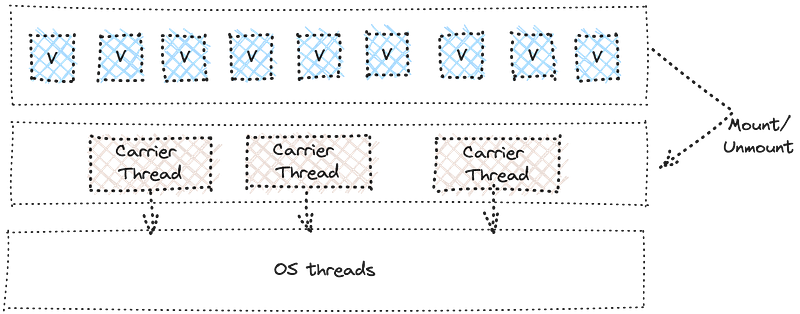
Figure 1: The virtual threading model in JDK 21.
The following is an example of virtual threads and a good contrast to OS/platform threads. The program uses the ExecutorService to create 10,000 tasks and waits for all of them to be completed. Behind the scenes, the JDK will run this on a limited number of carrier and OS threads, providing you with the durability to write concurrent code with ease.
try (var executor = Executors.newVirtualThreadPerTaskExecutor()) {
    IntStream.range(0, 10_000).forEach(i -> {
        executor.submit(() -> {
            Thread.sleep(Duration.ofSeconds(1));
            return i;
        });
    });
}  // executor.close() is called implicitly, and waits
Copy snippet
Structured concurrency (Preview)
Structured concurrency is closely tied to virtual threads, and it aims to eliminate common risks such as cancellation, shutdown, thread leaks, etc., by providing an API that enhances the developer experience. If a task splits into concurrent subtasks, then they should all return to the same place, i.e., the task’s code block.
In Figure 2, findUser and fetchOrder both need to execute to get the data from different services and then use that data to compose results and send it back in a response to the consumer. Normally, these tasks could be done concurrently and could be error prone if findUser didn't return; fetchOrder would need to wait for it to complete, and then finally execute the Join operations.
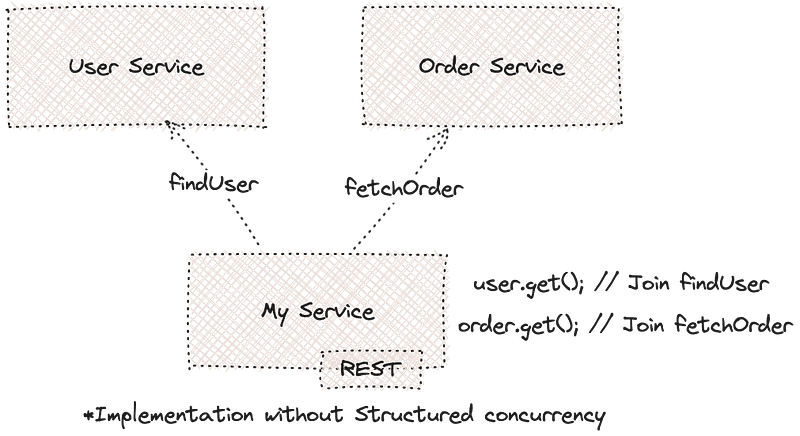
Figure 2: Structured concurrency example.
Furthermore, the lifetime of the subtasks should not be more than the parent itself. Imagine a task operation that would compose results of multiple fast-running I/O operations concurrently if each operation is executed in a thread. The structured concurrency model brings thread programming closer to the ease of single-threaded code style by leveraging the virtual threads API and the StructuredTaskScope.
Response handle() throws ExecutionException, InterruptedException {
    try (var scope = new StructuredTaskScope.ShutdownOnFailure()) {
        Supplier<String>  user  = scope.fork(() -> findUser());
Supplier<Integer> order = scope.fork(() -> fetchOrder()); scope.join() // Join both subtasks
.throwIfFailed(); // ... and propagate errors // Here, both subtasks have succeeded, so compose their results
return new Response(user.get(), order.get());
}
}Copy snippet
Scoped values (Preview)
ScopeValue also brings in interesting changes for developer productivity when programming with Threads. Historically, Java developers have used ThreadLocals to pass along data through the call chain in order for a thread to access data. However, changing that data through the call chain is also easier as the ThreadLocal variable passes through. This makes it harder to program and sometimes more error prone, with risks to insecure code.
ScopeValue aims to fix this by providing a model where threads can share data without the possibility of changing it during its scope. The data is immutable with the ScopeValue and enables runtime optimization.
Multi-threaded applications that use security principals, transactions, and shared context will benefit from the scoped values. The example below shows the ScopeValue<String>, which is created and used with the scope of runWhere, a runnable method.
public class WithUserSession {
	// Creates a new ScopedValue
	private final static ScopedValue<String> USER_ID = new ScopedValue.newInstance();
public void processWithUser(String sessionUserId) {
// sessionUserId is bound to the ScopedValue USER_ID for the execution of the
// runWhere method, the runWhere method invokes the processRequest method.
ScopedValue.runWhere(USER_ID, sessionUserId, () -> processRequest());
}
// ...
}Copy snippet
Sequenced collections
In JDK 21, a new set of collection interfaces are introduced to enhance the experience of using collections (Figure 3). For example, if one needs to get a reverse order of elements from a collection, depending on which collection is in use, it can be tedious. There can be inconsistencies retrieving the encounter order depending on which collection is being used; for example, SortedSet implements one, but HashSet doesn't, making it cumbersome to achieve this on different data sets.
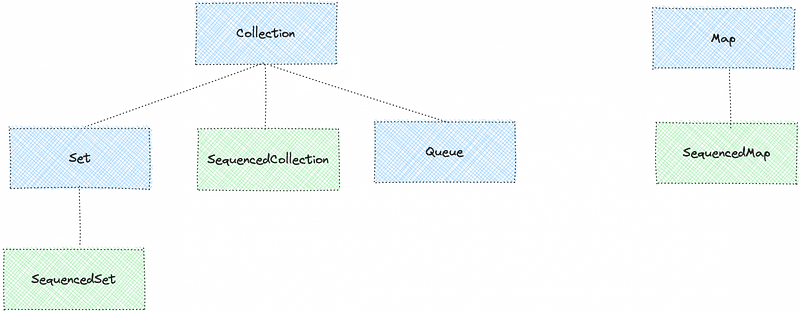
Figure 3: Sequenced Collections.
To fix this, the SequencedCollection interface aids the encounter order by adding a reverse method as well as the ability to get the first and the last elements. Furthermore, there are also SequencedMap and SequencedSet interfaces.
interface SequencedCollection<E> extends Collection<E> {
    // new method
    SequencedCollection<E> reversed();
    // methods promoted from Deque
    void addFirst(E);
    void addLast(E);
    E getFirst();
    E getLast();
    E removeFirst();
    E removeLast();
}
Copy snippet
So now, not only is it possible to get the encounter order, but you can also remove and add the first and last elements.
Record patterns
Records were introduced as a preview in Java 14, which also gave us Java enums. record is another special type in Java, and its purpose is to ease the process of developing classes that act as data carriers only.
In JDK 21, record patterns and type patterns can be nested to enable a declarative and composable form of data navigation and processing.
// To create a record:Public record Todo(String title, boolean completed){}// To create an Object:Todo t = new Todo(“Learn Java 21”, false);Copy snippet
Before JDK 21, the entire record would need to be deconstructed to retrieve accessors.. However, now it is much more simplified to get the values. For example:
static void printTodo(Object obj) {
    if (obj instanceof Todo(String title, boolean completed)) {
        	System.out.print(title);
System.out.print(completed);
    }
}
Copy snippet
The other advantage of record patterns is also nested records and accessing them. An example from the JEP definition itself shows the ability to get to the Point values, which are part of ColoredPoint, which is nested in a Rectangle. This makes it way more useful than before, when all the records needed to be deconstructed every time.
// As of Java 21
static void printColorOfUpperLeftPoint(Rectangle r) {
    if (r instanceof Rectangle(ColoredPoint(Point p, Color c),
                               ColoredPoint lr)) {
        System.out.println(c);
    }
}
Copy snippet
String templates
String templates are a preview feature in JDK 21. However, it attempts to bring more reliability and better experience to String manipulation to avoid common pitfalls that can sometimes lead to undesirable results, such as injections. Now you can write template expressions and render them out in a String.
// As of Java 21
String name = "Shaaf"
String greeting = "Hello \{name}";
System.out.println(greeting);
Copy snippet
In this case, the second line is the expression, and upon invoking, it should render Hello Shaaf. Furthermore, in cases where there is a chance of illegal Strings—for example, SQL statements or HTML that can cause security issues—the template rules only allow escaped quotes and no illegal entities in HTML documents.

