
Java CDI: How to Use Dependency Injection with Weld Container

This article is about the usage of “@Inject” with Weld Container.
Java 11 and the maven library weld-se-core and jakarta.inject-api are used.
Table of Contents
1. Use Case
2. Setup the IntelliJ Project
3. Source Code
4. Run
1. Use Case
We want start a weld container and get certain Java Bean Class (MyInjectClass.java) directly from BeanManager, inside this Bean we inject another Bean (MyDependency.java) as field. Then, we can invoke the method (printmessage()) from MyDependency.java inside the first bean.
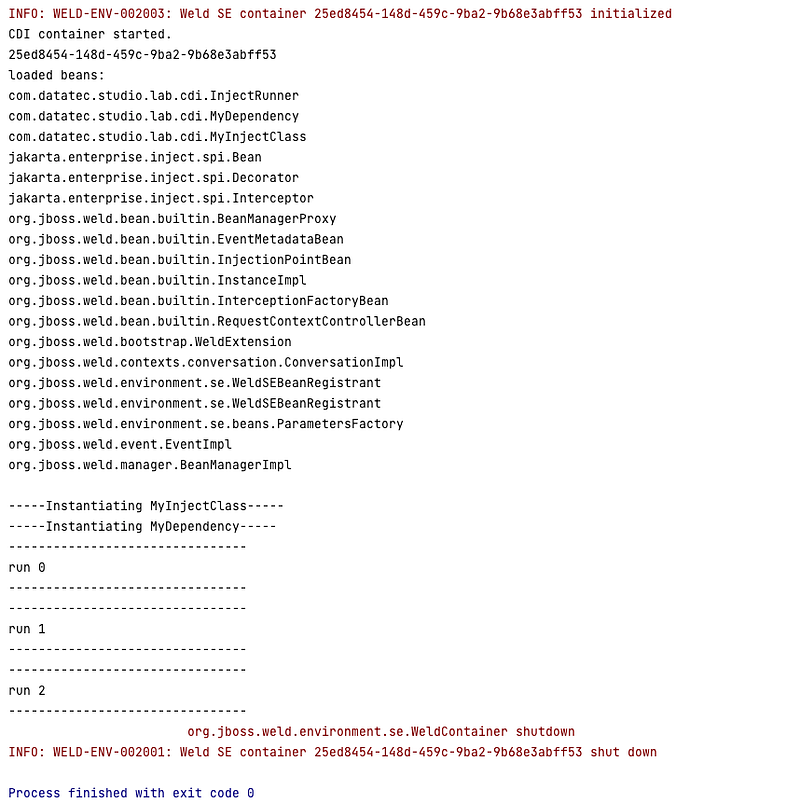
We invoke the method three times, at the end, we can see that both beans are only instantiated once:
2. Setup the IntelliJ Project
Please download my github project: weld-cdi-demo
The project structure looks like this screenshot. If the package “com.datatec.studio.lab.cdi” is shown not in one line, please follow the furhter steps to config IntelliJ so that the source root can be recognised.
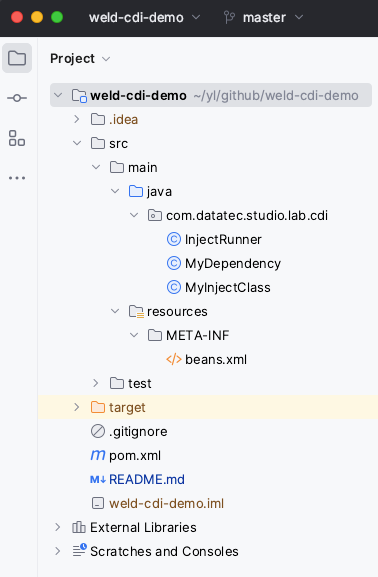
These configurations need to be done, if you have simply download the project from GitHub and opened it in IntelliJ.
- Preinstall JDK 11 on your laptop.
In my previous post there is a Guide to setup JDK on MacOS if you need.
If you have any other Version ≥ 9, you need adjust the pom.xml to support this version of Java. (e.g., change 11 to 9 or 17). Also the Project Settings in next step should be adjust to that version.
<maven.compiler.source>11</maven.compiler.source>
<maven.compiler.target>11</maven.compiler.target>
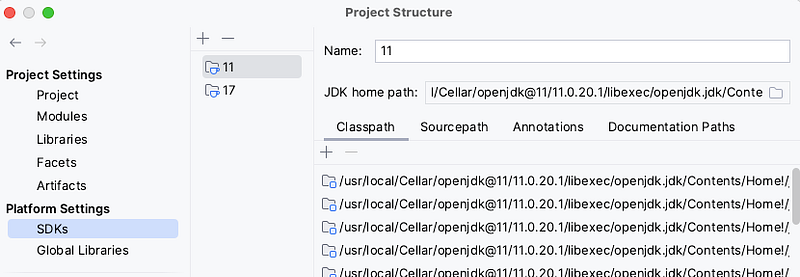
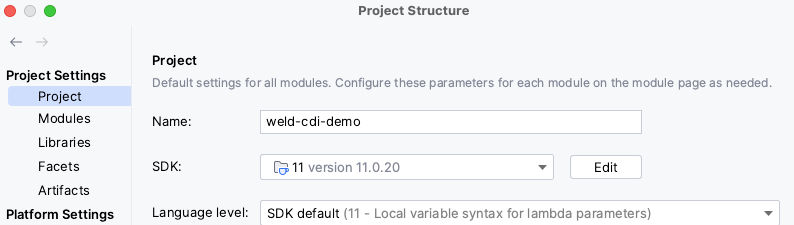
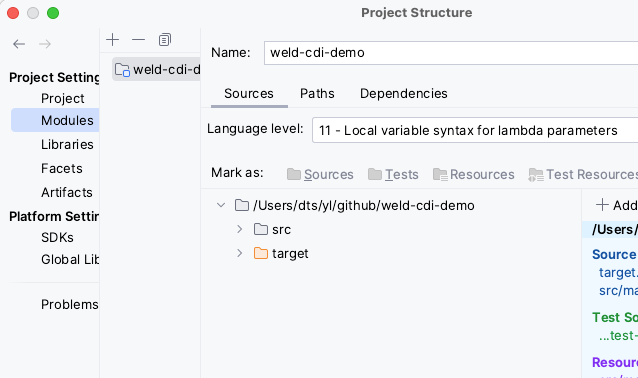
2. Config Project Settings in IntelliJ (File->Project Settings) to use JDK 11.
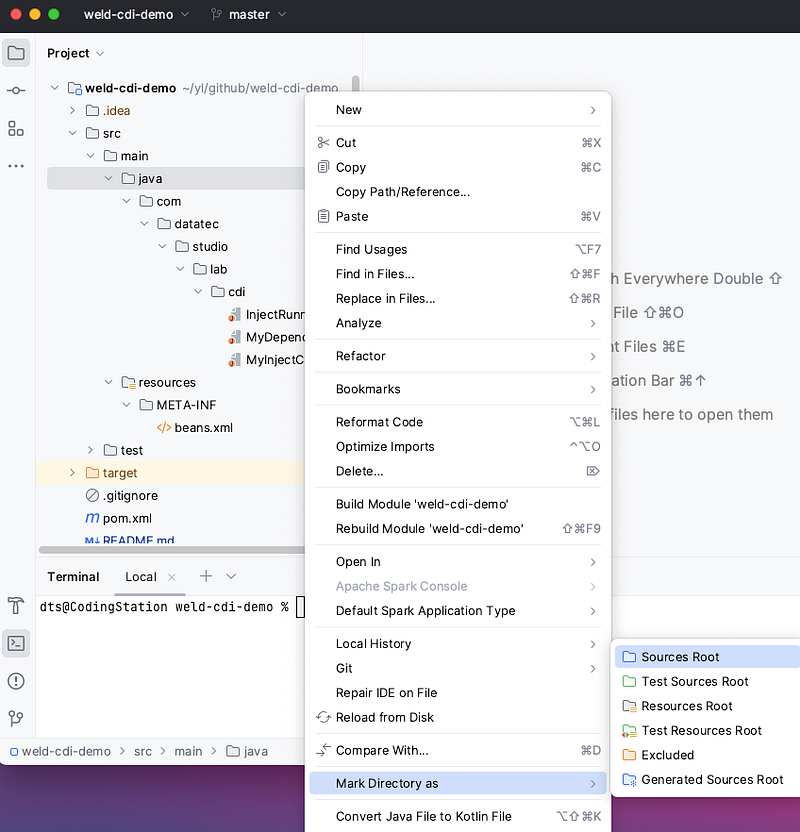
3. Right mouse click on folder “java” from “src->main->java” and choose entry “Mark Directory as” -> “Source Root” from pop-up menu.
3. Source Code
The source codes from my github repository are also shown here:
package com.datatec.studio.lab.cdi;

import jakarta.enterprise.inject.spi.Bean;
import jakarta.enterprise.inject.spi.BeanManager;
import java.util.Comparator;
import java.util.Set;
import java.util.stream.IntStream;
import org.jboss.weld.environment.se.Weld;
import org.jboss.weld.environment.se.WeldContainer;

public class InjectRunner {

    public static void main(String[] args) {
        try(WeldContainer container = new Weld().initialize()) {
            outputBeansInformation(container);

            MyInjectClass myInjectClass = container.select(MyInjectClass.class).get();

            IntStream.range(0, 3)
                    .forEach(i -> {
                        myInjectClass.doSomething(i);
                    });
        }
    }

    private static void outputBeansInformation(WeldContainer container) {
        System.out.println("CDI container started.");
        System.out.println(container.getId());

        System.out.println("loaded beans:");
        BeanManager beanManager = container.getBeanManager();
        Set<Bean<?>> beans = beanManager.getBeans(Object.class);

        beans.stream()
                .map(Bean::getBeanClass)
                .map(Class::getName)
                .sorted(Comparator.naturalOrder())
                .forEach(System.out::println);

        System.out.println("");
    }
}
package com.datatec.studio.lab.cdi;
import jakarta.inject.Named;
@Named
public class MyDependency {
private String message = "Hello World";
public MyDependency() {
System.out.println("-----Instantiating MyDependency-----");
}
public String printMessage(int runCount) {
System.out.println("--------------------------------");
System.out.println("run " + runCount);
System.out.println("--------------------------------");
return message;
}
}package com.datatec.studio.lab.cdi;
import jakarta.inject.Inject;
import jakarta.inject.Named;
@Named
public class MyInjectClass {
@Inject
private MyDependency myDependency;
public MyInjectClass() {
System.out.println("-----Instantiating MyInjectClass-----");
}
public void doSomething(int runCount) {
myDependency.printMessage(runCount);
}
}<?xml version="1.0" encoding="UTF-8"?>
<beans xmlns="http://xmlns.jcp.org/xml/ns/javaee"
xmlns:xsi="http://www.w3.org/2001/XMLSchema-instance"
xsi:schemaLocation="http://xmlns.jcp.org/xml/ns/javaee
http://xmlns.jcp.org/xml/ns/javaee/beans_2_0.xsd"
bean-discovery-mode="all">
</beans><project xmlns="http://maven.apache.org/POM/4.0.0" xmlns:xsi="http://www.w3.org/2001/XMLSchema-instance"
xsi:schemaLocation="http://maven.apache.org/POM/4.0.0 http://maven.apache.org/xsd/maven-4.0.0.xsd">
<modelVersion>4.0.0</modelVersion>
<groupId>org.example</groupId>
<artifactId>weld-cdi-demo</artifactId>
<version>1.0-SNAPSHOT</version>
<packaging>jar</packaging>
<name>weld-cdi-demo</name>
<url>https://datatec.studio</url>
<properties>
<project.build.sourceEncoding>UTF-8</project.build.sourceEncoding>
<maven.compiler.source>11</maven.compiler.source>
<maven.compiler.target>11</maven.compiler.target>
</properties>
<dependencies>
<dependency>
<groupId>jakarta.inject</groupId>
<artifactId>jakarta.inject-api</artifactId>
<version>2.0.1</version>
</dependency>
<dependency>
<groupId>org.jboss.weld.se</groupId>
<artifactId>weld-se-core</artifactId>
<version>4.0.0.Final</version>
</dependency>
<dependency>
<groupId>org.junit.jupiter</groupId>
<artifactId>junit-jupiter-engine</artifactId>
<version>5.9.2</version>
<scope>test</scope>
</dependency>
<dependency>
<groupId>org.junit.jupiter</groupId>
<artifactId>junit-jupiter-api</artifactId>
<version>5.9.2</version>
<scope>test</scope>
</dependency>
<dependency>
<groupId>org.junit.jupiter</groupId>
<artifactId>junit-jupiter</artifactId>
<version>5.9.2</version>
<scope>test</scope>
</dependency>
</dependencies>
<build>
<pluginManagement><!-- lock down plugins versions to avoid using Maven defaults (may be moved to
parent pom) -->
<plugins>
<!-- clean lifecycle, see
https://maven.apache.org/ref/current/maven-core/lifecycles.html#clean_Lifecycle -->
<plugin>
<artifactId>maven-clean-plugin</artifactId>
<version>3.1.0</version>
</plugin>
<!-- default lifecycle, jar packaging: see
https://maven.apache.org/ref/current/maven-core/default-bindings.html#Plugin_bindings_for_jar_packaging -->
<plugin>
<artifactId>maven-resources-plugin</artifactId>
<version>3.0.2</version>
</plugin>
<plugin>
<artifactId>maven-compiler-plugin</artifactId>
<version>3.8.0</version>
</plugin>
<plugin>
<artifactId>maven-surefire-plugin</artifactId>
<version>2.22.1</version>
</plugin>
<plugin>
<artifactId>maven-jar-plugin</artifactId>
<version>3.0.2</version>
</plugin>
<plugin>
<artifactId>maven-install-plugin</artifactId>
<version>2.5.2</version>
</plugin>
<plugin>
<artifactId>maven-deploy-plugin</artifactId>
<version>2.8.2</version>
</plugin>
<!-- site lifecycle, see
https://maven.apache.org/ref/current/maven-core/lifecycles.html#site_Lifecycle -->
<plugin>
<artifactId>maven-site-plugin</artifactId>
<version>3.7.1</version>
</plugin>
<plugin>
<artifactId>maven-project-info-reports-plugin</artifactId>
<version>3.0.0</version>
</plugin>
<plugin>
<groupId>org.apache.maven.plugins</groupId>
<artifactId>maven-surefire-plugin</artifactId>
<version>3.1.2</version>
</plugin>
</plugins>
</pluginManagement>
</build>
</project>4. Run
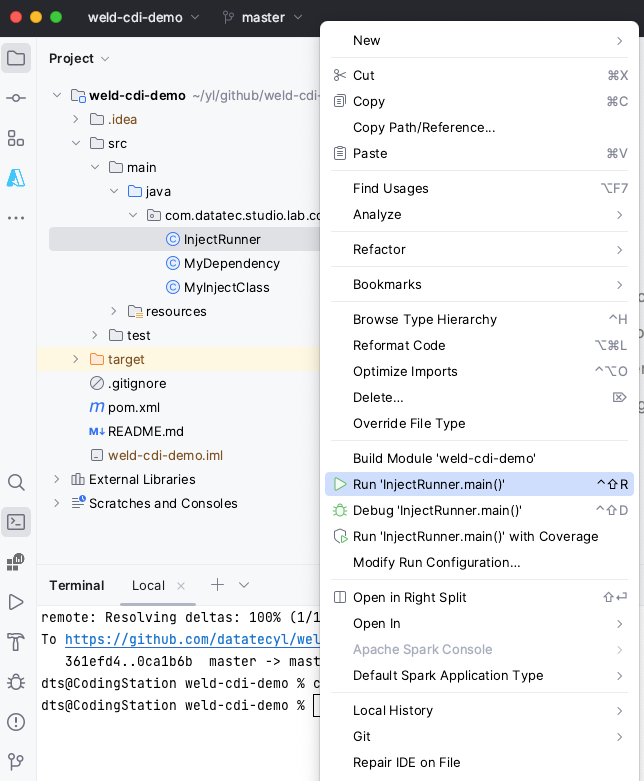
Just right click on the class “InjectRunner”, then click on Run. The result will be shown.
I hope you enjoyed today’s content.
You are welcome to my network:
Follow me on Medium
Your claps 👏 keep me continue writing high-quality articles. Thank you!


