
I’ve been convinced. Obsidian is now my note app of choice
Switching to Obsidian and How I’m Using it Now
The Reflect App
Reflect App has been my trusty sidekick for a while, I finally landed on it after trying RemNote. Its note-taking and organization features served me well for the past 6 months. However, there were some problems that started when I began to take coding courses…
Embracing Coding
As I dive deeper into learning JavaScript and React for my web development journey, I realize my need for a tool that offers better support for coding and development. This is where Obsidian comes into play.
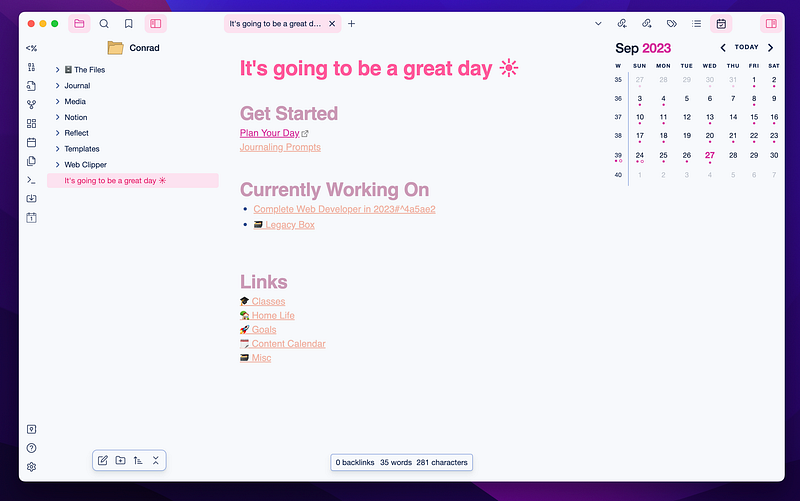
Why Obsidian?
1. Markdown: Obsidian is built around Markdown, which is a coder’s best friend. Writing code, code snippets, and technical documentation is a breeze with Markdown. Plus, it’s incredibly readable. I can easily export my code, share notes, and import the files as needed into various platforms.
2. Plugin Power: Obsidian’s plugin ecosystem is vast and growing. You can tailor it to suit your coding needs, from syntax highlighting to integrations with code editors like Visual Studio Code. I’ll get into a few community plugins I’m using below, but this was one of the deciding factors for my migration.
3. Similar Features: Obsidian’s core feature, the graph view, interlinked notes, outliner format, and note structure all closely match Reflect. It was actually one of the reasons I started using Reflect in the first place. This made the transition easy. While I loved the simplicity of Reflect, I am willing to sacrifice for more features with Obsidian.
4. Local Storage: Unlike some cloud-based note-taking apps, Obsidian stores your data locally. This means you have full control over your coding notes, ensuring privacy and security. I use iCloud to sync my notes between devices right now, and it has been working pretty well so far.
5. Pricing: Reflect was $15 per month, which I was happy to pay for since I was using it all throughout the day. However, Obsidian being free was a huge upside to making the switch. You can pay for additional services such as Obsidian Sync and Publish, but I haven’t found a need for these so far, thus saving me a $180/year investment.
Importing & Making the Switch
Learning how to use Obsidian was fairly easy. I had been using Markdown formatting in Reflect for a while, so that was all familiar. I did make a playlist of the YouTube tutorials I used to help me get my setup the way I wanted, you can watch it here:
Notion to Obsidian
Although I have been using Reflect for 6 months or so, I still had a ton of archived notes and projects in Notion. After using Obsidian for a few months and getting more comfortable with it, I’ve decided to also give up my $10 monthly Notion account to opt for a full Obsidian setup.
For this import, I used the plugin called “Importer”. My notes took a few minutes, but everything seemed to be well organized and formatted. I will have some cleaning up to do over time but it’s going to be completely usable in the meantime.
Reflect to Obsidian
Importing my Reflect App notes into Obsidian was a bit of an extra process. I exported my notes as Markdown and then ran a script to remove any unnecessary strings from the doc titles. This maintained all my note links from Reflect to Obsidian.
find . -type f -name "*.md" -exec sh -c 'mv "$0" "${0//-[A-Za-z0-9]*/.md}"' {} \;Once the note names were updated, I imported them as Markdown files and I was good to go. Everything seems to be working properly so far, and the links between my notes were maintained during the import.
Community Plugins
One of the beauties of Obsidian lies in its vibrant community and the wealth of plugins available. Let me introduce you to a few that have become indispensable in my daily workflow.
Calendar
The Calendar plugin is essential for daily notes. The plugin sits on the right sidebar and allows you to jump to any given date and create or reference a daily note from that period. You can also enable weekly notes that will give you a great starting point for summarizing or planning your weeks.
Periodic Notes
Periodic Notes is a gem for fostering consistency in your note-taking. It automates the creation of recurring notes, making it perfect for tracking your progress, setting goals, and managing recurring tasks. Whether it’s daily coding exercises or weekly project updates, this plugin keeps me on track and ensures nothing slips through the cracks.
Dataview
Dataview is a data magician within Obsidian. It transforms your notes into a dynamic database, allowing you to query and display information in versatile ways. For a productivity and organization enthusiast like me, Dataview is a game-changer. I use it to organize project details, track coding milestones, and even analyze my reading goals. It’s like having a personal data analyst in your note-taking app.
Outliner
Outliner is your best friend when it comes to structuring and organizing your notes. It lets you create hierarchical outlines within your notes, making it a breeze to outline coding projects, create to-do lists, and build structured documentation. As an operations coordinator for Baronfig and a busy mom, this plugin helps me maintain clarity in complex project plans and keeps my family’s schedules in check.
Customizing Your Obsidian Experience
These community plugins are just the tip of the iceberg. Obsidian’s plugin ecosystem is a treasure trove of productivity enhancements, and the best part is that you can tailor your Obsidian experience to your specific needs. Whether you’re a coder like me or have other passions and interests, there’s likely a plugin to elevate your note-taking game.
So, don’t hesitate to explore the Obsidian community, discover new plugins, and make Obsidian your own. It’s one of the reasons I’m loving this transition from Reflect App — it’s not just a note-taking app; it’s a productivity powerhouse.

Reflect served me well, but Obsidian has become my new go-to tool mostly due to its coding-friendly features, Markdown capabilities, and limitless customization. So, whether you’re a coding newbie or a seasoned developer, consider giving Obsidian a shot. It might just become your secret weapon.
👏🏼 If you found this article valuable hit those clapping hands once or twice.
✨ Thank you for reading & for your support!


