
Istio Ingress Gateway and Virtual Services in Kubernetes(K8s)

How to create an istio Ingress Gateway that allows incoming traffic based on domains, Virtual services that connect to this gateway with multiple routes configured to forward traffic to specific services in our Kubernetes(K8s) cluster.
If we are planning to have an istio service mesh configured in our K8s cluster, then, it's a common idea to have an Ingress Gateway which acts as a single point for incoming traffic, and a set of virtual services which forward the request as desired.
Let’s have a look in detail on what we are talking about,
Components we are creating
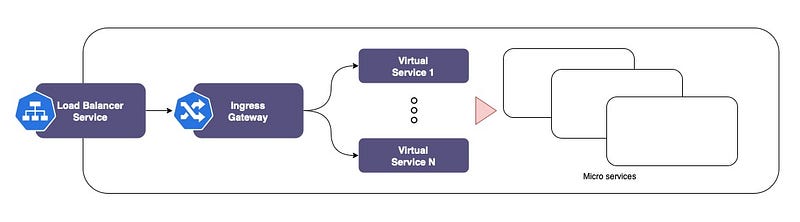
- Loadbalancer service: This allows the traffic into the Kubernetes cluster.
- Istio Ingress Gateway: Loadbalancer Service forwards the traffic to this Gateway. We will configure it to allow traffic to list whitelisted domains(hosts).
- Virtual Services: These accept the traffic from the Gateway and forward traffic to microservices based on the routes configured.
Note: For the first component, we can use NodePort as well. Loadbalancer is most common if our K8s providers(ex: aws) have external load balancers which can connect to K8s and figure out the load balancing by themselves. If we are to do the load balancing ourselves, we can point our load balancer to the node ports.
Here is a logical diagram that shows what it looks like,
Kubernetes Resources need to create
Today, I am going with Helmfor the installation of istio.
- Istio namespace (I prefer to keep all resources w.r.t to Istio and Gateway in this, but it is optional)
- Istio Base: Creates a set of Custom Resource Definition(CRD) for the Istio controller.
- Istio controller(istiod): This is The Istio.
- Istio Ingress Service: The service that let the traffic come in.
- Gateway: That accepts the traffic from the Istio Ingress Loadbalancer service.
- VirtualServices: Connect to the Gateway, accept and forward traffic based on routes.
Set-Up
Create namespace
A common namespace istio to hold the Istio related resources.
Note: This is optional. If we use the default namespaces created by Istio, then remove the namespace configuration from values files which used to install helm charts in the coming sections.
$ kubectl create namespace istio# To enable the istio service mesh, add the label.
$ kubectl label namespace istio istio-injection=enabledAdd helm repo
We need to add the Istio Helm repo to use helm for installation of “Istio Base”, “Istio controller” and “Istio Ingress service”
$ helm repo add istio https://istio-release.storage.googleapis.com/charts$ helm repo updateIstio Base
Istio base contains cluster-wide resources used by the Istio control plane. This command creates a set of Custom Resource Definitions(CRD) for the Istio controller(istiod).
Let’s create custom values.yaml file ( values.yaml file is the configuration file for helm install.
Note: Configurations we mention in the custom file (can be any filename), which is passed like
-f <custom>-values.yamlwill override the default configurations. If don’t use custom configurations, it will use the default values)
Filename: istio-base-values.yaml
As you can see, the custom configuration is just for setting the namespace we created. This will make the helm install the Istio Base to istio namespace.
Now, let's install istio-base.
$ helm install -f istio-base-values.yaml istio-base istio/base -n istio --version 1.13.2Note: “— version 1.13.2” this is the helm chart version, NOT Istio version. You can omit this if you just want to use the latest version.
Istio Controller
This is in effect “The Istio service mesh”. This installs the istiod (Istio Daemon).
Note:
istiodis introduced from Istio 1.5, to reduce the complexity of having multiple Istio control place microservices such as Pilot, Galley, Citadel and Mixer. This consolidates the components of the Istio Control Plane into a single binary.
As we did for Istio Base, let’s create custom values.yaml for Istiod as well.
Filename: istiod-values.yaml
Now install istiod using helm with above custom configuration.
$ helm install -f istiod-values.yaml istiod istio/istiod -n istio --version 1.13.2Istio Ingress Service
This will create a Loadbalncer service — if External IP(external loadbalancer like aws ELB) is available. This can be used to connect from the external world, else use the node port to use our own load balancer or connect directly with the Node address.
Custom configuration: istio-ingress-values.yaml
use this configuration to install Istio Ingress Service.
# The instance name "istio-ingress" in the command will be used in the gateway we create in the next step to connect this service to the Gateway$ helm install -f istio-ingress-values.yaml istio-ingress istio/gateway -n istio --version 1.13.2Gateway
This Gateway act as the single entry point for all the incoming traffic hitting the LoadBalancer Service we created in the previous step.
Let's look at the definition, Filename: istio-in-gw.yaml
Apply this file to create the gateway.
$ kubectl apply -f istio-in-gw.yamlVirtual Service
We can create as many VirtualService as we need to serve our purpose. This holds a set of route configurations to forward the traffic received from the gateway.
The below example shows a VirtulService(VS) for one host mentioned in Gateway. We can configure to have multiple hosts, or multiple VS for the same domain or even with a wildcard domain configuration as well.
Filename: istio-in-vs.yaml
Create this VirtulService(VS)
$ kubectl apply -f istio-in-vs.yamlIn this VS, there are 3 Routes configured.
- version1_route: This routes all the requests comes to
sub1.example.ca/v1toapp.v1-namespace.svc.cluster.local/. Note the/v1rewrite to/hence not/v1while forwarding to service. - version2_route: This routes all the requests comes to
sub1.example.ca/v2toapp.v2-namespace.svc.cluster.local/. Note the/v2rewrite to/hence not/v2while forwarding to service. - default: This is the default route, if none of the about routes matches, VS forward the request to this.
That’s it, if all went well we should see a set of resources running like below,
$kubectl get pod,service,deployment,gateway,replicaset,hpa,VirtualService -n istio
NAMESPACE NAME                               STATUS
istio     pod/istio-ingress-5bd77ffbdf-plnrz Running
istio     pod/istiod-59fdcfd676-w56hp        Running
NAMESPACE NAME TYPE SELECTOR
istio service/istio-ingress LoadBalancer app=istio-ingress,istio=ingress
istio service/istiod ClusterIP app=istiod,istio=pilotNAMESPACE NAME CONTAINERS SELECTOR
istio deployment.apps/istio-ingress istio-proxy app=istio-ingress,istio=ingress
istio deployment.apps/istiod discovery istio=pilotNAMESPACE NAME CONTAINERS SELECTOR
istio replicaset.apps/istio-ingress-5bd77ffbdf istio-proxy app=istio-ingress,istio=ingress,pod-template-hash=5bd77ffbdf
istio replicaset.apps/istiod-59fdcfd676 discovery istio=pilot,pod-template-hash=59fdcfd676NAMESPACE NAME REFERENCE istio horizontalpodautoscaler.autoscaling/istio-ingress Deployment/istio-ingress istio horizontalpodautoscaler.autoscaling/istiod Deployment/istiod
NAME                                    AGE
gateway.networking.istio.io/istio-in-gw 3m15s
NAME GATEWAYS HOSTS
virtualservice.networking.istio.io/istio-in-vs ["istio-in-gw"] ["sub1.example.ca"]Thanks!



