
TECH BASICS
Istio: Canary Deployment for Python Flask based WebServices
Part 2: Istio | Canary | Python Flask | Kubernetes | DevOps

In the first article of this series, we deployed a dummy python flask-based application in the Kubernetes cluster to demonstrate Istio traffic control capabilities. We talked about Istio concepts briefly and deployed few addons for monitoring and visualization of mesh.
Istio’s ability to enforce policy in communication networks enables useful traffic control, observability features, rate limiting, circuit breaking, and programmable rollouts such as canary deployments. In this article I am covering Canary deployment with Istio.
Quick Recap
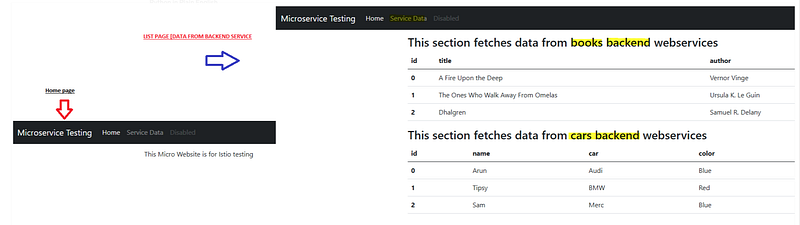
Before moving on, let me quickly brief you about the application. I have created an application using the Python Flask web framework. The home page of the application is simple and has a context root of “/home”. The Service Data page loads data from the backend dummy Webservice and has the context root of “/list”. The codebase for this application is available in Github.
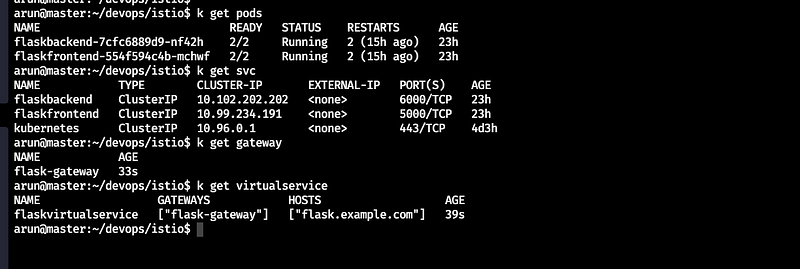
We deployed the Istio Gateway and Virtual Service, Kubernetes objects to expose these services out of our mesh.
It's time to verify our existing Istio components and Application state.
Using proxy-status you can get an overview of your mesh
istioctl proxy-status
State of Istio specific components —
$ istioctl proxy-config route istio-ingressgateway-5dc645f586-84bvf -n istio-system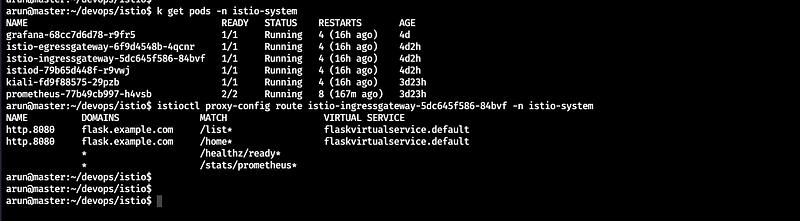
Please note istionctl proxy-config route <pod name> is a very powerful command. It fetches route configuration for the Envoy instance in the specified pod.
Let’s test our service using Gateway.
$ curl -s -I -HHost:flask.example.com http://10.0.1.6:31688/home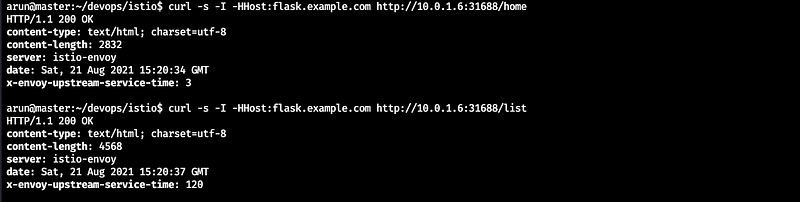
Let’s have a visualization in Kiali -
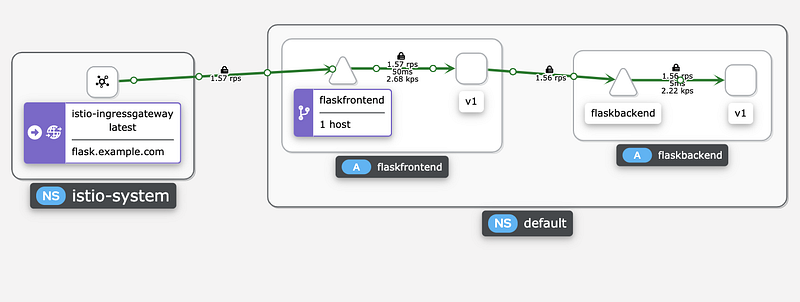
Everything is working absolutely fine. Let’s start with the objective for this post — Canary Deployment
Please note, I request you to have a look at the previous post before you move on.
Canary Deployment
Canary deployment is a deployment strategy that releases an application or service incrementally to a subset of users who are exposed to new updates before others. These users identity the release is good to proceed for full rollout or not.
How Istio Can help in Canary Deployments?
Istio, as a service mesh supports routing rules to be applied to all services in the mesh, not just to ingress traffic. Using this capability we can implement Canary deployment easily. Canary deployments in Istio cab be configured using following items:
- virtual service ( will be used to specify relative weights)
- destination rule ( will be used to define subsets of the target service based on version labels.)
I have updated the Home Page of our light application and rebuild the docker image, now it shows version information as well after deployment.
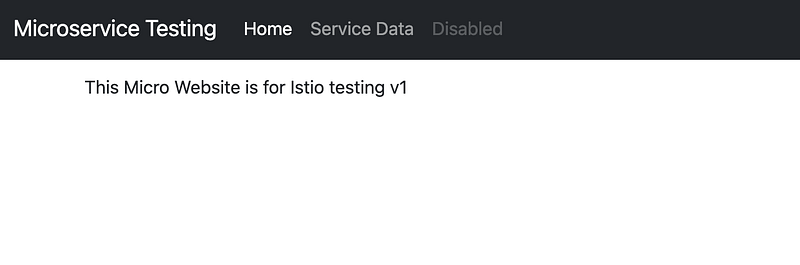
Please note, I am using a chrome plugin for header modification while accessing our app through browser.
I have prepared another docker image v2 of our app with a slight change in text on the home page. This image will be used for target release.
The deployment will be a canary deployment using Istio. We will use Istio to shift traffic from one version of an app to another gradually. We will configure a sequence of routing rules that redirect a percentage of traffic from one destination to another using Virtual Services and Destination Rules.
Steps —
- Deploy another version of the application without removing the existing application
- Update existing
VirtualServiceand add another objectDestinationRulesupport weight-based routing. Destination Rule defines additional, version-based policies to the routing rules you are applying to your app.
In the above VirtualServiceobject, check the route details for HTTP context root. We have two destination rules defined. One is having a weight of 90 and the subset is v1 and another one is 10 and the subset is v2. DestinationRule defines the labels of the target service based on version labels. So subset v1 is forwarding requests to current version of live application and v2 is the canary which we are releasing in the system gradually.
After setting this rule, Istio will ensure that only one-tenth of the requests will be sent to the canary version(v2), regardless of how many replicas of each version are running by our app.
Let’s do the deployment for new updated app first.

Now we can see the 2 pods of the frontend app are running. One with version 1 and another with version 2. It time to play with Istio now.
We will deploy updated Virtual Service and DestinationRules for weight-based routing first. It will modify the route rules and send 90% of connections to v1 of application and 10% to updated version.
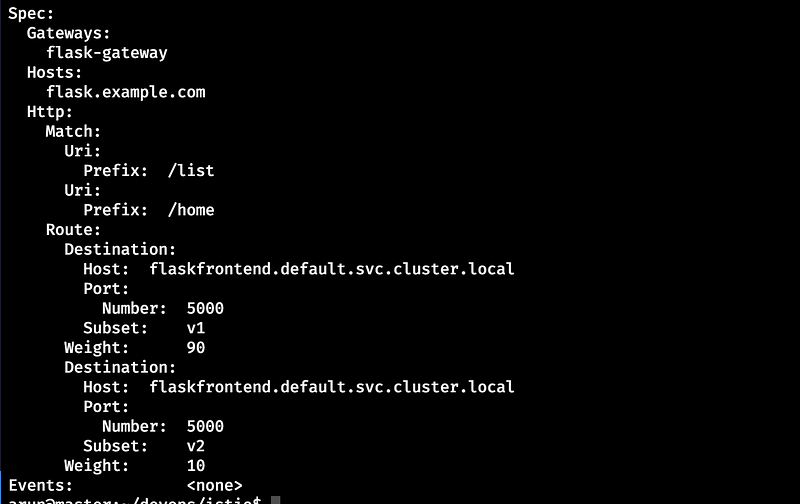
It’s time to test it. The best way I can advise is to use curl or any load generator. Please note you need to pass one hostname as a header so if you use browser then make sure you have a plugin to add custom header.
Load Generate using curl
This can generate a number of request very quickly. I have filtered the output using grep so that exact version can be printed.
$ while true; do curl -s -HHost:flask.example.com http://10.0.1.6:31688/home | grep -i "testing v"; sleep 0.5; done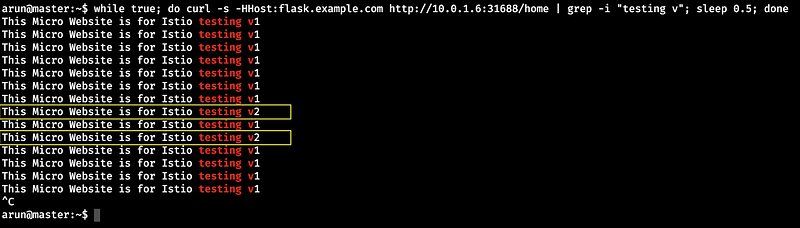
As you noticed most of the requests gone to v1 of app but few of them went to v2 as well.
Load Generate using Hey HTTP load generator
You can use a lightweight load generator hey as well. This tool is pretty powerful and can be used in these scenarios easily.
wget https://hey-release.s3.us-east-2.amazonaws.com/hey_linux_amd64
sudo mv hey_linux_amd64 /usr/bin/hey$ hey -m GET -H "Host: flask.example.com" -z 15s -host "flask.example.com" http://10.0.1.6:31688/home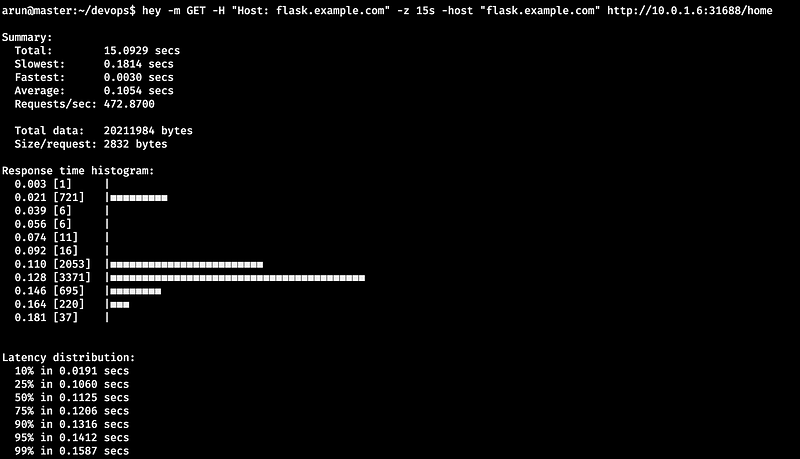
Again similar results we received from Hey as well. But to verify it, we will use Kiali dashboard to display or monitor.
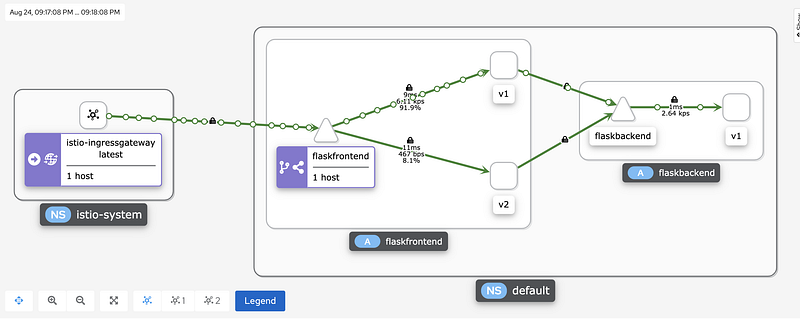
The above image is actually the gist of everything which we have done till this point. We can see two versions of the application that are currently handling the load. We can see the percentage of requests distribution as well. This is an example of weight-based routing which can be used in canary deployment in specific use-cases.
Traffic distribution 50/50%
Now update the virtual service again and put 50 in weight for both versions and view in Kiali.
route:
    - destination:
        host: flaskfrontend.default.svc.cluster.local
        subset: v1
        port:
          number: 5000
      weight: 50
    - destination:
        host: flaskfrontend.default.svc.cluster.local
        subset: v2 #  default to pods of the flaskfrontend service with label “version: v1” (i.e., subset v1)
        port:
          number: 5000
      weight: 50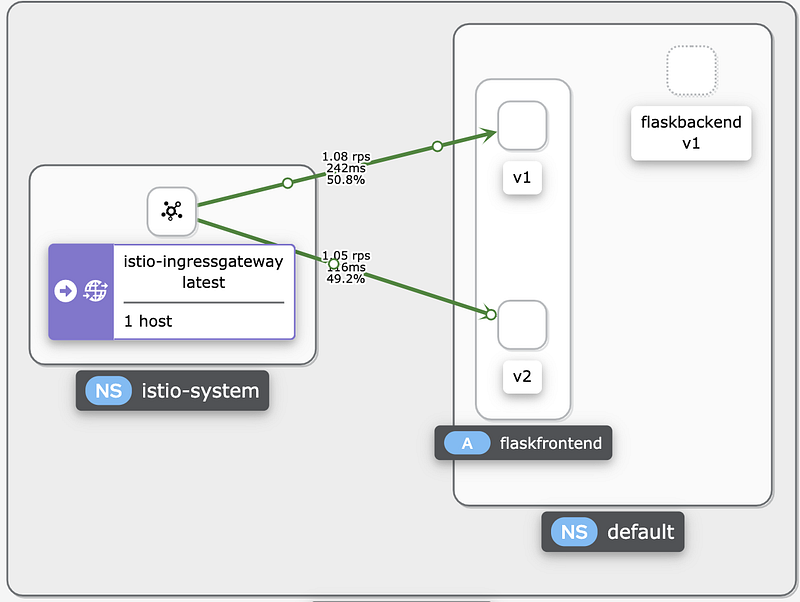
I think now we have an understanding now that how we can gradually update our deployment using Istio.
In the next post, I will cover focused Canary Testing using Istio Virtual Service and destination rules.
Stay Safe and Keep learning.
Resources
All the code snippets of this article are available on my GitHub Page.
Let’s Connect
LinkedIn: https://www.linkedin.com/in/arunksingh16/ GitHub: https://github.com/arunksingh16


