
Is watchOS 10 a Bigger Update Than It Appears?
Is this ‘the big one’?
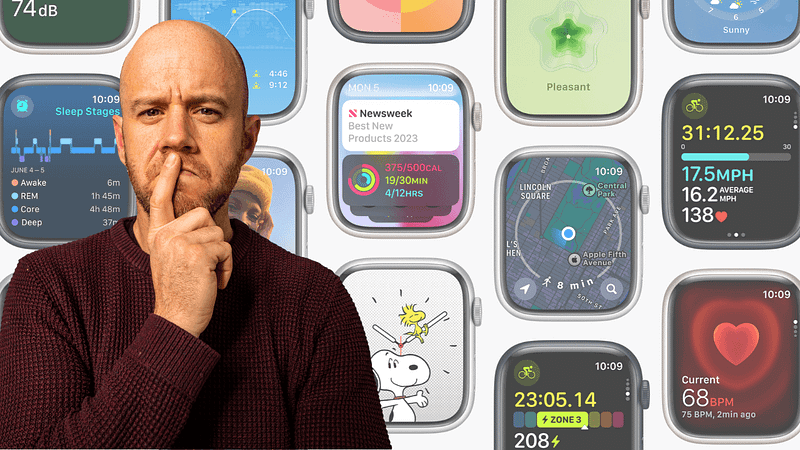
It’s been a couple of weeks since Apple unveiled watchOS 10 at WWDC and, as you might suspect, I have many thoughts.
The latest update to the Apple Watch operating system is ‘the big 10’, which should, in theory, mean a significant shift forward. It’s about time, too, because as wonderfully class-leading as watchOS might be, the look and feel of it haven’t changed for quite some time.
We’ve seen massive advances in what the Apple Watch can do, of course, and it is now a far more focused fitness device than it was at launch back in 2015. But it’s time for a fresh lick of paint, right, Tim?
Well, it looks like only half the tin was used, unfortunately. Although there are some very interesting updates in watchOS 10 which have caught my eye.
A new look for apps and WIDGETS!
Apple has updated ‘virtually’ all of its own apps in watchOS to make better use of the larger displays we’re now enjoying on the Apple Watch. They’ve found new places for content and, from the looks of the demos, added far more of the all-important ‘white space’ to each user interface.
The refreshed apps look great. These aren’t huge changes, but they’re a pleasing step forward which should give your Apple Watch that ‘new’ feeling come update time. It’s great news for Apple Watch Ultra owners, too, which boasts the biggest display of the range yet still conforms to the same app user interfaces as the rest.
10 Ways to Get the Most From Your Apple Watch Ultra
They’re not all particularly obvious!
medium.com
Widgets make a welcome return to watchOS 10, in the form of iPhone-inspired Smart Stacks. These bite-sized glances of information can be scrolled via the Digital Crown and use machine learning (not AI!) to show you what you’ll probably want to see at just the right time. As someone who still only scratches the surface of his Apple Watch Ultra, I’m hoping these new widgets will encourage me to delve more wholesomely into the information it can provide.
New watch faces
It wouldn’t be an Apple Watch software update without a new watch face or two, would it? This year, we’re getting two watch faces that swap functionality for, well, fun.
First up, there’s Snoopy and Woodstock (we’re familiar with the former in the UK, not so much the latter), both of whom react to the weather and any workouts you get stuck into. Secondly, Palette takes watch face simplicity to the next level with three overlapping layers of colour that shift throughout the day.
These watch faces aren’t going to change your world or the way in which you use your Apple Watch, but they are cute. Which is, sometimes, all we need.
Fitness
As noted earlier, the Apple Watch is an incredibly capable fitness device and it has long been Apple’s main focus for their wearable. In watchOS 10, Apple has focused on cycling and hiking, which provides a few clues as to the fitness areas in which Apple Watch users want to see the biggest improvements.
I used to do a fair bit of road cycling, therefore while I won’t be using the cycling updates regularly, I can appreciate what they mean to those who will. Top of the list is compatibility with Bluetooth cycling accessories which are capable of sending data such as cadence, speed, and power to the Apple Watch — i.e. the stuff Apple’s wearable can’t currently measure.
There’s also a new ‘power zones’ workout, which estimates your functional threshold power (which is basically the highest level of intensity you can maintain for an hour). This is geared towards helping riders improve performance but does need a compatible power meter.
One of the coolest cycling updates for the Apple Watch actually ties in with the iPhone. When you start a cycling workout, the workout is revealed as a live activity on the iPhone, and if you tap that, you’re taken into a full-screen view of your metrics. You know, a bit like Strava.
There are some big improvements to the hiking abilities of the Apple Watch, too. These include a three-dimensional view of where you’ve been and marked waypoints for where you last had cellular activity and where emergency calling is available. There are also topographic maps and trail info which includes distance, difficulty, elevation, and more about the route — including photos.
That all sounds wonderful, but as my hiking tests with the Apple Watch Ultra have demonstrated, battery performance is still the limiting factor for serious walkers. Maybe I should conduct another test later this year!
Mental and vision health
Mental health was a big focus for Apple at WWDC this year. As a result, watchOS 10 includes the ability to log your state of mind and select how you’re feeling at any given time. That data is logged in the Health app and can be viewed on your iPhone or iPad to see how your state of mind correlates with your exercise, sleep, and mindful minutes.
I’m all for this, and it’s a wonderful companion to the forthcoming Journal app in iOS 17 (one assumes the state of mind check-ins on the Apple Watch will in some way feed back into that app).
A big surprise came in the form of ‘vision health’ for watchOS 10. Really? How can the Apple Watch help your eyes, we all asked. Well, as it turns out, Apple has decided to use the ambient light sensor on the Apple Watch to measure the amount of time you spend in daylight. Smart.
This is with a view to helping reduce the risk of myopia. Parents can also measure the amount of time their kids spend in daylight, even if the child doesn’t have an iPhone (they’d just need an Apple Watch). Once again, I’m all for this, but the question is: how many people are going to actively keep an eye on this stuff before they turn off any notifications which are deemed annoying?
Final thought
I’m looking forward to watchOS 10 later this year. In particular, I think I need to give the cycling stuff a try (for old-time’s sake) and dig further into the hiking ability of the Apple Watch Ultra.
watchOS 10 feels like a decent update, but not quite the biggie suggested by its version number. With hindsight, that’s no surprise; why inadvertently ruin something that already works so well?
The fresh lick of paint provided by those smart stacked widgets and the breathing space given to Apple’s app design will make our Apple Watches feel much newer than they are in the autumn. With the additional functionality mentioned above (and the arrival of Snoopy) we can’t ask for much more, can we?
Before you go
Join my Substack newsletter for tips on becoming a profitable, happy online creator!
If you enjoy my writing, it’s only a snippet of what’s on Medium. I’m a paying member myself and highly recommend joining. Click here to join (a portion of your membership fee will be sent my way and therefore directly support my work!).
Originally published at https://markellisreviews.com on June 20, 2023.