
Illumination | Technology | Apple
Is the Unbelievably Expensive iPad Pro Worth It?
After using it for over a year now.
When I started sixth form college, I decided to buy an iPad Pro to somehow uplevel my studying experience. And in my experience, it has improved my studying and revision. However, I’ll let you be the decider of whether an iPad Pro is worth it for you, or not.
Note-taking
Since reception (equivalent to kindergarten in the US), like billions of students across the world, I wrote notes with a pen and paper. So to see the idea of taking notes on a screen with a stylus seemed new to me. That’s not true — I already knew about this since the release of Samsung’s Note Phone and the ongoing series of those phones.
But I never actually thought about using it to take notes at school. Would it feel better, faster, and feel like cluttered than with books?
The Apple Pencil is great (although its price is astronomical) and the response of the writing to the pen is fast as well. If you’re an artist, it also has pressure sensitivity, which can be a massive plus as well.
Because I decided to take notes digitally, I only brought 2–3 books to school every day. My school folders were almost empty, as everything was digital. It felt like a weight was taken off me. I could access any type of notes from any day any week, month or year. I could search by topic, and it essentially felt like a digital revision guide to me.
Depending on your note-taking app, you can double tap the pencil to switch from pen to eraser or pen to highlighter etc, which meant I could correct my errors very quickly.
However, it’s not all too good. The Apple Pencil could easily be lost, like your normal ballpoint pen, however it costs £80 — £100 (which is astronomically expensive), so you’ll have to go the extra mile to store it very safely. If you use the battery saver mode on the iPad, the responsiveness of the writing to the pen is slightly slower, not a major catch, but something to remember.
If your iPad suddenly has to reset because you forgot your PIN, you’ll have to say goodbye to all your notes unless it’s saved to the cloud.
Also, your iPad could go dead during a lesson as you take notes; you’ll need to charge it beforehand to avoid losing battery as much when taking notes during a lesson. You’ll have to put it on silent to avoid making sounds and notifications during a lesson.
The feel of a laptop
In many ways, using the Magic keyboard or an alternative, the iPad Pro feels like a laptop. You can switch from using the keyboard track pack to using the touch screen as a way to navigate through the device. Being able to type on a keyboard instead of the screen can make you complete tasks much faster on the tablet.
However, it is also not a laptop. You can’t download programs and save files like a laptop; the only hassle-free way to access applications is through the App Store but that does remove the worry of getting viruses on an iPad.
The Magic Keyboard — I would’ve gladly returned it if I could
In the list of Apple’s astronomically expensive accessories, I bought the Magic Keyboard for £329 (the price of Apple’s most affordable iPad) thinking it would do wonders for me.
The keyboard is backlighted, so you can see it, regardless of how dark your surroundings may be. The trackpad is like a mouse, and when you click on it, it acts as a left-click for your iPad (though there’s no right-click function). You can use two fingers to scroll up and down.
The keyboard is usable, and it’s not very heavy. The iPad connects to it like a magnet. It also has a charging port, so you can charge the iPad like a laptop rather than a phone, which takes off some hassle. The keys are a bit too close so some people may experience hand cramps early on if you are doing some typing.
However, you cannot adjust the keyboard so that you can only use the iPad (if you want to take, draw or watch movies). It has bad weight distribution, so be careful if you use it on your lap, as you may risk it falling when you least expect it.
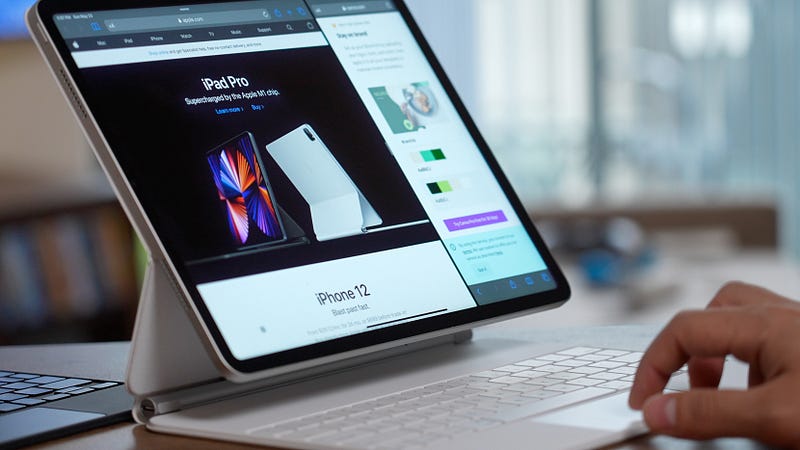
The iPad is lifted from the table (look at the picture of this article for an example), instead of on the table like a laptop, so it feels weirder. Not that it’s bad, however, it may not be favourable for some people.
For these, I do see why the magic keyboard is not worth the price of an entire iPad. I would simply purchase an alternative.
The fastness of the iPad
The iPad runs very fast. While the current one runs on the M2 chip, the one I have runs on the M1 chip and it still runs fast. I haven’t had it crash at all, and multiple heavy apps like video editing apps can still run smoothly.
Even games like ROBLOX can still run well on the iPad compared to the standard computer. I would say this is a massive pro for the iPad. Often if I try to video-edit, it goes worse on my PC as it’s much older so I often resort to the iPad as it never crashes for me.
Camera & Photos
I wouldn’t buy the iPad Pro solely for the camera, however, it is a great addition to the iPad. It has a 12MP front camera, another 10MP front camera and a 12MP selfie camera.
With the rear camera, you can shoot up to 4K at 60FPS, which is pretty good. I would say that recording in zoomed-in will create some grain which for many, including me, is slightly annoying.
What’s also baffled me (and articles like this have said) is that Portrait Mode is only available through the selfie camera. This is pretty ironic as most pictures using Portrait Mode are done through the rear camera as it’s usually better in quality than the selfie camera.
The iPad doesn’t have an SD slot (however most modern phones don’t), so you’ll need to find other ways to add more storage e.g. iCloud.
Pricing
When I bought the iPad Pro 2021 model, at 12.9 inches without cellular availability, it was priced at £999 (roughly $1270, however it may be priced differently for US customers). It may be slightly lower now, however, it is very expensive in my view. It would be a significant “investment”, as many call it now, and so you’d need to heavily weigh its pros and cons to see whether this iPad is worth it.
It’d also be good to look at other models like the iPad Air models, which do a lot of the same functions as the iPad Pro but at cheaper prices.
Hope you enjoyed this heavy piece about my experience with the iPad Pro. Feel free to comment below with your thoughts!
It would be highly generous if you could also give a tip through this link, and thanks a lot if you do.