

Is Microsoft Loop A Notion Alternative?
Microsoft is trying to replace your second brain, but is it worthwhile?
When I saw Microsoft Loop finally get launched, I was a little excited. Finally, a Notion-like workspace that you can use that will integrate with OneDrive.
In most professional jobs, you’re probably using a Microsoft Suite that uses, OneNote, Excel, Outlook, etc.
One of the things that I loath about OneNote is the lack of ability to organize the notes.
I’ve tried every tactic out there. I’ve created sections upon sections, subpages upon subpages but OneNote always seems to make it difficult to organize your notes after you stack up a bunch of them.
Initial Thoughts
If you’re a Notion user, when you open Microsoft Loop, you immediately recognize a few things.
You can use the backslash ( / ) to start your formatting prompt, you can write in Markdown is an option and create workspaces that Notion is known for.
However, there are a few features that are missing:
- You cannot create toggle lists like in Notion
- You cannot create a page within a page.
- There is no databasing option (the only similar option is to create a table with tags)
- You cannot create columns on the page. This forces you to sort everything vertically.
The Good Features
Table of Contents
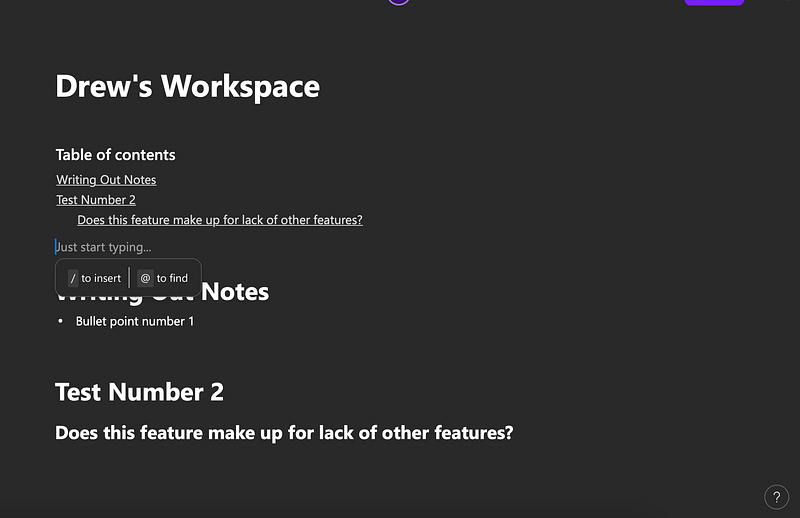
The Table of contents allows you the ability to quickly get to one portion of a page. The good news about this is that it’s automatically integrated with using Headers on the table. If you use a main header, it will be the main point. If you use a sub header, it automatically intends for you to make sorting through the table of contents a little easier.
The Downsides
Organization
What excited me the most about seeing Microsoft Loop was a Microsoft Integrated OneNote alternative that would allow me to organize my notes better.
Unfortunately, this does not appear to be the case. It looks like Microsoft took the downsides of OneNote and added them to this without adding any of the upsides.
The inability to put subpages into a main page is frustrating. There is a work around by adding a linked page but it’s not intuitive.
There’s only two options with this. Either you have to right click on the link to open the page (which of course opens in a new tab) or you have to have the subpage look like a previewed link that takes up three lines on the page.

No A.I. Features
I don’t really care too much for A.I. built into a note taking app but the fact that Microsoft builds up CoPilot and then launches this without it is a little mind numbing.
It makes me wonder if Microsofts A.I. is ready or if everything they’ve talked about is only hype.
Lack of Databasing
One of the main reasons people use Notion is to be their second brain.
Without the ability to database and organize data well, Microsoft Loop is a far cry from that.
I can imagine that if I used Loop for a while, it would eventually become an organizational nightmare. It may be even worse than OneNote. There does not seem to be an intuitive way of finding anything.
Conclusion
Is Microsoft Loop a Notion replacement? The answer right now is a hard no.
Microsoft did seem to copy a lot of features from Notion in building this program but there is a long ways to go before this will become a Notion alternative. Without some of the features mentioned above, I will stick to Notion for the time being.


