
Is Jira anti-agile? You have a bigger problem.
Jira and other tools of the same genre have been widely criticized in the realm of agile, many even say that tools like Jira are anti-agile.
Is this true? Maybe you are here because you hate Jira or maybe you love Jira, either way there’s something here for everyone.
Here’s my take on this.

Let’s remember what the Agile Manifesto says?
The Agile Manifesto has 4 values and 12 principles.
The first value reads…
Individuals and interactions over processes and tools
And one of the principles says that…
The most efficient and effective method of conveying information to and within a development team is face-to-face conversation.
It’s easy for someone dogmatic or lacking expertise to take these lines very close to heart and despise tools like Jira.
What is Jira after all?
Jira originated as a bug and issue tracker.
It’s a product belonging to the Australian software company Atlassian.
Jira has evolved since its early days and it is usually found being used at corporations of every type and size.
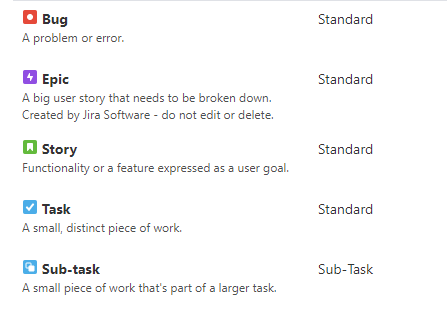
It allows to configure boards, backlogs, issue types (such as Stories, Tasks, Features, Epics, etc.) to support Scrum Teams, Kanban Teams and flexible enough to suit other kind of needs.
It also offers out-of-the-box several reporting functionalities that helps teams to visualize and inspect the progress of the work.
Why is Jira anti-agile?
The reasons I’ve seen people complaining about Jira sits usually between one of the below.
Inflexible
Hard to evolve and adjust to the people and teams’ needs.
One-size fits all
Some companies roll-out Jira and force every team to follow the same template of issues types and workflows — even if they don’t suit the team’s way of working. The team must adapt their approach to match the tool.
Management Agile Silver Bullet
Some management think that using a tool that allows the creation of user stories, backlogs and sprints is all that is is needed to be agile.
I have heard this one a few times…
“We are agile now because we use Jira!”
Tool to measure (and compare) team efficiency
Because Jira provides reporting capabilities it’s so tempting to start measuring things like velocity, number of features delivered, stories per developer and visualizing burndown charts.
The problem here is when this information starts getting used to compare teams.
Take as an example someone measuring velocity, using it to compare teams and forcing “lower velocity” teams to increase their velocity is a bit dumb. Teams can easily game this by inflating estimates and voilà… velocity increased but not necessarily more value created.
Promoting a hierarchical and micro-view of the work
There’s a concept called Containment Dependency that Bill Wake describes in his INVEST criteria — this is when there’s a hierarchical decomposition (and visualization) of the work, such as Epics > Features > User Stories.
This promotes a micro-view of the work as described by Jon Evans in his article — Jira definitely promotes this, people working in a discrete piece of work, like a user story may not see the bigger picture, missing the forest for the trees.
A good organization for describing a system is rarely the best organization for scheduling its implementation.
— Bill Wake
To overcome this issue there are other techniques that give an extra dimension to flat backlogs, such as User Story Mapping as described by Jeff Patton in his amazing book.
For those wanting an electronic solution — I have used a tool called Stories On board that allows to integrate with a Jira instance and pushing the stories onto the backlog after a rewarding User Story Mapping session with business stakeholders.
What is actually the real problem?
I think the real problem is that we forget Jira is a tool and how well it serves us is directly linked to how well we use it.
There are at least a few problems I have experienced.
Lack of understanding
I have come across several individuals that simply didn’t know the basics of Jira. I believe it’s important to understand at a minimum what the tool is and the basic building blocks (Issue Type, Boards, Backlogs, Sprint Backlogs etc.).

Not knowing how the tool is used around here
As Jira is widely used by several organizations when people move jobs they bring the knowledge of “How my Jira worked in my previous job” and they assume “It should work in the same way here as well”.
Because people are expecting the tool to work in a certain way and then they realize it doesn’t, their anger towards Jira increases.
The “Jira Admin department”
Usually large organizations deploy Jira and then there is a department somewhere that deals with administrating the tool.
These individuals are most of the times adamant to do any changes requested by teams. The preference is always to use a default standard and force it down to every team.
Usually these Jira admin departments find it hard to empathize with development teams and assess why a certain change is important for the team, resulting in an unfair power struggle where the outcome is just having teams to conform to a way of working that is not suited for them.

Jira isn’t good enough on its own
Assuming that teams only need one tool to perform complex work is an utopia, software features can’t be described solely by words, there are other artefacts such as Flow Diagrams, UMLs, API Diagrams, Wireframes and many more.
Replacing conversations by Jira issues
This one hurts the most — unfortunately very common in large corporate environments, the big issue is that it’s hard to quantify the short-term impact of it and the long-term impact which is only visible late in the development phase gets attributed to other reasons.
The overall impact of not having conversations is highly underestimated.
Too much detail (proportional to the number of custom fields your Jira instance been topped with) hinders the possibility for conversations to happen, all that extra detail gives a false sense of precision that mislead people into thinking that there’s no reason to have a conversation as explained by Mike Cohn in his book “User Stories Applied”.
As Ron Jefferies describes in the famous 3C’s model for user stories (Card, Conversation and Confirmation), if we translate this model to Jira this would be:
- Card <-> Jira Issue (such as Story)
- Confirmation <-> Acceptance Criteria in the Jira Issue (on the description or in a custom field)
Where’s Conversation??
Sorry, there isn’t any tool that replaces the richness of conversations happening between human beings. — Wilson Govindji
While Jira is good to persist decisions, assumptions and intents, it should never be used to convey information skipping the conversation — in the context of software development at least.
To give you an idea of how does conveying information without a conversation feels, check the video below, it’s not a good proposition, is it?
Is Jira good enough then?
I have used Jira for many years now in all the organizations I have worked for, I have even used different instances of Jira within the same organization and (surprise, surprise) they were setup in different ways.
Overall I think Jira is a good tool, it has evolved over the years alongside the Jira marketplace where every kind of plug-in is available (proving that not everyone uses Jira in the same way ) but it’s more about how we use it and how well it’s adapted to the needs of the individuals.
More importantly Jira is a good tool but regardless how good it is… people will most likely require other tools alongside Jira to be effective at their work.
Closing Notes
- With this article I am not trying to bash on Jira.
- I am also not trying to convince you that Jira is the best tool around.
- I am just trying to offer a different view on the issues many of us experience while using a tool like Jira .
- The Agile Manifesto doesn’t have it wrong, “People and interactions over processes and tools” — great software is made by great teams that interact with each other, often several times a day (even remotely).
- I hope I can make you reflect and think… if the tool is the real problem.
Back to you
I’d love to hear what are your thoughts about Jira, do you hate it, do you love it?
Share in the comments below. 👇 📝
✍ Check my other articles
- My Personal Notes on the new Scrum Guide 2020
- What every Scrum Master should know about success.
👋 About Wilson
I am a Scrum Master and Agility Coach, born in Portugal, with Indian origins and currently living in the UK.
I love to coach teams and individuals and get my my learnings at the coal face.
💬 Find me at:
- Instagram: https://www.instagram.com/iamagilebeing
- LinkedIn: https://www.linkedin.com/in/wgovindji/
- My Agile Meetup: https://www.meetup.com/Newbury-Agile-Group/


