
Is Jetpack DataStore a replacement for SharedPreferences?
A Jetpack recommended solution for storing data asynchronously

Introduction
SharedPreferences is the common way used for storing key-value pairs in local storage. We have been using the SharedPreferences concept since the start of Android development. As we are migrating to the latest programming languages like Kotlin there needs to be an advancement in terms of dealing with SharedPreferences. SharedPreferences have their downsides which will see in upcoming parts of this post. Also frequently changing properties may cause issues.
In this post let’s see what are the disadvantages of SharedPrefrences, What is DataStore, Why do we need it, and basic implementation stuff. Familiarity with coroutines and Kotlin Flow is needed for understanding this.
If you want to jump directly to the code base, check out the GitHub repo.
Disadvantages of SharedPreferences
Before going to check out DataStore we need to know the problems of existing SharedPreferences. There are few disadvantages that may cost us if not used in a proper way
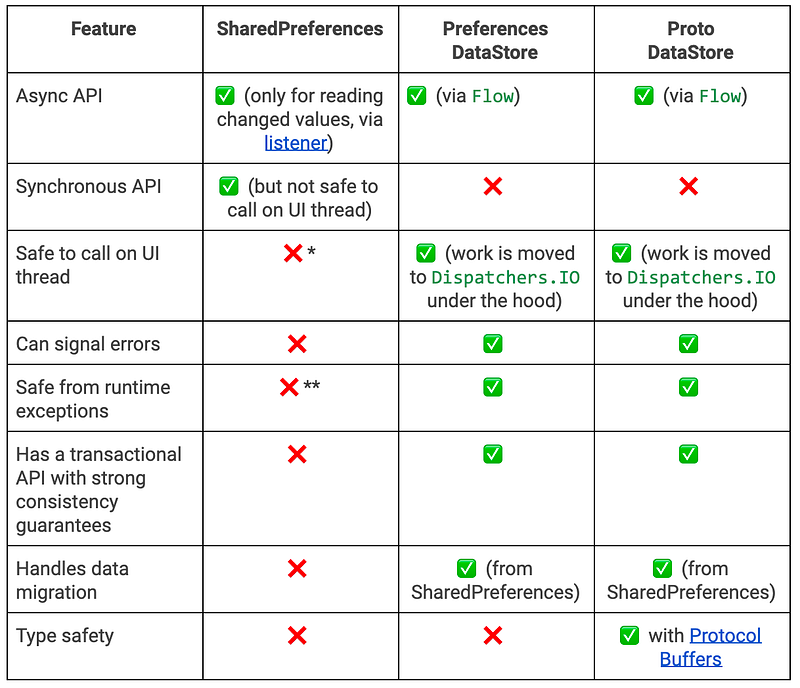
- They are not safe to call on UI thread although as they have asynchronous API that can appear to be safe to call on the UI thread, but which actually does disk I/O operations that might cause issues.
- It’s not safe from runtime exceptions as they throw parsing errors
- Cannot signal errors
- It doesn’t provide Type-safety
What is a DataStore?
DataStore is an advanced data storage solution provided by Jetpack in order to replace SharedPreferences. It was built using Kotlin coroutines and Flow to store data asynchronously, consistently, and transactionally.
There are two ways of implementations using DataStore:
Preferences DataStore: Stores data in key-value pairs similar to Shared Preferences. It doesn’t provide any type-safety. No predefined schema is required.
Proto DataStore: Stores data as instances of a custom data type with predefined schema using Protocol buffers. It provides type-safety.
In this post let’s check the implementation Preferences DataStore.
Why do we need DataStore?
To know which one to use among the three options we should basically understand what they provide and what they lack. Let’s check the differences
Implementation
Let’s check this step-by-step
Step 1
Adding Preference DataStore dependency to the build.gradle file
implementation "androidx.datastore:datastore-preferences:1.0.0-alpha08"Step 2
Let’s create an instance of a data store for storing and fetching data
preferencesDataStore Creates a property delegate for a single process DataStore. This should only be called once in a file, and all usages of the DataStore should use a reference to the same Instance.
Note: As we need to use the same instance try to keep this in an Singleton class while initialization and access the same instance whereever required
Step 2
As we have created an instance of preferenceDataStore instance now let’s see how to update data in it
Where PreferenceKeys is nothing but an object class where we define constants related to our Preferences
object PreferenceKeys {
  val IS_USER_LOGGED_IN = booleanPreferencesKey("is_user_logged_in")
}
Step 3
Let’s see how to read or retrieve data from preferenceDataStore
Step 4: Handling exceptions while reading data
IOExceptions may get thrown when an error occurs while reading data from preferenceDataStore. It would be a best practice to handle these exceptions using catch before applying map operator
The common catch block used is
.catch { exception ->
    if (exception is IOException) {
        emit(emptyPreferences())
    } else {
        throw exception
    }
}
If an IOException is encountered we throw emptyPreferences else we re-throw the exception raised. Now our read block would look like
Example
Let’s see them in action using a simple example. Let’s store and fetch a boolean(user logged-in state)using a repository pattern inside an activity. In this example repository pattern is nothing but a simple interface and class implementing the interface where we do store and fetch operations on preferenceDataStore instance. For keeping this simple let’s do a manual injection to repository implementation. As we keep observing the flowable emitted by the preference data store the data will be automatically changed
Step 1
Let’s create a simple XML with two buttons for log-in and log-out.
Step 2
Let’s create an Activity where we inflate the above layout and with one click of the Login button we save the state for user log-in as true and whereas on click of other we save false. Also, we create an instance of preference DataStore and will keep observing the user log-in state. Based on the state we append text and background-color
We need to add lifecycle-runtime-ktx dependency to make use of lifecycleScope
implementation "androidx.lifecycle:lifecycle-runtime-ktx:2.3.1"Step 3
Let’s create UserRepo with two methods for save and fetch of user-login state
Step 4
Let’s provide UserRepoImpl an implementation to UserRepo
That’s all we are done now run the app and check the output
Output

If you found any difficulty in executing code snippets, please check out the android_sample_datastore.
Migrate from SharedPreferences to DataStore
DataStore provides a simpler way for migrating from SharedPreferences. SharedPreferencesMigration is a DataMigration instance for migrating from SharedPreferences to DataStore. While building the datastore we just need to pass the SharedPreferences name to SharedPreferencesMigration. And SharedPreferencesMigration instance needs to be added to Datastore builder.
Note: keys are only migrated from SharedPreferences once, so you should discontinue using the old SharedPreferences once the code is migrated to DataStore — Codelabs
However, Migrations should run before any data access can occur in DataStore. Our migration must be succeeded before reading any data using DataStore.data and before updating any data usingDataStore.updateData() We can specify the keys to be migrated. This is an optional parameter if we specify the set then only those keys will be migrated else it MIGRATE_ALL_KEYS. Default signature of SharedPreferencesMigration
@JvmOverloads // Generate methods for default params for java users.
public fun SharedPreferencesMigration(
    context: Context,
    sharedPreferencesName: String,
    keysToMigrate: Set<String> = MIGRATE_ALL_KEYS,
)Note: This migration only supports the basic SharedPreferences types like boolean, float, int, long, string and string set. If the result of getAll contains other types, they will be ignored.
Summary
The DataStore from Jetpack is a replacement for SharedPreferences that addresses most of its shortcomings. As it doesn’t have a stable release yet think twice before using it in apps. It also provides easy migration from existing SharedPreferences. So give it a try…
In the upcoming post let’s learn about Proto DataStore. Thank you for reading…


