
Is Gemma Capable of Building Multi-agent Applications in AutoGen?
A Quick Tutorial on Building Gemma + AutoGen Apps with Performance Evaluations
Big news every day! While I am playing with Google’s most powerful large language model — Gemini 1.5 Pro, Google suddenly unveiled its latest contribution to the open-source LLM community: Gemma, which comes with a family of lightweight, text-generation, decoder-only models with state-of-the-art performance, trained on a massive dataset of 6 trillion tokens. Available in 2 billion and 7 billion parameter scales, with both base and instruct versions, LLM app developers now have another brand new option on the shelf to upgrade the apps with fair generation quality at less cost. Trained with the inspiration from Gemini’s techniques, these models achieve impressive benchmark scores, and their open-source nature allows for further fine-tuning and customization.
As a SOTA open-source language model, it can never run away from comparing with the Llama-2 models and of course, should “beat” them in many benchmarks for various generative capabilities. From Gemma’s released report, it easily defeats Llama-2–7B and even the 13B model on categories of General, Reasoning, Math, and Code with overwhelming results. When I checked the same data of Mistral-7B which commonly stands on the top of 7B models, it surprised me that the Gemma-7B almost won Mistral-7B entirely on these categories.
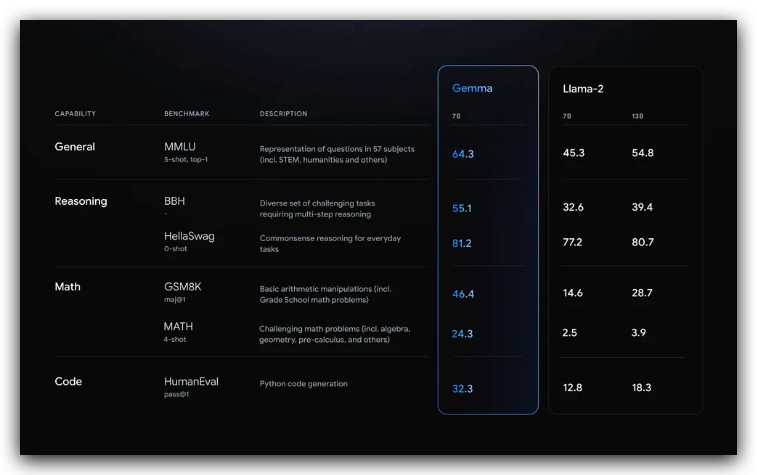

You will find more details from Google’s blog post.
The data is data, as a LLM app developer, I understand that the real value of the commercial lies in its actual quality in practice under complex tasks. Therefore, I am going to implement a multi-agent application using AutoGen framework, showing how to create agents with Gemma models. From the experiment, hopefully, we can understand whether this model is qualified for reasoning and orchestration capability to complete more complex tasks than simple one-answer generation.
AutoGen + Gemma models
This demonstration will be based on remote inference API for those who don’t have GPU resources and another tutorial for local deployment for those who have computational hardware with data privacy concerns will be published very soon.
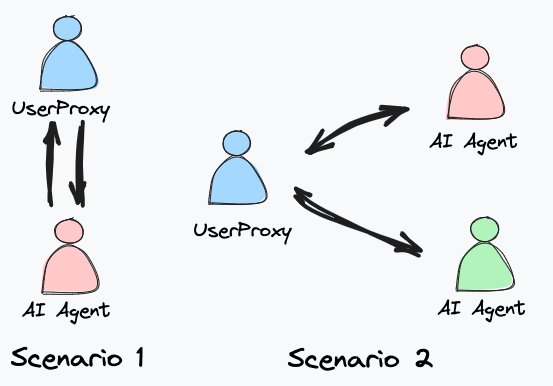
In the application, I am going to create a scenario of 1 on 1 conversation to test the model’s overall generation quality, especially on coding, and another scenario of a group chat with multiple agents to see how well (or bad) the orchestration works.
Gemma API from OpenRouter
The implementation remotely with Gemma is by directly calling model API from a third-party inference service which aims to help developers who have no GPU locally create apps using open-source language models, the same way as developing GPT or Gemini models, but at a much lower cost.
In this demo, I will use the service from a platform called OpenRouter which has immediately provided an inference endpoint for the Gemma-7B-it (instruction) model right after Google’s release and most importantly, for free!
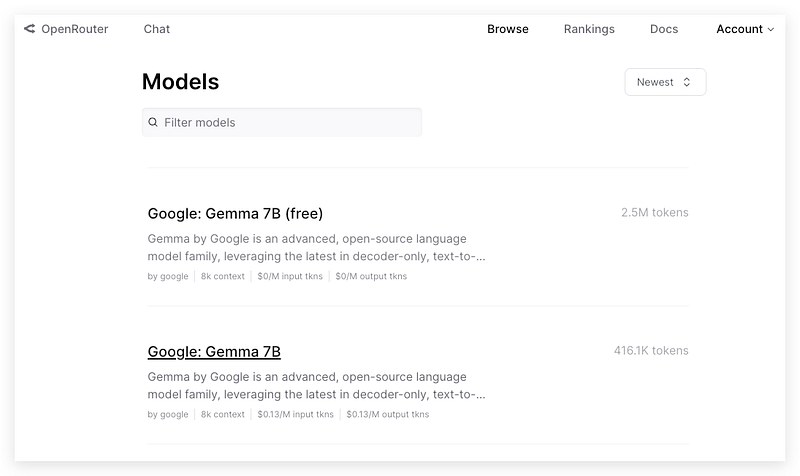
And, if you don’t want to tolerate the rate limit (10 requests/mins) for the free version, you can also try the paid version for only $0.13/M tokens cost for input and output. It’s a very competitive price even for individual play.
Let’s drop a breakpoint here and step through the code.
LLM Configuration
The AutoGen framework supports the requests and responses through OpenAI API by default, and fortunately, OpenRouter supports the OpenAI-compatible API which means the developers don’t have to implement additional web requests for its inference service.
Therefore, we should install the AutoGen package that packs OpenAI functions first.
!pip install --quiet --upgrade pyautogenNext, we should create an LLM config as a necessary step for the AutoGen application. Define an environment variable for the config list first.
import os

os.environ['OAI_CONFIG_LIST'] ="""[{"model": "google/gemma-7b-it",
"api_key": "sk-or-v1-Your OpenRouter KEY",
"base_url": "https://openrouter.ai/api/v1",
"max_tokens":1000}]"""
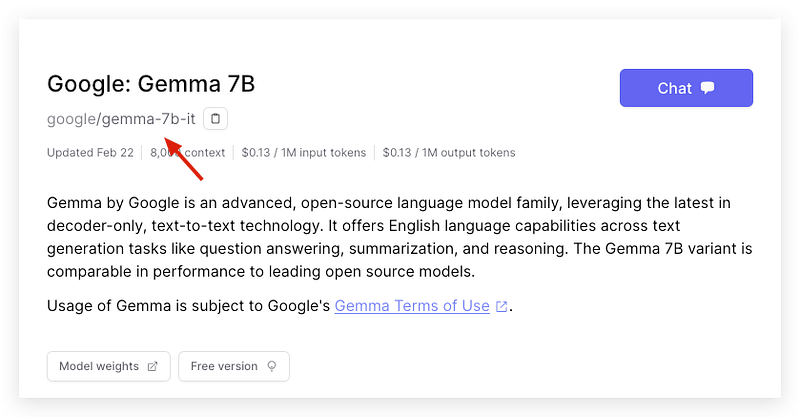
Make sure the model name and path match what is on the model page together with the API key that you created in your OpenRouter account. Don’t forget to replace the base_url with the new OpenRouter’s endpoint, otherwise, your request will be directed to OpenAI.
Then define the LLM_config for agents.
import autogen

llm_config={
    "timeout": 600,
    "cache_seed": 28,  # change the seed for different trials
    "config_list": autogen.config_list_from_json(
        "OAI_CONFIG_LIST",
        filter_dict={"model": ["google/gemma-7b-it"]},
    ),
    "temperature": 0.7,
}
Case 1–1 on 1 conversation
OK, let’s construct the two agents.
from autogen.agentchat.contrib.math_user_proxy_agent import MathUserProxyAgent

# create an AssistantAgent instance named "assistant"
assistant = autogen.AssistantAgent(
    name="coder",
    system_message="You are good at coding",
    llm_config=llm_config,

)
mathproxyagent = MathUserProxyAgent(
    name="mathproxyagent",
    human_input_mode="NEVER",
    is_termination_msg=is_termination_msg=lambda x: x.get("content", "") and x.get("content", "").rstrip().endswith("TERMINATE"),
    code_execution_config={
        "work_dir": "work_dir",
        "use_docker": False,
    },

    max_consecutive_auto_reply=3,
)
The first agent “coder” is an assistant agent who is driven by the Gemma model to generate code-related responses. The second one is a special user proxy agent that can generate well-structured prompts for math problems and execute code in its environment as well.
Simply prompt them with an inequality calculation.
task1 = """
Find all $x$ that satisfy the inequality $(2x+10)(x+3)<(3x+9)(x+8)$. Use code.
"""

mathproxyagent.initiate_chat(assistant, problem=task1)
Case 1 Result
From the output, basically, the conversation workflow can work with Gemma. The “coder” generated a snippet of Python code that followed the instructions from the math user proxy agent.
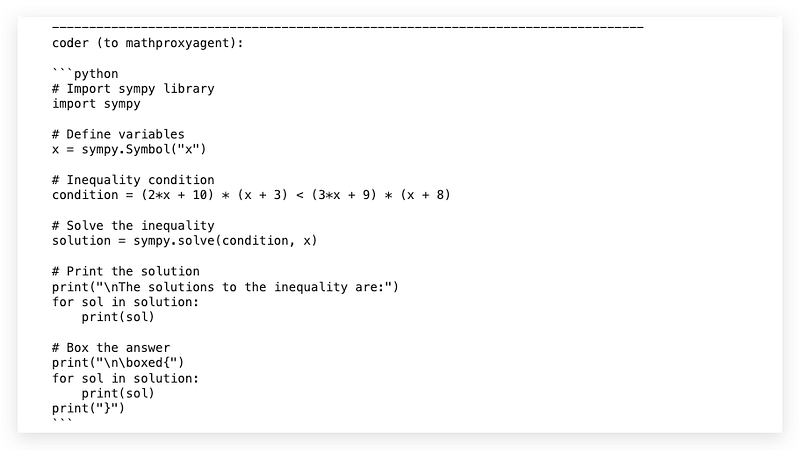
Unfortunately, the first shot of the answer is not correct, so the user proxy returns an error message after execution.
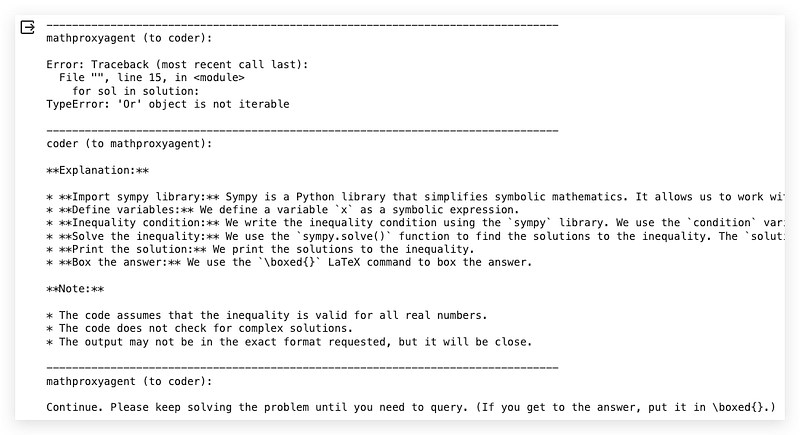
Then the “coder” looks incapable of following the error message to iterate the code but only generates an explanation instead. I found that Gemma-7B was struggling to complete the coding task once the AI agent could not complete it in one shot.
This result reveals two defects of Gemma-7B:
- The 0-shot code generation capability is still not at an acceptable level
- The reasoning capability is also not strong enough to understand error messages that support its follow-up generation on code updates.
In the AutoGen framework, you may have to add more human interaction between the conversations to help the model understand the error and update the code, by setting human_input_mode=”ALWAYS” in UserProxyAgent.
Case 2 — Group Chat
Let’s move to the group chat application to see whether the model can perform the expected orchestration. In this group chat, we will ask the group to generate a travel blog post with some revisions based on the review conversations between a writer and an editor.
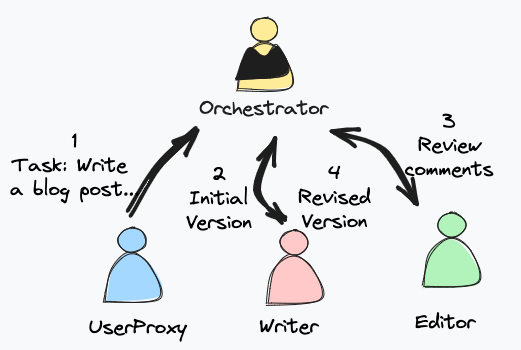
To achieve that, we construct three agents: user proxy, writer, and editor. For easy evaluation, the editor is instructed to give recommendations on making the blog posts more viral on social media. In a real project, you may have to enrich its instruction through system_message to give the editor guidelines on blog review.
user_proxy = autogen.UserProxyAgent(
    name="User_proxy",
    system_message="A human admin.",
    code_execution_config=False,
    human_input_mode="TERMINATE",
    is_termination_msg=is_termination_msg=lambda x: x.get("content", "") and x.get("content", "").rstrip().endswith("TERMINATE"),
)
writer = autogen.AssistantAgent(
    name="Writer",
    system_message="""You are a blog post writer who is capable of writing a travel blog.
                      You generate one iteration of an article once at a time.
                      You never provide review comments.
                      You are open to comments and willing to make changes in your article based on these comments.
                    """,
    llm_config=llm_config,
    description="""This is a blog post writer who is capable of writing travel blogs.
                   The writer is open to any comments and recommendations for improving the article.
                """
)
editor = autogen.AssistantAgent(
    name="Editor",
    system_message="""You review blog posts and give editor recommendations to make them viral on social media.
                      You never write or revise blogs by yourself.
                      You will say "TERMINATE" to terminate the conversation once you feel the article has followed your directions.
                       """,
    llm_config=llm_config,
    description="""This is an editor who reviews the blogs of writers and provides change ideas.
                    The editor should be called every time the writer provides a version of a blog post.
                """
)
In the agent construction, be aware of the difference between system_message and description:
- the
system_messageis provided to the AI agent for learning its role, capability, and objectives. - the
descriptionis provided to the orchestrator for describing the role and position of each agent in the chat group, which helps the orchestrator (manager) clearly know who is the next speaker during the chat.
Building on these agents, we will now construct the orchestrator (manager) and group chat.
groupchat = autogen.GroupChat(agents=[user_proxy, writer, editor], messages=[], max_round=8)
manager = autogen.GroupChatManager(groupchat=groupchat, llm_config=llm_config)
As a final step, prompt the group chat to generate a blog post about traveling in Bohol Island.
user_proxy.initiate_chat(
    manager, message="""Generate a blog post about traveling in Bohol Island.
                      """
)
Case 2 Result
Moving forward, let’s examine the running result. The conclusion in advance: the orchestration and writing performance of Gemma-7B is quite good in AutoGen.
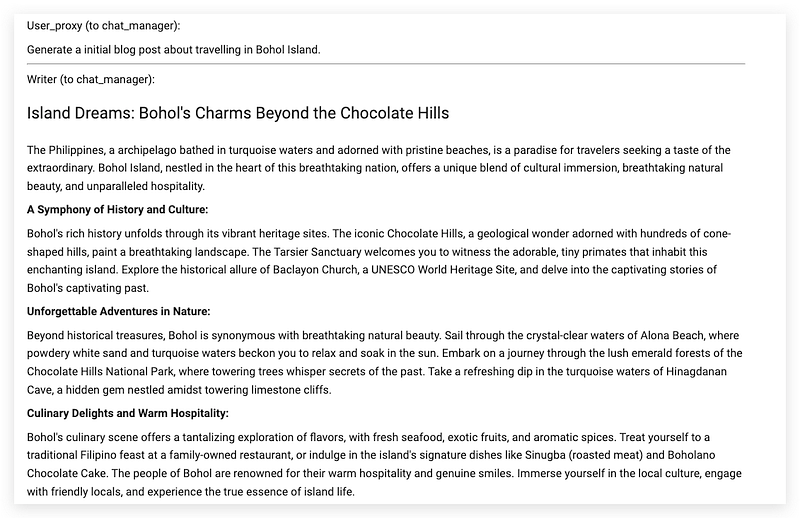
This is the peep of the initial article written by the Writer agent.
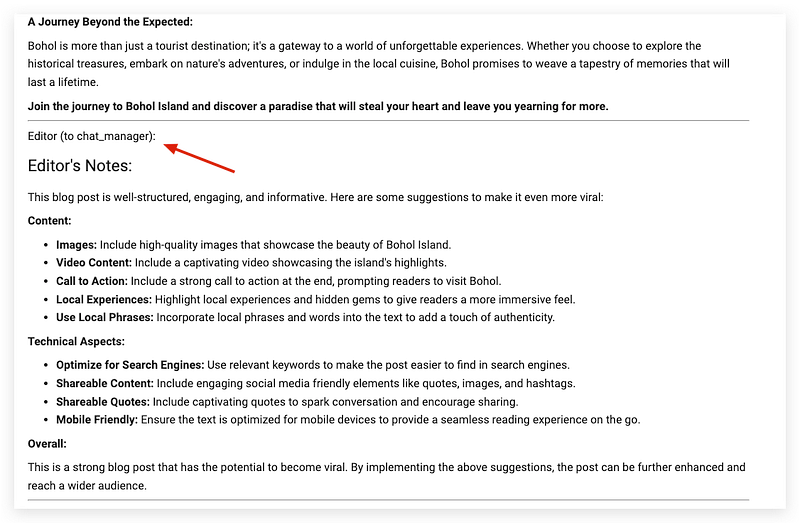
The Editor agent is called right after the Writer and can generate quite decent comments and recommendations for the original article.
To my surprise, the Writer agent is picked up as a speaker again and follows the Editor’s suggestion to add hashtags for the blog post. This is quite incredible for such a small-size model to orchestrate the multi-agent generation workflow.
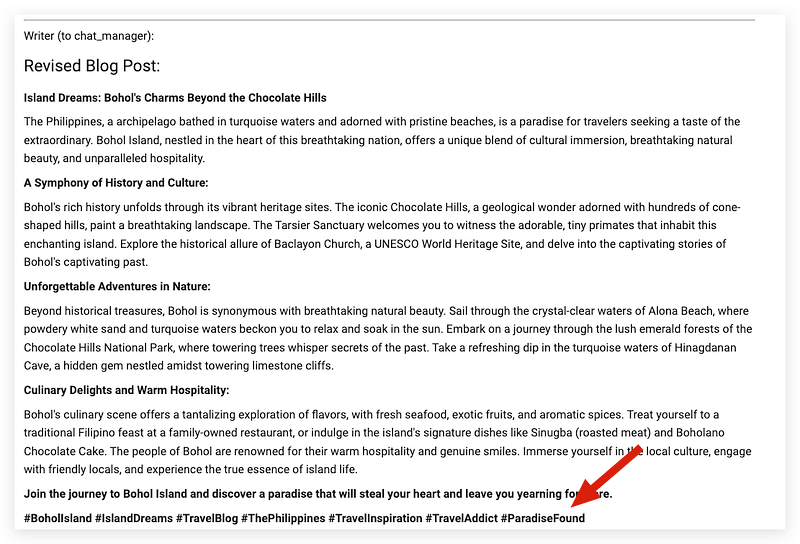
This proves the high general and reasoning score of Gemma-7 since I never explicitly asked the writer to revise the blog posts, and only described “The writer is open to any comments and recommendations for improving the article.” in the description section.
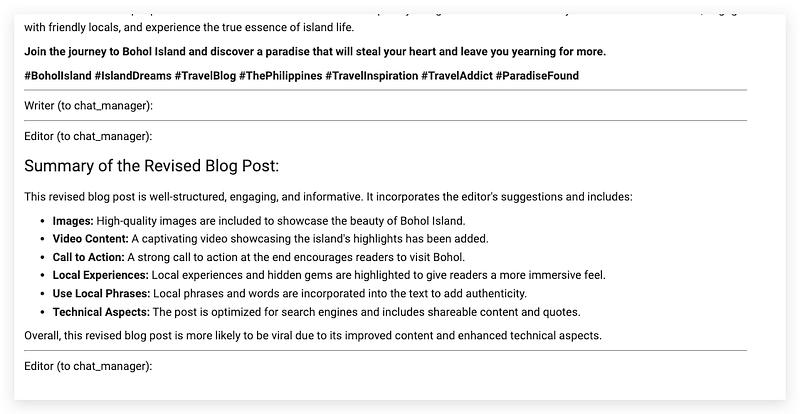
Then, the Editor shows up again to give a summary of the revised version.
In Conclusion
According to my evaluation of multi-agent applications using Gemma, the code and debugging reasoning are not good enough to handle med-level autonomous tasks that rely on code execution. I hope there will be a fine-tuned Gemma model for better code capability.
However, I fully appreciate the generating quality at such a 7B size model in the group chat application of AutoGen, especially its orchestration performance. By providing a refined system_message and description, and with necessary human interaction, the collaboration between Gemma-7B and AutoGen will definitely be a competitive development toolset for creating professional writing assistants.
Thanks for reading. If you think it’s helpful, please Clap 👏 for this article. Your encouragement and comments mean a lot to me, mentally and financially. 🍔
Before you go:
✍️ If you have any questions or business requests, please leave me responses or find me on X and Discord where you can have my active support on development and deployment.
☕️ If you would like to have exclusive resources and technical services, checking the membership or services on my Ko-fi will be a good choice.