
Is Evernote Losing its Productivity Race with Notion & Craft
Evernote's reign is coming to an end.

As a writer and researcher, I heavily depend on note-taking apps to keep track of my ideas, research, and writing projects.
Evernote has been my go-to tool for all things note-taking for a long time.
Thanks to its user-friendly interface, powerful search features, and easy integration with other productivity tools, it became an essential component of my workflow.
Evernote, however, has recently had to contend with fierce rivalry from brand-new entrants to the note-taking market. Moreover, since Evernote lacks certain features and functionalities, apps like Notion and Craft have surfaced as solid alternatives.
Because of this, many users wonder if Evernote is losing the efficiency war to Notion and Craft.
My Experience with Notion, Craft, and Evernote.
Since I first began using it in 2013, Evernote has played a crucial role in my workflow. I used it to jot down notes on everything, including research papers and concepts for blog posts.
I cherished the ability to categorize my notes into journals and tags, making it simple to locate the information I required at any time.
But as time passed, I became aware of some constraints with Evernote. One reason is that the program has become increasingly sluggish and challenging.
Evernote had excellent search capabilities, but it needed to include some of the more sophisticated features that I required for my work as a writer and researcher.
In 2019, after learning about Notion's remarkable powers, I decided to try it. Notion markets itself as a one-stop workspace that can handle everything from project administration to note-taking. The Notion interface initially intimidated me, but I was hooked once I got the idea.
The best asset of Notion is its adaptability. The app lets you build pages, databases, tables, and more within the same workspace. This was helpful for me to keep track of my writing assignments and study notes.
I could add a table for my notes, make a website for each assignment, and embed multimedia files like videos and images. Additionally, Notion provides a selection of templates, which makes it simple to begin brand-new tasks.
Craft is a different note-taking app that has recently gained much attention in the productivity community, and I've begun using it. Craft has already amassed a devoted following despite being a more recent app due to its elegant design and distinctive features.
The user-friendly Craft interface features a minimalist design that places the front and center of your notes. I adore how Craft interacts with other apps like Google Docs and Slack and how simple it is to add images, links, and multimedia to my notes.
Craft's capacity to produce "blocks" is one of its most distinctive characteristics. Blocks are discrete materials that you can place wherever you need them. As a result, making dynamic, eye-catching notes and papers is simple. This function was beneficial to me when creating presentations or team documents.
Evernote, Notion, and Craft comparison,
After discussing my experience with each program, let's contrast Evernote, Notion, and Craft's advantages and disadvantages.
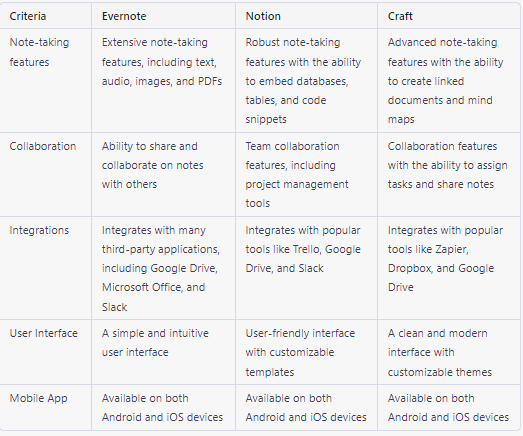
Evernote: The Classic Note-Taking App.
Pros:
- Simple and intuitive interface
- Excellent search capabilities
- Seamless integration with other productivity tools
- Wide range of third-party integrations
- Easy to share notes with others
Cons:
- It can be slow and clunky, especially on older devices
- It lacks some advanced features that other apps offer
- Limited formatting options
- Pricey premium subscription
Notion: The All-In-One Workspace.
Pros:
- Highly customizable and flexible
- Allows for multiple types of content in one workspace
- Offers templates for different use cases
- Strong organizational capabilities Great for project management and team collaboration
Cons:
- Steep learning curve
- It can feel overwhelming at first
- Lacks some advanced note-taking features
- The free version has limited functionality
Craft: The Sleek and Stylish Newcomer.
Pros:
- Beautiful and minimalist interface
- The unique "blocks" feature allows for dynamic note-taking
- Integrates well with other apps
- Offers a range of formatting options
- Great for collaborative documents and presentations
Cons:
- Limited third-party integrations
- No web clipper extension
- Limited functionality on the free version
- Only available on Mac and iOS devices
Which Note-taking Software Is Best for You?
What is note-taking software best for you, then? It depends on your requirements and tastes, as with many productivity tools. The following factors should be taken into account when deciding between Evernote, Notion, and Craft:
Evernote may be the best option if you're looking for a straightforward, dependable note-taking app with superior search features.
The Notion is a good option if you require a more all-inclusive workspace that can handle everything from note-taking to project administration.
Craft is a fantastic choice if you’re looking for slick, fashionable note-taking software with distinct features and powerful formatting options.
Closing thoughts.
The note-taking tool that you will use is the best, in the end. These three robust applications can be tailored to meet your unique requirements. It is worthwhile to spend time experimenting with each one to determine which one suits you the best.
The competition will only intensify as note-taking apps develop further and more companies join the market.
What do you envision for note-taking applications in the future?
Will Evernote be able to compete with Notion and Craft, or will the next great thing in productivity come from a different player?


