
IoT Security ~ AWS 1-Click Buttons
~~~~~~~~~~~~~~~~~~~~~~~~~~~~~~~~~~~~~~~~~~~~~~~~~~~~~~~~~~~
🔒 Related Stories: OS and IoT Security | Network Security.
💻 Free Content on Jobs in Cybersecurity | ✉️ Sign up for the Email List
~~~~~~~~~~~~~~~~~~~~~~~~~~~~~~~~~~~~~~~~~~~~~~~~~~~~~~~~~~~
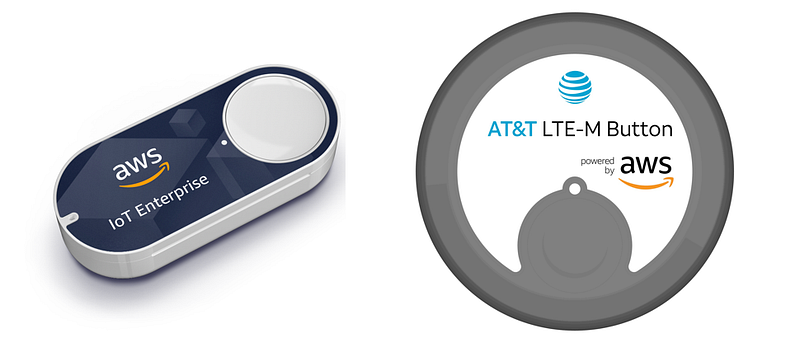
I mentioned in my post for the AWS Blog about using an AWS IoT Button for just in time access to a VPN that I would explain later why I chose to use an AWS IoT Button instead of writing a web application or a phone application. I am familiar with AWS IoT because I previously architected a system that leveraged it to allow firewalls to send logs to AWS. I felt that certain aspects of the service fit my needs for this solution.
One of the benefits of using an AWS IoT button is the built-in authentication and encryption of data in transit. As explained in that article, each device has a unique certificate. A public and private key pair protect communications. The private key identifies the specific button when it communicates with AWS because only the button has the private key can decrypt communications sent using the corresponding public key. TLS protects data in transit. AWS IoT leverages IAM to allow access to take actions in the account. The button can call a Lambda function with specific permissions. All this saves me a lot of time versus setting up my own encryption, authentication, and authorization scheme.
A unique serial number is printed on each button, and displayed in the AWS console when I register the device to my account. I can track which user has which button. When a button click occurs, we can make a fairly safe assumption that the assigned user clicked it and initiated the event— if the provisioning process is secure and the application logs the button that took a particular action.
If I spent more time on this idea, I could even possibly create a user-specific VPN endpoint when the button was clicked and tear it down when they double-click the button. Then I could track network activity for individual users and their devices more easily.
To log into the VPN the user needs the VPN connection information, and the button so it is a form of MFA. If the user has the VPN credentials, but not the button, and they are on a separate network, they won’t be able to access the VPN endpoint. If the attacker has the button, but not the login credentials, they could open up the network but not login to the VPN.
Another benefit of the button is the fact even if the user falls victim to a phishing attack and malware infects his or her phone or computer, the malware won’t be able to infect the button. Although the malware still may be able to leverage the VPN connection when the user is connected, if the user faithfully double-clicks the button to terminate network access to the VPN endpoint when finished, the malware can’t give itself access to the network. We could also add a timeout to close the network after a certain amount of time or period of inactivity.
AWS provides secure access to the API endpoint (a Lambda function in this case) via this service. Each button has unique credentials, as is best practice for security IoT devices when calling the API, not a single set of credentials for all the buttons out there — which has been the root cause of past security vulnerability disclosures. Only devices registered in my account can take actions in my account. I can revoke or change permissions of a button at any time.
And yes, I am aware of various other attacks that could still take place in this scenario, but I think we have made it a least a bit harder for the attackers. The AWS IoT button provides a lot of the complicated security functions out the box, so I don’t have to implement that myself and provides a few benefits as well.
Follow for updates.
Teri Radichel | © 2nd Sight Lab 2018
About Teri Radichel:
~~~~~~~~~~~~~~~~~~~~
⭐️ Author: Cybersecurity Books
⭐️ Presentations: Presentations by Teri Radichel
⭐️ Recognition: SANS Award, AWS Security Hero, IANS Faculty
⭐️ Certifications: SANS ~ GSE 240
⭐️ Education: BA Business, Master of Software Engineering, Master of Infosec
⭐️ Company: Penetration Tests, Assessments, Phone Consulting ~ 2nd Sight Lab
Need Help With Cybersecurity, Cloud, or Application Security?
~~~~~~~~~~~~~~~~~~~~~~~~~~~~~~~~~~~~~~~~~~~~~~~~~~~~~~~~~~~~~
🔒 Request a penetration test or security assessment
🔒 Schedule a consulting call
🔒 Cybersecurity Speaker for PresentationFollow for more stories like this:
~~~~~~~~~~~~~~~~~~~~~~~~~~~~~~~~~~~~~~~~~~~~~~~~~~~~~~~~~~~~~
❤️ Sign Up my Medium Email List
❤️ Twitter: @teriradichel
❤️ LinkedIn: https://www.linkedin.com/in/teriradichel
❤️ Mastodon: @teriradichel@infosec.exchange
❤️ Facebook: 2nd Sight Lab
❤️ YouTube: @2ndsightlab


