
iOS Interview Prep 4 — Event Handling & Responder Chain
Event handling and the responder chain are very important concepts in iOS development, they are the fundamental and primary mechanism used for managing user interactions with the UI. Understanding how it works, you can not only ensure your app’s UI is responsive, but also be able to customize the way events are handled in your app.
Interview Questions
- Explain how hit testing works?
- What is the UIResponder object? Why is it useful, what does it enable you to do?
- How are events propagated and dispatched through the system via UIResponder?
- Explain the iOS Responder Chain?
- Why UIButton is not responsive?
Hit Testing
Hit testing is a process used in iOS to determine which view is currently under user’s finger or cursor. iOS uses hit-testing to determin which view is the frontmost view under the user’s finger.
The hit-testing process involves several steps:
- OS generates events containing touch location
- It then starts at the root view of the UI and checks if the touch point is within the bounds of a view. It is using an approach similar to DFS search algorithm.
- It iterates all the subviews, checking if the touch point is within the bounds of any subview.
- If a subview is a potential hit-test view, the process is repeated for its subviews
- The view that is ultimately selected as the hit-test view is the one that is closest to the front of the screen and is capable of handling the touch event.
// Returns the farthest descendant of the receiver in the view hierarchy
// (including itself) that contains a specified point.

// 1. Start with the root view
func hitTest(_ point: CGPoint, with event: UIEvent?) -> UIView? {

// 2. Check if view is opaque, interaction is disabled or if view is hidden
    if alpha < 0.01 || !isUserInteractionEnabled || isHidden {
        return nil
    }

    // 3. Check if touchpoint is within the bounds
    if !point(inside: point, with: event) {
        return nil
    }

    // 4. Reverse the subviews to check the top views first
    for subview in subviews.reverse() {
         if let hitView = subview.hitTest(point, with: event) {
            return hitView
        }
    }

    return self
}
Use Cases
- Increasing the view touch area, icons are sometimes too small to handle by touches
- Passing touch events through the views below, sometimes view must ignore touch events and pass them through
- Passing touch events to subview
// Example of passing the events through views
class PassthroughView: UIView {
    override func hitTest(_ point: CGPoint, with event: UIEvent?) -> UIView? {
        let view = super.hitTest(point, with: event)
        return view == self ? nil : view
    }
}
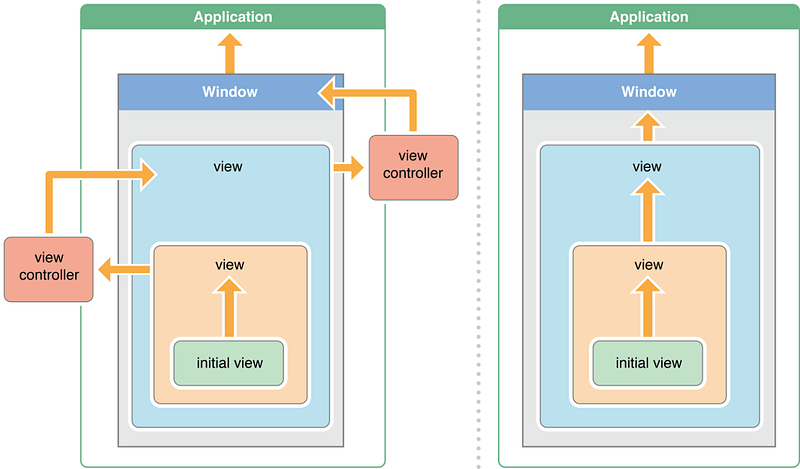
Responder chain
- Responder chain is a hierarchy of responder objects that are capable of handling events.
- A event is generated whenever user taps on a button or perform some other action on the screen, then it is sent to the first object in the responder chain, known as the first responder.
- Responders receive the raw event data and must either handle the event or forward it to another responder object.
- If that object can’t handle the event, it is forwarded to the next object in the chain, until it reaches an object that can handle the event.
- When your app receives an event, UIKit automatically directs that event to the most appropriate responder object through hit testing.
The responder chain is important because it allows objects in an app to communicate with each other without needing to have direct references to one another. This makes it easier to manage the flow of events in an app and to customize the way that events are handled.

UIResponder vs UIControl
UIResponder is an abstract interface for responding to and handling events. The class defines methods for handling common events, such as touches and motion events. It also defines properties and methods for managing the responder chain.
As events occur, UIKit dispatches them to your app’s responder objects for handling.There are several kinds of events, including touch events, motion events, remote-control events, and press events. To handle a specific type of event, a responder must override the corresponding methods.
UIControl is a subclass of UIView that provides a base class for controls, which are UI elements that can be interacted with by the user. UIControl also implements the UIResponder interface, so it can participate in the responder chain and handle events as well.
Target Action
Target-action pattern is a design pattern used in iOS to decouple the object that initiates an action from the object that handles the action. This allows objects to communicate with each other without having direct reference to one another, which can make it easier to manage the flow of events in an app.
In iOS, the target-action pattern is used extensively for handling user interactions with the user interface. Controls communicate directly with their associated target object using action messages. When the user interacts with a control, the control sends an action message to its target object. Action messages aren’t events, but they may still take advantage of the responder chain.
The target-action pattern and event handling are closely related, because the target-action pattern is often used to implement event handling in iOS.
iOS Interview Prep Series
iOS Interview Prep 1 — Memory management iOS Interview Prep 2 — Autorelease Pool iOS Interview Prep 3 — Blocks and Closures iOS Interview Prep 4 — Event Handling & Responder Chain iOS Interview Prep 5 — Singletons iOS Interview Prep 6 — Dependency Injection iOS Interview Prep 7 — Concurrency Part 1 iOS Interview Prep 7 — Concurrency Part 2 iOS Interview Prep 8 — View and Layout


