
iOS & Android onBackground & onForeground

Sometimes we want our App to perform some task when it is put to background (e.g. to save some data) or they are brought back to foreground (e.g. to sync some data).
Here I share how they are done on both iOS and Android, to know their similarity and differences.
How to detect onBackground/onForeground
In iOS
iOS natively provides ability to track onBackground or onForeground easily, in AppDelegate (before iOS 13) and in SceneDelegate (default in iOS 13).
// App Delegate (pre iOS 13.0, where one uses App Delegate)
func applicationWillEnterForeground(_ application: UIApplication)
func applicationDidEnterBackground(_ application: UIApplication)
// Scene Delegate (iOS 13.0 onward, when one uses Scene/s)
func sceneWillEnterForeground(_ scene: UIScene)
func sceneDidEnterBackground(_ scene: UIScene)If one like to support both iOS 13 and older OS, use
AppDelegateapproach
In Android
Prior to Architecture Component introduced (before 2017), the approach used is ActivityLifecycleCallback as mentioned this Stackoverflow. It’s quite troublesome to use as one need to detect the active activities count, as on top of that, also need to ensure it is not due to onConfigurationChange. One word, complicating.
In 2017, with Architecture Component in place, Google introduced ProcessLivecycleOwner, where one could be informed of the Application came on foreground or get into background. Sample code could be found in this stackoverflow
In short, I need to create a LifecycleObserver, when map it to ON_START and ON_STOP to be notified of the status.
class MainLifecycleListener: LifecycleObserver {

    @OnLifecycleEvent(Lifecycle.Event.ON_START)
    fun onMoveToForeground() { ...}

    @OnLifecycleEvent(Lifecycle.Event.ON_STOP)
    fun onMoveToBackground() { ... }
}
In the MainApplication, just need to instantiate the MainLifecycleListener and register it to ProcessLifecycleOwner.
class MainApplication: Application() {
    private val lifecycleListener: MainLifecycleListener by lazy {
        MainLifecycleListener()
    }

    override fun onCreate() {
        super.onCreate()
        setupLifecycleListener()
    }

    private fun setupLifecycleListener() {
        ProcessLifecycleOwner.get()
           .lifecycle.addObserver(lifecycleListener)
    }
}
When will they be called
In iOS
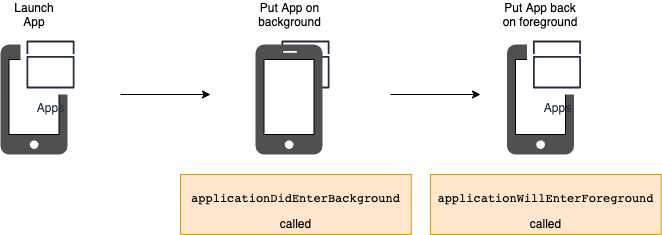
As shown in diagram, the applicationWillEnterForeground is not called when the App first launch. It is only called subsequently after the app has been background and re-foreground.
In Android
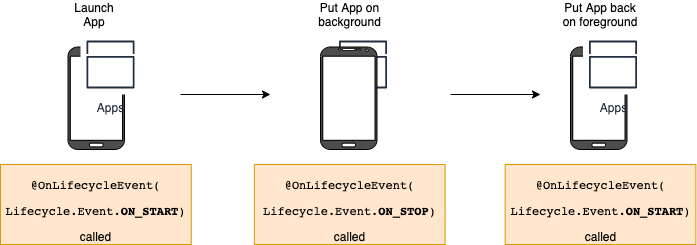
As shown in diagram above, differ from iOS, the ON_START is triggered both during app launch as well as normal bring to foreground.
This is one main different between the two platforms one need to be aware of.
Is the onBackground task preserved?
Here, we investigate the onBackground task, if they are executed to completion, or would be suspended.
We’re not checking onForeground, as foreground app will have the priority of task execution.
In iOS
When executed on main thread synchronously as below, all the background task will be completed.
func applicationDidEnterBackground(_ application: UIApplication) {
    print("Track: Background \(Thread.current)")
    print("Track: Enter Background DispatchQueue \(Thread.current)")
    for index in 1...10 {
        sleep(1)
        print("Track: After Background DispatchQueue \(index)")
    }
}
When executed on main thread asynchronous as below, all the background task will be completed.
func applicationDidEnterBackground(_ application: UIApplication) {
    print("Track: Background \(Thread.current)")
    DispatchQueue.main.async {
        print("Track: Enter Background DispatchQueue
            \(Thread.current)")
        for index in 1...10 {
            sleep(1)
            print("Track: After Background DispatchQueue \(index)")
        }
    }
}
However if executed on main thread asynchronous with some delay as below, all the background task will NOT be completed. It continue as the app on foreground again.
func applicationDidEnterBackground(_ application: UIApplication) {
    print("Track: Background \(Thread.current)")
    DispatchQueue.main.asyncAfter(deadline: .now() + 1) {
        print("Track: Enter Background DispatchQueue
            \(Thread.current)")
        for index in 1...10 {
            sleep(1)
            print("Track: After Background DispatchQueue \(index)")
        }
    }
}
If executed on another thread asynchronous without any delay, all the background task will NOT be completed. It continue as the app on foreground again.
func applicationDidEnterBackground(_ application: UIApplication) {
    print("Track: Background \(Thread.current)")
    DispatchQueue.global().async {
        print("Track: Enter Background DispatchQueue
            \(Thread.current)")
        for index in 1...10 {
            sleep(1)
            print("Track: After Background DispatchQueue \(index)")
        }
    }
}
If executed on another thread asynchronous with some delay, all the background task will NOT be completed. It continue as the app on foreground again.
func applicationDidEnterBackground(_ application: UIApplication) {
    print("Track: Background \(Thread.current)")
    DispatchQueue.global().asyncAfter(deadline: .now() + 1) {
        print("Track: Enter Background DispatchQueue
            \(Thread.current)")
        for index in 1...10 {
            sleep(1)
            print("Track: After Background DispatchQueue \(index)")
        }
    }
}
To ensure delayed or another thread task executed to completion, we’ll need to use UIApplication.shared.beginBackgroundTask(...) as recommended by Apple.
func applicationDidEnterBackground(_ application: UIApplication) {
    var backgroundTaskID: UIBackgroundTaskIdentifier?
    backgroundTaskID = UIApplication.shared.beginBackgroundTask
        (withName: "Finish Background Tasks") {
        backgroundTaskID = self.endBackgroundTask(
             backgroundTaskID: backgroundTaskID)
    }
guard backgroundTaskID?.rawValue !=
UIBackgroundTaskIdentifier.invalid.rawValue else { return } print("Track: Background \(Thread.current)")
DispatchQueue.global().asyncAfter(deadline: .now() + 1) {
print("Track: Enter Background DispatchQueue
\(Thread.current)")
for index in 1...10 {
sleep(1)
print("Track: After Background DispatchQueue \(index)")
} backgroundTaskID = self.endBackgroundTask(
backgroundTaskID: backgroundTaskID)
}
}func endBackgroundTask(backgroundTaskID:
UIBackgroundTaskIdentifier?) -> UIBackgroundTaskIdentifier { if let backgroundTaskID = backgroundTaskID,
backgroundTaskID != UIBackgroundTaskIdentifier.invalid {
UIApplication.shared.endBackgroundTask(backgroundTaskID)
}
return UIBackgroundTaskIdentifier.invalid
}In Android
For Android, the experiment result as below.
When executed on main thread synchronously as below, all the background task will be completed.
@OnLifecycleEvent(Lifecycle.Event.ON_STOP)
fun onMoveToBackground() {
    println("Track: Background ${Thread.currentThread()}")
    println("Track: Enter Background handler
        ${Thread.currentThread()}")
    for (index in 1..10) {
       Thread.sleep(ONE_SECOND)
       println("Elye: After Background handler $index")
    }
}
When executed on main thread asynchronous as below, all the background task will be completed.
@OnLifecycleEvent(Lifecycle.Event.ON_STOP)
fun onMoveToBackground() {
    println("Track: Background ${Thread.currentThread()}")
    Handler().post {
        println("Track: Enter Background handler
            ${Thread.currentThread()}")
        for (index in 1..10) {
            Thread.sleep(ONE_SECOND)
            println("Elye: After Background handler $index")
        }
    }
}
However if executed on main thread asynchronous with some delay as below, all the background task will be completed.
@OnLifecycleEvent(Lifecycle.Event.ON_STOP)
fun onMoveToBackground() {
    println("Track: Background ${Thread.currentThread()}")
    Handler().postDelayed({
        println("Track: Enter Background handler
            ${Thread.currentThread()}")
        for (index in 1..10) {
            Thread.sleep(ONE_SECOND)
            println("Elye: After Background handler $index")
        }
    }, ONE_SECOND)
}
However if executed on another thread asynchronous without delay as below, all the background task will be completed.
@OnLifecycleEvent(Lifecycle.Event.ON_STOP)
fun onMoveToBackground() {
    println("Track: Background ${Thread.currentThread()}")
    Handler(handlerThread.looper).post{
        println("Track: Enter Background handler
            ${Thread.currentThread()}")
        for (index in 1..10) {
            Thread.sleep(ONE_SECOND)
            println("Elye: After Background handler $index")
        }
    }
}
However if executed on another thread asynchronous with some delay as below, all the background task will be completed.
@OnLifecycleEvent(Lifecycle.Event.ON_STOP)
fun onMoveToBackground() {
    println("Track: Background ${Thread.currentThread()}")
    Handler(handlerThread.looper).postDelayed({
        println("Track: Enter Background handler
            ${Thread.currentThread()}")
        for (index in 1..10) {
            Thread.sleep(ONE_SECOND)
            println("Elye: After Background handler $index")
        }
    }, ONE_SECOND)
}
In short, the tasks will get completed regardless, as long as the App process is not killed by the system (beware, Android system tense to kill the app process more frequently than iOS)
Nevertheless, Android is introducing more and more restriction on its background task. Refer to the below update for more details.
Summary
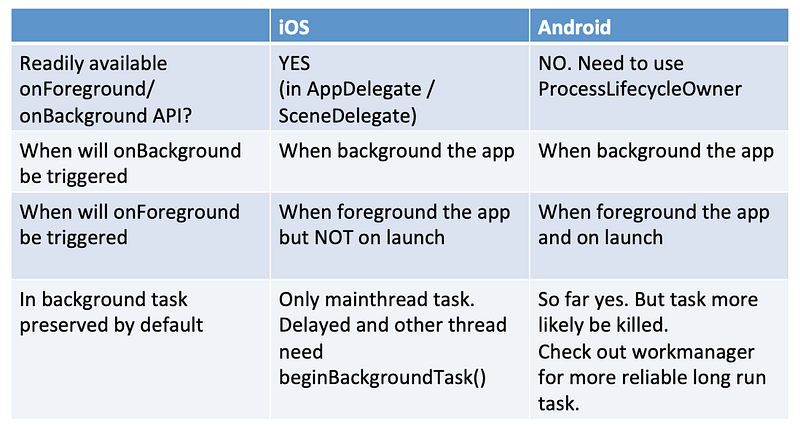
You could get the code from
Thanks for reading. You can check out my other topics here.
Follow me on medium, Twitter, Facebook or Reddit for little tips and learning on mobile development etc related topics. ~Elye~


