avatarNikhil Vemu

Free AI web copilot to create summaries, insights and extended knowledge, download it at here

4823

Abstract

9">The initial version of the service will let you log your moods throughout your day by answering questions — which will be recorded so you’d compare results over time.</p><p id="6fc8">Very basic. Even <i>I</i> can create such an app with my l’il brain and ChatGPT.</p><div id="07d3" class="link-block"> <a href="https://readmedium.com/heres-a-chatgpt-powered-shortcut-for-ios-that-will-blow-your-mind-c6aeebb77e00"> <div> <div> <h2>This ChatGPT-Powered iOS Shortcut Will Blow Your Mind</h2> <div><h3>A complex shortcut that can simplify your life</h3></div> <div><p>medium.com</p></div> </div> <div> <div style="background-image: url(https://miro.readmedium.com/v2/resize:fit:320/1*uVVfQjvlwuVxDA30NIb22w.jpeg)"></div> </div> </div> </a> </div><p id="f888">But in the future, Apple’s planning to use algorithms to determine your mood via your speech, the kind of words you type, and data from other devices.</p><h2 id="3327">3. Health App Finally Arrives to iPadOS ❤️</h2><p id="5e4b">Apple’s also planning to roll out Health app to iPads with iPadOS 17.</p><p id="7bfa">This will let users see their ECG and other health data on a much larger and elaborated format.</p><h1 id="cb85">#3. New App Stores might arrive</h1><p id="7022">This is the first rumour I’ve ever heard of iOS 17 → <b><i>“Side-loading”</i></b>. It isn’t something Apple loves to allow, but is <a href="https://www.bloomberg.com/news/newsletters/2023-04-16/apple-wwdc-2023-june-5-plan-reality-headset-new-macs-watchos-10-ios-17-lgjfj5bf">forced by an EU law</a>.</p><p id="da36">Basically, it’s a facility that allows you to install apps from other sources than the original App Store.</p><p id="2b60">It’s been on macOS for ages. Remember yourself installing apps from the internet, <a href="https://nikhilvemu.medium.com/list/amazing-homebrew-tools-b6ecb7545a97">Homebrew</a>, or Setapp, that aren’t App Store.</p><p id="e7e5"><i>(Btw, if you’d like to get a bundle of <b>240+ amazing apps for just $9.99</b>, get Setapp using my <a href="https://linktr.ee/macaffiliate"><b>affiliate link</b></a>. It’s <b>free for 30 days!</b>)</i></p><p id="2a46">But before you side-load any app, keep in mind the app might not be complying with Apple’s regulations, and might come virus-infected.</p><p id="baee">Side-load only if you really need to, and only from trustworthy sources.</p><p id="0060">Also, we’re not sure if iOS 17'd allow side-loading for countries <i>outside</i> EU, as Apple isn’t being forced to do so everywhere.</p><p id="d7b8">But still, hope it allows :)</p><h1 id="e0ff">#4. Ability to link Apple Watch to multiple iPhones & iPads ⌚</h1><p id="f03f">Ever since the Apple Watch was launched, its relationship with the iPhone was many-to-one but not one-to-many. I.e., one iPhone could have multiple paired Watches, but vice-versa wasn’t possible.</p><p id="fc40"><a href="https://twitter.com/analyst941/status/1651405783764983808?s=20">Not anymore</a>, say iOS 17 and watchOS 10.</p><p id="165d">We might finally be able to sync an Apple Watch with multiple Apple devices. Not only iPhones, but also Macs and iPads.</p><p id="ca35">It’s still unclear whether we’ll still require an iPhone to setup an Apple Watch, or we can do that from any other device.</p><p id="2b1e">This is a great news for folks like me who have multiple iPhones (work and personal) and only one Apple Watch. It’ll be seamless to switch between them if that’s the case.</p><h1 id="5cf2">#5. App Library Customisations 📱</h1><p id="8354">App Library was introduced back in iOS 14, and we didn’t have any provision to customise it until now — i.e.,</p><ul><li>you can’t create any custom categories,</li><li>or rename existing ones.</li></ul><p id="7f3f">It’s been so restrictive. However, iOS 17’s rumored to let you do that two things.</p><h1 id="e648">#6. Sharing your Lock Screen with a friend</h1><p id="ac95">iOS 16 allowed Lock Screen customisations for the first time ever. But lets say your friend liked your Lock Screen and would love to apply it on their iPhone too. How’d they do that?</p><p id="d019">Simple, by taking time to replicate the wallpaper, emojis, colours, fonts, widgets, and perhaps even focus mode.</p><p id="d12d">Difficult, right? Not with iOS 17.</p><p id="378c">The update’s said to let you <i>share</i> your Lock Screen, presumably in the similar way you share your Apple Watch faces.</p><h2 id="c7db">Bonus</h2><p id="42c3">There could be additional fonts for time and Emoji wallpaper styles.</p><h1 id="bf56">#7. Custom Accessibility Mode</h1><figure id="fc60"><img src="https://cdn-images-1.readmedium.com/v2/resize:fit:800/1*EB_BFReRm246zLH01dWwIg.jpe

Options

g"><figcaption>Credit: <a href="https://9to5mac.com/2022/11/08/ios-16-2-custom-accessibility-mode/">9to5Mac</a></figcaption></figure><p id="af7e">Thanks to 9to5Mac for finding out <b>‘Custom Accessibility Mode’</b> in <a href="https://nikhilvemu.medium.com/ios-16-2-is-finally-out-45-new-features-changes-f3eb4dc043b4">iOS 16.2</a>’s code.</p><p id="b76f">This lets you restrict your device to fewer apps and lesser functionality — and lock it behind your passcode — maybe to save battery or for parental controls.</p><div id="e1fc" class="link-block"> <a href="https://9to5mac.com/2022/11/08/ios-16-2-custom-accessibility-mode/"> <div> <div> <h2>iOS 16.2 to introduce ‘Custom Accessibility Mode’ with streamlined experience for iPhone and iPad</h2> <div><h3>Apple on Tuesday released iOS 16.2 beta 2 to developers as the company gets ready to make the update available to the…</h3></div> <div><p>9to5mac.com</p></div> </div> <div> <div style="background-image: url(https://miro.readmedium.com/v2/resize:fit:320/0*BLD9Ak4UGwxgybBX)"></div> </div> </div> </a> </div><p id="96af">Though CAM first appeared in back then, it’s still yet to arrive. And rumours suggest it might be out with iOS 17.</p><h1 id="566b">More rumours that’re sure to excite you</h1><h2 id="5844">#8. Control Centre UI Changes</h2><p id="6856">It’s been the same since iOS 11. It’s gonna change now.</p><h2 id="7626">#9. Apple Music Upgrades 🎵</h2><ul><li>You’d be able to view a song’s lyrics directly on the Lock Screen. Maybe a Live Activity feature..?</li><li>Text inside the app will be reduced in favour of new images and graphics.</li></ul><div id="07a5" class="link-block"> <a href="https://readmedium.com/7-lesser-known-apple-music-tricks-youll-want-to-keep-using-11fe5e616b71"> <div> <div> <h2>7 Lesser-Known Apple Music Tricks You’ll Want To Keep Using</h2> <div><h3>It’s time to get more groovy</h3></div> <div><p>medium.com</p></div> </div> <div> <div style="background-image: url(https://miro.readmedium.com/v2/resize:fit:320/0*STXmZYCoI4TLDFnK)"></div> </div> </div> </a> </div><h2 id="3378">#10. Step-less control for Flashlight brightness 🔦</h2><figure id="a894"><img src="https://cdn-images-1.readmedium.com/v2/resize:fit:800/1*[email protected]"><figcaption>Image by the author</figcaption></figure><p id="57ab">Till now, Flashlight’s brightness can only be adjusted in five steps, including off.</p><p id="9f8f">iOS 17 might feature step-less increments, just like screen brightness, allowing for more granular control.</p><h1 id="87fb">Compatible devices</h1><p id="c2ae">Every device up from iPhone XR is sure to be compatible with iOS 17.</p><div id="e9eb" class="link-block"> <a href="https://readmedium.com/does-the-iphone-xr-still-carry-its-stature-in-2021-1df143d5d8ce"> <div> <div> <h2>Why is iPhone XR the Greatest Deal in 2021?</h2> <div><h3>It still carries its stature today.</h3></div> <div><p>medium.com</p></div> </div> <div> <div style="background-image: url(https://miro.readmedium.com/v2/resize:fit:320/1*nz60Cjfqh-d5eVV3ig1d2g.jpeg)"></div> </div> </div> </a> </div><p id="78b5">iPhone 8, 8+, and X are doubtful to get.</p><p id="a4a0">But one thing’s for sure — if one gets, they’ll all get. If one doesn’t, they all won’t. Friends for life.</p><p id="d2d2">But as per my prediction, I think they’ll all get. Coz there aren’t any rumoured features that require significant hardware. So I think iOS 17 will be compatible with a bit old hardware too. 🤞</p><p id="1049"><i>Join <b>360+</b> others to <a href="https://nikhilvemu.medium.com/subscribe"><b>get notified</b></a> whenever I publish a new story.</i></p><div id="eef2" class="link-block"> <a href="https://nikhilvemu.medium.com/membership"> <div> <div> <h2>Join Medium with my referral link - Nikhil Vemu</h2> <div><h3>As a Medium member, a portion of your membership fee goes to writers you read, and you get full access to every story…</h3></div> <div><p>nikhilvemu.medium.com</p></div> </div> <div> <div style="background-image: url(https://miro.readmedium.com/v2/resize:fit:320/0*BrL3jmU-4_WoRE1k)"></div> </div> </div> </a> </div></article></body>

iOS 17 — Major Leaks! It Could Be Way Better Than We’ve Expected

All the features rumoured till now
Photo by TheRegisti on Unsplash

It’s just been a couple of months since we’re told iOS 17’s gonna be a very minor update, primarily focusing on bug fixes and stability improvements.

The reason being — Apple’s shifting its focus on the AR/VR Headset launching later this year. However, the new rumours that lately came from very reliable sources are saying otherwise.

Though not as huge as iOS 16 (255+ features), iOS 17’s gonna be a pretty big update.

#1. A New Journaling App that “Understands” You

If you’re a journaler, and are currently using third-party apps like Day One to journal, iOS 17’s sure to excite you.

Rumours suggest we’re gonna get a native Journal app with iOS 17. Code-named “Jurassic”, the app helps keep track of your daily life.

Obviously, right? It’s after all a journaling app 🤷‍♂️. But here comes the best part →

It could analyse — yes, analyse! — your journals to determine how your typical day looks like, and whether a day’s got something unusual. I.e., remembers your special days.

Don’t freak out yet! Apple won’t know your secrets. All the analysing happens on-device.

Being Apple’s own app, it’ll also have the privilege to access your Call History and Messages to better understand your behaviour (if you consent). So,

Probably, bye… Day One.

It’s worth noting it’ll be preloaded onto every iPhone that updates to iOS 17 — just like Freeform for iOS 16.2.

As a poor guy who’s currently managing all his journals in a locked Note, “Jurassic” pretty much excites me.

What about you?

#2. Mind-blowing Health upgrades 🩺

Apple already anchored itself tight into Physical Health — letting you track Activity, Cycles, Hearing, Heart, Medications, Sleep etc.

With iOS 17, it’s gonna step its foot into Mental Health. (Source)

1. AI-Powered Health Coaching Service 👨‍🏫

The service — codenamed “Quartz” — uses AI and data from your Apple Watch to tailor personalised programs to

  • keep yourself motivated to workout,
  • improve your eating habits,
  • sleep better.

How awesome!

2. Mood and Emotion Tracker 😃

This service won’t be linked to the Journal (#1) in any way — say rumours — It’s standalone, and will be integrated into Health app.

The initial version of the service will let you log your moods throughout your day by answering questions — which will be recorded so you’d compare results over time.

Very basic. Even I can create such an app with my l’il brain and ChatGPT.

But in the future, Apple’s planning to use algorithms to determine your mood via your speech, the kind of words you type, and data from other devices.

3. Health App Finally Arrives to iPadOS ❤️

Apple’s also planning to roll out Health app to iPads with iPadOS 17.

This will let users see their ECG and other health data on a much larger and elaborated format.

#3. New App Stores might arrive

This is the first rumour I’ve ever heard of iOS 17 → “Side-loading”. It isn’t something Apple loves to allow, but is forced by an EU law.

Basically, it’s a facility that allows you to install apps from other sources than the original App Store.

It’s been on macOS for ages. Remember yourself installing apps from the internet, Homebrew, or Setapp, that aren’t App Store.

(Btw, if you’d like to get a bundle of 240+ amazing apps for just $9.99, get Setapp using my affiliate link. It’s free for 30 days!)

But before you side-load any app, keep in mind the app might not be complying with Apple’s regulations, and might come virus-infected.

Side-load only if you really need to, and only from trustworthy sources.

Also, we’re not sure if iOS 17'd allow side-loading for countries outside EU, as Apple isn’t being forced to do so everywhere.

But still, hope it allows :)

#4. Ability to link Apple Watch to multiple iPhones & iPads ⌚

Ever since the Apple Watch was launched, its relationship with the iPhone was many-to-one but not one-to-many. I.e., one iPhone could have multiple paired Watches, but vice-versa wasn’t possible.

Not anymore, say iOS 17 and watchOS 10.

We might finally be able to sync an Apple Watch with multiple Apple devices. Not only iPhones, but also Macs and iPads.

It’s still unclear whether we’ll still require an iPhone to setup an Apple Watch, or we can do that from any other device.

This is a great news for folks like me who have multiple iPhones (work and personal) and only one Apple Watch. It’ll be seamless to switch between them if that’s the case.

#5. App Library Customisations 📱

App Library was introduced back in iOS 14, and we didn’t have any provision to customise it until now — i.e.,

  • you can’t create any custom categories,
  • or rename existing ones.

It’s been so restrictive. However, iOS 17’s rumored to let you do that two things.

#6. Sharing your Lock Screen with a friend

iOS 16 allowed Lock Screen customisations for the first time ever. But lets say your friend liked your Lock Screen and would love to apply it on their iPhone too. How’d they do that?

Simple, by taking time to replicate the wallpaper, emojis, colours, fonts, widgets, and perhaps even focus mode.

Difficult, right? Not with iOS 17.

The update’s said to let you share your Lock Screen, presumably in the similar way you share your Apple Watch faces.

Bonus

There could be additional fonts for time and Emoji wallpaper styles.

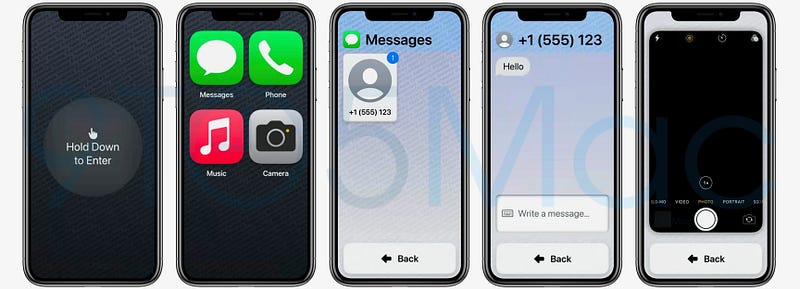
#7. Custom Accessibility Mode
Credit: 9to5Mac

Thanks to 9to5Mac for finding out ‘Custom Accessibility Mode’ in iOS 16.2’s code.

This lets you restrict your device to fewer apps and lesser functionality — and lock it behind your passcode — maybe to save battery or for parental controls.

Though CAM first appeared in back then, it’s still yet to arrive. And rumours suggest it might be out with iOS 17.

More rumours that’re sure to excite you

#8. Control Centre UI Changes

It’s been the same since iOS 11. It’s gonna change now.

#9. Apple Music Upgrades 🎵

  • You’d be able to view a song’s lyrics directly on the Lock Screen. Maybe a Live Activity feature..?
  • Text inside the app will be reduced in favour of new images and graphics.

#10. Step-less control for Flashlight brightness 🔦
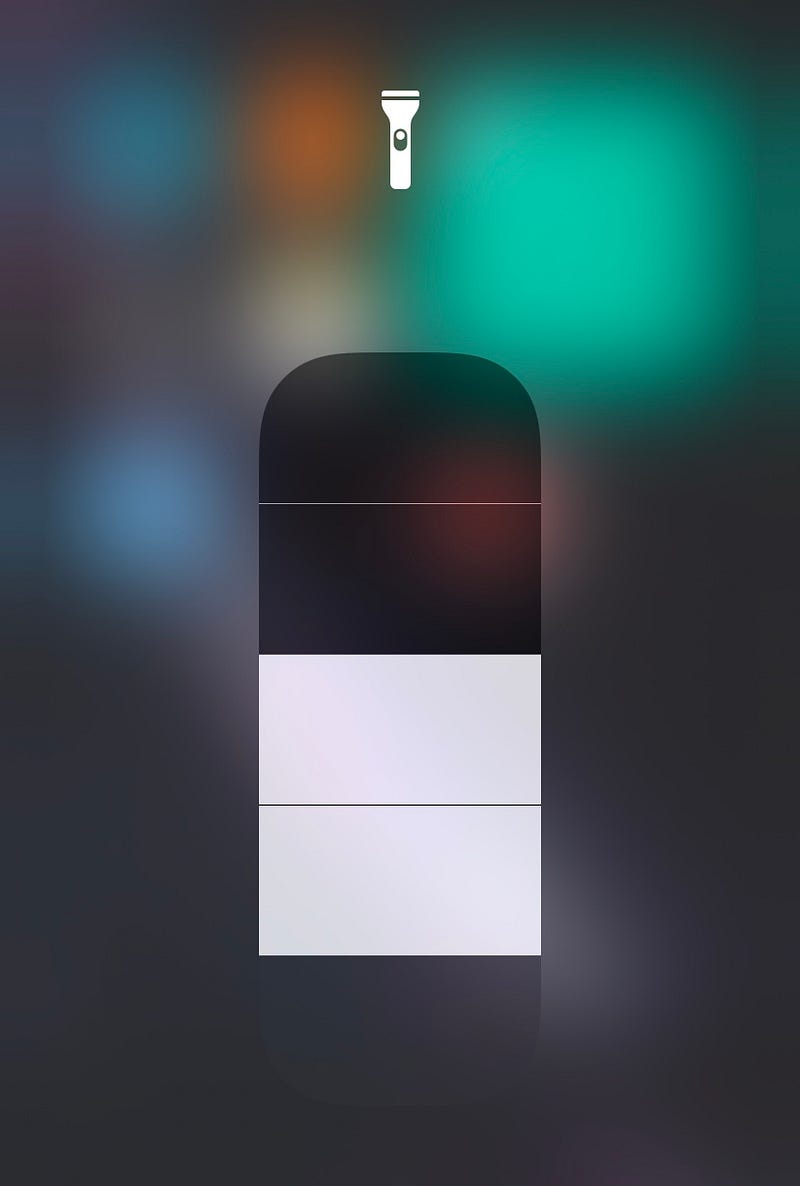
Image by the author

Till now, Flashlight’s brightness can only be adjusted in five steps, including off.

iOS 17 might feature step-less increments, just like screen brightness, allowing for more granular control.

Compatible devices

Every device up from iPhone XR is sure to be compatible with iOS 17.

iPhone 8, 8+, and X are doubtful to get.

But one thing’s for sure — if one gets, they’ll all get. If one doesn’t, they all won’t. Friends for life.

But as per my prediction, I think they’ll all get. Coz there aren’t any rumoured features that require significant hardware. So I think iOS 17 will be compatible with a bit old hardware too. 🤞

Join 360+ others to get notified whenever I publish a new story.

Technology
Apple
iOS
Mobile
Ios 17
Recommended from ReadMedium