
Invoking Lambda With A Different IP Upon Every Execution
Recently while working on creating a Lambda for Cowin vaccine slot alert, I thought of trying how we can invoke Lambda with a different IP upon every execution, so that we don’t hit the API throttling limit.
Note: We’ll be using Mumbai region. If you are using a different region, make sure you choose the correct NAT instance AMI.
Step 1: Launch an instance in Public subnet using amzn-ami-vpc-nat-2018.03.0.20200918.0-x86_64-ebs AMI. We’ll use this as our NAT instance. In the security group, allow all traffic from this security group as we’ll use the same group for Lambda function as well.
Once it’s launched, go to Actions->Networking->Change source/destination check and disable it. This is required for NAT instance to route traffic.
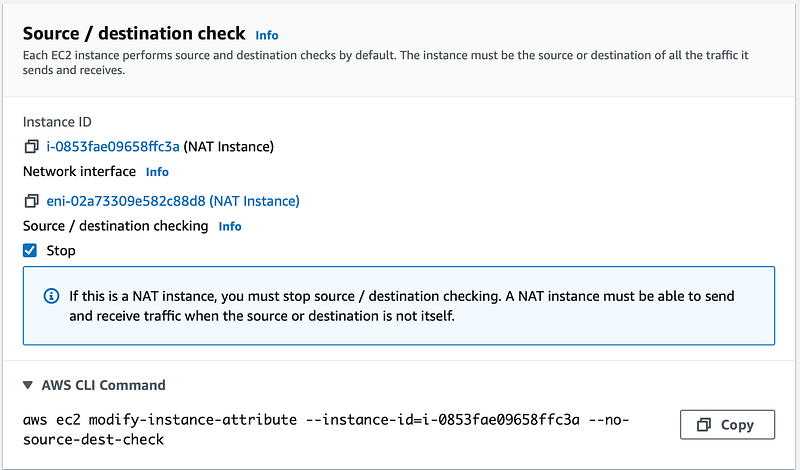
Step 2: Change the Route table of Private subnets to use NAT instance to route external traffic via NAT instance.

Step 3: Create a role for lambda which has AWSLambdaBasicExecutionRole permission, along with this policy attached to it:
{
    "Version": "2012-10-17",
    "Statement": [
        {
            "Sid": "VisualEditor0",
            "Effect": "Allow",
            "Action": [
                "ec2:CreateNetworkInterface",
                "ec2:DescribeNetworkInterfaces",
                "ec2:StartInstances",
                "lambda:InvokeFunction",
                "ec2:DeleteNetworkInterface",
                "lambda:InvokeAsync",
                "ec2:StopInstances"
            ],
            "Resource": "*"
        }
    ]
}
Step 4: Create a lambda function named trigger with the role we created and Python 3.7 as runtime. Set timeout as 5 minutes and create an event trigger to invoke this lambda every 5 minutes. Use this code and change NAT instance id.
import boto3
import time
def lambda_handler(event, context):
client = boto3.client('lambda')
ec2 = boto3.client('ec2')
response = ec2.start_instances(InstanceIds=['i-0853fae09658ffc3a']) ## Specify NAT instance ID
time.sleep(180)
response = client.invoke(FunctionName='ip')This function will start our NAT instance and then trigger our main lambda function. Since we are not using Elastic IP for our NAT instance, it will get a new public IP, every time it’s started.
Step 5: Create another function named ip with the role we created and Python 3.7 as runtime. In the network configuration, select our VPC and private subnets. Also, use the same security group as we had for the NAT instance. Set function timeout as 1 minute.
Use this code for our lambda function and change NAT instance id.
def lambda_handler(event, context):
    from botocore.vendored import requests
    import boto3
    ec2 = boto3.client('ec2')
    print(requests.get('http://ip.42.pl/raw').text)
    ec2.stop_instances(InstanceIds=['i-0853fae09658ffc3a']) #Specify NAT instance id
This function simply prints the public IP used by lambda(which is our NAT instance IP) and then stops our NAT instance.
That’s all for setup. Once the trigger lambda is executed, check the logs for ip lambda to make sure the setup is working fine.



Join FAUN: Website 💻|Podcast 🎙️|Twitter 🐦|Facebook 👥|Instagram 📷|Facebook Group 🗣️|Linkedin Group 💬| Slack 📱|Cloud Native News 📰|More.
If this post was helpful, please click the clap 👏 button below a few times to show your support for the author 👇


