
Introduction to Deep Learning with PyTorch and how it compares to Tensorflow and Keras
Quick summary of PyTorch and how it compares to Tensorflow and Keras.
Introduction
PyTorch is the new kid on the block in the Deep Learning community. It is open source and it was partially developed by Facebook. It is gaining popularity in the community because if very powerful and relatively easy to use. Frameworks like Keras are simpler to use but very slow and limited. Tensorflow is the most famous framework and heavily used in production but for a data scientist that needs to experiment, it is quite tedious to use.
PyTorch is a python based library built to provide flexibility as a deep learning development platform. It is not a simple set of wrappers to support Python, it was rewritten and tailored to be fast and feel native. It is imperative in nature; this means that you can easily run it step by step on a notebook and see the results right away!
PyTorch provides two high-level features:
- Tensor computation (like NumPy) with strong GPU acceleration
- Deep neural networks
The basic building blocks are tensors but the way they are used is different from Tensorflow. The computational graph is imperative, there is no need to define session or placeholders and you can easily debug it in Python.
PyTorch vs. TensorFlow vs. Keras
Keras it’s just a high level API which is an abstraction of other low level libraries like Theano or Tensorflow, so it is not a library on its own. I like to use my GPU for deep learning, it can be a bit tricky to set up but there are many guides available. After installing CUDA and Tensorflow (which it is not straightforward) you can easily run neural networks models using Keras without much effort.
As you can see, you can create deep learning models very easily; but you pay the price in terms of performance. Keras is great to start with deep learning but you cannot use it in production, it is slow and difficult to deploy.
In the other hand, PyTorch is less concise even for a simple linear regression problem:
However, this example is more concise than Tensorflow and easier to debug. This fits right into the python programming methodology, as we don’t have to wait for the whole code to be written before getting to know if it works or not.
Keras
- Easy to use
- Great for beginners
- Do not use in Production
Tensorflow
- Great for Prod
- Fast and powerful
- Tensorboard for visualization
- Flexible
- Layered Components
- Lots of features
- Great Community
- Backed by Google
- Easy to deploy and use with Java or C++
PyTorch
- No extra setup for GPU
- Native Python Support
- Less features but catching up
- Faster than Tensorflow. See this benchmarks
- Amazing parallelization with many GPUs and easy to setup
- Great Ecosystem
- Cloud providers support
- Backed by Facebook
Getting Started with PyTorch
You can start PyTorch locally or using the cloud partners, you can select your configuration in the main page and run the provided command. For example to install it locally with NVidia support just run:
conda install pytorch torchvision -c pytorchYou can check all the features here.
There is a huge ecosystem that you can explore here.
I recommend starting with this tutorial. All tutorials are here.
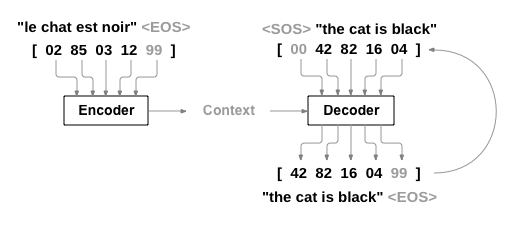
To check the power of PyTorch, you can follow this tutorial where you can build your own chatbot. It is based on encoders and decoders also used for translation.
How PyTorch Works
PyTorch uses “define-by-run” methodology, an imperative paradigm. We can independently perform computations on these components itself, even before your graph is built completely.
These are the main elements:
Tensors
Tensors are multidimensional arrays similar to NumPy’s ndarrays, with the addition being that Tensors can also be used on a GPU to accelerate computing. PyTorch supports various types of Tensors.
To construct a 5x3 matrix:
import torch
x = torch.empty(5, 3)
Operations
PyTorch supports over 200 mathematical operations. There are multiple syntaxes for operations.
y = torch.rand(5, 3)
print(x + y)
Optim module
This module t implements various optimization algorithms used for building neural networks. Most of the commonly used methods are already supported.
Below is the code for using SGD and Adam optimizer:
optimizer = optim.SGD(model.parameters(), lr = 0.01, momentum=0.9)
optimizer = optim.Adam([var1, var2], lr = 0.0001)
Autograd module
This module uses a technique called automatic differentiation. It provides a recorder that records what operations we have performed, and then it replays it backward to compute our gradients. This technique is especially powerful when building neural networks. The package provides classes and functions implementing automatic differentiation of arbitrary scalar valued functions.
nn module
This module builds on top of Autograd and it is used to build neural netowkrs; autograd makes it easy to define computational graphs and take gradients, but autograd can be a bit too low-level for defining complex neural networks. The nn module aims to simplify this.
The nn package defines a set of modules, which we can think of as a neural network layer that produces output from input and may have some trainable weights. It makes really easy to build neural networks almost as easy as Keras.
import torch

# define model
model = torch.nn.Sequential(
 torch.nn.Linear(input_num_units, hidden_num_units),
 torch.nn.ReLU(),
 torch.nn.Linear(hidden_num_units, output_num_units),
)
loss_fn = torch.nn.CrossEntropyLoss()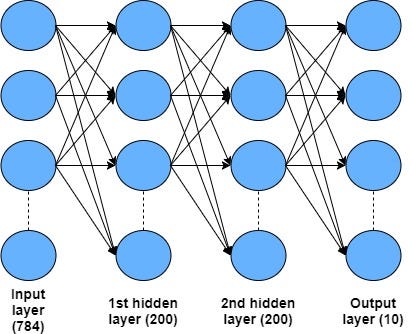
Conclusion
I’m mainly a developer, I did struggle with Tensorflow because you really need to spend many hours to really learn how to use it. For me PyTorch is easier to use and debug; it is also easier to setup to use the GPU. You can use frameworks like Flask to setup REST end points to call your models in Production but if you are a Java user and you want to integrated with technologies like Kafka; then Tensorflow could be a better option. My advise is to start with PyTorch, you can always migrate the code easily to Tensorflow.
hope you enjoyed this article. Follow me for future updates.


