avatarArpita Ghosh

Free AI web copilot to create summaries, insights and extended knowledge, download it at here

2170

Abstract

ical</li><li>Statistical</li><li>Text</li><li>Parent/Child</li><li>Other</li></ol><h1 id="0106">Components of DAX Data Model</h1><figure id="3cc8"><img src="https://cdn-images-1.readmedium.com/v2/resize:fit:800/1*AGmhNKd53phsMKfz9K-wcw.jpeg"><figcaption>Image by Author</figcaption></figure><p id="1da7">A data model consists of data, calculations and formatting rules and it combines to create an object. This object helps to explore and understand the dataset.</p><h1 id="50e2">Your First Practical Experience with DAX</h1><p id="1ca9">Till now you have some idea about DAX and its importance. Before moving to discuss each DAX function category, let us get some hands-on experience with DAX.</p><h2 id="418d">Get Data</h2><p id="289e">For this case study, I consider the US Superstore dataset from Kaggle ( <a href="https://www.kaggle.com/juhi1994/superstore">https://www.kaggle.com/juhi1994/superstore</a>)</p><ul><li>Let’s start with the <b>Get Data</b> option under the <b>Home</b> tab. As this is a CSV file, select the <b>Text/CSV</b> option from the drop-down list</li><li>Select the file named <b>US Superstore data.csv</b></li><li>After selecting the file, data will be displayed in the below format</li></ul><figure id="8f53"><img src="https://cdn-images-1.readmedium.com/v2/resize:fit:800/0*h1S2KX-_1Tv2Yok0.png"><figcaption>Image by Author</figcaption></figure><ul><li>Click on Load and save data.</li></ul><p id="a124">There are 3 types of calculations in DAX.</p><ul><li>Calculated Columns</li><li>Calculated Measures</li><li>Calculated Tables</li></ul><h2 id="20a6">Example 1 (Calculated Measure)</h2><ol><li>Create calculated measure Total Sales</li></ol><p id="1582">Total Sales = SUM(‘US Superstore data’[Sales])</p><figure id="0893"><img src="https://cdn-images-1.readmedium.com/v2/resize:fit:800/1*gDbGiM07sVwozJys7s32Ig.png"><figcaption>Image by Author</figcaption></figure><p id="65cb">2. Similarly, create a calculated measure of Total Profit.</p><p id="e728">Total Profit = SUM(‘US Superstore data’[Profit])</p><h2 id="b7ca">Example 2 (Calculated Column)</h2><ol><li>Create calculated column Total Cost.</li></ol><figure id="1172"><img src="http

Options

s://cdn-images-1.readmedium.com/v2/resize:fit:800/1*bHVlY13_vr5MVzl_qUh4bA.png"><figcaption>Image by Author</figcaption></figure><h2 id="aa6c">Example 3 (Calculated Table)</h2><ol><li>In Report View, go to Modeling Tab and click on New Table under Calculations group.</li><li>Create a calculated table (e.g. Date Table).</li></ol><figure id="7a04"><img src="https://cdn-images-1.readmedium.com/v2/resize:fit:800/1*ASxUb6h8SueU686NAMealQ.png"><figcaption>Image by Author</figcaption></figure><h1 id="2385">Download</h1><p id="2e48">Please find the code in the below location</p><p id="ebef">DAX — Chapter 1 (<a href="https://github.com/arpitag1/Power-BI">https://github.com/arpitag1/Power-BI</a>)</p><h1 id="736e">Video</h1> <figure id="6074"> <div> <div> <img class="ratio" src="http://placehold.it/16x9"> <iframe class="" src="https://cdn.embedly.com/widgets/media.html?src=https%3A%2F%2Fwww.youtube.com%2Fembed%2FikGbu1cN07g%3Ffeature%3Doembed&amp;display_name=YouTube&amp;url=https%3A%2F%2Fwww.youtube.com%2Fwatch%3Fv%3DikGbu1cN07g&amp;image=https%3A%2F%2Fi.ytimg.com%2Fvi%2FikGbu1cN07g%2Fhqdefault.jpg&amp;key=a19fcc184b9711e1b4764040d3dc5c07&amp;type=text%2Fhtml&amp;schema=youtube" allowfullscreen="" frameborder="0" height="480" width="854"> </div> </div> </figure></iframe></div></div></figure><h1 id="92d8">Conclusion</h1><p id="2255">In this blog, the following things have been identified</p><ol><li>What is DAX</li><li>What are all DAX Operators</li><li>How many types of DAX categories</li><li>How many components are there in DAX Data Model</li><li>First Hands-on Experience with DAX.</li></ol><p id="1450">In my next blog, we will learn in detail about DAX.</p><p id="36bf">If you have any questions related to this project, please feel free to post your comments.</p><p id="2905">You can check my Medium Profile for other related blogs and please like, and share comments if you feel it will help others to learn.</p><p id="b271">Please like, comment and subscribe to my YouTube channel which you have already seen. :-) Keep Learning.</p></article></body>

Introduction to DAX in Power BI — DAX in Power BI — Chapter 1

This is a step by step tutorial starting with an introduction to DAX operators, DAX function categories, DAX data model components and first hands-on experience with DAX

Image by Unsplash

For any POWER BI job description, you will find one competency is mandatory. Any idea what is that? Yes, you are right. It is DAX.

DAX is playing an important key role in any Power BI project. In this blog series, I will capture my understanding of DAX with some practical code.

What is DAX?

DAX (Data Analysis Expressions) is known as a functional language. It means, calculations mostly use functions to generate the results.

DAX is designed for enhancing data modelling, reporting and analytics capability.

DAX Data Type
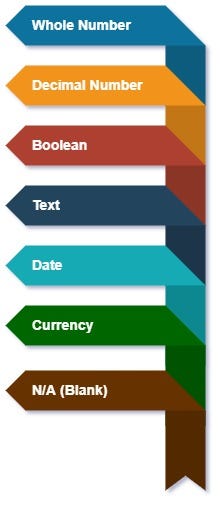
Image by Author

In DAX, it is possible to define the data type for each column based on your requirement.

The selection of the best data type helps to reduce the size of a data model and improve the performance when to refresh data and use of any report.

DAX Operator
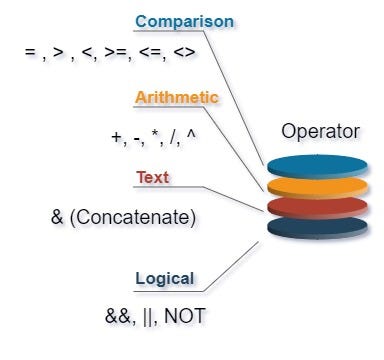
Image by Author

DAX operators are divided into four categories: comparison operators, arithmetic operators, text operator, and logic operators.

DAX Function Category

You can write a nested function using DAX but you cannot create your own.

There are more than 200 DAX functions. There are 9 categories in the DAX function.

  1. Date and Time
  2. Time Intelligence
  3. Information
  4. Logical
  5. Mathematical
  6. Statistical
  7. Text
  8. Parent/Child
  9. Other

Components of DAX Data Model

Image by Author

A data model consists of data, calculations and formatting rules and it combines to create an object. This object helps to explore and understand the dataset.

Your First Practical Experience with DAX

Till now you have some idea about DAX and its importance. Before moving to discuss each DAX function category, let us get some hands-on experience with DAX.

Get Data

For this case study, I consider the US Superstore dataset from Kaggle ( https://www.kaggle.com/juhi1994/superstore)

  • Let’s start with the Get Data option under the Home tab. As this is a CSV file, select the Text/CSV option from the drop-down list
  • Select the file named US Superstore data.csv
  • After selecting the file, data will be displayed in the below format
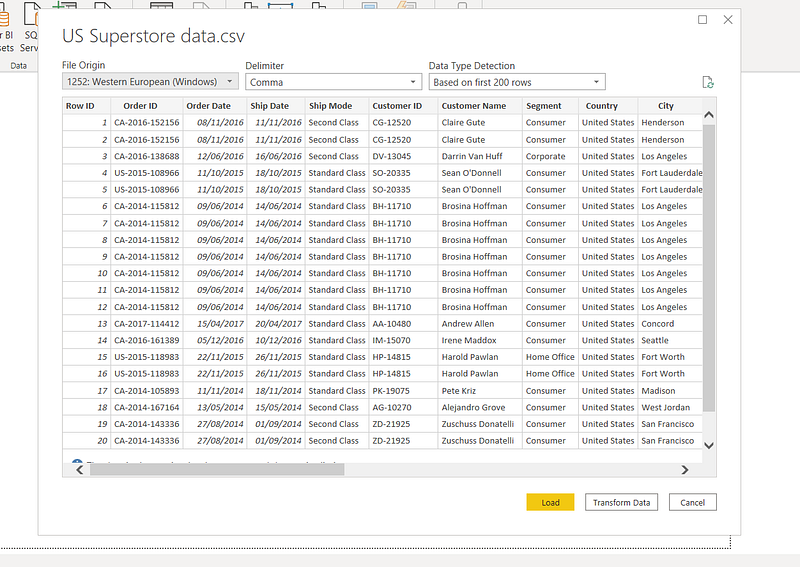
Image by Author
  • Click on Load and save data.

There are 3 types of calculations in DAX.

  • Calculated Columns
  • Calculated Measures
  • Calculated Tables

Example 1 (Calculated Measure)

  1. Create calculated measure Total Sales

Total Sales = SUM(‘US Superstore data’[Sales])
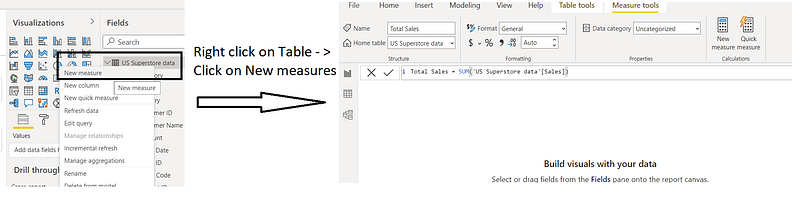
Image by Author

2. Similarly, create a calculated measure of Total Profit.

Total Profit = SUM(‘US Superstore data’[Profit])

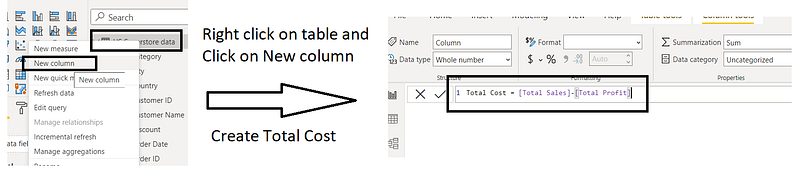
Example 2 (Calculated Column)

  1. Create calculated column Total Cost.
Image by Author

Example 3 (Calculated Table)

  1. In Report View, go to Modeling Tab and click on New Table under Calculations group.
  2. Create a calculated table (e.g. Date Table).

Image by Author

Download

Please find the code in the below location

DAX — Chapter 1 (https://github.com/arpitag1/Power-BI)

Video

Conclusion

In this blog, the following things have been identified

  1. What is DAX
  2. What are all DAX Operators
  3. How many types of DAX categories
  4. How many components are there in DAX Data Model
  5. First Hands-on Experience with DAX.

In my next blog, we will learn in detail about DAX.

If you have any questions related to this project, please feel free to post your comments.

You can check my Medium Profile for other related blogs and please like, and share comments if you feel it will help others to learn.

Please like, comment and subscribe to my YouTube channel which you have already seen. :-) Keep Learning.

Power Bi
Dax
Data Analysis
Data Science
Power Bi Tutorials
Recommended from ReadMedium