
Introduction to Containers and Kubernetes
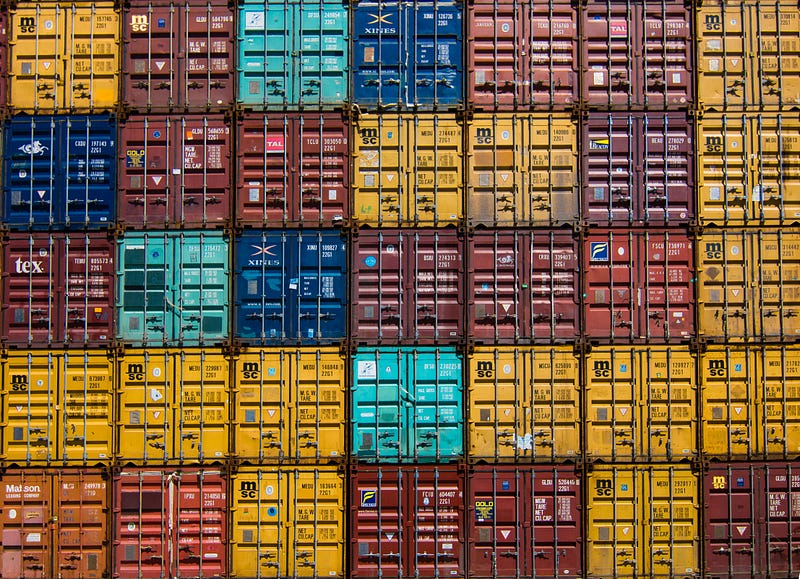
Now a days, every developer meet-ups or conferences have some topics around Containers like: Docker, Kubernetes and few others. The purpose of this article is to lay the basics and fundamentals of Containers and understanding how tools like Kubernetes play their role in Containerization.
Let’s see how powerful can containerization and using Kubernetes can be:
What exactly is a Container?
Containers offer a logical packaging mechanism where applications are abstracted from the environment in which they actually run. It provides a standard way to package your application’s code, configurations, and dependencies into a single object. Containers execute resource isolated processes as they share an operating system installed on the server which leads to quick, reliable, and consistent deployments, regardless of environment.
In simple words, Containers only contain the application, the libraries, frameworks, etc. that they depend on. You can put lots of them on a single host operating system. There is just one operating system installed on the server which is the host operating system and rest all the containers communicate with it. That keeps the containers small and the overhead is extremely low.
Containers are a powerful tool for developing, managing, migrating applications and software components from one system or environment to another. It greatly speeds and enhances cloud computing development.
How is a Container different from Virtual Machines?
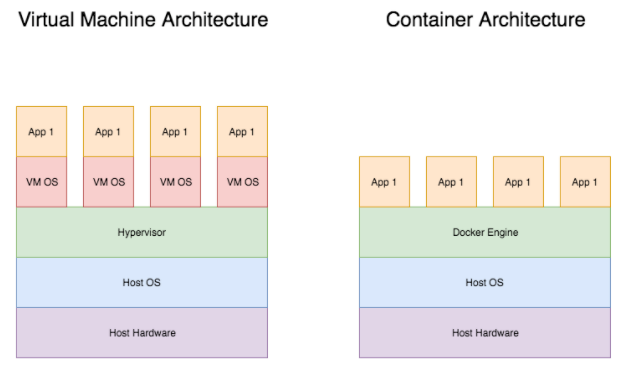
The container system is isolated by having an underlying operating system that provides basic service to all applications present in different containers. Whereas, hypervisor runs multiple VMs that contain their own independent operating system along with the VM hardware support.
Because of this, containers have lower overheads compared to Virtual Machines. Also, container systems provide isolation between containers. As a result, services like file system or networks can have limited resource access to containers.
Therefore, a Virtual Machine provides an abstract machine that uses drivers targeting the abstract machine, while containerization provides an abstract layer of OS. Ideally a Virtual Machine would host multiple applications which may change over time and on the other side containers would normally have a single application.
Why use Containers?
- Containers require less system resources than traditional or hardware virtual machine environments because they don’t include operating system images.
- Applications running in containers can be deployed easily to multiple different operating systems and hardware platforms.
- It provides consistency as containers will run the same, regardless of where they are deployed.
- Container-based virtualization are a great option for microservices, DevOps, and continuous deployment.
Disadvantages of Containers?
- Containers introduce some new security challenges. Firstly, the way in which Linux container apps relate to their host machine and it’s OS kernel potentially creates vulnerabilities.
- Containerization is generally limited to Linux OSs and applications, as it has evolved from the Linux Containers (LXC) environment.
What is Kubernetes and how is it related to Containers?
Kubernetes is a vendor-agnostic cluster and container management tool, open-sourced by Google in 2014. It provides a “platform for automating deployment, scaling, and operations of application containers across clusters of hosts”. Above all, this lowers the cost of cloud computing expenses and simplifies operations and architecture.
Note: Kubernetes is not a containerization platform. It is a multi-container management solution.
Let’s get deeper into the basic architecture of Kubernetes
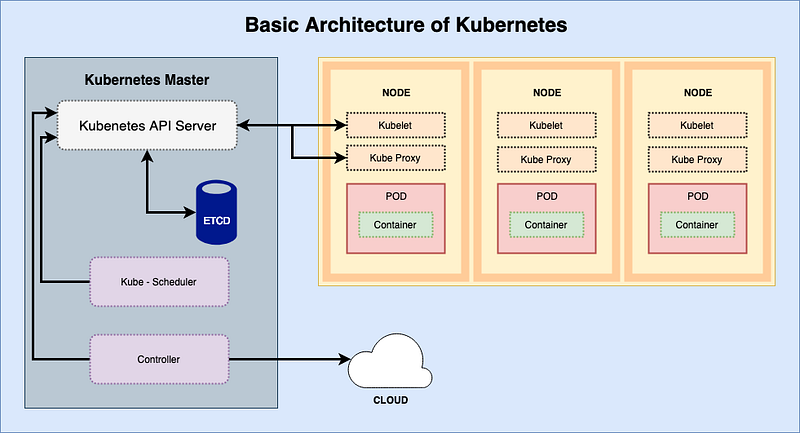
The kubernetes architecture basically consists three main components:
- Master nodes
- Worker nodes
- Distributed key-value store(etcd.)
Master node: It is the entry point for all administrative tasks which are responsible for managing the Kubernetes cluster. There can be more than one master node in the cluster to check for fault tolerance. More than one master node puts the system in a High Availability mode, in which one of them will be the main node which will perform all the tasks.
It consists of basic four components:
- API server: Performs all the administrative tasks through the API server within the master node.
- Scheduler: The scheduler schedules the tasks for worker nodes. It stores the resource usage information of each worker node.
- Controller: It is a daemon process which regulates the Kubernetes cluster and manages the different non-terminating control loops. It also performs lifecycle functions such as namespace creation and lifecycle, garbage collection, etc.
- etcd: It is a distributed key-value store designed to reliably and quickly preserve and provide access to critical data. It manages a lot of the tricky problems in running a distributed database — like race conditions and networking as it enables reliable distributed coordination through distributed locking, and leader elections. An etcd cluster is intended for high availability and permanent data storage and retrieval. It can also be configured externally.
Worker Node: It is a physical server or you can say a VM which runs the applications, it is controlled by the master node.
Worker Node consists of the following three components:
- Kubelet: It is an agent which communicates with the Master node and executes worker nodes. It gets the Pod specifications through the API server and executes the containers associated with the Pod and ensures that the containers described in those Pod are running and healthy.
- Kube-proxy: It runs on each node to deal with individual host sub-netting and ensure that the services are available to external parties. It serves as a network proxy and a load balancer for a service on a single worker node and manages the network routing for TCP and UDP packets.
- Pods: A pod is one or more container that logically go together. They run on nodes together as a logical unit. So they have the same shared content. They all share the same IP address, but can reach other Pods via localhost, as well as shared storage. All pods don’t need run on the same machine as containers can span out more than one machine. One node can run multiple pods.
What features does Kubernetes come with?
- Automatic Binpacking: Kubernetes automatically packages your application and schedules the containers based on their requirements and available resources while not sacrificing availability. To ensure complete utilization and save unused resources, Kubernetes balances between critical and best-effort workloads.
- Service Discovery & Load balancing: With Kubernetes, there is no need to worry about networking and communication because Kubernetes will automatically assign IP addresses to containers and a single DNS name for a set of containers, that can load-balance traffic inside the cluster.
- Storage Orchestration: With Kubernetes, you can mount the storage system of your choice. You can either opt for local storage, or choose a public cloud provider such as GCP or AWS, or perhaps use a shared network storage system such as NFS, iSCSI, etc.
- Self-Healing: Kubernetes can automatically restart containers that fail during execution and kills those containers that don’t respond to user-defined health checks. But if nodes itself die, then it replaces and reschedules those failed containers on other available nodes.
- Secret & Configuration Management: Kubernetes can help you deploy and update secrets and application configuration without rebuilding your image and without exposing secrets in your stack configuration.
- Batch Execution: In addition to managing services, Kubernetes can also manage your batch and CI workloads, thus replacing containers that fail, if desired.
- Horizontal Scaling: Kubernetes needs only 1 command to scale up the containers, or to scale them down when using the CLI. Else, scaling can also be done via the Dashboard.
- Automatic Rollbacks & Rollouts: Kubernetes progressively rolls out changes and updates to your application or its configuration, by ensuring that not all instances are worked at the same instance. Even if something goes wrong, Kubernetes will rollback the change for you.
Hoping that this article has highlighted the overview of Containers and Kubernetes and their relation.
Thanks for reading.
References:
https://cloud.google.com/containers/

Follow us on Twitter 🐦 and Facebook 👥 and join our Facebook Group 💬.
To join our community Slack 🗣️ and read our weekly Faun topics 🗞️, click here⬇
