
Introducing “Gemma”: Google’s Open-Source LLM (Better then Mistral 7B and LLAMA-2 7B)
A deep dive into Gemma’s capabilities, use cases, and how it compares to leading AI models
Introduction
Today, Google introduced Gemma, a cutting-edge family of open Large Language Models (LLMs), marking a significant step in its dedication to open-source AI. I am thrilled to see this launch, ensuring seamless integration within the Hugging Face platform.
Gemma is available in two configurations: a 7B parameter version optimized for efficient operation on standard consumer GPUs and TPUs, and a 2B parameter version tailored for CPU and mobile device use. Each version is offered in both a standard and an instruction-tuned format.
In this Blog I have only tried to introduce and summarize the model and all the different variant present on Internet. In Next part. I will finetune it and share the results . Thanks for your patience
Keywords: Google Gemma, LLM, Open-Source AI, Natural Language Processing, Machine Learning, Artificial Intelligence, Gemini project, TPU, Text Generation, Instruction-tuned models, Hugging Face, Mistral, Other LLMs, Chatbots, Code generation, Content creation, Text Summarization, Translation, Question-answering

Table of Contents
- Introduction to Gemma
- Hardware
- Training Dataset
- Structure of Prompts
- Demo
- How to use Gemma using transformers
- JAX Weights
- Finetuning Gemma
- Use Model with Quantization (4bit and 8 bit)
- Conclusion
What is Gemma ?
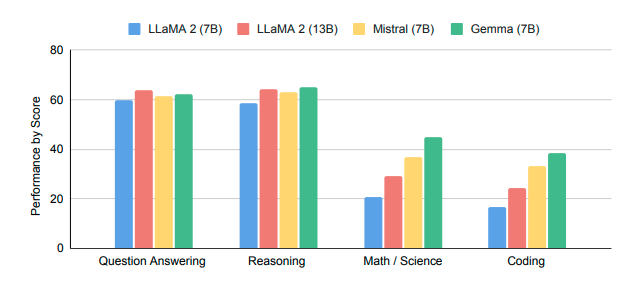
Gemma is Google’s latest series of four Large Language Models (LLMs), created under the Gemini project. These models are available in two sizes, 2B and 7B parameters, each offering both a base (pretrained) and an instruction-tuned variant. These models are designed to run on a wide range of consumer hardware, including without the need for quantization, and feature an impressive context length of 8,000 tokens:
- gemma-7b: The basic model with 7B parameters.
- gemma-7b-it: The 7B model that has been fine-tuned with instructions.
- gemma-2b: The standard model featuring 2B parameters.
- gemma-2b-it: The instruction-tuned version of the 2B model.
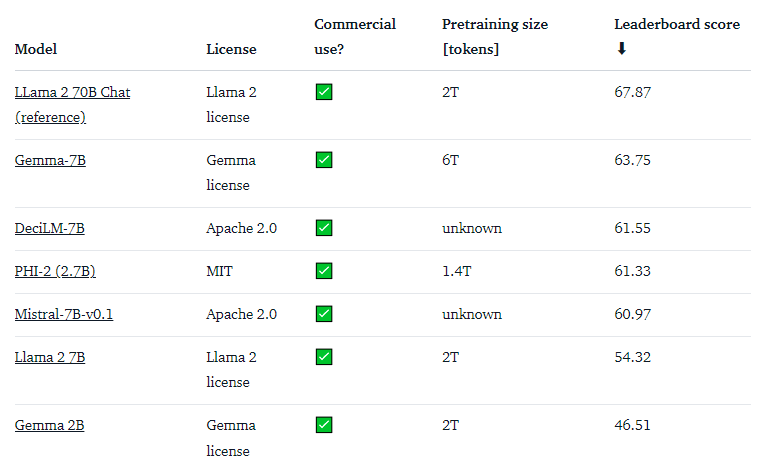
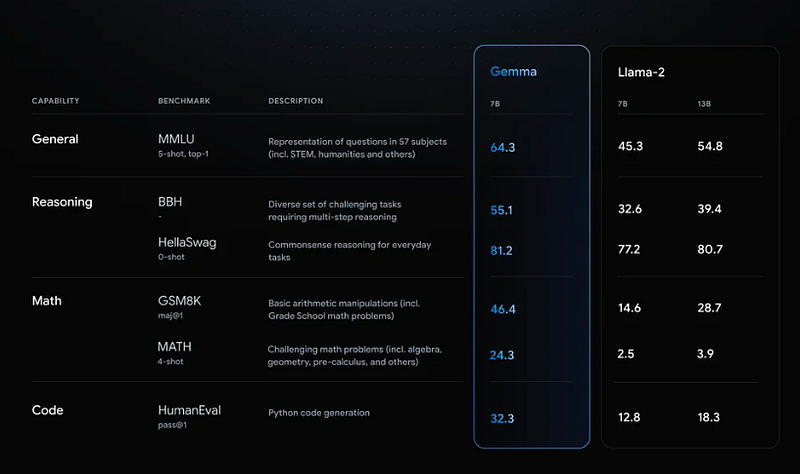
The Gemma 7B model stands out as a particularly powerful option, matching the performance of top contenders in its 7B weight class, including the likes of Mistral 7B. On the other hand, the Gemma 2B model presents an intriguing choice for its size. However, it doesn’t achieve as high a ranking on the leaderboard when compared to the most proficient models of similar size, like Phi 2. We’re eager to gather input from the community regarding how it performs in practical applications!
Hardware
Gemma was trained using the latest generation of Tensor Processing Unit (TPU) hardware (TPUv5e).
Training large language models requires significant computational power. TPUs, designed specifically for matrix operations common in machine learning, offer several advantages in this domain:
- Performance: TPUs are specifically designed to handle the massive computations involved in training LLMs. They can speed up training considerably compared to CPUs.
- Memory: TPUs often come with large amounts of high-bandwidth memory, allowing for the handling of large models and batch sizes during training. This can lead to better model quality.
- Scalability: TPU Pods (large clusters of TPUs) provide a scalable solution for handling the growing complexity of large foundation models. You can distribute training across multiple TPU devices for faster and more efficient processing.
- Cost-effectiveness: In many scenarios, TPUs can provide a more cost-effective solution for training large models compared to CPU-based infrastructure, especially when considering the time and resources saved due to faster training.
Training Dataset
These models were trained on a dataset of text data that includes a wide variety of sources, totaling 6 trillion tokens. Here are the key components:

- Web Documents: A diverse collection of web text ensures the model is exposed to a broad range of linguistic styles, topics, and vocabulary. Primarily English-language content.
- Code: Exposing the model to code helps it to learn the syntax and patterns of programming languages, which improves its ability to generate code or understand code-related questions.
- Mathematics: Training on mathematical text helps the model learn logical reasoning, symbolic representation, and to address mathematical queries.
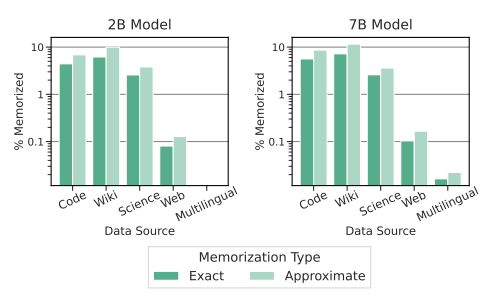
The combination of these diverse data sources is crucial for training a powerful language model that can handle a wide variety of different tasks and text formats.
Prompt Structure
The foundational models in the Gemma series don’t adhere to a specific prompt format. Similar to other base models, they are versatile in generating coherent continuations from given input sequences, making them suitable for zero-shot and few-shot inference tasks. This flexibility also makes them an excellent starting point for custom fine-tuning tailored to specific applications. On the other hand, the instruction-tuned versions are designed with a straightforward conversational framework:
<start_of_turn>user
knock knock<end_of_turn>
<start_of_turn>model
who is there<end_of_turn>
<start_of_turn>user
Gemma<end_of_turn>
<start_of_turn>model
Gemma who?<end_of_turn>
This format has to be exactly reproduced for effective use.
Demo
You can chat with the Gemma Instruct model on Hugging Chat! Check out the link here: https://huggingface.co/chat?model=google/gemma-7b-it
How to use Gemma using Transformers?
Below are steps for this:
Install the Required Library
pip install -U "transformers==4.38.0" --upgradefrom transformers import AutoTokenizer, pipeline
import torch
model = "google/gemma-7b-it"
tokenizer = AutoTokenizer.from_pretrained(model)
pipeline = pipeline(
"text-generation",
model=model,
model_kwargs={"torch_dtype": torch.bfloat16},
device="cuda",
)
messages = [
{"role": "user", "content": "Who are you? Please, answer in pirate-speak."},
]
prompt = pipeline.tokenizer.apply_chat_template(messages, tokenize=False, add_generation_prompt=True)
outputs = pipeline(
prompt,
max_new_tokens=256,
add_special_tokens=True,
do_sample=True,
temperature=0.7,
top_k=50,
top_p=0.95
)
print(outputs[0]["generated_text"][len(prompt):])#output
Avast me, me hearty. I am a pirate of the high seas, ready to pillage and plunder. Prepare for a tale of adventure and booty!Some other Details
1.) They chose bfloat16 as the standard precision because it’s the benchmark for all our evaluations. Switching to float16 might speed up performance on certain hardware setups.
2.) For the model to properly process and respond, it’s essential that the input begins with a <bos> token. This requirement is met by setting add_special_tokens=True when calling the pipeline, ensuring that the special beginning-of-sequence token is automatically included.
Moreover, there’s an option to quantize the model to reduce its memory footprint significantly. You can load the model in an 8-bit or even more compact 4-bit mode. Using 4-bit quantization allows the model to operate with approximately 9 GB of memory. This adjustment makes it feasible for use with many consumer-grade GPUs, including those available on Google Colab. To initiate the generation pipeline in 4-bit mode, follow the specific loading instructions provided:
pipeline = pipeline(
    "text-generation",
    model=model,
    model_kwargs={
        "torch_dtype": torch.float16,
        "quantization_config": {"load_in_4bit": True}
    },
)
At this point, the prompt contains the following text:
<start_of_turn>user
Write a hello world program<end_of_turn>
<start_of_turn>model
As you can see, each turn is preceeded by a <start_of_turn> delimiter and then the role of the entity (either user, for content supplied by the user, or model for LLM responses). Turns finish with the <end_of_turn> token.
You can follow this format to build the prompt manually, if you need to do it without the tokenizer’s chat template.
After the prompt is ready, generation can be performed like this:
inputs = tokenizer.encode(prompt, add_special_tokens=True, return_tensors="pt")
outputs = model.generate(input_ids=inputs.to(model.device), max_new_tokens=150)
JAX Weights
All the Gemma model variants are available for use with PyTorch, as explained above, or JAX / Flax. To load Flax weights, you need to use the flax revision from the repo, as shown below:
import jax.numpy as jnp
from transformers import AutoTokenizer, FlaxGemmaForCausalLM

model_id = "google/gemma-2b"

tokenizer = AutoTokenizer.from_pretrained(model_id)
tokenizer.padding_side = "left"

model, params = FlaxGemmaForCausalLM.from_pretrained(
        model_id,
        dtype=jnp.bfloat16,
        revision="flax",
        _do_init=False,
)

inputs = tokenizer("Valencia and Málaga are", return_tensors="np", padding=True)
output = model.generate(inputs, params=params, max_new_tokens=20, do_sample=False)
output_text = tokenizer.batch_decode(output.sequences, skip_special_tokens=True)
#output
['Valencia and Málaga are two of the most popular tourist destinations in Spain. Both cities boast a rich history, vibrant culture,']If you are running on TPU or on multiple GPU devices, you can use jit and pmap to compile and run inference in parallel.
Fine-tuning large language models (LLMs) can be quite complex and demand substantial computational resources. However, within the Hugging Face ecosystem, there are tools designed to streamline the process of training Gemma on GPUs suitable for consumer use.
To fine-tune Gemma on the OpenAssistant chat dataset, the following approach is recommended. It incorporates 4-bit quantization and QLoRA to minimize memory usage, specifically targeting the linear layers within all attention blocks.
Begin by updating 🤗 TRL to the latest nightly version and cloning the repository to access the necessary training scripts:
1.Update the Transformers library and install TRL from the GitHub repository:
pip install -U transformers
pip install git+https://github.com/huggingface/trl
2. Clone the TRL repository and navigate into its directory:
git clone https://github.com/huggingface/trl
cd trl
Next, execute the training script:
accelerate launch --config_file examples/accelerate_configs/multi_gpu.yaml --num_processes=1 \
    examples/scripts/sft.py \
    --model_name google/gemma-7b \
    --dataset_name OpenAssistant/oasst_top1_2023-08-25 \
    --batch_size 2 \
    --gradient_accumulation_steps 1 \
    --learning_rate 2e-4 \
    --save_steps 20_000 \
    --use_peft \
    --peft_lora_r 16 --peft_lora_alpha 32 \
    --target_modules q_proj k_proj v_proj o_proj \
    --load_in_4bit
This process is expected to take approximately 9 hours on a single A10G GPU. However, by adjusting the --num_processes option to match the number of GPUs at your disposal, you can significantly reduce the training time through parallel processing.
More running casees:
Running the model on a CPU
from transformers import AutoTokenizer, AutoModelForCausalLMtokenizer = AutoTokenizer.from_pretrained("google/gemma-2b-it")
model = AutoModelForCausalLM.from_pretrained("google/gemma-2b-it")input_text = "Write me a poem about Machine Learning."
input_ids = tokenizer(input_text, return_tensors="pt")outputs = model.generate(**input_ids)
print(tokenizer.decode(outputs[0]))Running the model on a single / multi GPU
# pip install accelerate
from transformers import AutoTokenizer, AutoModelForCausalLM
tokenizer = AutoTokenizer.from_pretrained("google/gemma-2b-it")
model = AutoModelForCausalLM.from_pretrained("google/gemma-2b-it", device_map="auto")input_text = "Write me a poem about Machine Learning."
input_ids = tokenizer(input_text, return_tensors="pt").to("cuda")outputs = model.generate(**input_ids)
print(tokenizer.decode(outputs[0]))Running the model on a GPU using different precisions
- Using
torch.float16
# pip install accelerate
from transformers import AutoTokenizer, AutoModelForCausalLM
tokenizer = AutoTokenizer.from_pretrained("google/gemma-2b-it")
model = AutoModelForCausalLM.from_pretrained("google/gemma-2b-it", device_map="auto", torch_dtype=torch.float16)input_text = "Write me a poem about Machine Learning."
input_ids = tokenizer(input_text, return_tensors="pt").to("cuda")outputs = model.generate(**input_ids)
print(tokenizer.decode(outputs[0]))- Using
torch.bfloat16
# pip install accelerate
from transformers import AutoTokenizer, AutoModelForCausalLM
tokenizer = AutoTokenizer.from_pretrained("google/gemma-2b-it")
model = AutoModelForCausalLM.from_pretrained("google/gemma-2b-it", device_map="auto", torch_dtype=torch.bfloat16)input_text = "Write me a poem about Machine Learning."
input_ids = tokenizer(input_text, return_tensors="pt").to("cuda")outputs = model.generate(**input_ids)
print(tokenizer.decode(outputs[0]))Quantized Versions through bitsandbytes
- Using 8-bit or 4 bit precision (int8)
# pip install bitsandbytes accelerate
from transformers import AutoTokenizer, AutoModelForCausalLM, BitsAndBytesConfig
quantization_config = BitsAndBytesConfig(load_in_8bit=True)
# for 4 bit just put (load_in_4bit=True)tokenizer = AutoTokenizer.from_pretrained("google/gemma-2b-it")
model = AutoModelForCausalLM.from_pretrained("google/gemma-2b-it", quantization_config=quantization_config)input_text = "Write me a poem about Machine Learning."
input_ids = tokenizer(input_text, return_tensors="pt").to("cuda")outputs = model.generate(**input_ids)
print(tokenizer.decode(outputs[0]))Other optimizations
- Flash Attention 2
First make sure to install flash-attn in your environment pip install flash-attn
model = AutoModelForCausalLM.from_pretrained(
    model_id,
    torch_dtype=torch.float16,
+   attn_implementation="flash_attention_2"
).to(0)
Conclusion:
Gemma represents an important step toward democratizing powerful language models. Its open-source nature and ease of integration on consumer hardware opens new frontiers for developers and researchers. Gemma’s performance, while not always topping the leaderboards, signifies promising potential within its class and highlights Google’s ongoing commitment to accessible AI.


