
Intelligent Web Browsing & Reporting with LangChain and OpenAI
A Technical End-to-End Python Guide to Automatic Web Browsing and Results Reporting
Imagine the convenience of automatically gathering and summarizing online information on diverse topics like the latest advancements in renewable energy, analyzing current market trends in the tech industry, or compiling comprehensive research on public health issues.
This article provides an end-to-end Python solution, utilizing LangChain and Open AI API, designed to simplify this process. LangChain, a tool for constructing language model chains, and Open AI API, a system for making calls to large language models, work together in this code to execute efficient online searches, aggregate data from multiple sources, and automatically generate detailed reports.
The practicality of this code lies in its ability to transform a complex, often labor-intensive task into a streamlined, automated process. By quickly retrieving and summarizing relevant online information, it saves time and also ensures a comprehensive and nuanced understanding of the topic at hand.
1. Overview of LangChain and Key Components
LangChain is a versatile framework for developing applications powered by language models. It serves as a tool for building language model chains, allowing users to connect a language model to various sources of context and reason based on the provided context.
LangChain’s primary value lies in its composable tools and integrations for working with language models, offering both built-in chains for high-level tasks and components for customizing existing chains or building new ones.
The integration of specific components in this Python implementation enhances web browsing and reporting:
- OpenAI Embeddings: This interfaces with OpenAI’s language models to generate text embeddings. These embeddings are vital for semantic search and understanding textual context, which are essential for retrieving relevant information based on queries.
- FAISS: A library for efficient similarity search and clustering of dense vectors. It is utilized in tandem with OpenAI Embeddings to store and search embeddings, aiding in the quick retrieval of pertinent information.
- ChatOpenAI: An interface for interactive and conversational interactions with OpenAI’s GPT models, enhancing the system’s capability to handle queries in a chat-like format.
- GoogleSearchAPIWrapper: This wraps the Google Search API, allowing the system to perform web searches and retrieve online information based on user queries.
The system’s power lies in combining the contextual understanding and reasoning of language models (through OpenAI Embeddings and ChatOpenAI) with the data retrieval and search capabilities (via FAISS and GoogleSearchAPIWrapper).
2. Setting Up the Environment
To implement the solution presented in this article, there are several technologies that need to be setup correctLY first.
Namely LangChain, OpenAI API, and the Google Search API. Here’s a guide to help you through this process.
2.1 Installation and Dependencies
Install LangChain and Google API Client Libraries for interacting with Google’s services
pip install langchain google-api-python-client google-auth-httplib2 google-auth-oauthlib
2.2 Setting Up API Keys and Environment Variables
- Google API Key:
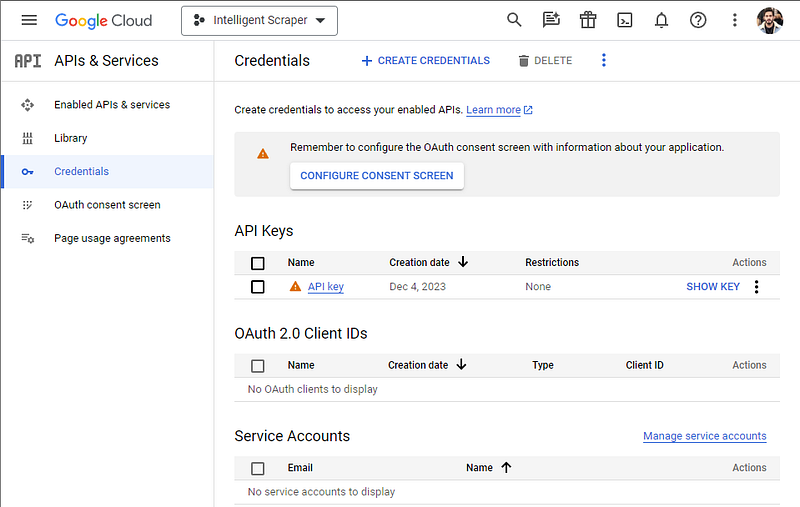
- Create an API key from the Google Cloud Credentials Console (Google Cloud Console) and retrieve the API key. See screenshot below for reference.
- Navigate to APIs & Services → Dashboard in the Google Cloud Console and enable the Custom Search API.
2. Google Custom Search Engine ID (CSE ID):
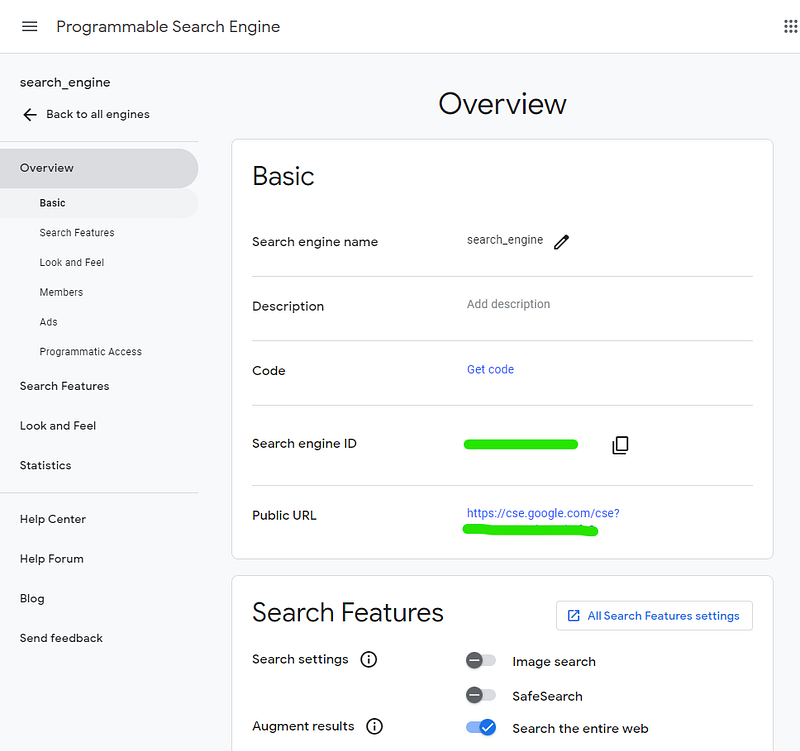
- Create a Custom Search Engine at Programmable Search Engine. Retrieve the Search engine ID which will be used later. See image below for reference.
3. Python Implementation
This section is a deep dive into the Python implementation for a system that automates the retrieval and summarization of web content using LangChain, OpenAI, and Google’s Search API. We’ll discuss the key elements first and then provide the entire code at the end.
3.1 Building the Web Research Retriever
The WebResearchRetriever is a sophisticated class that combines various components to fetch and process web-based information. Below is a detailed walkthrough of the initialization process and the involved components, accompanied by the corresponding code snippets.
Initialization of Components:
- OpenAI Embeddings: Generate text embeddings for semantic searches and contextual understanding.
- FAISS Index: Efficiently store and retrieve text embeddings.
- In-Memory Docstore: Temporarily hold documents during the retrieval process.
- ChatOpenAI: Interact with OpenAI’s GPT models in a conversational manner.
- GoogleSearchAPIWrapper: Perform web searches using Google’s API.
Here’s how these components are initialized in code:
from langchain.retrievers.web_research import WebResearchRetriever
from langchain.embeddings.openai import OpenAIEmbeddings
from langchain.vectorstores import FAISS
from langchain.docstore import InMemoryDocstore
import faiss

# Initializing OpenAI Embeddings
embeddings_model = OpenAIEmbeddings()

# Setting up FAISS Index
embedding_size = 1536
index = faiss.IndexFlatL2(embedding_size)
vectorstore_public = FAISS(embeddings_model.embed_query, index, InMemoryDocstore({}), {})

# Creating the WebResearchRetriever
web_retriever = WebResearchRetriever.from_llm(
    vectorstore=vectorstore_public,
    llm=llm,
    search=search,
    num_search_results=3
)
The WebResearchRetriever.from_llm() method is responsible for initializing the retriever with the components mentioned above. It utilizes the vector store, language model, and Google search to obtain and process the data, aiming to return a user-defined number of search results.
3.2 The Retrieval and Reporting Process
The retrieval and reporting process is a critical component of the system that involves fetching relevant data in response to user queries and then presenting this information in a structured and comprehensible manner. Let’s delve deeper into how this process unfolds through the RetrievalQAWithSourcesChain class and the PrintRetrievalHandler.
- Retrieval Process:
The RetrievalQAWithSourcesChain is at the heart of the operation. It leverages a language model and the web retriever to process user queries. When a query is issued, the chain conducts a search to find relevant documents that can provide the necessary information. The documents fetched are usually based on the semantic similarity of their content to the query, determined by the embeddings previously generated.
from langchain.chains import RetrievalQAWithSourcesChain

# Set up the ChatOpenAI model
llm = ChatOpenAI(model_name="gpt-3.5-turbo-16k", temperature=0, streaming=True)

# Set up the GoogleSearchAPIWrapper
search = GoogleSearchAPIWrapper()

# Instantiate the retrieval chain
qa_chain = RetrievalQAWithSourcesChain.from_chain_type(llm, retriever=web_retriever)
2. Reporting Process:
The PrintRetrievalHandler is a subclass of BaseCallbackHandler that manages the formatting and output of the retrieval results. During the retrieval process, it captures key events to log the query and summarize each document. This is done through two main methods:
on_retriever_start: Logs the beginning of a retrieval process.on_retriever_end: Iterates through the retrieved documents to compile a summary.
Here’s an example of how PrintRetrievalHandler is defined and used:
class PrintRetrievalHandler(BaseCallbackHandler):
    def __init__(self):
        self.results = []

    def on_retriever_start(self, query: str, **kwargs):
        print(f"Fetching information for: {query}")

    def on_retriever_end(self, documents, **kwargs):
        for doc in documents:
            # Summarization logic goes here
            # Append results with source, title, URL, and summary
In this handler, when the retrieval ends, it uses OpenAI’s ChatCompletion API to generate a succinct summary of each document. This can be particularly useful when the documents are extensive, and the user needs concise information. The handler then appends this summary, along with the document’s source and title, to the results.
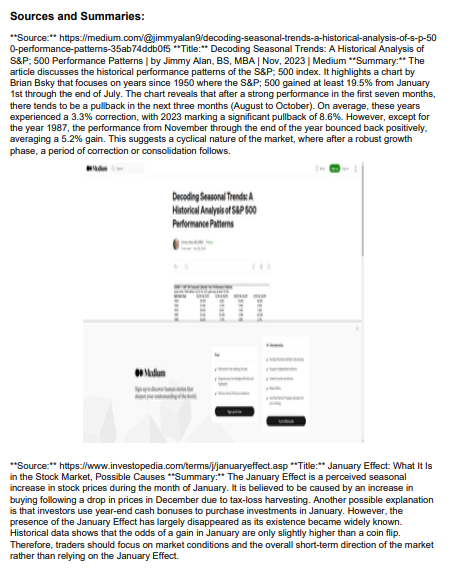
Finally, the results are printed out, providing the user with an answer to their query, accompanied by a summary of each source that contributed to the answer. Here is how the final output might look:
# Assuming 'result' contains the answer and source information from the retrieval process
print("\nAnswer:\n")
print(result['answer'])
print("\nSources and Summaries:\n")
for summary in retrieval_streamer_cb.results:
    print(summary)
3.3 Complete Code
Putting all of the above logic together, we get the following code:
from langchain.callbacks.base import BaseCallbackHandler
from langchain.chains import RetrievalQAWithSourcesChain
from langchain.retrievers.web_research import WebResearchRetriever
import faiss
from langchain.vectorstores import FAISS
from langchain.embeddings.openai import OpenAIEmbeddings
from langchain.docstore import InMemoryDocstore
from langchain.chat_models import ChatOpenAI
from langchain.utilities import GoogleSearchAPIWrapper
import openai
import os
import logging

os.environ["GOOGLE_API_KEY"] = "" # Get it at https://console.cloud.google.com/apis/api/customsearch.googleapis.com/credentials
os.environ["GOOGLE_CSE_ID"] = "" # Get it at https://programmablesearchengine.google.com/
os.environ["OPENAI_API_BASE"] = "https://api.openai.com/v1"
os.environ["OPENAI_API_KEY"] = "" # Get it at https://openai.com/account/api-keys
openai.api_key = "" # Get it at https://openai.com/account/api-keys

# Initialize required components

embeddings_model = OpenAIEmbeddings()
embedding_size = 1536
index = faiss.IndexFlatL2(embedding_size)
vectorstore_public = FAISS(embeddings_model.embed_query, index, InMemoryDocstore({}), {})

llm = ChatOpenAI(model_name="gpt-3.5-turbo-16k", temperature=0, streaming=True)
search = GoogleSearchAPIWrapper()

web_retriever = WebResearchRetriever.from_llm(
    vectorstore=vectorstore_public,
    llm=llm,
    search=search,
    num_search_results=3 #This should be adjusted depending on how many sources are desired
)

class PrintRetrievalHandler(BaseCallbackHandler):
    def __init__(self):
        self.results = []

    def on_retriever_start(self, query: str, **kwargs):
        self.results.append(f"**Question:** {query}\n")

    def on_retriever_end(self, documents, **kwargs):
        for idx, doc in enumerate(documents):
            source = doc.metadata.get("source", "Source not available")
            title = doc.metadata.get("title", "Title not available")
            snippet = doc.page_content[:2000]  # Using a snippet for summary

            # Generate summary for each document using the provided method
            summary_prompt = f"Please summarize the following content from '{title}' ({source}):\n\n{snippet}"
            summary = self.extract_chunk(summary_prompt)

            # Append results with source, title, URL, and summary
            self.results.append(f"**Source:** {source}\n**Title:** {title}\n**Summary:**\n{summary}\n")

    def extract_chunk(self, content):
        """
        Applies a prompt to some input content and extracts the response from OpenAI's ChatCompletion API.
        """
        response = openai.ChatCompletion.create(
            model="gpt-3.5-turbo-16k", messages=[{"role": "user", "content": content}], temperature=0
        )
        return response["choices"][0]["message"]["content"]

# User input
question = "What is does the SP500 tend to do in January?"

# Instantiate the PrintRetrievalHandler
retrieval_streamer_cb = PrintRetrievalHandler()

# Perform retrieval and answer generation
qa_chain = RetrievalQAWithSourcesChain.from_chain_type(llm, retriever=web_retriever)
result = qa_chain({"question": question}, callbacks=[retrieval_streamer_cb])

# Print the answer and sources with summaries
print("\nMain Answer:\n")
print(result['answer'])

print("\nSources and Summaries:\n")
for item in retrieval_streamer_cb.results:
    print(item)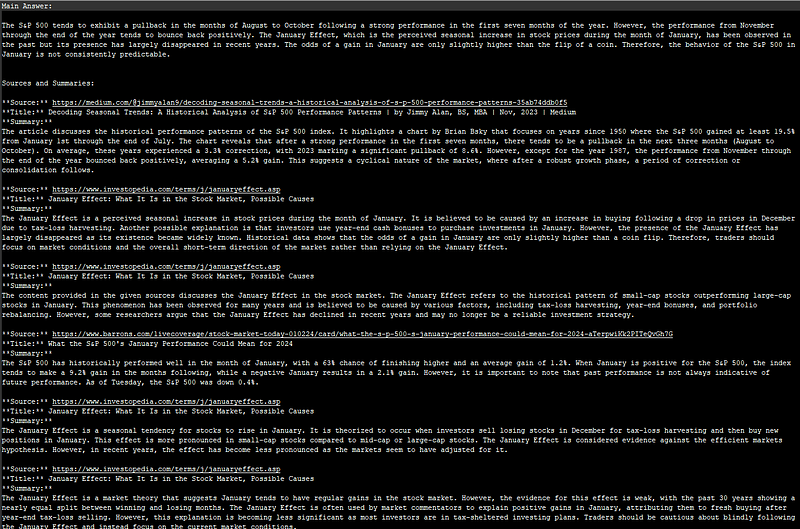
3.4 Bonus — Generating the Report
Transforming the information retrieved into into a cohesive report can be useful. We create a script and in particular acreate_pdf function to methodically construct a PDF from collected data.
doc = SimpleDocTemplate("report.pdf", pagesize=letter)
styles = getSampleStyleSheet()
Next, it adds the content, beginning with a well-defined question and followed by the corresponding answer. Each section is introduced with a heading for easy readability:
flowables.append(Paragraph("Question:", styles['Heading2']))
flowables.append(Paragraph(question, styles['BodyText']))
Finally, the function dynamically integrates sources and summaries, preserving the logical flow and ensuring each piece of information is well-represented:
flowables.append(Paragraph("Sources and Summaries:", styles['Heading2']))
# Code to append sources and summaries goes here
To get the complete code, head over to entreprenerdly.com. Alongside this, our site offers a variety of technical tutorials and guides, covering topics from AI and data science to broader tech subjects, aimed at helping you enhance your skills in a practical and straightforward manner.

5. Practical Application and Use Cases
The integration of LangChain, OpenAI LLM APIs, and the Google Search API Wrapper in Python opens up a wide array of practical applications and use cases across various industries and sectors.
Here’s an exploration of some scenarios where this technology can be effectively employed:
- Market Research and Analysis — A market analyst needs to understand the recent trends, say in renewable energy. The system can be used to automatically gather the latest news, research papers, and market reports.
- Academic Research — A researcher is compiling a literature review on the effects of urbanization on biodiversity. Application: The tool streamlines the process of searching for relevant academic papers, extracting key findings, and summarizing them.
- Journalism — A journalist is investigating the impact of a recent policy change in international trade. The system can quickly gather information from various news sources, official government releases, and expert opinions.
- Business Intelligence — A company is exploring new markets for expansion. The tool can assist in collecting and summarizing data on potential markets, including consumer trends, local regulations, and competitive landscapes.
- Healthcare Research — Medical professionals need up-to-date information on the latest treatments for a specific disease. The system can be used to retrieve and summarize the latest research findings, clinical trial results, and expert opinions from medical journals and health-related websites.
- Legal Research — A legal team requires comprehensive information on precedents and rulings related to a specific legal matter. This technology can automate the retrieval of case laws, legal commentaries, and scholarly articles, providing summarized insights that are crucial for legal research.
- Public Relations — A PR agency needs to monitor public sentiment and media coverage of their client. The system can continuously scan news articles and social media posts, providing summarized reports on public perception and media presence.
- Educational Purposes— Educators need resources to create comprehensive learning materials on a specific subject. The tool can compile and summarize relevant educational content, aiding in the creation of rich and informative course material.
- Financial Analysis — Financial analysts require up-to-date information on stock market trends and company performances. The system can be used to aggregate financial reports, news articles, and market analyses, providing quick and summarized insights for effective financial decision-making.
6. Areas of Improvement and Future Developments
LangChain, while a robust tool for connecting large language models to external data, faces several challenges and limitations that impact its broader adoption and effectiveness:
- Complexity and Abstractions: LangChain has been critiqued for its complex layers of abstraction, which can be daunting, especially for new users.
- Customization Limitations: The high level of abstraction in LangChain can restrict customization, making it less flexible for specific user needs.
- Inefficient Token Usage: LangChain has been noted for inefficient token usage in API calls, potentially leading to higher costs.
- Primarily Optimized for Demos: LangChain is perceived as being optimized more for creating demos or prototypes than for building production-ready applications.
As the field of language models continues to evolve, native Integration with OpenAI’s Web browsing Capabilities could be made once this becomes available.
Conclusion
This technology, standing at the intersection of advanced language processing and web-based data retrieval, offers transformative possibilities across various domains, from market research to academic studies.
The future seems geared towards more intuitive, user-friendly iterations of these technologies. As OpenAI’s web browsing capabilities integrate further, we can anticipate a more seamless experience in information handling.
Thank you for taking the time to read. If you found the article insightful, please consider clapping to support future content.👏
In Plain English 🚀
Thank you for being a part of the In Plain English community! Before you go:
- Be sure to clap and follow the writer ️👏️️
- Follow us: X | LinkedIn | YouTube | Discord | Newsletter
- Visit our other platforms: Stackademic | CoFeed | Venture
- More content at PlainEnglish.io


