
Integrating LangChain with SageMaker JumpStart to Operationalize LLM Applications
Building LLM-Driven Workflows

Large Language Models (LLMs) continue to take the world by storm. Hosting these models is a challenging task as we’ve explored in my previous articles. The next challenge is operationalizing these hosted LLMs in larger real-world applications.
To solve these two problems we have a pair of respective tools that we will work with today’s article:
- SageMaker JumpStart: SageMaker’s Model Zoo, here you can select from an available list of popular pre-trained models and deploy directly to SageMaker Inference using API calls via the SageMaker Python SDK.
- LangChain: An open source framework that helps users build GenerativeAI applications by enabling tools to simplify Prompt Engineering and Retrieval Augmented Generation (RAG). LangChain will help us create a “Chain” where our prompt is directly connected to our LLM, which in this case is our SageMaker JumpStart Endpoint.
For today’s article we will explore how we can specifically work with both of these tools to build a mock LLM workflow.
NOTE: This article assumes an intermediate understanding of SageMaker Deployment and Real-Time Inference in particular. I would suggest following this article for understanding Deployment/Inference more in depth. We also cover SageMaker JumpStart, but to understand the Foundational Model Deployment further please refer to this blog.
DISCLAIMER: I am a Machine Learning Architect at AWS and my opinions are my own.
SageMaker JumpStart Deployment
For this article we’ll be utilizing SageMaker JumpStart to deploy a Flan-T5 model on a Real-Time SageMaker Endpoint. Why and when to use SageMaker JumpStart for LLM Deployment?
- If you are happy with a base model’s performance, JumpStart makes it easy to deploy these LLMs via simple API calls.
- Certain Foundational Models are also enabled to support fine-tuning to help boost model accuracy and performance.
To get started with SageMaker JumpStart we can first go to the SageMaker Console (UI). Here you should notice a tab for JumpStart and the different Foundation Models that are available.
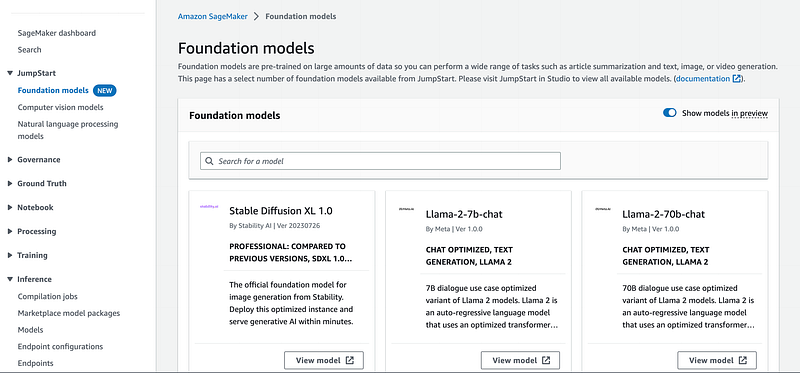
Here we can toggle for any models that we are interested in and observe the model card for more information such as fine-tuning support, a mock playground for inference, and more.
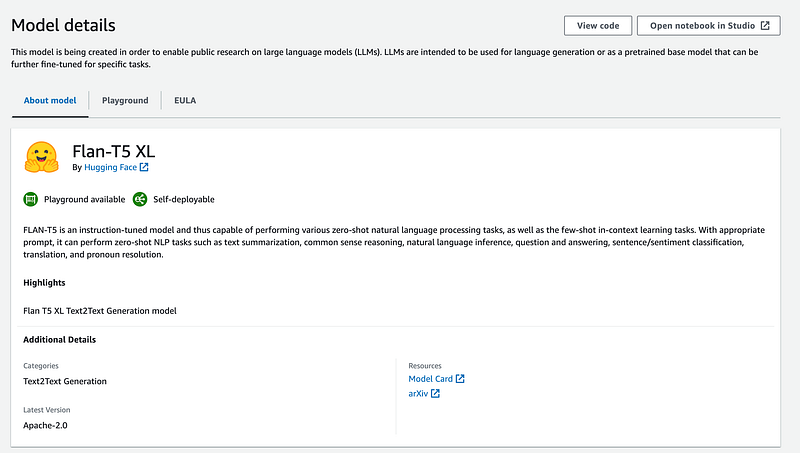
By default a sample notebook is also generated for you that you can use as a boilerplate. For today’s example we keep it simple and grab the ready made notebook from the following Github link.
To interact with SageMaker JumpStart we utilize the SageMaker Python SDK and provide a model_id and model_version so the right metadata for the model is retrieved.
from sagemaker.jumpstart.model import JumpStartModel

model_id, model_version = (
    "huggingface-text2text-flan-t5-xl",
    "*",
)
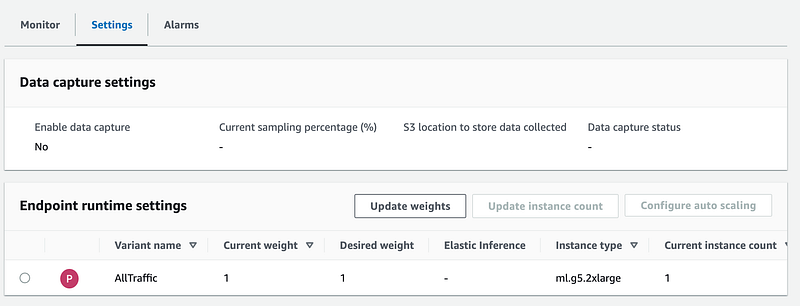
We can then deploy our JumpStart model as we would with other SageMaker endpoints, the main difference here is that by default an instance type is selected for you based off of the existing knowledge of the foundation model.
Due to the varying sizes and computational requirements of these larger models only specific instances can be used to host these models. To understand further you can also check the model cards to see what other instances are supported for your model if you would like to override the default value.
model = JumpStartModel(model_id=model_id, model_version=model_version)
model_predictor = model.deploy()
Before we can get to setting up LangChain, we can run a sample inference to understand how our input/output needs to be shaped. We also provide a few parameters that you can tune for model accuracy, here’s a quick primer below on what each parameter entails and the value ranges:
- Top_K: For generated text only use the “Top K” specified words, this can be any positive integer.
- Top_P: Top P helps increase diversity into the generated text by setting a probability threshold. For example if a value of .2 is set, for the next generated text only the highest probability tokens that add up to that 20% will be considered. This value can be any float between 0 to 1.
- Temperature: Controls randomness of output, the higher the value the more low probability words that are considered. Temperature limits vary depending on the model, but this value must be a positive integer.
The following linked Medium article is a great reference to understand these parameters farther.
payload = {
    "text_inputs": "Tell me the steps to make a pizza",
    "max_length": 50,
    "num_return_sequences": 3,
    "top_k": 50,
    "top_p": 0.95,
    "do_sample": True,
}
Using the sample payload we can invoke our created endpoint with the following code (endpoint creation will take ~5 minutes in this case).
import json
client = boto3.client("runtime.sagemaker")
encoded_payload = json.dumps(payload).encode('utf-8') #JSON serialization
response = client.invoke_endpoint(
        EndpointName=endpoint_name, ContentType="application/json", Body=encoded_payload
    )
model_predictions = json.loads(response["Body"].read())
model_predictions['generated_texts'][0]
Now that we have our hosted LLM we can focus on LangChain integration.
LangChain Integration
LangChain is a popular open-source framework that has made it simple to build GenerativeAI applications. Why is LangChain so useful? It simplifies a lot of the common constructs and challenges that come into play when operationalizing LLMs. If you are new to LangChain please refer to this amazing starter article on Medium.
Specifically today we will utilize three LangChain constructs:
1. Prompts
A large part of GenAI applications is something known as Prompt Engineering. Prompt Engineering is the science of tuning and developing prompts in the most efficient manner for models to understand. To help with this, the Prompt object in LangChain can be utilized to customize and inject your prompts with input variables.
from langchain.prompts import PromptTemplate

# In this instance we are just passing in the question for the prompt for our chain
prompt_template = """{question}"""

prompt = PromptTemplate(
    template=prompt_template, input_variables=["question"]
)
In our example above we don’t provide anything other than our question, but for other use-cases you may have supporting text that augments your input variables to shape your prompt.
2. Models:
LangChain natively supports a variety of different model providers for LLMs including OpenAI, HuggingFace, and in our case a SageMaker Endpoint construct. Note that this can be any SageMaker Endpoint, you are not limited to using just SageMaker JumpStart for your deployment.
To integrate SageMaker Real-Time Inference we first import the necessary LangChain classes to work with our JumpStart Endpoint.
from langchain import SagemakerEndpoint
from langchain.llms.sagemaker_endpoint import LLMContentHandler
LangChain expects a ContentHandler class that helps shape the input and output of our SageMaker Endpoint with two methods: transform_input and transform_output. Using our sample inference we can understand how we need to serialize and deserialize our data in the corresponding methods.
We can also optionally pass in model params (captured as model_kwargs) for our transform_input method to parse. What we return from our transform_input method should match what we passed into our invoke_endpoint API call with our SageMaker endpoint.
class ContentHandler(LLMContentHandler):
    content_type = "application/json"
    accepts = "application/json"

    def transform_input(self, prompt: str, model_kwargs: dict) -> bytes:
        input_str = json.dumps({"text_inputs": prompt, **model_kwargs}).encode('utf-8')
        return input_str

    def transform_output(self, output: str) -> str:
        response_json = json.loads(output.read().decode("utf-8"))
        return response_json["generated_texts"][0]

content_handler = ContentHandler()
After instantiating our content handler class we can focus on creating our LangChain SageMaker object. We also pass in model params, that you can toggle and tune for performance.
model_params = {"max_length": 100,
                "num_return_sequences": 1,
                "top_k": 100,
                "top_p": .95,
                "do_sample": True}

llm = SagemakerEndpoint(
        endpoint_name=endpoint_name,
        region_name="us-east-1",
        model_kwargs=model_params,
        content_handler=content_handler,
    )
3. Chains:
Our last construct is our Chain, which essentially takes the above LangChain constructs and puts it into a workflow that can simply take an input. In our case we use the ready-made LLM Chain that can take a prompt and model, but you can also make a Custom Chain as well if needed.
chain = LLMChain(
llm=llm, prompt=prompt)

# Execute chain
sample_prompt = "Tell me the steps to make a pizza"
chain.run(sample_prompt)
Additional Resources & Conclusion
The entire code for the example can be found at the link above. Operationalizing LLMs and building scalable GenerativeAI applications is a challenging task and this solution utilizing SageMaker Inference with LangChain is one such manner of tackling this domain. In coming articles we will explore how we can continue to build and scale Generative AI applications.
As always thank you for reading and feel free to leave any feedback.
If you enjoyed this article feel free to connect with me on LinkedIn and subscribe to my Medium Newsletter.
In Plain English
Thank you for being a part of our community! Before you go:
- Be sure to clap and follow the writer! 👏
- You can find even more content at PlainEnglish.io 🚀
- Sign up for our free weekly newsletter. 🗞️
- Follow us on Twitter(X), LinkedIn, YouTube, and Discord.