
Integrating Firebase with Laravel: A Step-by-Step Guide

In today’s digital age, building dynamic web applications that can handle real-time data updates, user authentication, and secure file storage is crucial. In this article, we’ll explore how to integrate the power of Laravel, a popular PHP framework, and Firebase, a real-time database, for your web development projects.
Firebase is Google’s mobile platform that allows you to rapidly develop web and mobile applications. When integrated with Laravel, a powerful PHP framework, you can create dynamic and real-time applications. Here’s a step-by-step guide with code snippets on how to integrate Firebase with Laravel.
Step 1: Create a Laravel Project
If you don’t already have a Laravel project, create one using Composer:
composer create-project - prefer-dist laravel/laravel firelara
Where firelara is my project name. So you can replace it with your project name.
Step 2: Install Firebase PHP SDK
In your Laravel project directory, use Composer to install the Firebase PHP SDK:
composer require kreait/firebase-php
Step 3: Creating a Firebase Project
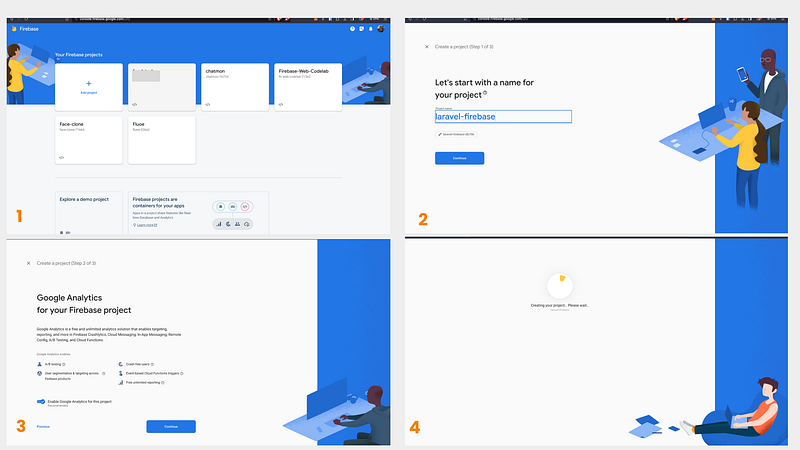
- Go to the Firebase Console and sign in with your Google account.
- Click on “Add Project” to create a new Firebase project. Give it a name and follow the on-screen instructions to set up your project.
Step 4: Get Firebase Configuration
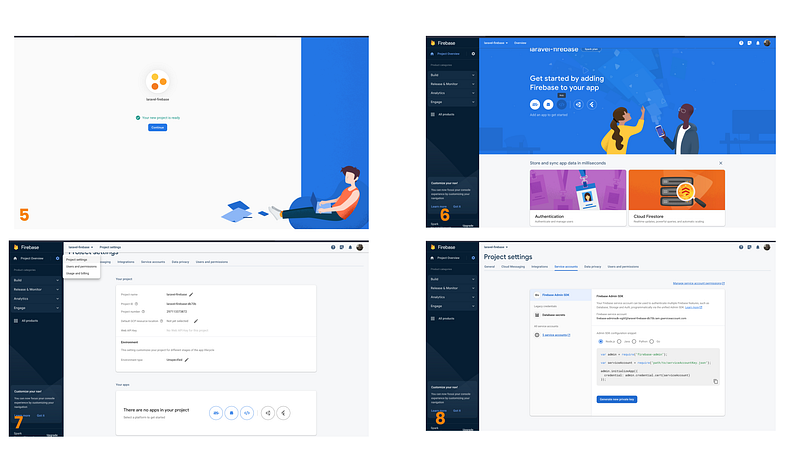
- After creating the project, click on the gear icon (Project settings) in the left sidebar.
- Under the “General” tab, scroll down to the “Your apps” section and click on the web app icon () to register your app.
- Follow the setup instructions, and Firebase will provide you with a configuration object that includes your Firebase SDK configuration. It will look something like this:
const firebaseConfig = {
  apiKey: "YOUR_API_KEY",
  authDomain: "YOUR_PROJECT_ID.firebaseapp.com",
  databaseURL: "https://YOUR_PROJECT_ID.firebaseio.com",
  projectId: "YOUR_PROJECT_ID",
  storageBucket: "YOUR_PROJECT_ID.appspot.com",
  messagingSenderId: "YOUR_MESSAGING_SENDER_ID",
  appId: "YOUR_APP_ID"
};
Step 5: Configure Firebase in Laravel
In your Laravel project, open the .env file and add your Firebase configuration values from the Firebase console
FIREBASE_API_KEY=YOUR_API_KEY
FIREBASE_AUTH_DOMAIN=YOUR_PROJECT_ID.firebaseapp.com
FIREBASE_DATABASE_URL=https://YOUR_PROJECT_ID.firebaseio.com
FIREBASE_PROJECT_ID=YOUR_PROJECT_ID
FIREBASE_STORAGE_BUCKET=YOUR_PROJECT_ID.appspot.com
FIREBASE_MESSAGING_SENDER_ID=YOUR_MESSAGING_SENDER_ID
FIREBASE_APP_ID=YOUR_APP_ID
Step 6: Initialize Firebase
In your Laravel application, you can initialize Firebase by creating a Firebase service instance in your controller or service provider:
use Kreait\Firebase\Factory;
use Kreait\Firebase\ServiceAccount;

$serviceAccount = ServiceAccount::fromJsonFile(config('firebase.credentials_path'));

$firebase = (new Factory)
    ->withServiceAccount($serviceAccount)
    ->withDatabaseUri(config('firebase.database_url'))
    ->create();

$database = $firebase->getDatabase();
You can also read the documentation (link below) on how to use dependence injection to retrieve the data.
To test we are going to use Firebase Realtime Database to retrieve a collection.
Step 7: Using Firebase Realtime Database
You can now use the $database object to interact with Firebase Realtime Database. For example, to read data:
$reference = $database->getReference('path/to/your/data'); // e.g $database->getRefrence('users');
$data = $reference->getValue();
That’s it fam! You’ve successfully integrated Laravel with Firebase Realtime Database. You can now build real-time features in your Laravel application using Firebase as the backend data storage.
Will also be dropping more on how to work with Realtime database and their methods. I hope to see y’all in the comment block.
For more details you can read the package documentation at: https://firebase-php.readthedocs.io/en/stable/setup.html


