
Integrate Azure Key Vault with AKS — Using “akv2k8s” (Part 3/3)
In this 3-parts tutorial we will explain how to integrate AKS with Azure Key Vault using “FlexVolumes” and “Azure Key Vault to Kubernetes”. However, before we get down to work let’s talk a little about each approach.

In this section
Azure Key Vault to Kubernetes (akv2k8s) use two main components (Azure Key Vault Controller and Azure Key Vault Env Injector) to inject a secret, key or certificate as environment variable accessible only for the main process of the container.
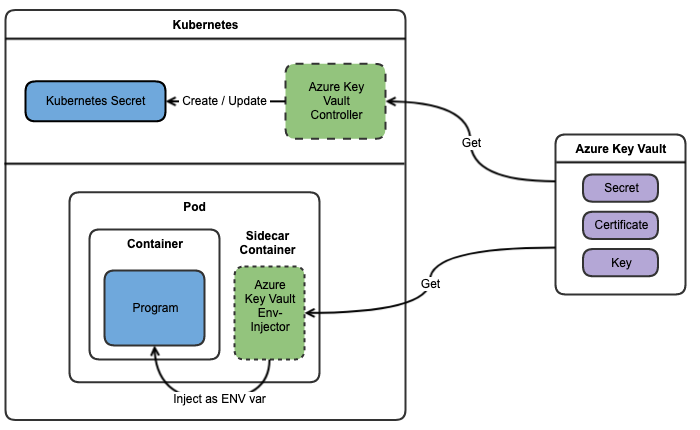
For more information visit the official documentation: https://github.com/SparebankenVest/azure-key-vault-to-kubernetes
What will we do in this tutorial?
- Configure your environment (set some environment variables)
- Install akv2k8s in your AKS cluster
- Configure akv2k8s (create a namespace with the required annotation and create an AzureKeyVaultSecret resource)
- Deploy a pod that access to a Key Vault secret
- Cleanup
Configure your environment
Let’s configure some environment variables that will be used during the tutorial
KEY_VAULT_NAME=<your-key-vault-name>
KEY_VAULT_SECRET_NAME=<your-secret-name>
Installation
Create a dedicated namespace for akv2k8s
kubectl create ns akv2k8sAdd the helm repository (I assume you have helm already installed)
helm repo add spv-charts http://charts.spvapi.no
helm repo update
Install the Controller (and the “AzureKeyVaultSecret” CRD):
helm install azure-key-vault-controller \
  spv-charts/azure-key-vault-controller \
  --namespace akv2k8s
Install the Env-Injector:
helm install azure-key-vault-env-injector \
  spv-charts/azure-key-vault-env-injector \
  --set installCrd=false \
  --namespace akv2k8s
Configuration
To allow the secret injection you need to add the label “azure-key-vault-env-injection: enabled” at the namespace level. Let’s create a new namespace called “akv2k8s-test” with the required label for our test:
cat << EOF | kubectl apply -f -
apiVersion: v1
kind: Namespace
metadata:
  name: akv2k8s-test
  labels:
    azure-key-vault-env-injection: enabled
EOF
Then, let’s create a “AzureKeyVaultSecret” CRD to sync akv2k8s with the Key Vault secret
cat << EOF | kubectl apply -f -
apiVersion: spv.no/v1alpha1
kind: AzureKeyVaultSecret
metadata:
  name: ${KEY_VAULT_SECRET_NAME}
  namespace: akv2k8s-test
spec:
  vault:
    name: ${KEY_VAULT_NAME}             # name of key vault
    object:
      name: ${KEY_VAULT_SECRET_NAME}    # name of the akv object
      type: secret                      # akv object type
EOF
Usage
Now we can create a pod to test our configuration
cat << EOF | kubectl apply -f -
apiVersion: v1
kind: Pod
metadata:
  name: akv2k8s-test
  namespace: akv2k8s-test
spec:
  containers:
  - name: akv2k8s-env-test
    image: spvest/akv2k8s-env-test:2.0.1
    args: ["TEST_SECRET"]
    env:
    - name: TEST_SECRET
      value: "${KEY_VAULT_SECRET_NAME}@azurekeyvault" # ref to akvs
EOF
Finally, see the log output from your Pod
kubectl logs akv2k8s-test -n akv2k8s-testIf you try to access the environment variable using “kubectl exec” you won’t be able to see the value (only the container main process have access to it)
kubectl exec -it flex-kv-test -n akv2k8s-test echo ${TEST_SECRET}Cleanup
Delete the test pod
kubectl delete pod flex-kv-test -n akv2k8s-testDelete the AzureKeyVaultSecret resource
kubectl delete AzureKeyVaultSecret ${KEY_VAULT_SECRET_NAME} -n akv2k8s-testDelete the test namespace
kubectl delete ns akv2k8s-test -n akv2k8s
Delete the akv2k8s Controller
helm delete azure-key-vault-controller -n akv2k8sDelete the akv2k8s Env-Injector
helm delete azure-key-vault-env-injector -n akv2k8sDelete the dedicated namespace for akv2k8s
kubectl delete ns akv2k8sIntegrate Azure Key Vault with AKS — Introduction (Part 1/3)
Integrate Azure Key Vault with AKS — Using “FlexVolume” (Part 2/3)