Installing ArgoCD on an EKS Cluster and Configuring Sync with a GitHub Manifest Repository
Introduction
ArgoCD is a powerful tool used for the continuous delivery of applications to Kubernetes clusters. When combined with Amazon EKS (Elastic Kubernetes Service) and GitHub, it forms a robust CI/CD pipeline. ArgoCD empowers cloud engineers with GitOps, a powerful methodology for managing Kubernetes applications using Git as the single source of truth.
This article guides you through installing ArgoCD on your Amazon EKS cluster and configuring it to synchronize with your GitHub manifest repository. By the end, you’ll have a streamlined deployment process driven by Git commits.
Understanding ArgoCD
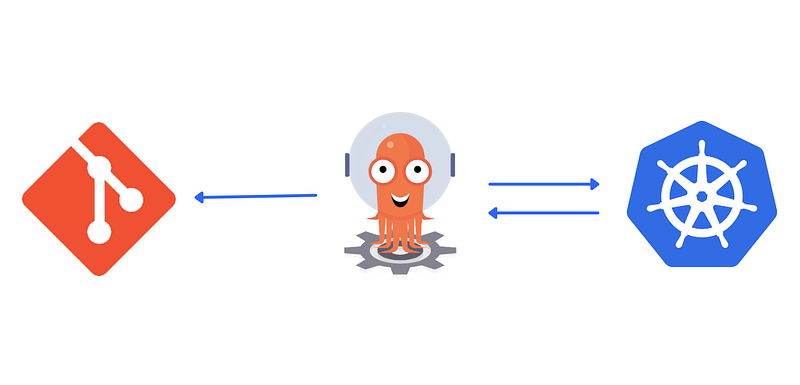
ArgoCD simplifies deployment by automating the process of syncing Kubernetes manifests stored in a Git repository with the target cluster. It ensures that the cluster’s desired state matches the Git repository’s state, providing a declarative and GitOps-based approach to managing Kubernetes applications. This approach promotes infrastructure-as-code principles and simplifies deployments.
Prerequisites
Before proceeding, ensure you have the following:
· An active AWS account with the necessary permissions to create resources in EKS.
· An EKS cluster created and configured.
· AWS CLI installed and configured.
· kubectl installed and configured.
· A GitHub repository containing Kubernetes manifests.
Installing ArgoCD on EKS
· Download the latest ArgoCD CLI: Visit the ArgoCD releases page on GitHub and download the appropriate binary for your operating system.
· Update Kubeconfig: Ensure your kubeconfig file is configured with access to your EKS cluster. Use the following command, replacing <REGION> and <CLUSTER_NAME> with your specific values:
aws eks update-kubeconfig --region <REGION> --name <CLUSTER_NAME>· Install ArgoCD: Deploy ArgoCD resources using the downloaded CLI. Here’s the command (replace <VERSION> with the downloaded version):
argocd install --create-namespace --prunes --self-heal --version <VERSION>This command creates the necessary Kubernetes resources for ArgoCD, including a dedicated namespace, service accounts, and deployments.
· Verify Installation: Wait for ArgoCD pods to become ready. You can check this using:
kubectl get pods -n argocdConfiguring ArgoCD with Your GitHub Repository
Create an ArgoCD Application: Now, let’s configure ArgoCD to synchronize with your GitHub repository. Create a YAML file named application.yaml with the following content, replacing placeholders with your details:
apiVersion: argoproj.io/v1alpha1
kind: Application
metadata:
  name: my-app  # Replace with your application name
spec:
  project: default
  source:
    repoURL: https://github.com/<your-username>/<your-repo>.git  # Replace with your repository URL
    path: manifests/  # Path to your manifests within the repository (optional)
    targetRevision: HEAD  # Git revision to synchronize (optional)
  destination:
    server: https://kubernetes.default.svc  # Cluster API server address
    namespace: default  # Target namespace for deployments (optional)
Explanation:
· name: A unique name for your application within ArgoCD.
· repoURL: URL of your GitHub repository containing the manifests.
· path: (Optional) Path within the repository where your manifests reside. Defaults to the root directory.
· targetRevision: (Optional) Specific Git commit or branch to synchronize. Defaults to HEAD (latest commit).
· server: Kubernetes API server address within the cluster.
· namespace: (Optional) Namespace within the cluster where deployments should be applied. Defaults to “default”.
Apply the Application: Deploy the application.yaml configuration using kubectl:
kubectl apply -f application.yaml· Access ArgoCD UI: Once deployed, access the ArgoCD UI by running the following command to forward the service port locally:
kubectl port-forward svc/argocd-server -n argocd 8080:80
Open http://localhost:8080 in your browser. The default username is “admin” and the password is stored in a Kubernetes secret named argocd-initial-password-admin. You can retrieve it using:
kubectl get secret argocd-initial-password-admin -n argocd -o jsonpath="{.data.password}" | base64 -dManaging Your Deployment Workflow
The ArgoCD UI provides a user-friendly interface to visualize your applications, track deployments, and manage GitOps workflows. You can see the status of your synchronized application, review deployment history, and even manually trigger deployments based on specific Git revisions.
Conclusion
ArgoCD simplifies continuous delivery on Kubernetes by automating deployment processes through GitOps principles. By following the steps outlined in this guide, you can seamlessly install ArgoCD on your EKS cluster and configure it to synchronize with your GitHub repository. Embracing ArgoCD empowers development teams to achieve faster, more reliable deployments in their Kubernetes environments.
By integrating ArgoCD into your workflow, you pave the way for a more efficient and automated continuous delivery pipeline, ultimately enhancing your organization’s agility and productivity in deploying Kubernetes applications.
In Plain English 🚀
Thank you for being a part of the In Plain English community! Before you go:
- Be sure to clap and follow the writer ️👏️️
- Follow us: X | LinkedIn | YouTube | Discord | Newsletter
- Visit our other platforms: Stackademic | CoFeed | Venture | Cubed
- More content at PlainEnglish.io


