avatarThe Pragmatic Programmers

Free AI web copilot to create summaries, insights and extended knowledge, download it at here

5526

Abstract

ath_to_tetris_rom) ​ ​ <span class="hljs-title class_">Agent</span>.start_link(​<span class="hljs-keyword">fn</span>​ -> game ​<span class="hljs-keyword">end</span>​, ​<span class="hljs-symbol">name:</span>MODULE) ​ ​<span class="hljs-keyword">end</span></pre></div><p id="be9d">This function spins up a new Agent that’s a wrapper around an ALEx interface. It takes a path to a ROM file — which you’ll learn about in the next section — and initializes a new ALEx interface with some options. :display_screen ensures you can see the gameplay that’s happening, :sound ensures you can hear the sound, and :random_seed is the seed the game starts with. Setting the seed ensures every single iteration of game play is exactly the same. This is important for comparing between solutions.</p><h1 id="8aaf">Creating a Tetris Agent</h1><p id="fa09">Before you can get started evolving Tetris agents, you need to download a copy of an Atari 2600 Tetris ROM. Fortunately, the ALE repo offers the official Tetris ROM.<a href="https://readmedium.com/what-you-learned-558f65085768">[12]</a> Atari 2600 ROMs are also available from a number of websites. If you’re worried about the contents of a ROM, you can see the checksums of supported ROMs here.<a href="https://readmedium.com/what-you-learned-558f65085768">[13]</a></p><p id="8d83">Once you download tetris.bin, create a new folder named priv and place tetris.bin into it. Next, in tetris.exs, create a new problem:</p><div id="3f0c"><pre>​ ​<span class="hljs-class"><span class="hljs-keyword">defmodule</span><span class="hljs-title">Tetris</span></span><span class="hljs-keyword">do</span>​ ​ <span class="hljs-variable">@behaviour</span> <span class="hljs-title class_">Problem</span><span class="hljs-keyword">alias</span> <span class="hljs-title class_">Types</span>.<span class="hljs-title class_">Chromosome</span> ​ ​ <span class="hljs-variable">@impl</span> <span class="hljs-literal">true</span> ​ ​<span class="hljs-function"><span class="hljs-keyword">def</span><span class="hljs-title">genotype</span></span>, ​<span class="hljs-keyword">do</span>​: ​<span class="hljs-comment"># ...​</span> ​ ​ <span class="hljs-variable">@impl</span> <span class="hljs-literal">true</span> ​ ​<span class="hljs-function"><span class="hljs-keyword">def</span><span class="hljs-title">fitness_function</span></span>(chromosome), ​<span class="hljs-keyword">do</span>​: ​<span class="hljs-comment"># ...​</span> ​ ​ <span class="hljs-variable">@impl</span> <span class="hljs-literal">true</span> ​ ​<span class="hljs-function"><span class="hljs-keyword">def</span><span class="hljs-title">terminate?</span></span>(population, generation), ​<span class="hljs-keyword">do</span>​: ​<span class="hljs-comment"># ...​</span> ​ ​<span class="hljs-keyword">end</span></pre></div><p id="f860">Now you need to get started encoding your problem.</p><p id="8430">Your Tetris AI will need to perform a series of actions that change the game state. If you recall, Tetris is a game where tiles fall into the playing field until they stack on another tile or hit the bottom. If the tiles are stacked such that they create a horizontal line filling the entire playing field, all of the blocks on the horizontal line disappear, and the player is awarded points.</p><p id="98b7">In Tetris, you can choose to move left or right or rotate a tile. You can also choose to speed up or slow down the falling of the tile. In ALEx, actions are encoded as positive integers and stored in the legal_actions field of an ALEx interface. You want your agent to make a series of actions that maximize the score of the game. If your goal is to find the best series of actions, you can encode solutions as a list of integer actions, like this:</p><div id="34d1"><pre>​ ​def​ genotype ​<span class="hljs-keyword">do</span>​ ​ game = Agent.<span class="hljs-keyword">get</span>(TetrisInterface, & &<span class="hljs-number">1</span>) ​# <span class="hljs-keyword">Get</span> the ALE​ ​ genes = <span class="hljs-keyword">for</span> _ <- <span class="hljs-number">1.</span><span class="hljs-number">.1000</span>, ​<span class="hljs-keyword">do</span>​: Enum.random(game.legal_actions) ​ %Chromosome{​genes:​ genes, ​size:​ <span class="hljs-number">1000</span>} ​ ​<span class="hljs-keyword">end</span></pre></div><p id="d2be">First, you grab the running game from the TetrisGame Agent. The game gives you access to legal_actions, which is the set of legal actions you can perform in Tetris. Next, you use Enum.random/1 to select 100 random actions to perform in a series. Note, 1000 actions is probably not long enough to complete a full game of Tetris. Additionally, implementing agents in this way is a bit naive — typically you’d want to make decisions based off of the game state, but doing this is outside of the scope of this book.</p><p id="dc55">Next, you need to define a fitness function. Remember, your goal is to maximize the reward of a series of 100 actions. To do this, you need to run a series of 100 actions and get the final score. You can accomplish that like this:</p><div id="816d"><pre>​ ​<span class="hljs-function"><span class="hljs-keyword">def</span><span class="hljs-title">fitness_function</span></span>(chromosome) ​<span class="hljs-keyword">do</span>​ ​ game = <span class="hljs-title class_">Agent</span>.get(<span class="hljs-title class_">TetrisInterface</span>, & &<span class="hljs-number">1</span>) ​<span class

Options

="hljs-comment"># Get the ALE​</span> ​ actions = chromosome.genes ​ ​ game = ​ actions ​ |> <span class="hljs-title class_">Enum</span>.reduce(game, ​<span class="hljs-keyword">fn</span>​ act, game -> <span class="hljs-title class_">Alex</span>.step(game, act) ​<span class="hljs-keyword">end</span>​) ​ ​ reward = game.reward ​ <span class="hljs-title class_">Alex</span>.reset(game) ​<span class="hljs-comment"># Reset the game after a run​</span> ​ reward ​ ​<span class="hljs-keyword">end</span></pre></div><p id="d324">In this function, you start by getting the ALEx interface. Next, you get the actions specified by the current solution. After that you run each action, updating the game state every time with Enum.reduce/3. Alex.step/2 represents a single step through the game, given an action. After you complete all of the actions, you extract the current reward from the game and then reset the game.</p><p id="56d1">The fitness function corresponds to a single episode of 100 steps. An episode is a static run through a game. After each episode, you need to reset the game to evaluate the next episode.</p><p id="cb9b">Now you need to define your termination criteria. You don’t know exactly what the best score possible is, so it’s best to terminate based on generation:</p><div id="0401"><pre>​ ​def​ <span class="hljs-keyword">terminate</span>?(_population, generation), ​<span class="hljs-keyword">do</span>​: generation == <span class="hljs-number">5</span></pre></div><p id="8e4f">Each episode will take a long time to run, so you’ll want to keep the number of generations low. You can always run the algorithm longer if you want to.</p><p id="f66e">Now, you’re ready to run.</p><h1 id="8107">Running the Tetris Agent</h1><p id="114b">With your algorithm implemented, you’re ready to roll. First, you need to start the TetrisGame agent so your algorithm can interact with the game, like this:</p><div id="0d9b"><pre>​ TetrisInterface<span class="hljs-selector-class">.start_link</span>(​<span class="hljs-string">"​​priv/tetris.bin"</span>​)</pre></div><p id="1b0a">Next, add the following:</p><div id="5ee1"><pre>​ soln = Genetic.<span class="hljs-built_in">run</span>(Tetris, ​population_size:​ <span class="hljs-number">10</span>) ​ ​ IO.<span class="hljs-built_in">write</span>(​<span class="hljs-string">"​​\n"</span>​) ​ IO.<span class="hljs-built_in">write</span>(​<span class="hljs-string">"​​Best is ​​#{​soln​}​​\n"</span>​)</pre></div><p id="9d86">Because it takes so long to run a solution, you’ll want to keep your population size small as well. Now, you can run your algorithm:</p><div id="9536"><pre>​ ​ ​​mix​​ ​​<span class="hljs-keyword">run</span><span class="language-bash">​​ ​​scripts/tetris.exs​</span></pre></div><p id="fa42">While your algorithm is running, you should see something like this:</p><figure id="4c51"><img src="https://cdn-images-1.readmedium.com/v2/resize:fit:800/1*60xtJaUNr7jcb9pKW5WkiA.png"><figcaption></figcaption></figure><p id="4a9f">ALEx will display a small Tetris window that runs through each solution in your population and tests it. It will reset each solution once the run is complete. All you need to do is wait.</p><p id="373f">If you don’t wish to watch the evolution in real time, you can always set :display_screen to false and instead take screenshots at the end of every episode using Alex.screenshot/1.</p><p id="6800">After the algorithm runs for awhile, you’ll get some output like this:</p><div id="4dfb"><pre>​ ​​ mix run scripts/tetris.exs ​ <span class="hljs-meta">%Type</span>s.Chromosome{ ​ ​age:​ <span class="hljs-number">1</span>, ​ ​fitness:​ <span class="hljs-number">0</span>, ​ ​genes:​ [<span class="hljs-number">0</span>, <span class="hljs-number">1</span>, <span class="hljs-number">1</span>, <span class="hljs-number">2</span>, <span class="hljs-number">3.</span>.., <span class="hljs-number">1</span>, <span class="hljs-number">0</span>], ​ ​size:​ <span class="hljs-number">1000</span> ​ }</pre></div><p id="5432">Your algorithm didn’t learn how to play Tetris very well. That’s OK — you can improve upon it in plenty of ways. See if you can build off of your work here and create a better Tetris agent. Additionally, you can implement agents for a ton of different Atari 2600 games, so be sure to check them out.</p><p id="813b">ALEx is just one tool — a sandbox for creating algorithms that interact with actual environments. OpenAI has lots of other environments for a wide variety of different games and scenarios. Hopefully, you saw how these tools can help you understand how solutions translate to actions in an environment.</p><p id="d518"><i>👈 <a href="https://readmedium.com/playing-tetris-with-genetic-algorithms-98182a062cf9">Playing Tetris with Genetic Algorithms</a> | <a href="https://readmedium.com/table-of-contents-879fc8614df">TOC</a> | <a href="https://readmedium.com/what-you-learned-558f65085768">What You Learned</a> 👉</i></p><p id="ed43"><i>Genetic Algorithms in Elixir by Sean Moriarity can be purchased in other book formats <a href="https://pragprog.com/titles/smgaelixir">directly from the Pragmatic Programmers</a>. If you notice a code error or formatting mistake, please let us know <a href="https://readmedium.com/how-to-report-errata-4e164674347a">here</a> so that we can fix it.</i></p><figure id="b7ae"><img src="https://cdn-images-1.readmedium.com/v2/resize:fit:800/1*U2E2a23SuM4520w9CUXSWw.jpeg"><figcaption></figcaption></figure></article></body>

Installing and Compiling ALEx

Genetic Algorithms in Elixir — by Sean Moriarity (79 / 101)

👈 Playing Tetris with Genetic Algorithms | TOC | What You Learned 👉

The ALE, and subsequently ALEx, requires libsdl1.2[10] and cmake.[11] If you don’t have either, you can install them like this:

​ ​$ ​​sudo​​ ​​apt-get​​ ​​install​​ ​​libsdl1.2-dev​​ ​​libsdl-gfx1.2-dev​​ ​​\​
​ ​    ​​libsdl-image1.2-dev​​ ​​cmake​

The easiest way to build ALEx on Windows is by installing the Windows Subsystem for Linux (WSL) and running your project in the WSL.

Next, you need to add ALEx to your dependencies in mix.exs:

​ ​defpdepsdo​
​   ...
​   {​:alex​, ​"​​~> 0.3.2"​}
​   ...
​ ​end

Now, run mix deps.get. After your dependencies are downloaded, run mix deps.compile. You should see something like this:

​ ​$ ​​mix​​ ​​deps.compile​
​ Compiling ALE. This will take some time.

As the output says, the ALE compilation will take a very long time to complete. If your compilation fails, it’s likely because ALEx can’t find erl_nif.h. This usually happens if you don’t have erlang-dev installed. You can fix this by running the following:

​ ​$ ​​sudo​​ ​​apt-get​​ ​​install​​ ​​erlang-dev

And then run this:

​ ​$ ​​mix​​ ​​deps.clean​
​ ​$ ​​mix​​ ​​deps.get​
​ ​$ ​​mix​​ ​​deps.compile​

After awhile, here’s what you should see:

​ ​$ ​​mix​​ ​​deps.compile​
​ Compiling ALE. This will take some time.
​ Successfully compiled ALE.

Once that’s done, you’re ready to go. Fortunately, you won’t have to recompile the ALE every time you recompile your program.

Interacting with ALEx

ALEx offers functionality through the Alex module. You’ll likely only ever need to work with the functions in the Alex module; however, ALEx also offers a number of modules for interacting with things like game state, RAM, Atari ROMs, and the screen. The Alex.Interface module offers functions that directly interact with the ALE interface.

Future versions of ALEx will offer interactions with the ALE interface through a GenServer. For now, to interact with ALEx inside your genetic algorithm, you’ll need to create a basic wrapper around the ALE interface. To keep things simple, you’ll create a simple game Agent that holds a reference to the ALE interface.

First, create a new file tetris.exs in scripts. In tetris.exs, define a new TetrisInterface module, like this:

​ ​defmoduleTetrisInterfacedo​
​   ​useAgent
​ 
​   ​defstart_link(path_to_tetris_rom) ​do​
​   ​end​
​ 
​ ​end

You’ll only need to implement start_link/1 to spin up a new Agent around an ALEx interface. Implement start_link/1 like this:

​ ​defstart_link(path_to_tetris_rom) ​do​
​   int = Alex.new()
​ 
​   game =
​     int
​     |> Alex.set_option(​:display_screen​, true)
​     |> Alex.set_option(​:sound​, true)
​     |> Alex.set_option(​:random_seed​, 123)
​     |> Alex.load(path_to_tetris_rom)
​ 
​   Agent.start_link(​fn​ -> game ​end​, ​name:​ __MODULE__)
​ ​end

This function spins up a new Agent that’s a wrapper around an ALEx interface. It takes a path to a ROM file — which you’ll learn about in the next section — and initializes a new ALEx interface with some options. :display_screen ensures you can see the gameplay that’s happening, :sound ensures you can hear the sound, and :random_seed is the seed the game starts with. Setting the seed ensures every single iteration of game play is exactly the same. This is important for comparing between solutions.

Creating a Tetris Agent

Before you can get started evolving Tetris agents, you need to download a copy of an Atari 2600 Tetris ROM. Fortunately, the ALE repo offers the official Tetris ROM.[12] Atari 2600 ROMs are also available from a number of websites. If you’re worried about the contents of a ROM, you can see the checksums of supported ROMs here.[13]

Once you download tetris.bin, create a new folder named priv and place tetris.bin into it. Next, in tetris.exs, create a new problem:

​ ​defmoduleTetrisdo​
​   @behaviour Problemalias Types.Chromosome
​ 
​   @impl true
​   ​defgenotype, ​do​: ​# ...​
​ 
​   @impl true
​   ​deffitness_function(chromosome), ​do​: ​# ...​
​ 
​   @impl true
​   ​defterminate?(population, generation), ​do​: ​# ...​
​ ​end

Now you need to get started encoding your problem.

Your Tetris AI will need to perform a series of actions that change the game state. If you recall, Tetris is a game where tiles fall into the playing field until they stack on another tile or hit the bottom. If the tiles are stacked such that they create a horizontal line filling the entire playing field, all of the blocks on the horizontal line disappear, and the player is awarded points.

In Tetris, you can choose to move left or right or rotate a tile. You can also choose to speed up or slow down the falling of the tile. In ALEx, actions are encoded as positive integers and stored in the legal_actions field of an ALEx interface. You want your agent to make a series of actions that maximize the score of the game. If your goal is to find the best series of actions, you can encode solutions as a list of integer actions, like this:

​ ​def​ genotype ​do​
​   game = Agent.get(TetrisInterface, & &1) ​# Get the ALE​
​   genes = for _ <- 1..1000, ​do​: Enum.random(game.legal_actions)
​   %Chromosome{​genes:​ genes, ​size:​ 1000}
​ ​end

First, you grab the running game from the TetrisGame Agent. The game gives you access to legal_actions, which is the set of legal actions you can perform in Tetris. Next, you use Enum.random/1 to select 100 random actions to perform in a series. Note, 1000 actions is probably not long enough to complete a full game of Tetris. Additionally, implementing agents in this way is a bit naive — typically you’d want to make decisions based off of the game state, but doing this is outside of the scope of this book.

Next, you need to define a fitness function. Remember, your goal is to maximize the reward of a series of 100 actions. To do this, you need to run a series of 100 actions and get the final score. You can accomplish that like this:

​ ​deffitness_function(chromosome) ​do​
​   game = Agent.get(TetrisInterface, & &1) ​# Get the ALE​
​   actions = chromosome.genes
​ 
​   game =
​     actions
​     |> Enum.reduce(game, ​fn​ act, game -> Alex.step(game, act) ​end​)
​ 
​   reward = game.reward
​   Alex.reset(game) ​# Reset the game after a run​
​   reward
​ ​end

In this function, you start by getting the ALEx interface. Next, you get the actions specified by the current solution. After that you run each action, updating the game state every time with Enum.reduce/3. Alex.step/2 represents a single step through the game, given an action. After you complete all of the actions, you extract the current reward from the game and then reset the game.

The fitness function corresponds to a single episode of 100 steps. An episode is a static run through a game. After each episode, you need to reset the game to evaluate the next episode.

Now you need to define your termination criteria. You don’t know exactly what the best score possible is, so it’s best to terminate based on generation:

​ ​def​ terminate?(_population, generation), ​do​: generation == 5

Each episode will take a long time to run, so you’ll want to keep the number of generations low. You can always run the algorithm longer if you want to.

Now, you’re ready to run.

Running the Tetris Agent

With your algorithm implemented, you’re ready to roll. First, you need to start the TetrisGame agent so your algorithm can interact with the game, like this:

​ TetrisInterface.start_link(​"​​priv/tetris.bin"​)

Next, add the following:

​ soln = Genetic.run(Tetris, ​population_size:​ 10)
​ 
​ IO.write(​"​​\n"​)
​ IO.write(​"​​Best is ​​#{​soln​}​​\n"​)

Because it takes so long to run a solution, you’ll want to keep your population size small as well. Now, you can run your algorithm:

​ ​$ ​​mix​​ ​​run​​ ​​scripts/tetris.exs​

While your algorithm is running, you should see something like this:
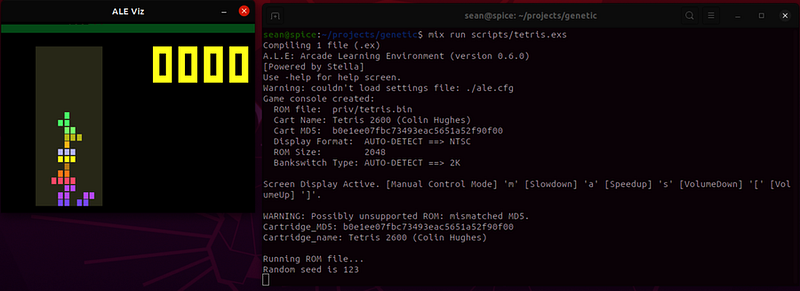
ALEx will display a small Tetris window that runs through each solution in your population and tests it. It will reset each solution once the run is complete. All you need to do is wait.

If you don’t wish to watch the evolution in real time, you can always set :display_screen to false and instead take screenshots at the end of every episode using Alex.screenshot/1.

After the algorithm runs for awhile, you’ll get some output like this:

​ ​$​ mix run scripts/tetris.exs
​ %Types.Chromosome{
​   ​age:​ 1,
​   ​fitness:​ 0,
​   ​genes:​ [0, 1, 1, 2, 3..., 1, 0],
​   ​size:​ 1000
​ }

Your algorithm didn’t learn how to play Tetris very well. That’s OK — you can improve upon it in plenty of ways. See if you can build off of your work here and create a better Tetris agent. Additionally, you can implement agents for a ton of different Atari 2600 games, so be sure to check them out.

ALEx is just one tool — a sandbox for creating algorithms that interact with actual environments. OpenAI has lots of other environments for a wide variety of different games and scenarios. Hopefully, you saw how these tools can help you understand how solutions translate to actions in an environment.

👈 Playing Tetris with Genetic Algorithms | TOC | What You Learned 👉

Genetic Algorithms in Elixir by Sean Moriarity can be purchased in other book formats directly from the Pragmatic Programmers. If you notice a code error or formatting mistake, please let us know here so that we can fix it.
Smgaelixir
Recommended from ReadMedium