Install OpenCTI
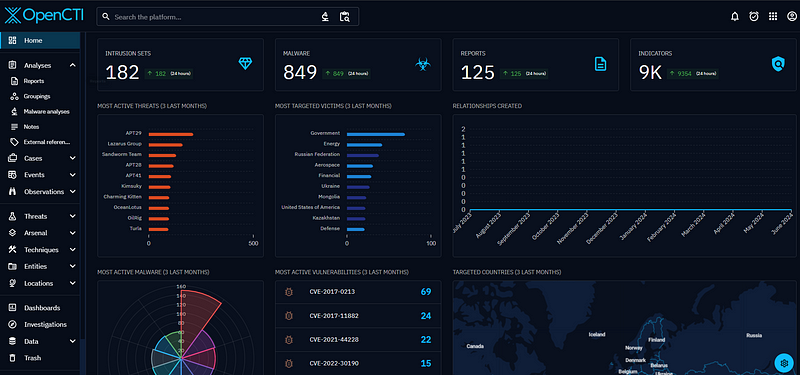
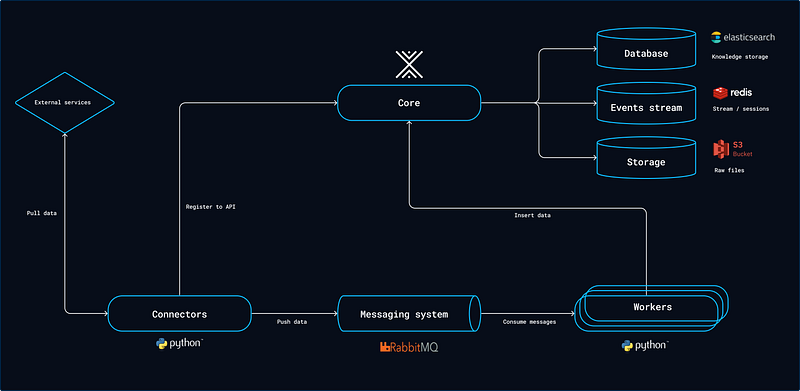
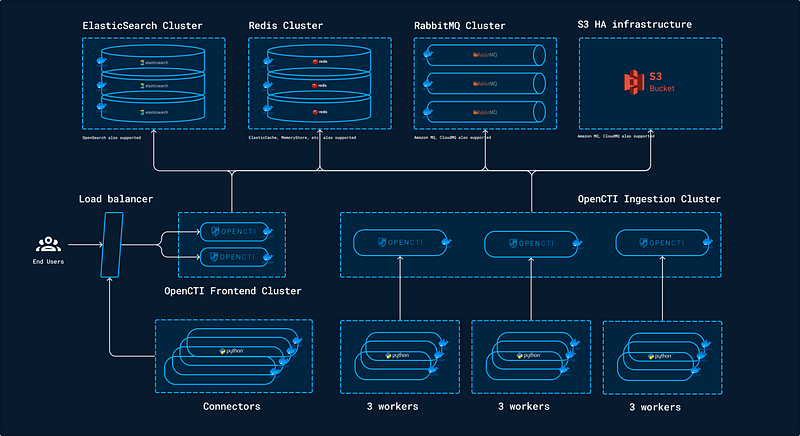
OpenCTI (Open Cyber Threat Intelligence) is an open-source platform designed to collect, store, and utilize cyber threat data. It helps organizations manage threat information by providing tools for the collection, aggregation, analysis, and sharing of threat intelligence.
Features:
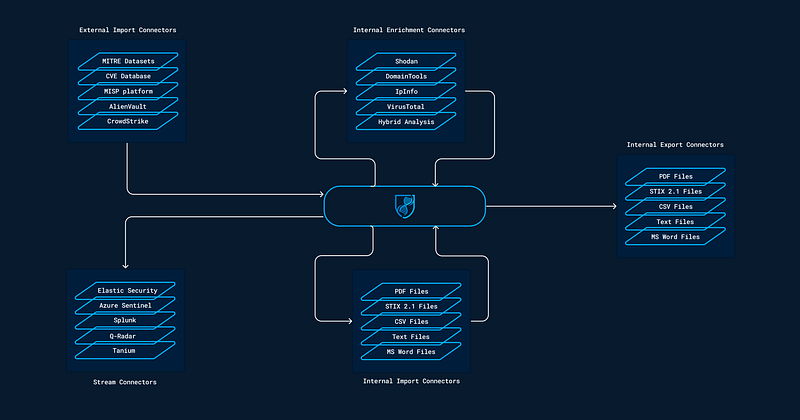
1. Integrate MITRE
2. Integrate Malware Bazaar
3. Integrate Alient Vault
4. Integrate MISP
Installation
Pre-requisites
# apt install docker-compose
# apt install -y jq
# echo "vm.max_map_count=1048575" >> /etc/sysctl.conf
# mkdir -p /path/to/your/app && cd /path/to/your/app
# vim docker-compose.yml
version: '3'
services:
redis:
image: redis:7.2.5
restart: always
volumes:
- redisdata:/data
elasticsearch:
image: docker.elastic.co/elasticsearch/elasticsearch:8.13.4
volumes:
- esdata:/usr/share/elasticsearch/data
environment:
# Comment-out the line below for a cluster of multiple nodes
- discovery.type=single-node
# Uncomment the line below below for a cluster of multiple nodes
# - cluster.name=docker-cluster
- xpack.ml.enabled=false
- xpack.security.enabled=false
- thread_pool.search.queue_size=5000
- logger.org.elasticsearch.discovery="ERROR"
- "ES_JAVA_OPTS=-Xms${ELASTIC_MEMORY_SIZE} -Xmx${ELASTIC_MEMORY_SIZE}"
restart: always
ulimits:
memlock:
soft: -1
hard: -1
nofile:
soft: 65536
hard: 65536
minio:
image: minio/minio:RELEASE.2024-05-28T17-19-04Z # Use "minio/minio:RELEASE.2024-05-28T17-19-04Z-cpuv1" to troubleshoot compatibility issues with CPU
volumes:
- s3data:/data
ports:
- "9000:9000"
environment:
MINIO_ROOT_USER: ${MINIO_ROOT_USER}
MINIO_ROOT_PASSWORD: ${MINIO_ROOT_PASSWORD}
command: server /data
restart: always
rabbitmq:
image: rabbitmq:3.13-management
environment:
- RABBITMQ_DEFAULT_USER=${RABBITMQ_DEFAULT_USER}
- RABBITMQ_DEFAULT_PASS=${RABBITMQ_DEFAULT_PASS}
- RABBITMQ_NODENAME=rabbit01@localhost
volumes:
- amqpdata:/var/lib/rabbitmq
restart: always
opencti:
image: opencti/platform:6.2.6
environment:
- NODE_OPTIONS=--max-old-space-size=8096
- APP__PORT=8080
- APP__BASE_URL=${OPENCTI_BASE_URL}
- APP__ADMIN__EMAIL=${OPENCTI_ADMIN_EMAIL}
- APP__ADMIN__PASSWORD=${OPENCTI_ADMIN_PASSWORD}
- APP__ADMIN__TOKEN=${OPENCTI_ADMIN_TOKEN}
- APP__APP_LOGS__LOGS_LEVEL=error
- REDIS__HOSTNAME=redis
- REDIS__PORT=6379
- ELASTICSEARCH__URL=http://elasticsearch:9200
- MINIO__ENDPOINT=minio
- MINIO__PORT=9000
- MINIO__USE_SSL=false
- MINIO__ACCESS_KEY=${MINIO_ROOT_USER}
- MINIO__SECRET_KEY=${MINIO_ROOT_PASSWORD}
- RABBITMQ__HOSTNAME=rabbitmq
- RABBITMQ__PORT=5672
- RABBITMQ__PORT_MANAGEMENT=15672
- RABBITMQ__MANAGEMENT_SSL=false
- RABBITMQ__USERNAME=${RABBITMQ_DEFAULT_USER}
- RABBITMQ__PASSWORD=${RABBITMQ_DEFAULT_PASS}
- SMTP__HOSTNAME=${SMTP_HOSTNAME}
- SMTP__PORT=25
- PROVIDERS__LOCAL__STRATEGY=LocalStrategy
ports:
- "8080:8080"
depends_on:
- redis
- elasticsearch
- minio
- rabbitmq
restart: always
worker:
image: opencti/worker:6.2.6
environment:
- OPENCTI_URL=http://192.168.100.232:8080
- OPENCTI_TOKEN=${OPENCTI_ADMIN_TOKEN}
- WORKER_LOG_LEVEL=info
depends_on:
- opencti
deploy:
mode: replicated
replicas: 3
restart: always
connector-export-file-stix:
image: opencti/connector-export-file-stix:6.2.6
environment:
- OPENCTI_URL=http://192.168.100.232:8080
- OPENCTI_TOKEN=${OPENCTI_ADMIN_TOKEN}
- CONNECTOR_ID=${CONNECTOR_EXPORT_FILE_STIX_ID} # Valid UUIDv4
- CONNECTOR_TYPE=INTERNAL_EXPORT_FILE
- CONNECTOR_NAME=ExportFileStix2
- CONNECTOR_SCOPE=application/json
- CONNECTOR_LOG_LEVEL=info
restart: always
depends_on:
- opencti
connector-export-file-csv:
image: opencti/connector-export-file-csv:6.2.6
environment:
- OPENCTI_URL=http://192.168.100.232:8080
- OPENCTI_TOKEN=${OPENCTI_ADMIN_TOKEN}
- CONNECTOR_ID=${CONNECTOR_EXPORT_FILE_CSV_ID} # Valid UUIDv4
- CONNECTOR_TYPE=INTERNAL_EXPORT_FILE
- CONNECTOR_NAME=ExportFileCsv
- CONNECTOR_SCOPE=text/csv
- CONNECTOR_LOG_LEVEL=info
restart: always
depends_on:
- opencti
connector-export-file-txt:
image: opencti/connector-export-file-txt:6.2.6
environment:
- OPENCTI_URL=http://192.168.100.232:8080
- OPENCTI_TOKEN=${OPENCTI_ADMIN_TOKEN}
- CONNECTOR_ID=${CONNECTOR_EXPORT_FILE_TXT_ID} # Valid UUIDv4
- CONNECTOR_TYPE=INTERNAL_EXPORT_FILE
- CONNECTOR_NAME=ExportFileTxt
- CONNECTOR_SCOPE=text/plain
- CONNECTOR_LOG_LEVEL=info
restart: always
depends_on:
- opencti
connector-import-file-stix:
image: opencti/connector-import-file-stix:6.2.6
environment:
- OPENCTI_URL=http://192.168.100.232:8080
- OPENCTI_TOKEN=${OPENCTI_ADMIN_TOKEN}
- CONNECTOR_ID=${CONNECTOR_IMPORT_FILE_STIX_ID} # Valid UUIDv4
- CONNECTOR_TYPE=INTERNAL_IMPORT_FILE
- CONNECTOR_NAME=ImportFileStix
- CONNECTOR_VALIDATE_BEFORE_IMPORT=true # Validate any bundle before import
- CONNECTOR_SCOPE=application/json,text/xml
- CONNECTOR_AUTO=true # Enable/disable auto-import of file
- CONNECTOR_LOG_LEVEL=info
restart: always
depends_on:
- opencti
connector-import-document:
image: opencti/connector-import-document:6.2.6
environment:
- OPENCTI_URL=http://192.168.100.232:8080
- OPENCTI_TOKEN=${OPENCTI_ADMIN_TOKEN}
- CONNECTOR_ID=${CONNECTOR_IMPORT_DOCUMENT_ID} # Valid UUIDv4
- CONNECTOR_TYPE=INTERNAL_IMPORT_FILE
- CONNECTOR_NAME=ImportDocument
- CONNECTOR_VALIDATE_BEFORE_IMPORT=true # Validate any bundle before import
- CONNECTOR_SCOPE=application/pdf,text/plain,text/html
- CONNECTOR_AUTO=true # Enable/disable auto-import of file
- CONNECTOR_ONLY_CONTEXTUAL=false # Only extract data related to an entity (a report, a threat actor, etc.)
- CONNECTOR_CONFIDENCE_LEVEL=15 # From 0 (Unknown) to 100 (Fully trusted)
- CONNECTOR_LOG_LEVEL=info
- IMPORT_DOCUMENT_CREATE_INDICATOR=true
restart: always
depends_on:
- opencti
connector-analysis:
image: opencti/connector-import-document:6.2.6
environment:
- OPENCTI_URL=http://192.168.100.232:8080
- OPENCTI_TOKEN=${OPENCTI_ADMIN_TOKEN}
- CONNECTOR_ID=${CONNECTOR_ANALYSIS_ID} # Valid UUIDv4
- CONNECTOR_TYPE=INTERNAL_ANALYSIS
- CONNECTOR_NAME=ImportDocumentAnalysis
- CONNECTOR_VALIDATE_BEFORE_IMPORT=false # Validate any bundle before import
- CONNECTOR_SCOPE=application/pdf,text/plain,text/html
- CONNECTOR_AUTO=true # Enable/disable auto-import of file
- CONNECTOR_ONLY_CONTEXTUAL=false # Only extract data related to an entity (a report, a threat actor, etc.)
- CONNECTOR_CONFIDENCE_LEVEL=15 # From 0 (Unknown) to 100 (Fully trusted)
- CONNECTOR_LOG_LEVEL=info
restart: always
depends_on:
- opencti
connector-mitre:
image: opencti/connector-mitre:6.2.6
environment:
- OPENCTI_URL=http://192.168.100.232:8080
- OPENCTI_TOKEN=${OPENCTI_ADMIN_TOKEN}
- CONNECTOR_ID=95996acf-1b08-4492-b66f-f54a46f14398
- "CONNECTOR_NAME=MITRE Datasets"
- CONNECTOR_SCOPE=tool,report,malware,identity,campaign,intrusion-set,attack-pattern,course-of-action,x-mitre-data-source,x-mitre-data-component,x-mitre-matrix,x-mitre-tactic,x-mitre-collection
- CONNECTOR_RUN_AND_TERMINATE=false
- CONNECTOR_LOG_LEVEL=error
- MITRE_REMOVE_STATEMENT_MARKING=true
- MITRE_INTERVAL=7 # In days
restart: always
depends_on:
- opencti
connector-malwarebazaar-recent-additions:
image: opencti/connector-malwarebazaar-recent-additions:6.2.6
environment:
- OPENCTI_URL=http://192.168.100.232:8080
- OPENCTI_TOKEN=${OPENCTI_ADMIN_TOKEN}
- CONNECTOR_ID=51ebc133-58c4-4a8b-9afc-4177e597cc91
- "CONNECTOR_NAME=MalwareBazaar Recent Additions"
- CONNECTOR_LOG_LEVEL=error
- MALWAREBAZAAR_RECENT_ADDITIONS_API_URL=https://mb-api.abuse.ch/api/v1/
- MALWAREBAZAAR_RECENT_ADDITIONS_COOLDOWN_SECONDS=300 # Time to wait in seconds between subsequent requests
- MALWAREBAZAAR_RECENT_ADDITIONS_INCLUDE_TAGS=exe,dll,docm,docx,doc,xls,xlsx,xlsm,js # (Optional) Only download files if any tag matches. (Comma separated)
- MALWAREBAZAAR_RECENT_ADDITIONS_INCLUDE_REPORTERS= # (Optional) Only download files uploaded by these reporters. (Comma separated)
- MALWAREBAZAAR_RECENT_ADDITIONS_LABELS=malware-bazaar # (Optional) Labels to apply to uploaded Artifacts. (Comma separated)
- MALWAREBAZAAR_RECENT_ADDITIONS_LABELS_COLOR=#54483b # Color to use for labels
restart: always
depends_on:
- opencti
connector-alienvault:
image: opencti/connector-alienvault:6.2.6
environment:
- OPENCTI_URL=http://192.168.100.232:8080
- OPENCTI_TOKEN=${OPENCTI_ADMIN_TOKEN}
- CONNECTOR_ID=a0525916-3eb7-406a-bd25-20383dca5d9d
- CONNECTOR_NAME=AlienVault
- CONNECTOR_SCOPE=alienvault
- CONNECTOR_LOG_LEVEL=error
- ALIENVAULT_BASE_URL=https://otx.alienvault.com
- ALIENVAULT_API_KEY=e5f5573751513045d34a501225493013acd92c5025c24f362fb282509a7500c1
- ALIENVAULT_TLP=White
- ALIENVAULT_CREATE_OBSERVABLES=true
- ALIENVAULT_CREATE_INDICATORS=true
- ALIENVAULT_PULSE_START_TIMESTAMP=2022-05-01T00:00:00 # BEWARE! Could be a lot of pulses!
- ALIENVAULT_REPORT_TYPE=threat-report
- ALIENVAULT_REPORT_STATUS=New
- ALIENVAULT_GUESS_MALWARE=false # Use tags to guess malware.
- ALIENVAULT_GUESS_CVE=false # Use tags to guess CVE.
- ALIENVAULT_EXCLUDED_PULSE_INDICATOR_TYPES=FileHash-MD5,FileHash-SHA1 # Excluded Pulse indicator types.
- ALIENVAULT_ENABLE_RELATIONSHIPS=true # Enable/Disable relationship creation between SDOs.
- ALIENVAULT_ENABLE_ATTACK_PATTERNS_INDICATES=false # Enable/Disable "indicates" relationships between indicators and attack patterns
- ALIENVAULT_INTERVAL_SEC=1800
restart: always
depends_on:
- opencti
connector-misp:
image: opencti/connector-misp:6.2.6
environment:
- OPENCTI_URL=http://192.168.100.232:8080
- OPENCTI_TOKEN=${OPENCTI_ADMIN_TOKEN}
- CONNECTOR_ID=8d14ed11-eda8-4efe-af80-738460720d5d
- CONNECTOR_NAME=MISP
- CONNECTOR_SCOPE=misp
- CONNECTOR_LOG_LEVEL=error
- CONNECTOR_EXPOSE_METRICS=false
- MISP_URL=https://192.168.100.232 # Required
- MISP_REFERENCE_URL= # Optional, will be used to create external reference to MISP event (default is "url")
- MISP_KEY=UVhkfPwFN0xdecHIGSD0V12AwqhxieIfomzK7lR7 # Required
- MISP_SSL_VERIFY=false # Required
- MISP_DATETIME_ATTRIBUTE=timestamp # Required, filter to be used in query for new MISP events
- MISP_DATE_FILTER_FIELD=timestamp # Required, field to filter on date
- MISP_REPORT_DESCRIPTION_ATTRIBUTE_FILTER= # Optional, filter to be used to find the attribute with report description (example: "type=comment,category=Internal reference")
- MISP_CREATE_REPORTS=true # Required, create report for MISP event
- MISP_CREATE_INDICATORS=true # Required, create indicators from attributes
- MISP_CREATE_OBSERVABLES=true # Required, create observables from attributes
- MISP_CREATE_OBJECT_OBSERVABLES=true # Required, create text observables for MISP objects
- MISP_CREATE_TAGS_AS_LABELS=true # Optional, create tags as labels (sanitize MISP tag to OpenCTI labels)
- MISP_GUESS_THREAT_FROM_TAGS=false # Optional, try to guess threats (threat actor, intrusion set, malware, etc.) from MISP tags when they are present in OpenCTI
- MISP_AUTHOR_FROM_TAGS=false # Optional, map creator:XX=YY (author of event will be YY instead of the author of the event)
- MISP_MARKINGS_FROM_TAGS=false # Optional, map marking:XX=YY (in addition to TLP, add XX:YY as marking definition, where XX is marking type, YY is marking value)
- MISP_ENFORCE_WARNING_LIST=false # Optional, enforce warning list in MISP queries
- MISP_REPORT_TYPE=misp-event # Optional, report_class if creating report for event
- MISP_IMPORT_FROM_DATE=2000-01-01 # Required, import all event from this date
- MISP_IMPORT_TAGS=opencti:import,type:osint # Optional, list of tags used for import events
- MISP_IMPORT_TAGS_NOT= # Optional, list of tags to not include
- MISP_IMPORT_CREATOR_ORGS= # Optional, only import events created by those orgs (put the identifiers here)
- MISP_IMPORT_CREATOR_ORGS_NOT= # Optional, do not import events created by those orgs (put the identifiers here)
- MISP_IMPORT_OWNER_ORGS= # Optional, only import events owned by those orgs (put the identifiers here)
- MISP_IMPORT_OWNER_ORGS_NOT= # Optional, do not import events owned by those orgs (put the identifiers here)
- MISP_IMPORT_KEYWORD= # Optional, search only events based on a keyword
- MISP_IMPORT_DISTRIBUTION_LEVELS= # Optional, only import events with the given distribution levels (ex: 0,1,2,3)
- MISP_IMPORT_THREAT_LEVELS= # Optional only import events with the given threat levels (ex: 1,2,3,4)
- MISP_IMPORT_ONLY_PUBLISHED=false
- MISP_IMPORT_WITH_ATTACHMENTS=false # Optional, try to import a PDF file from the attachment attribute
- MISP_IMPORT_TO_IDS_NO_SCORE=40 # Optional, use as a score for the indicator/observable if the attribute to_ids is no
- MISP_IMPORT_UNSUPPORTED_OBSERVABLES_AS_TEXT=false # Optional, import unsupported observable as x_opencti_text
- MISP_IMPORT_UNSUPPORTED_OBSERVABLES_AS_TEXT_TRANSPARENT=true # Optional, import unsupported observable as x_opencti_text just with the value
- MISP_INTERVAL=5 # Required, in minutes
restart: always
depends_on:
- opencti
volumes:
esdata:
s3data:
redisdata:
amqpdata:# cat << EOF > .env
[email protected]
OPENCTI_ADMIN_PASSWORD= ChangeMePlease
OPENCTI_ADMIN_TOKEN=$(cat /proc/sys/kernel/random/uuid)
OPENCTI_BASE_URL=http://192.168.100.232:8080
MINIO_ROOT_USER=$(cat /proc/sys/kernel/random/uuid)
MINIO_ROOT_PASSWORD=$(cat /proc/sys/kernel/random/uuid)
RABBITMQ_DEFAULT_USER=guest
RABBITMQ_DEFAULT_PASS=guest
ELASTIC_MEMORY_SIZE=8G
CONNECTOR_ANALYSIS_ID=$(cat /proc/sys/kernel/random/uuid)
CONNECTOR_HISTORY_ID=$(cat /proc/sys/kernel/random/uuid)
CONNECTOR_EXPORT_FILE_STIX_ID=$(cat /proc/sys/kernel/random/uuid)
CONNECTOR_EXPORT_FILE_CSV_ID=$(cat /proc/sys/kernel/random/uuid)
CONNECTOR_IMPORT_FILE_STIX_ID=$(cat /proc/sys/kernel/random/uuid)
CONNECTOR_EXPORT_FILE_TXT_ID=$(cat /proc/sys/kernel/random/uuid)
CONNECTOR_IMPORT_DOCUMENT_ID=$(cat /proc/sys/kernel/random/uuid)
SMTP_HOSTNAME=$(hostname)
EOF# docker compose up -d --build
Reference:
https://www.uuidgenerator.net/version4
https://github.com/misje/wazuh-opencti/tree/mainThats it.
Thank you for reading. I hope it was helpful.


