avatarYang Zhou

Free AI web copilot to create summaries, insights and extended knowledge, download it at here

2234

Abstract

metadata.</b></p><p id="b3ee">Each file has a corresponding inode, and its inode number is an identifier of its inode.</p><p id="3e79">The concept of inodes makes our lives easier cause it separates the data and metadata of a file both in the system and developers’ minds. It’s a good practice of the Linux philosophy.</p><h1 id="6312">Mastering the Commands Relative to Inodes</h1><p id="111d">Only understanding the concept is not enough for an engineer, let’s move forward to practical commands.</p><h2 id="4e1b">Checking the inodes information of a filesystem</h2><p id="418f">It’s not possible to have unlimited numbers of inodes for a filesystem, since saving inodes needs space and the space is limited. To check the relative information, we can use the <code>df -i</code> command as follows:</p><div id="0ad9"><pre><span class="hljs-built_in">df</span> -i /dev</pre></div><p id="640e">The above command will check the inodes’ information of the <code>dev</code>. The results are as follows:</p><figure id="c0c6"><img src="https://cdn-images-1.readmedium.com/v2/resize:fit:800/1*JKfjlJJNRVup0D8sMoEprg.png"><figcaption></figcaption></figure><p id="e9e3">Based on the above results, I’m relaxed since only 1% incodes were used. 😄</p><p id="3e14">Now, you can answer the interview question mentioned at the beginning.</p><blockquote id="a4fd"><p>Since every file must have an inode, it is possible to run out of inodes, but the hard drive is not yet full. In this case, new files cannot be created on the hard disk.</p></blockquote><h2 id="6b94">Checking the inode number of a file</h2><p id="30ba">As mentioned before, a file’s inode number, or called inode id, is the identifier of its inode. Therefore, if we’ll do some operations based on a file’s inode, finding its inode number is the first step.</p><p id="b115">For a single file, we can use the <code>ls -i</code> command:</p><div id="cfeb"><pre><span class="hljs-keyword">ls</span> -i <span class="hljs-keyword">test</span>.txt</pre></div><p id="ca29">The result is as follows:</p><figure id="e6e9"><img src="https://cdn-images-1.readmedium.com/v2/resize:fit:800/1*GyxUQSkaaw3Nsdn3QDOfoA.png"><figcaption></figcaption></figure><p id="26e7">For a directory that includes

Options

many files, the command is the same. We just need to change the filename to the directory’s name.</p><p id="6c04">After getting the inode number, we can do precise operations for the corresponding file. For example, if we would like to delete the <code>test.txt</code> file, we can use the following command:</p><div id="d665"><pre>find . -inum <span class="hljs-number">8800836</span><span class="hljs-keyword">delete</span></pre></div><p id="8b8e">It seems unnecessary to delete the <code>test.txt</code> file with the above command, since the <code>rm</code> command is easier. But if you use Linux long enough, you may meet issues as follows:</p><figure id="ad14"><img src="https://cdn-images-1.readmedium.com/v2/resize:fit:800/1*p7AY-bUeX0K1OPX5Zos39A.png"><figcaption></figcaption></figure><p id="f546">Yes, some files with weird names may be hard to be deleted as normal. To avoid this issue, the easiest way is to delete the files directly based on their inode number.</p><h1 id="f010">Conclusion</h1><p id="fbab">Understanding inodes is a great starting point to figure out the filesystems of Linux. Basically, an inode is a place to store the metadata of a file and every file has an inode. Linux provides a few commands for us to check relative information and do operations based on it.</p><p id="a6de"><b><i>Thanks for reading. If you like it, please follow <a href="https://yangzhou1993.medium.com/follow">me</a> and become a <a href="https://yangzhou1993.medium.com/membership">Medium member</a> to enjoy more great articles. </i></b>🙂</p><p id="56d4">Relative posts:</p><div id="bf64" class="link-block"> <a href="https://readmedium.com/mtime-ctime-and-atime-in-linux-whats-the-difference-209f3db0718e"> <div> <div> <h2>mtime, ctime and atime in Linux: What’s the Difference</h2> <div><h3>Use a correct one for a certain scenario</h3></div> <div><p>medium.com</p></div> </div> <div> <div style="background-image: url(https://miro.readmedium.com/v2/resize:fit:320/1*akd-zglIbYgp7C3u-_gFzA.png)"></div> </div> </div> </a> </div></article></body>

Inodes: A Starting Point for Understanding Linux Filesystems

From concepts to practical usages

Image from alvander on Wallhaven

There is an interesting tech interview question for backend developers:

If a Linux server’s hard disk space is not full but new files can not be created, what are the potential reasons?

To answer it, you need to understand how the Linux filesystem works.

Basically, to save a file in the Linux system is not only about storing its data (or called its content), but also about saving its metadata.

Every file has its own metadata, which includes the basic information of the file itself, such as:

  • The name of the file
  • The size of the file
  • User id of the file owner
  • Group id of the file
  • The file’s read, write and execute permissions
  • Timestamps of the file (ctime,atime and mtime)
  • The inode number of the file
  • The number of links (how many file names point to this inode)
  • The location of the file data block

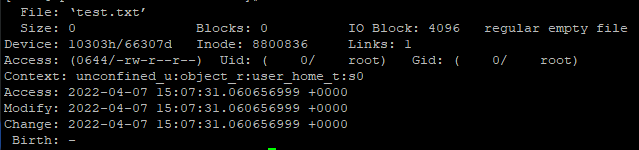
To check out a file’s metadata, we can use the stat command.

For example, there is a file named test.txt on my Linux server, when I execute the command:

stat test.txt

The results are as follows:

Lots of the information is understandable, but there is a special concept worth paying attention to — “inode”.

An inode, which stands for an index node, is a place to store a file’s metadata.

Each file has a corresponding inode, and its inode number is an identifier of its inode.

The concept of inodes makes our lives easier cause it separates the data and metadata of a file both in the system and developers’ minds. It’s a good practice of the Linux philosophy.

Mastering the Commands Relative to Inodes

Only understanding the concept is not enough for an engineer, let’s move forward to practical commands.

Checking the inodes information of a filesystem

It’s not possible to have unlimited numbers of inodes for a filesystem, since saving inodes needs space and the space is limited. To check the relative information, we can use the df -i command as follows:

df -i /dev

The above command will check the inodes’ information of the dev. The results are as follows:

Based on the above results, I’m relaxed since only 1% incodes were used. 😄

Now, you can answer the interview question mentioned at the beginning.

Since every file must have an inode, it is possible to run out of inodes, but the hard drive is not yet full. In this case, new files cannot be created on the hard disk.

Checking the inode number of a file

As mentioned before, a file’s inode number, or called inode id, is the identifier of its inode. Therefore, if we’ll do some operations based on a file’s inode, finding its inode number is the first step.

For a single file, we can use the ls -i command:

ls -i test.txt

The result is as follows:

For a directory that includes many files, the command is the same. We just need to change the filename to the directory’s name.

After getting the inode number, we can do precise operations for the corresponding file. For example, if we would like to delete the test.txt file, we can use the following command:

find . -inum 8800836delete

It seems unnecessary to delete the test.txt file with the above command, since the rm command is easier. But if you use Linux long enough, you may meet issues as follows:

Yes, some files with weird names may be hard to be deleted as normal. To avoid this issue, the easiest way is to delete the files directly based on their inode number.

Conclusion

Understanding inodes is a great starting point to figure out the filesystems of Linux. Basically, an inode is a place to store the metadata of a file and every file has an inode. Linux provides a few commands for us to check relative information and do operations based on it.

Thanks for reading. If you like it, please follow me and become a Medium member to enjoy more great articles. 🙂

Relative posts:

Linux
Programming
DevOps
Shell
Bash
Recommended from ReadMedium