avatarCoucou Camille

Free AI web copilot to create summaries, insights and extended knowledge, download it at here

2327

Abstract

re id="6c29"> <div> <div>

            <iframe class="gist-iframe" src="/gist/coucou-camille/4c8fef232452cae63708d47819ced989.js" allowfullscreen="" frameborder="0" height="undefined" width="undefined">
          </div>
        </div>
    </figure></iframe></div></div></figure><p id="6b44">The program updates the bid and asks for BTC/USDT on Binance infinitely:</p><figure id="4e83"><img src="https://cdn-images-1.readmedium.com/v2/resize:fit:800/1*Ys3ac7KW9aPHy4LWJxSZsQ.png"><figcaption>Image by Author</figcaption></figure><h2 id="cbc5">Stack Overflow</h2><p id="7359">Stack overflow is a similar context that could be confused with infinite loops sometimes. It arises from an infinite (or sufficiently deep) recursion. The simplest example would be a function calling itself:</p><div id="d6e8"><pre>def <span class="hljs-built_in">run</span>():
<span class="hljs-built_in">run</span>()</pre></div><div id="9de9"><pre><span class="hljs-function"><span class="hljs-title">run</span><span class="hljs-params">()</span></span></pre></div><p id="9c44">Run it in the Python console and you will get a <b>RecursionError </b>stating that the maximum recursion depth is exceeded.</p><figure id="68bf"><img src="https://cdn-images-1.readmedium.com/v2/resize:fit:800/1*MWBNGw9FB2FH9QujrEsk-A.png"><figcaption>Image by Author</figcaption></figure><h2 id="236e">CPU Usage of Infinite Loop</h2><p id="8b51">An infinite loop causes unexpected consumption of resources, such as CPU or memory. It could take CPU usage to near 100% and hinder the running progress of other programs.</p><p id="d56f">An easy cure for the high CPU usage of infinite loops is to add a <code>time.sleep()</code> statement at the start and/or end of each loop. <code>time.sleep()</code> is mainly used to suspend execution for a specified number of seconds, 0.5 in this case, and it is not CPU intensive.</p>
    <figure id="9650">
        <div>
          <div>
            
            <iframe class="gist-iframe" src="/gist/coucou-camille/b8b023bf46000522f0c68214eb7e11cb.js" allowfullscreen="" frameborder="0" height="undefined" width="undefined">
          </div>
        </div>
    </figure></iframe></div></div></figure><h2 id="d75a">Use Python to Check CPU &am

Options

p; Memory Usage</h2><p id="3dd3">If you are a Windows user, rather than Task Manager, you may also choose to track the CPU and memory usage using Python itself within codes. The library <code>psutil</code> is used to retrieve information on running processes and system utilization. To install the package, simply do <code>pip install psutil</code> in the Python console.</p><ul><li>CPU Usage: <code>psutil.cpu_percent(interval=None)</code></li></ul><p id="14e3">The function returns a float representing the percentage number of current system-wide CPU utilization. You could specify the <code>interval</code> or left it blank for an immediate report. See follows for an example of an infinite loop with CPU percentage printed:</p><figure id="de15"><img src="https://cdn-images-1.readmedium.com/v2/resize:fit:800/1*7sfUELIqVq7eBqLIietjTw.png"><figcaption>Image by Author</figcaption></figure><ul><li>Memory Usage: <code>psutil.virtual_memory()</code></li></ul><p id="1239">The function returns a tuple of statistics on system memory usage. The main metrics are the total physical memory and available memory.</p><figure id="b15b"><img src="https://cdn-images-1.readmedium.com/v2/resize:fit:800/1*nhLJrsev5LFm74brKMNvzg.png"><figcaption>Image by Author</figcaption></figure><h2 id="c7dc">Final Note</h2><p id="89be">Infinite loops led by <code>while True</code> are used extensively in my high-frequency crypto trading projects as I need the algorithms to constantly check the market condition and the order status. The addition of the time sleep statement helps reduce my CPU speed by a large extent, as I have multiple modules running on infinite loops on different threads for every single algorithm.</p><p id="648c">However, it is not a cure for all, and there are more tricks to boost your program speed and reduce memory usage which I will be writing about next, so <b>thanks for reading and stay tuned!</b></p><p id="00e8">If you are interested: <a href="https://readmedium.com/my-article-list-coucou-camille-c86e4e026f0c">summary of my articles on <b>Python & Cryptos</b></a>, and if you wish to get unlimited access to stories on Medium, <a href="https://medium.com/@coucoucamille/membership">sign up here at $5/month</a> (I will get a portion of your monthly fees but at no extra cost on you!)</p></article></body>

Infinite Loops Are Chewing up Your CPU!

An infinite loop is a conditional loop that keeps repeating and the terminal condition is never reached. While some infinite loops are coded by mistake, they are useful in scenarios when a program needs to run continuously, like a server program that needs to be communicating with client programs at all times. This article is going to introduce the following aspects:

Infinite Loops by Mistake
Necessary Infinite Loops
Stack Overflow
CPU Usage of Infinite Loop
Use Python to Check CPU & Memory Usage

Infinite Loops by Mistake

It is common in while loops, especially if the condition is bounded by value of some variables. For example, in the simple program to calculate the sum of numbers from 0 to 9 (inclusive):
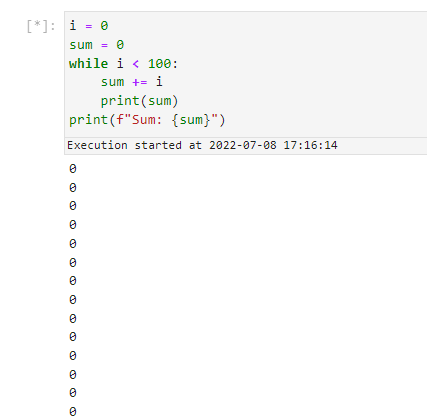
Image by Author

Such mistakes are common, especially for beginners. Since the variable i is not incremented at the end of each loop, making the terminal condition i < 10 unreachable, the program runs infinitely.

To avoid the unintentional loop, simply add to the code: i += 1 and we get the correct output with definite lines of output:
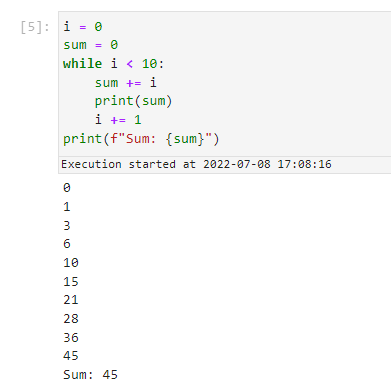
Image by Author

Always make sure you double-check to avoid any unintentional infinite loops in your codes! Ensure that the variable used in the while condition, such as i in the codes above, changes within the loop.

Necessary Infinite Loops

Infinite loops could be desirable in certain cases as well. For example, if you want a program that constantly monitors the market price of a cryptocurrency (which runs 24/7):

The program updates the bid and asks for BTC/USDT on Binance infinitely:
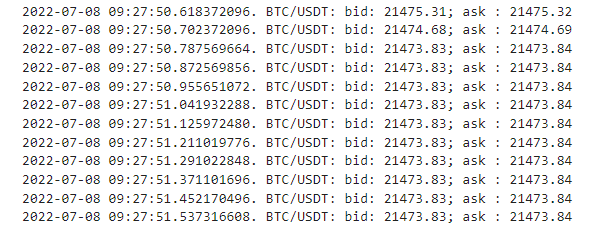
Image by Author

Stack Overflow

Stack overflow is a similar context that could be confused with infinite loops sometimes. It arises from an infinite (or sufficiently deep) recursion. The simplest example would be a function calling itself:

def run():
    run()
run()

Run it in the Python console and you will get a RecursionError stating that the maximum recursion depth is exceeded.
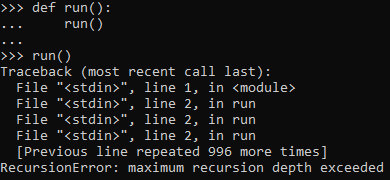
Image by Author

CPU Usage of Infinite Loop

An infinite loop causes unexpected consumption of resources, such as CPU or memory. It could take CPU usage to near 100% and hinder the running progress of other programs.

An easy cure for the high CPU usage of infinite loops is to add a time.sleep() statement at the start and/or end of each loop. time.sleep() is mainly used to suspend execution for a specified number of seconds, 0.5 in this case, and it is not CPU intensive.

Use Python to Check CPU & Memory Usage

If you are a Windows user, rather than Task Manager, you may also choose to track the CPU and memory usage using Python itself within codes. The library psutil is used to retrieve information on running processes and system utilization. To install the package, simply do pip install psutil in the Python console.

  • CPU Usage: psutil.cpu_percent(interval=None)

The function returns a float representing the percentage number of current system-wide CPU utilization. You could specify the interval or left it blank for an immediate report. See follows for an example of an infinite loop with CPU percentage printed:
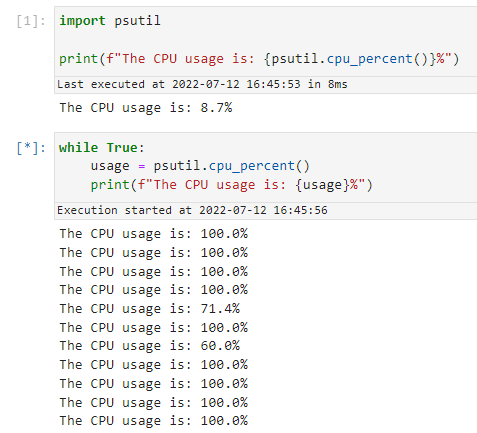
Image by Author
  • Memory Usage: psutil.virtual_memory()

The function returns a tuple of statistics on system memory usage. The main metrics are the total physical memory and available memory.
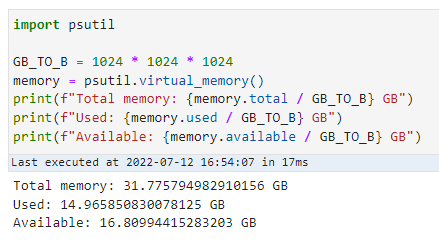
Image by Author

Final Note

Infinite loops led by while True are used extensively in my high-frequency crypto trading projects as I need the algorithms to constantly check the market condition and the order status. The addition of the time sleep statement helps reduce my CPU speed by a large extent, as I have multiple modules running on infinite loops on different threads for every single algorithm.

However, it is not a cure for all, and there are more tricks to boost your program speed and reduce memory usage which I will be writing about next, so thanks for reading and stay tuned!

If you are interested: summary of my articles on Python & Cryptos, and if you wish to get unlimited access to stories on Medium, sign up here at $5/month (I will get a portion of your monthly fees but at no extra cost on you!)

Python
While Loop
Stackoverflow
Recommended from ReadMedium