
Inference and Quantization with Qwen1.5 LLMs on Your Computer
The best open LLMs?

Recently, Alibaba published the Qwen1.5 models. They are open pre-trained and chat LLMs available from tiny to large sizes: 0.5B, 1.8B, 4B, 7B, 14B, and 72B. We don’t know much about these models but there is evidence that they perform better than Mistral 7B, Mixtral-8x7B, and Llama 2 models.
The Qwen team also collaborates with the authors of popular packages for quantization, fine-tuning, and serving LLMs. Consequently, Qwen1.5 is already very well-supported by the deep learning frameworks.
In this article, I first briefly present the Qwen1.5 models and comment on their performance. Then, I demonstrate how to use them. We will see that Qwen1.5 can be challenging to use on consumer hardware. I also show how to quantize the models with AWQ and GPTQ.
I use Qwen1.5 7B for the examples but it would work the same for the other sizes. Only the 72B versions can’t be fine-tuned on consumer hardware. For the other sizes, a GPU with 24 GB of VRAM is enough.
Qwen1.5: The Best Open LLMs?
The Qwen1.5 models are available in this Hugging Face collection:
The license of the model is a Tongyi Qianwen license. It allows commercial uses in applications with less than 100 million users.
The Qwen team didn’t release a technical report detailing the models’ training and architecture. We only know what is mentioned in the model cards, e.g.:
It is trained on a large “amount” of data, and for the architecture, they wrote:
It is based on the Transformer architecture with SwiGLU activation, attention QKV bias, group query attention, mixture of sliding window attention and full attention, etc.
If you “print” one of the Qwen models once loaded with Hugging Face Transformers, you will see that the neural architecture is very similar to the architecture of Mistral 7B and Llama 2.
Qwen1.5 natively supports a longer context than Llama 2 with up to 32k tokens.
They also made a “chat” version for all the models they released. We only know that they have been trained with DPO.
We know much more about the performance of the models. The blog post announcing Qwen1.5 is mainly about their results in numerous benchmarks:
Let’s start with the standard benchmarks:
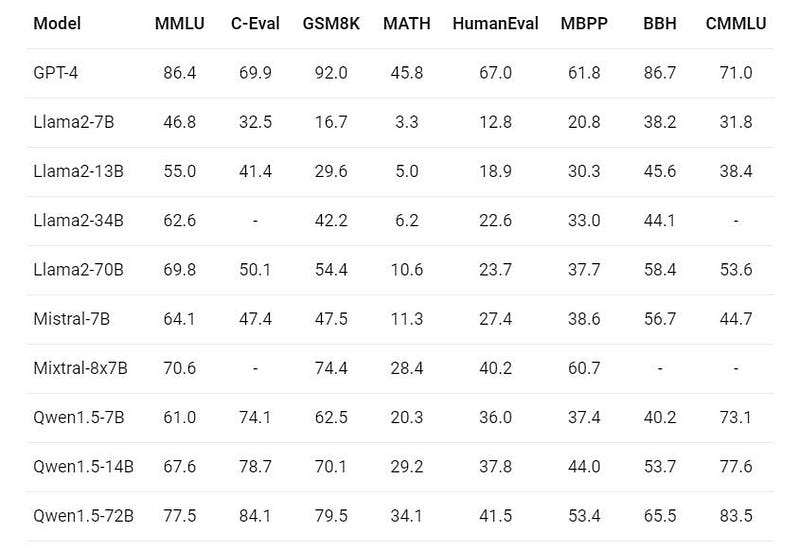
The most interesting comparisons are between Qwen-1.5 7B, Llama 2 7B, and Mistral 7B. Except on MMLU and BBH, Qwen1.5 7B significantly outperforms Llama 2 7B and Mistral 7B. The 14B version is even better. Only the 72B version of Qwen1.5 seems to outperform Mixtral-8x7B.
Note: As shown in a recent study by CMU, these numbers can be easily manipulated by changing a few settings. Always interpret benchmark results with caution.
A particularity of Qwen1.5 is that they are also available in tiny sizes which can be easily tested on consumer hardware.
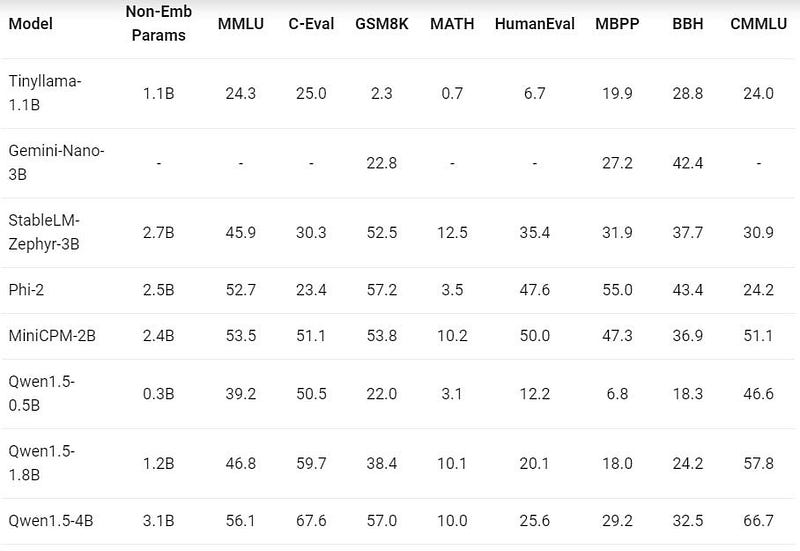
I’m not sure we can conclude anything from this table. The performances of the models compared are very diverse. Phi-2 outperforms Qwen1.5 1.8B and 4B for half of the tasks. Note: Again, this is assuming that all these results are comparable.
The Qwen1.5 models were also trained on multilingual data. Their results on multilingual benchmarks are particularly impressive:
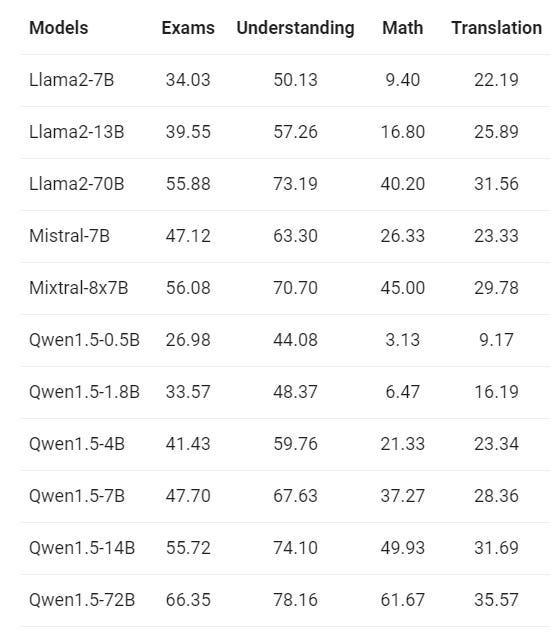
Qwen-1.5 14B is better than Mixtral-8x7B which is almost 3.5x larger.
However, this multilingualism comes with an additional cost: the vocabulary of the Qwen1.5 models is almost 5x times larger than the vocabularies of Llama 2 and Mistral 7B (151936 for Qwen1.5 against 32000 for Llama 2). Consequently, the models are larger and consume more memory. On the hard drive, Llama 2 7B consumes 13.5 GB while Qwen-1.5 7B consumes 15.5 GB, i.e., a difference of 2 GB. It makes the Qwen-1.5 models more challenging to run on consumer hardware as we will see in the next section.
Using Qwen1.5 on Consumer Hardware
In the following subsections, we will see how to run inference with Qwen-1.5 7B and how to quantize it. I will only comment on my main observations. The full code of all my experiments is available in the notebook:
Inference with Qwen1.5 Using vLLM
For fast inference with optimal memory usage, we can use vLLM (Apache 2.0 license).
Here is how to use it with the model quantized with GPTQ:
import time
from vllm import LLM, SamplingParams
prompts = [
    "The best recipe for pasta is"
]
sampling_params = SamplingParams(temperature=0.7, top_p=0.8, top_k=20, max_tokens=150)
loading_start = time.time()
llm = LLM(model="kaitchup/Qwen1.5-7B-gptq-4bit", quantization="gptq")
print("--- Loading time: %s seconds ---" % (time.time() - loading_start))
generation_time = time.time()
outputs = llm.generate(prompts, sampling_params)
print("--- Generation time: %s seconds ---" % (time.time() - generation_time))
for output in outputs:
    generated_text = output.outputs[0].text
    print(generated_text)
    print('------')
I really recommend to use the decoding hyperparameters that you can see in this line:
SamplingParams(temperature=0.7, top_p=0.8, top_k=20, max_tokens=150)I took them from the generation_config file distributed with the chat models. If I use more standard hyperparameters, the model tends to show code-switching (i.e., different languages in the same sentence) and generate meaningless sentences more often.
GPTQ and AWQ Quantization for Qwen1.5
To quantize the model with GPTQ, I use the following code:
from transformers import AutoModelForCausalLM, AutoTokenizer
from optimum.gptq import GPTQQuantizer
import torch
model_path = 'Qwen/Qwen1.5-7B'
w = 4 #quantization to 4-bit. Change to 2, 3, or 8 to quantize with another precision
quant_path = 'Qwen1.5-7B-gptq-'+str(w)+'bit'
# Load model and tokenizer
tokenizer = AutoTokenizer.from_pretrained(model_path, use_fast=True)
model = AutoModelForCausalLM.from_pretrained(model_path, torch_dtype=torch.float16, device_map="auto")
quantizer = GPTQQuantizer(bits=w, dataset="c4", model_seqlen = 2048)
quantized_model = quantizer.quantize_model(model, tokenizer)
quantized_model.save_pretrained("./"+quant_path, safetensors=True)
tokenizer.save_pretrained("./"+quant_path)
Note that I use a “model_seqlen” of only 2048 while the model can handle sequences of 32k tokens. If you have a CPU powerful enough, consider increasing model_seqlen to get a more accurate quantization. Note: I couldn’t increase it with Google Colab since the CPU is too old and small.
I have also tried to quantize and serialize the model with bitsandbytes NF4 and AWQ. However, the performance of AWQ for this model seems to be particularly bad. I compared the original model with the GPTQ and AWQ models on three different tasks:
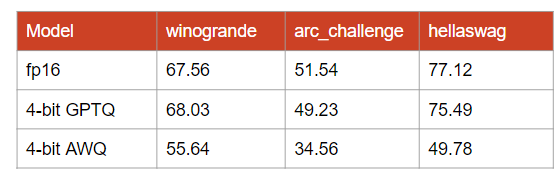
I’m not sure what is wrong with AWQ here. My assumption, and note that this is only an assumption, is that AWQ underperforms for models with a large vocabulary.
Benchmarking Inference Speed and Memory Consumption of Qwen1.5
Finally, I used optimum-benchmark to benchmark the decoding memory consumption and throughput of the fp16, GPTQ 4-bit, and AWQ 4-bit models:
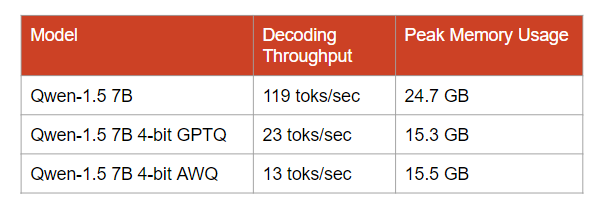
Note: Measured with a batch size of 4.
The GPTQ model consumes almost 9.5 GB less than the original model, i.e., the inference is possible on a 16 GB GPU with a minimal drop in accuracy, as shown above.
Conclusion
Qwen1.5 models are among the best, if not the best, open pre-trained LLMs at the moment. They particularly outperform other LLMs for tasks in languages other than English. They are also easy to use as many frameworks already support them.
However, the Qwen1.5 models are memory-hungry. The largest Qwen1.5 that you can easily run on a 24 GB GPU is the 7B version. The 14B version could work if you offload some part of it, once quantized, to the CPU RAM.
If you have less than 24 GB of VRAM and don’t want to quantify the model, Qwen-1.5 4B is a good alternative that won’t consume more than 16 GB of VRAM.
To support my work, consider subscribing to The Kaitchup (my AI newsletter):


