Free AI web copilot to create summaries, insights and extended knowledge, download it at here
7186
Abstract
enth element from the end and 2 is the interval. The output starts from the seventh element at the bottom and moves up till the end.</p><div id="105c"><pre><span class="hljs-attribute">x</span>[-<span class="hljs-number">7</span>::-<span class="hljs-number">2</span>]</pre></div><div id="3cc6"><pre><span class="hljs-selector-id">#output</span>: <span class="hljs-built_in">array</span>(<span class="hljs-selector-attr">[8, 0, 1, 2]</span>)</pre></div><p id="6298"><b>2D Array Slicing And Indexing</b></p><p id="ba8f">Now we will practice the same with a two-dimensional array. I made a 6×7 matrix for this video. Because it is big enough to show some meaningful operation.</p><div id="0245"><pre><span class="hljs-attribute">y</span> = np.arange(<span class="hljs-number">42</span>).reshape(<span class="hljs-number">6</span>,<span class="hljs-number">7</span>)</pre></div><div id="4250"><pre>#<span class="hljs-built_in">array</span> y comes <span class="hljs-keyword">out</span> to be:
<span class="hljs-built_in">array</span>([[ <span class="hljs-number">0</span>, <span class="hljs-number">1</span>, <span class="hljs-number">2</span>, <span class="hljs-number">3</span>, <span class="hljs-number">4</span>, <span class="hljs-number">5</span>, <span class="hljs-number">6</span>],
<span class="hljs-string"> [ 7, 8, 9, 10, 11, 12, 13]</span>,
<span class="hljs-string"> [14, 15, 16, 17, 18, 19, 20]</span>,
<span class="hljs-string"> [21, 22, 23, 24, 25, 26, 27]</span>,
<span class="hljs-string"> [28, 29, 30, 31, 32, 33, 34]</span>,
<span class="hljs-string"> [35, 36, 37, 38, 39, 40, 41]</span>])</pre></div><p id="5787"><b>Output the Rows</b></p><p id="36c9">The easiest thing is to return rows from a two-dimensional array. Simply index through the number of rows.</p><div id="df36"><pre>y<span class="hljs-selector-attr">[0]</span>
<span class="hljs-selector-id">#output</span>: <span class="hljs-built_in">array</span>(<span class="hljs-selector-attr">[0, 1, 2, 3, 4, 5, 6]</span>)</pre></div><div id="37fa"><pre>y<span class="hljs-selector-attr">[3]</span>
<span class="hljs-selector-id">#output</span>: <span class="hljs-built_in">array</span>(<span class="hljs-selector-attr">[ 7, 8, 9, 10, 11, 12, 13]</span>)</pre></div><p id="6a4d"><b>Output the Columns</b></p><p id="2f13">Returning columns can be a bit tricky.</p><div id="24f6"><pre>y<span class="hljs-selector-attr">[:, 0]</span>
<span class="hljs-selector-id">#output</span>: <span class="hljs-built_in">array</span>(<span class="hljs-selector-attr">[ 0, 7, 14, 21, 28, 35]</span>)</pre></div><div id="a7aa"><pre>y<span class="hljs-selector-attr">[:, 3]</span>
<span class="hljs-selector-id">#output</span>: <span class="hljs-built_in">array</span>(<span class="hljs-selector-attr">[ 3, 10, 17, 24, 31, 38]</span>)</pre></div><p id="6acc"><b>Output One Element Only</b></p><p id="6ec0">Let’s see how to return a number from the matrix. Return number 17 from this matrix. Start by finding the row. It is in the third row that means the index of the row is 2 as count starts from 0. Next look at the column index. Number 17 is in the fourth column. So, the column index is 3.</p><div id="1c3b"><pre><span class="hljs-attribute">y</span>[<span class="hljs-number">2</span>, <span class="hljs-number">3</span>]
<span class="hljs-comment">#output: 17</span></pre></div><p id="d162"><b>Return the first three elements of the second column as the bold numbers in the picture</b></p><figure id="0fa7"><img src="https://cdn-images-1.readmedium.com/v2/resize:fit:800/1*zSv2ZB4OK0ByrrMjRtUrEw.png"><figcaption></figcaption></figure><p id="3995">All the elements are in rows 1,2 and 3. The row-index is 0:3. The next step is to figure out the column-index. All three elements are in the second column. That is column index 1.</p><div id="0813"><pre><span class="hljs-attribute">y</span>[<span class="hljs-number">0</span>:<span class="hljs-number">3</span>, <span class="hljs-number">1</span>]
<span class="hljs-comment">#output: array([ 1, 8, 15])</span></pre></div><p id="e629"><b>Output a portion of the elements from the first two columns shown in the matrix below as the bold numbers below</b></p><figure id="08ea"><img src="https://cdn-images-1.readmedium.com/v2/resize:fit:800/1*4iknqqQ-TzOZELYiM_ql6Q.png"><figcaption></figcaption></figure><p id="81a0">All the elements are in row 1,2 and 3. The row index is 1:4. The corresponding column indices are 0 and 1. So, the column indices can be represented as 0:2</p><div id="4a31"><pre><span class="hljs-attribute">y</span>[<span class="hljs-number">1</span>:<span class="hljs-number">4</span>, <span class="hljs-number">0</span>:<span class="hljs-number">2</span>]</pre></div><div id="4ab8"><pre>#<span class="hljs-built_in">output</span>:
array(<span class="hljs-string">[[ 7, 8],
[14, 15],
[21, 22]]</span>)</pre></div><p id="79ff"><b>Output this three by three subarray (bold-red elements in the matrix) from the matrix</b></p><figure id="faa4"><img src="https://cdn-images-1.readmedium.com/v2/resize:fit:800/1*1eMzAj7Bo2Kc_E-jqfhw5g.png"><figcaption></figcaption></figure><p id="f6ca">The solution to this is the same theory as before. Row indexes of the numbers are 2, 3, and 4. So we can slice it by 2:5. Column indexes are also 2,3 and 4. A slice of columns also can be taken by 2:5.</p><div id="fecb"><pre><span class="hljs-attribute">y</span>[<span class="hljs-number">2</span>:<span class="hljs-number">5</span>, <span class="hljs-number">2</span>:<span class="hljs-number">5</span>]</pre></div><div id="4548"><pre>#<span class="hljs-built_in">output</span>
array(<span class="hljs-string">[[16, 17, 18],
[23, 24, 25],
[30, 31, 32]]</span>)</pre></div><p id="a00d"><b>Print every second row starting from the first row</b></p><figure id="0360"><img src="https://cdn-images-1.readmedium.com/v2/resize:fit:800/1*M_sekvbxe9plr2ln1j_IUA.png"><figcaption></figcaption></figure><div id="8785"><pre><span class="hljs-attribute">y</span>[<span class="hljs-number">0</span>::<span class="hljs-number">2</span>]</pre></div><div id="de61"><pre>#<span class="hljs-built_in">output</span>:
array(<span class="hljs-string">[[ 0, 1, 2, 3, 4, 5, 6],
[14, 15, 16, 17, 18, 19, 20],
[28, 29, 30, 31, 32, 33, 34]]</span>)</pre></div><p id="6690">Here, 0 is the lower limit and 2 is the interval. The output array will start at index 0 and keep going till the end with an interval of 2.</p><p id="824e"><b>Print every second column starting from the first column.</b></p><p id="4eeb">In the code below, ‘:’ means selecting all the indexes. Here ‘:’ is selecting all the rows. As the column input, we put 0::2. I already mentioned the functionality of this above.</p><div id="24dd"><pre><span class="hljs-attribute">y</span>[:, <span class="hljs-number">0</span>::<span class="hljs-number">2</span>]</pre></div><div id="3086"><pre><span class="hljs-selector-id">#output</span>:
<span class="hljs-built_in">array</span>(<span class="hljs-selector-attr">[[ 0, 2, 4, 6]</span>,
<span class="hljs-selector-attr">[ 7, 9, 11, 13]</span>,
<s
Options
pan class="hljs-selector-attr">[14, 16, 18, 20]</span>, <span class="hljs-selector-attr">[21, 23, 25, 27]</span>, <span class="hljs-selector-attr">[28, 30, 32, 34]</span>, <span class="hljs-selector-attr">[35, 37, 39, 41]</span>])</pre></div><p id="390a">This is another way of doing the same. In the code below 0 is the lower limit, 7 is the upper limit and 2 is the interval. The code snippet below will output the same matrix as above.</p><div id="c6da"><pre><span class="hljs-attribute">y</span>[:, <span class="hljs-number">0</span>:<span class="hljs-number">7</span>:<span class="hljs-number">2</span>]</pre></div><h2 id="006d">3D Array Slicing And Indexing</h2><p id="771f">Make a three-dimensional array with this code below. Here it will arrange the numbers from 0 to 44 as three two-dimensional arrays of shape 3×5. The output will look like this.</p><div id="91b3"><pre><span class="hljs-attribute">x</span> = np.arange(<span class="hljs-number">45</span>).reshape(<span class="hljs-number">3</span>,<span class="hljs-number">3</span>,<span class="hljs-number">5</span>)</pre></div><div id="9af9"><pre>#<span class="hljs-built_in">output</span>: array(<span class="hljs-string">[[[ 0, 1, 2, 3, 4], [ 5, 6, 7, 8, 9], [10, 11, 12, 13, 14]]</span>,</pre></div><div id="915e"><pre><span class="hljs-string">[[15, 16, 17, 18, 19], [20, 21, 22, 23, 24], [25, 26, 27, 28, 29]]</span>,</pre></div><div id="6dc8"><pre><span class="hljs-string">[[30, 31, 32, 33, 34], [35, 36, 37, 38, 39], [40, 41, 42, 43, 44]]</span>])</pre></div><p id="dceb"><b>Selecting the Two-Dimensional Arrays</b></p><p id="b511">We can access every two-dimensional array in it with simple indexing as follows:</p><div id="8af6"><pre><span class="hljs-attribute">x</span>[<span class="hljs-number">0</span>]</pre></div><div id="51f2"><pre>#<span class="hljs-built_in">output</span>: array(<span class="hljs-string">[[ 0, 1, 2, 3, 4], [ 5, 6, 7, 8, 9], [10, 11, 12, 13, 14]]</span>)</pre></div><div id="4b3c"><pre><span class="hljs-attribute">x</span>[<span class="hljs-number">1</span>]</pre></div><div id="7c13"><pre>#<span class="hljs-built_in">output</span>: array(<span class="hljs-string">[[15, 16, 17, 18, 19], [20, 21, 22, 23, 24], [25, 26, 27, 28, 29]]</span>)</pre></div><p id="4d92"><b>Print the second row of the first two-dimensional array</b></p><p id="db43">Select the first two-dimensional array the way we showed before with this code: x[0]. Then add this to select the second row: x[0][1]</p><div id="41a1"><pre><span class="hljs-attribute">x</span>[<span class="hljs-number">0</span>][<span class="hljs-number">1</span>]</pre></div><div id="b728"><pre><span class="hljs-comment">#output:</span> <span class="hljs-attribute">array</span>([<span class="hljs-number">5</span>, <span class="hljs-number">6</span>, <span class="hljs-number">7</span>, <span class="hljs-number">8</span>, <span class="hljs-number">9</span>])</pre></div><p id="6bdb"><b>Get element 22 from the array</b></p><figure id="5e6c"><img src="https://cdn-images-1.readmedium.com/v2/resize:fit:800/1*MoFskRAGIc98c9lumgkbUg.png"><figcaption></figcaption></figure><p id="0008">I will solve this problem in a few steps.</p><p id="a85b">Select the two-dimensional array in which the element 22 is. That’s the second two-dimensional array. So, select that by using x[1].</p><p id="4adf">Next, see where the row index is. Our target element is in the second row of the selected two-dimensional array. The row index is 1. We can select the row with this code: x[1][1].</p><p id="cad1">Finally, the column index is 2 because from the picture above it shows that it is the third element. Combining:</p><div id="10a7"><pre><span class="hljs-attribute">x</span>[<span class="hljs-number">1</span>][<span class="hljs-number">1</span>][<span class="hljs-number">2</span>]</pre></div><div id="6018"><pre><span class="hljs-meta">#output: 22</span></pre></div><p id="7263"><b>Return the first rows of the last two two-dimensional array</b></p><figure id="0255"><img src="https://cdn-images-1.readmedium.com/v2/resize:fit:800/1*hED29kJDGW4U4jc-HeqmrA.png"><figcaption></figcaption></figure><p id="836c">First, select the two-dimensional array in which these rows belong. One row is in the second two-dimensional array and another one is in the third two-dimensional array. We can select these two with x[1:]. As both of the rows are the first row of its corresponding two-dimensional array, the row index is zero.</p><div id="e28d"><pre><span class="hljs-attribute">x</span>[<span class="hljs-number">1</span>:, <span class="hljs-number">0</span>]</pre></div><div id="7901"><pre>#<span class="hljs-built_in">output</span>: array(<span class="hljs-string">[[15, 16, 17, 18, 19], [30, 31, 32, 33, 34]]</span>)</pre></div><p id="d700"><b>Slice through both columns and rows and print part of the first two rows of the last two two-dimensional arrays like the red-bold numbers in the picture</b></p><figure id="cc42"><img src="https://cdn-images-1.readmedium.com/v2/resize:fit:800/1*84hk9VKBYdefpjdtvAACXg.png"><figcaption></figcaption></figure><p id="fbdc">Like the previous problem, all the target elements are in second and third two-dimensional arrays. So, we can select those as before with x[1:]. All the elements are in the first and second rows of both the two-dimensional arrays. The row index should be represented as 0:2. The column index is 1:4 as the elements are in the first, second, and third columns. Combining all together:</p><div id="5584"><pre><span class="hljs-attribute">x</span>[<span class="hljs-number">1</span>:, <span class="hljs-number">0</span>:<span class="hljs-number">2</span>, <span class="hljs-number">1</span>:<span class="hljs-number">4</span>]</pre></div><div id="d7bf"><pre>#<span class="hljs-built_in">output</span>: array(<span class="hljs-string">[[[16, 17, 18], [21, 22, 23]]</span>,</pre></div><div id="52bb"><pre><span class="hljs-string">[[31, 32, 33], [36, 37, 38]]</span>])</pre></div><p id="908c">I wanted to make a video and write up on slicing and indexing of 1D, 2D, and 3D arrays that make matrix or multidimensional array indexing easier. I hope this was helpful.</p><p id="b0cf">Some recommended reading materials:</p><p id="d139"><a href="https://towardsdatascience.com/factors-that-can-contribute-to-the-faulty-statistical-inference-a7ebedd5a343">Factors That Can Contribute to the Faulty Statistical Inference</a></p><p id="86f2"><a href="https://readmedium.com/data-analysis-with-pivot-table-in-pandas-ac0b944cd7bc">Data Analysis With Pivot Table in Pandas</a></p><p id="7fa4"><a href="https://towardsdatascience.com/lambda-map-filter-and-sorted-efficient-programming-with-python-15d45bc1912a">Lambda, Map, Filter, and Sorted — Efficient Programming In Python</a></p><p id="944a"><a href="https://towardsdatascience.com/import-csv-files-as-pandas-dataframe-with-skiprows-skipfooter-usecols-index-col-and-header-fbf67a2f92a">Import CSV Files As Pandas DataFrame With skiprows, skipfooter, use cols, index_col and header Options</a></p></article></body>
Array indexing and slicing are important parts in data analysis and many different types of mathematical operations. We always do not work with a whole array, matrix, or Dataframe. Array indexing and slicing are most important when we work with a subset of an array. This article will be started with the basics and eventually will explain some advanced techniques of slicing and indexing of 1D, 2D, and 3D arrays. Even if you already used Array slicing and indexing before, you may find something to learn in this tutorial article.
1D Array Slicing And Indexing
Import Numpy in your notebook and generate a one-dimensional array. Here, I am using a Jupyter Notebook. You can use any other notebook of your choice.
import numpy as npx = np.array([2,5,1,9,0,3,8,11,-4,-3,-8,6,10])Basic Indexing
Let’s do some simple slicing. Just a reminder, arrays are zero-indexed, so count starts from zero. x[0] will return the first element of the array and x[1] will return the second element of the array.
x[0]#output: 2x[3]#output: 9x[4]#output: 0Basic Slicing
Now moving on to some slicing operation of one-dimensional arrays,
x[1:7]#output: array([5, 1, 9, 0, 3, 8])Here 1 is the lower limit and 7 is the upper limit. Output array starts from the element of index 1 and ends right before index 7. In other words, it includes the element at index 1 but does not include the element in index 7.
Slicing With Interval
x[2::3]#output: array([ 1, 3, -4, 6])In this case, 2 is the starting index and 3 is the interval. So the returning array starts from the element at index two. After that, it takes every third element of the array until the end.
Say, we don’t need till the end. We only want the output till -4. In that case, we can further slice it.
x[2::3][0:3]
#output: array([ 1, 3, -4])Default Beginning and Ending
Next, I should show a syntax that is used most commonly. x[0:4] is used to return the first four elements, right? Instead, x[:4] can be used to do the same. Because if we do not define any lower limit, it will start from the beginning by default. In the same way, if we do not mention any upper limit, it will output till the end. When we do not mention both upper and lower limits, we get the whole array as the output.
x[:4]#output: array([2, 5, 1, 9])x[3:]#output: array([ 9, 0, 3, 8, 11, -4, -3, -8, 6, 10])x[:]
#output: array([2,5,1,9,0,3,8,11,-4,-3,-8,6,10])Slicing With Interval and Both Upper and Lower Limit
x[1:7:2]#output: array([5, 9, 3])In x[1:7:2], 1 is the lower limit, 7 is the upper limit, and 2 in the interval. The output starts in the element at index 1 and ends at index 7 but instead of outputting each element in between, it outputs every second element. Because the interval is 2.
Starting From The End with Interval
x[-7::2]#output: array([ 8, -4, -8, 10])Here, -7 means the seventh element from the end and 2 is the interval. The output starts from the seventh element at the bottom and moves up till the end.
x[-7::-2]#output: array([8, 0, 1, 2])2D Array Slicing And Indexing
Now we will practice the same with a two-dimensional array. I made a 6×7 matrix for this video. Because it is big enough to show some meaningful operation.
y = np.arange(42).reshape(6,7)#array y comes out to be:
array([[ 0, 1, 2, 3, 4, 5, 6],
[ 7, 8, 9, 10, 11, 12, 13],
[14, 15, 16, 17, 18, 19, 20],
[21, 22, 23, 24, 25, 26, 27],
[28, 29, 30, 31, 32, 33, 34],
[35, 36, 37, 38, 39, 40, 41]])Output the Rows
The easiest thing is to return rows from a two-dimensional array. Simply index through the number of rows.
y[0]
#output: array([0, 1, 2, 3, 4, 5, 6])y[3]
#output: array([ 7, 8, 9, 10, 11, 12, 13])Output the Columns
Returning columns can be a bit tricky.
y[:, 0]
#output: array([ 0, 7, 14, 21, 28, 35])y[:, 3]
#output: array([ 3, 10, 17, 24, 31, 38])Output One Element Only
Let’s see how to return a number from the matrix. Return number 17 from this matrix. Start by finding the row. It is in the third row that means the index of the row is 2 as count starts from 0. Next look at the column index. Number 17 is in the fourth column. So, the column index is 3.
y[2, 3]
#output: 17Return the first three elements of the second column as the bold numbers in the picture
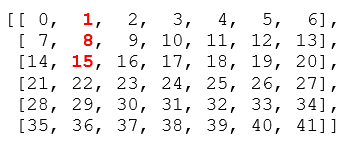
All the elements are in rows 1,2 and 3. The row-index is 0:3. The next step is to figure out the column-index. All three elements are in the second column. That is column index 1.
y[0:3, 1]
#output: array([ 1, 8, 15])Output a portion of the elements from the first two columns shown in the matrix below as the bold numbers below
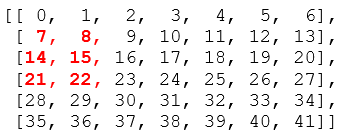
All the elements are in row 1,2 and 3. The row index is 1:4. The corresponding column indices are 0 and 1. So, the column indices can be represented as 0:2
y[1:4, 0:2]#output:
array([[ 7, 8],
[14, 15],
[21, 22]])Output this three by three subarray (bold-red elements in the matrix) from the matrix
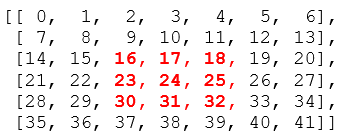
The solution to this is the same theory as before. Row indexes of the numbers are 2, 3, and 4. So we can slice it by 2:5. Column indexes are also 2,3 and 4. A slice of columns also can be taken by 2:5.
y[2:5, 2:5]#output
array([[16, 17, 18],
[23, 24, 25],
[30, 31, 32]])Print every second row starting from the first row
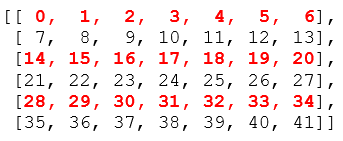
y[0::2]#output:
array([[ 0, 1, 2, 3, 4, 5, 6],
[14, 15, 16, 17, 18, 19, 20],
[28, 29, 30, 31, 32, 33, 34]])Here, 0 is the lower limit and 2 is the interval. The output array will start at index 0 and keep going till the end with an interval of 2.
Print every second column starting from the first column.
In the code below, ‘:’ means selecting all the indexes. Here ‘:’ is selecting all the rows. As the column input, we put 0::2. I already mentioned the functionality of this above.
y[:, 0::2]#output:
array([[ 0, 2, 4, 6],
[ 7, 9, 11, 13],
[14, 16, 18, 20],
[21, 23, 25, 27],
[28, 30, 32, 34],
[35, 37, 39, 41]])This is another way of doing the same. In the code below 0 is the lower limit, 7 is the upper limit and 2 is the interval. The code snippet below will output the same matrix as above.
y[:, 0:7:2]Make a three-dimensional array with this code below. Here it will arrange the numbers from 0 to 44 as three two-dimensional arrays of shape 3×5. The output will look like this.
x = np.arange(45).reshape(3,3,5)#output:
array([[[ 0, 1, 2, 3, 4],
[ 5, 6, 7, 8, 9],
[10, 11, 12, 13, 14]],[[15, 16, 17, 18, 19],
[20, 21, 22, 23, 24],
[25, 26, 27, 28, 29]],[[30, 31, 32, 33, 34],
[35, 36, 37, 38, 39],
[40, 41, 42, 43, 44]]])Selecting the Two-Dimensional Arrays
We can access every two-dimensional array in it with simple indexing as follows:
x[0]#output:
array([[ 0, 1, 2, 3, 4],
[ 5, 6, 7, 8, 9],
[10, 11, 12, 13, 14]])x[1]#output:
array([[15, 16, 17, 18, 19],
[20, 21, 22, 23, 24],
[25, 26, 27, 28, 29]])Print the second row of the first two-dimensional array
Select the first two-dimensional array the way we showed before with this code: x[0]. Then add this to select the second row: x[0][1]
x[0][1]#output:
array([5, 6, 7, 8, 9])Get element 22 from the array
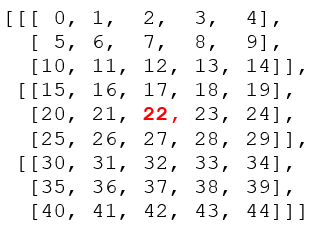
I will solve this problem in a few steps.
Select the two-dimensional array in which the element 22 is. That’s the second two-dimensional array. So, select that by using x[1].
Next, see where the row index is. Our target element is in the second row of the selected two-dimensional array. The row index is 1. We can select the row with this code: x[1][1].
Finally, the column index is 2 because from the picture above it shows that it is the third element. Combining:
x[1][1][2]#output: 22Return the first rows of the last two two-dimensional array
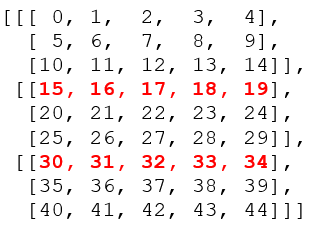
First, select the two-dimensional array in which these rows belong. One row is in the second two-dimensional array and another one is in the third two-dimensional array. We can select these two with x[1:]. As both of the rows are the first row of its corresponding two-dimensional array, the row index is zero.
x[1:, 0]#output:
array([[15, 16, 17, 18, 19],
[30, 31, 32, 33, 34]])Slice through both columns and rows and print part of the first two rows of the last two two-dimensional arrays like the red-bold numbers in the picture
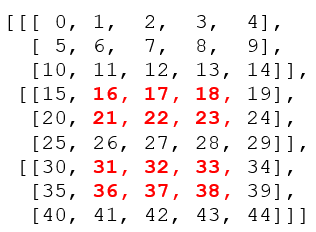
Like the previous problem, all the target elements are in second and third two-dimensional arrays. So, we can select those as before with x[1:]. All the elements are in the first and second rows of both the two-dimensional arrays. The row index should be represented as 0:2. The column index is 1:4 as the elements are in the first, second, and third columns. Combining all together:
x[1:, 0:2, 1:4]#output:
array([[[16, 17, 18],
[21, 22, 23]],[[31, 32, 33],
[36, 37, 38]]])I wanted to make a video and write up on slicing and indexing of 1D, 2D, and 3D arrays that make matrix or multidimensional array indexing easier. I hope this was helpful.
Some recommended reading materials:
Factors That Can Contribute to the Faulty Statistical Inference
Data Analysis With Pivot Table in Pandas
Lambda, Map, Filter, and Sorted — Efficient Programming In Python