
Increase AWS Organizations Account Limit
ACM.221 Increasing the number of accounts we can create in an AWS Organization
Part of my series on Automating Cybersecurity Metrics. The Code.
Free Content on Jobs in Cybersecurity | Sign up for the Email List
In the last post, I explained how I worked around a constraint related to closing AWS accounts. In this post, I explain how to increase the account limit for an Organization, because the account I’m moving to will need more capacity for additional accounts.
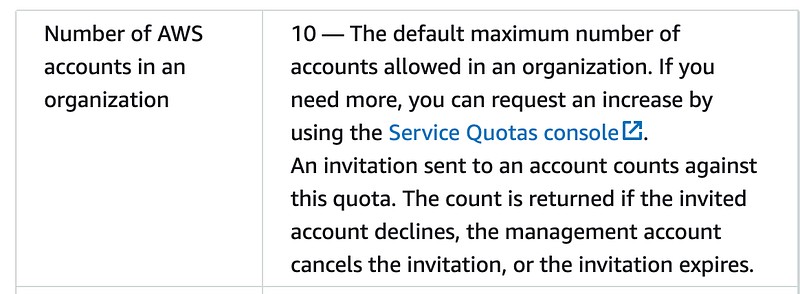
While that was running I went ahead an took the steps in this post to ensure I can create more AWS accounts when I need to do that. In a past post I explained that there are some quotas for AWS Organizations of which you need to be aware:
One of those is the AWS limit of 10 accounts. I’m going to request an increase now because I already know I need more than 10 accounts.
Following the instructions, click the link to go to the Service Quotas console.
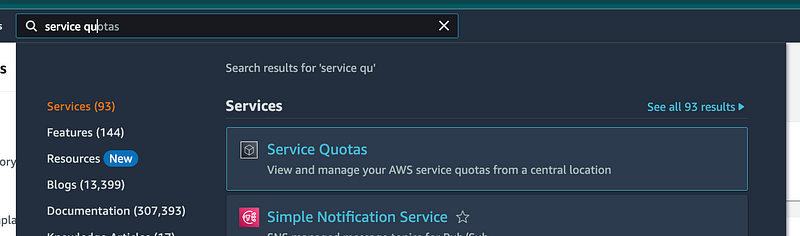
You can also get to this page by navigating to Service Quotas in the AWS Console.
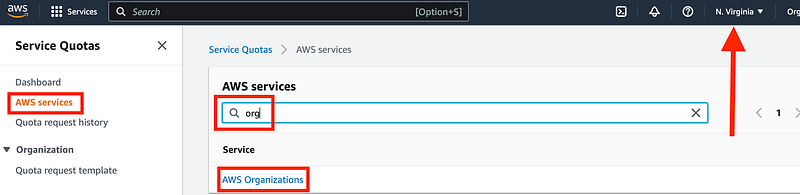
Make sure you you choose the N. Virginia region because AWS Organizations is managed from us-east-1. Click AWS Services on the left, search for and click on AWS Organizations.
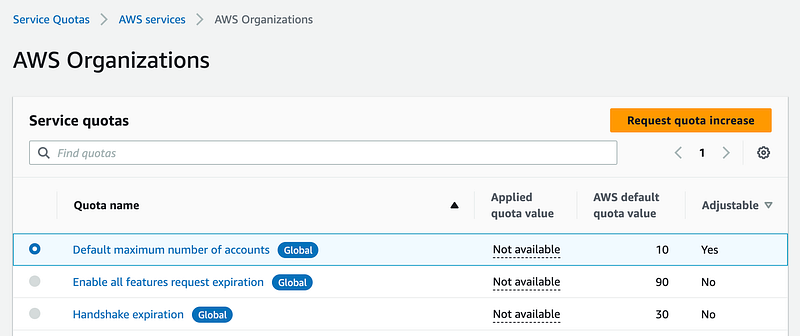
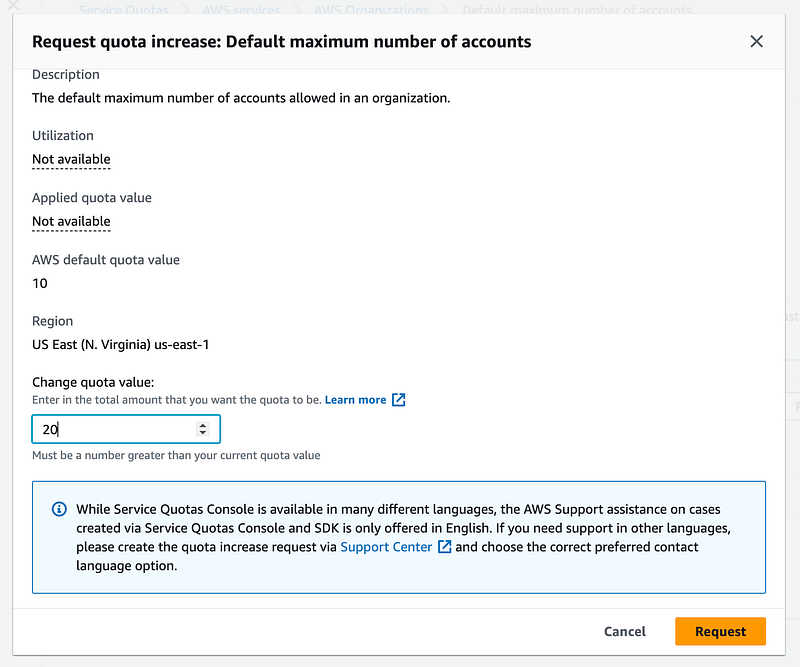
Click the first option and click Request quota increase.
Enter the number of accounts you will need and click Request:
Your request will show up as pending.
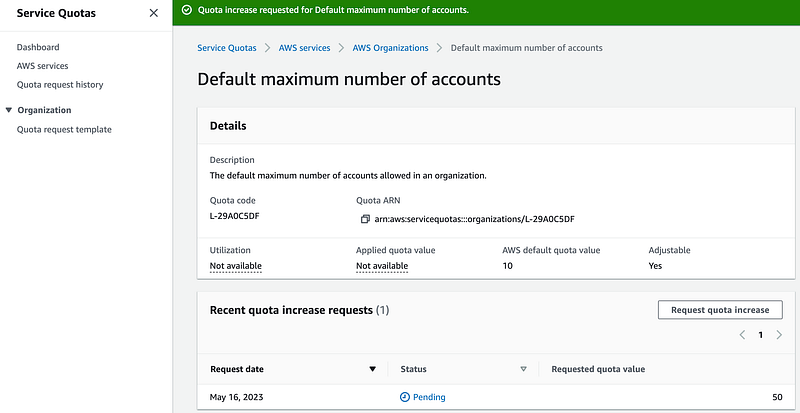
Now we wait…
You can get back to this status page by following the steps to get to the AWS Organizations Service Quotas and click on Default maximum number of account.
I’ll update this post after the request finishes processing.
One day later, still waiting for an increase. I successfully moved all my accounts over to this new organization up to the quota so waiting on the increase to finish the job.
This request went smoothly. I had to take some time away for some time with family and when I got back I got this lovely message:
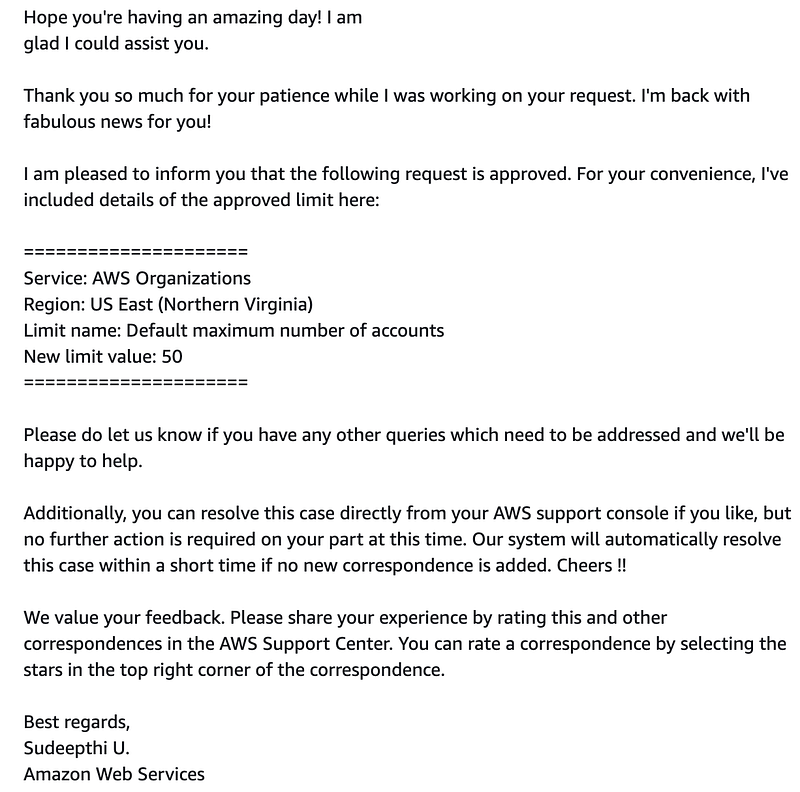
Five stars.
Follow for updates.
Teri Radichel | © 2nd Sight Lab 2023
About Teri Radichel:
~~~~~~~~~~~~~~~~~~~~
⭐️ Author: Cybersecurity Books
⭐️ Presentations: Presentations by Teri Radichel
⭐️ Recognition: SANS Award, AWS Security Hero, IANS Faculty
⭐️ Certifications: SANS ~ GSE 240
⭐️ Education: BA Business, Master of Software Engineering, Master of Infosec
⭐️ Company: Penetration Tests, Assessments, Phone Consulting ~ 2nd Sight Lab
Need Help With Cybersecurity, Cloud, or Application Security?
~~~~~~~~~~~~~~~~~~~~~~~~~~~~~~~~~~~~~~~~~~~~~~~~~~~~~~~~~~~~~
🔒 Request a penetration test or security assessment
🔒 Schedule a consulting call
🔒 Cybersecurity Speaker for PresentationFollow for more stories like this:
~~~~~~~~~~~~~~~~~~~~~~~~~~~~~~~~~~~~~~~~~~~~~~~~~~~~~~~~~~~~~
❤️ Sign Up my Medium Email List
❤️ Twitter: @teriradichel
❤️ LinkedIn: https://www.linkedin.com/in/teriradichel
❤️ Mastodon: @teriradichel@infosec.exchange
❤️ Facebook: 2nd Sight Lab
❤️ YouTube: @2ndsightlab