Implementing Spring Cloud Gateway: A Comprehensive Guide
Spring Cloud Gateway is a powerful tool designed for managing API traffic efficiently. It offers robust features for routing, filtering, rate limiting, tracing, session management, and security. This guide provides a comprehensive walkthrough for setting up and configuring Spring Cloud Gateway to build a scalable and resilient API gateway.

Getting Started with Spring Cloud Gateway
- Setting Up Your Project
Start by creating a Spring Boot project with the following dependencies:
- Spring Boot Dev Tools
- Spring Web
- Spring Cloud Gateway
Generate your project using Spring Initializr and import it into your preferred IDE.
2. Basic Configuration
Define a simple route in application.yml:
spring:
  application:
    name: spring-cloud-gateway
  cloud:
    gateway:
      routes:
        - id: example_route
          uri: http://example1.com
          predicates:
            - Path=/api/v1/data
Understanding Route Configuration
Routes determine how incoming requests are handled and forwarded. Each route is defined by:
- Route ID: A unique identifier for the route.
- URI: The destination service address where requests are forwarded.
- Predicates: Conditions that determine when the route should be applied.
For example, the route above forwards requests with the path /api/v1/data to http://example1.com.
Defining Routes with RouteLocator Beans
For more dynamic routing, use the RouteLocator bean to define routes programmatically.
1. Configuring Routes Programmatically
Create a configuration class:
import org.springframework.cloud.gateway.route.RouteLocator;
import org.springframework.cloud.gateway.route.builder.RouteLocatorBuilder;
import org.springframework.context.annotation.Bean;
import org.springframework.context.annotation.Configuration;
@Configuration
public class GatewayConfig {
    @Bean
    public RouteLocator customRouteLocator(RouteLocatorBuilder builder) {
        return builder.routes()
            .route(r -> r.path("/api/v1/data")
                .uri("http://example1.com")
                .id("data_route"))
            .route(r -> r.host("*.mydomain.com")
                .and()
                .path("/special/**")
                .uri("http://example2.com")
                .id("special_route"))
            .build();
    }
}
This setup demonstrates defining routes that match specific URL paths and host patterns.
Exploring Gateway Filters
Filters modify requests and responses, offering a flexible mechanism for customizing route behavior.

1. Built-In Filters
Spring Cloud Gateway includes several built-in filters:
AddRequestHeader: Adds headers to requests.
spring:
  cloud:
    gateway:
      routes:
        - id: add_header_route
          uri: http://example1.com
          filters:
            - AddRequestHeader=X-Request-Foo, Bar
          predicates:
- Path=/add-header- Example: Adds the header
X-Request-Foo: Barto requests matching/add-header.
AddRequestParameter: Adds query parameters to requests.
spring:
  cloud:
    gateway:
      routes:
        - id: add_param_route
          uri: http://example1.com
          filters:
            - AddRequestParameter=foo, bar
          predicates:
- Path=/add-param- Example: Adds the query parameter
foo=barto requests matching/add-param
RemoveRequestHeader: Removes headers from requests.
spring:
  cloud:
    gateway:
      routes:
        - id: remove_header_route
          uri: http://example1.com
          filters:
            - RemoveRequestHeader=X-Remove-Header
          predicates:
- Path=/remove-header- Example: Removes the header
X-Remove-Headerfrom requests matching/remove-header.
RewritePath: Rewrites the request path.
spring:
  cloud:
    gateway:
      routes:
        - id: rewrite_path_route
          uri: http://example1.com
          filters:
            - RewritePath=/foo/(?<segment>.*), /${segment}
          predicates:
- Path=/foo/**- Example: Rewrites
/foo/barto/bar.
SetPath: Sets a new path for the request.
spring:
  cloud:
    gateway:
      routes:
        - id: set_path_route
          uri: http://example1.com
          filters:
            - SetPath=/newpath
          predicates:
- Path=/oldpath- Example: Changes the request path from
/oldpathto/newpath.
PrefixPath: Adds a prefix to the request path.
spring:
  cloud:
    gateway:
      routes:
        - id: prefix_path_route
          uri: http://example1.com
          filters:
            - PrefixPath=/prefix
          predicates:
- Path=/somepath- Example: Adds the prefix
/prefixto requests matching/somepath, resulting in/prefix/somepath.
StripPrefix: Removes a prefix from the request path.
spring:
  cloud:
    gateway:
      routes:
        - id: strip_prefix_route
          uri: http://example1.com
          filters:
            - StripPrefix=1
          predicates:
- Path=/prefix/somepath- Example: Strips the prefix
/prefixfrom requests matching/prefix/somepath, resulting in/somepath.
Retry: Retries requests upon failure.
spring:
  cloud:
    gateway:
      routes:
        - id: retry_route
          uri: http://example1.com
          filters:
            - Retry=5
          predicates:
- Path=/retry- Example: Retries failed requests up to 5 times for requests matching
/retry.
RequestRateLimiter: Implements rate limiting.
spring:
  cloud:
    gateway:
      routes:
        - id: rate_limited_route
          uri: http://example1.com
          filters:
            - RequestRateLimiter=redis-rate-limiter
          predicates:
- Path=/rate-limited/*- Example: Applies rate limiting to requests matching
/rate-limited/*.
CircuitBreaker: Implements a circuit breaker to handle service failures.
spring:
  cloud:
    gateway:
      routes:
        - id: circuit_breaker_route
          uri: http://example1.com
          filters:
            - CircuitBreaker=circuitBreakerName
          predicates:
- Path=/circuit-breaker/*- Example: Defines a circuit breaker for requests matching
/circuit-breaker/*.
RedirectTo: Redirects requests to a different URI.
spring:
  cloud:
    gateway:
      routes:
        - id: redirect_route
          uri: http://example1.com
          filters:
            - RedirectTo=301, /newpath
          predicates:
- Path=/oldpath- Example: Redirects requests from
/oldpathto/newpathwith a 301 status code
2. Creating Custom Filters
For custom filtering needs, you can create your own filters:
Global Filters:
import org.springframework.cloud.gateway.filter.GlobalFilter;
import org.springframework.core.annotation.Order;
import org.springframework.stereotype.Component;
import reactor.core.publisher.Mono;
@Component
@Order(0)
public class CustomGlobalFilter implements GlobalFilter {
    @Override
    public Mono<Void> filter(ServerWebExchange exchange, GatewayFilterChain chain) {
        System.out.println("Global Filter executed");
        return chain.filter(exchange).then(Mono.fromRunnable(() -> {
            System.out.println("Global Filter Post-processing logic");
        }));
    }
Route-Specific Filters:
import org.springframework.cloud.gateway.filter.GatewayFilter;
import org.springframework.cloud.gateway.filter.GatewayFilterChain;
import org.springframework.stereotype.Component;
import org.springframework.web.server.ServerWebExchange;
import reactor.core.publisher.Mono;
@Component
public class CustomRouteFilter implements GatewayFilter {
    @Override
    public Mono<Void> filter(ServerWebExchange exchange, GatewayFilterChain chain) {
        exchange.getRequest().mutate().header("X-Custom-Header", "CustomValue").build();
        return chain.filter(exchange);
    }
}
Implementing Rate Limiting
Rate limiting helps control the frequency of requests to prevent service abuse.
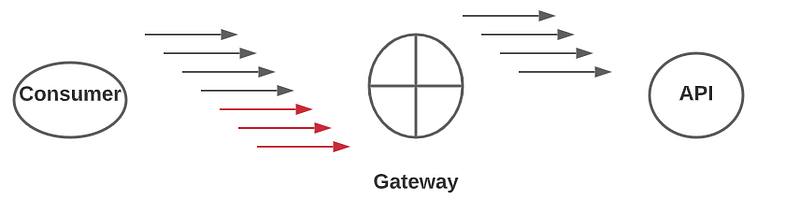
1. Adding Dependencies
Include Redis for rate limiting
<dependency>
  <groupId>org.springframework.boot</groupId>
  <artifactId>spring-boot-starter-data-redis-reactive</artifactId>
</dependency>
2. Configuring Rate Limiting
Set up rate limiting in application.yml:
spring:
  cloud:
    gateway:
      routes:
        - id: rate_limited_route
          uri: http://example1.com
          predicates:
            - Path=/rate-limited/*
          filters:
            - name: RequestRateLimiter
              args:
                redis-rate-limiter:
                  replenishRate: 10
                  burstCapacity: 20
Explanation:
replenishRate: Maximum requests per second.burstCapacity: Maximum requests allowed in a burst.
Enabling Request Tracing
Tracing helps monitor and debug request flows across services.
1. Adding Sleuth Dependency
<dependency>
  <groupId>org.springframework.cloud</groupId>
  <artifactId>spring-cloud-starter-sleuth</artifactId>
</dependency>
2. Configuring Tracing
Configure tracing in application.yml:
spring:
  sleuth:
    sampler:
      probability: 1.0
Explanation:
probability: Sampling rate, with1.0capturing all requests.
Ensuring Fault Tolerance
Fault tolerance mechanisms like circuit breakers enhance application resilience.
1. Adding Resilience4j Dependency
<dependency>
  <groupId>io.github.resilience4j</groupId>
  <artifactId>resilience4j-spring-boot2</artifactId>
  <version>1.7.0</version>
</dependency>
2. Configuring Circuit Breakers
Define circuit breakers in application.yml:
spring:
  cloud:
    gateway:
      routes:
        - id: circuit_breaker_route
          uri: http://example1.com
          predicates:
            - Path=/circuit-breaker/*
          filters:
            - name: CircuitBreaker
              args:
                name: myCircuitBreaker
Explanation:
name: Unique identifier for the circuit breaker.
Managing Sessions
Session management maintains user session data securely.
1. Adding Dependencies
<dependency>
  <groupId>org.springframework.session</groupId>
  <artifactId>spring-session-data-redis</artifactId>
</dependency>
<dependency>
  <groupId>org.springframework.boot</groupId>
  <artifactId>spring-boot-starter-data-redis</artifactId>
</dependency>
2. Configuring Redis
Set up Redis in application.yml:
spring:
  redis:
    host: localhost
    port: 6379
spring:
  session:
    store-type: redis
3. Enabling Session Management
Create a configuration class:
import org.springframework.context.annotation.Bean;
import org.springframework.context.annotation.Configuration;
import org.springframework.session.data.redis.config.annotation.web.http.EnableRedisHttpSession;
@Configuration
@EnableRedisHttpSession
public class SessionConfig {
    // Additional session configurations can go here
Implementing CSRF and XSS Protection
Securing applications against CSRF and XSS attacks is crucial for protecting user data and ensuring application integrity.
1. CSRF Protection
Cross-Site Request Forgery (CSRF) protection helps prevent unauthorized commands being transmitted from a user that the web application trusts.

Configuring CSRF Protection:
Add the following configuration to your SecurityConfig class:
import org.springframework.context.annotation.Bean;
import org.springframework.context.annotation.Configuration;
import org.springframework.security.config.annotation.web.builders.HttpSecurity;
import org.springframework.security.config.annotation.web.configuration.EnableWebSecurity;
import org.springframework.security.config.annotation.web.configuration.WebSecurityConfigurerAdapter;
@Configuration
@EnableWebSecurity
public class SecurityConfig extends WebSecurityConfigurerAdapter {
    @Override
    protected void configure(HttpSecurity http) throws Exception {
        http
            .authorizeRequests()
                .anyRequest().authenticated()
            .and()
            .csrf().csrfTokenRepository(CookieCsrfTokenRepository.withHttpOnlyFalse());
    }
}
Explanation:
csrfTokenRepository: Configures how CSRF tokens are stored and sent.CookieCsrfTokenRepositoryis used to store the token in cookies.
2. XSS Protection
Cross-Site Scripting (XSS) protection prevents attackers from injecting malicious scripts into web pages viewed by other users.
Configuring XSS Protection:
Add the following configuration to your SecurityConfig class:
import org.springframework.context.annotation.Bean;
import org.springframework.context.annotation.Configuration;
import org.springframework.security.config.annotation.web.builders.HttpSecurity;
import org.springframework.security.config.annotation.web.configuration.EnableWebSecurity;
import org.springframework.security.config.annotation.web.configuration.WebSecurityConfigurerAdapter;
import org.springframework.security.web.header.writers.ContentSecurityPolicyHeaderWriter;
@Configuration
@EnableWebSecurity
public class SecurityConfig extends WebSecurityConfigurerAdapter {
    @Override
    protected void configure(HttpSecurity http) throws Exception {
        http
            .authorizeRequests()
                .anyRequest().authenticated()
            .and()
            .headers()
                .contentSecurityPolicy("script-src 'self'");
    }
}
Explanation:
contentSecurityPolicy: Sets a policy to control which sources of content are allowed to be loaded. The example allows only scripts from the same origin.
Implementing Role-Based Access Control
Role management controls access based on user roles.

1. Adding Spring Security
Include Spring Security dependency:
<dependency>
  <groupId>org.springframework.boot</groupId>
  <artifactId>spring-boot-starter-security</artifactId>
</dependency>
2. Configuring Security
Set up role-based access control:
import org.springframework.context.annotation.Bean;
import org.springframework.context.annotation.Configuration;
import org.springframework.security.config.annotation.web.builders.HttpSecurity;
import org.springframework.security.config.annotation.web.configuration.EnableWebSecurity;
import org.springframework.security.config.annotation.web.configuration.WebSecurityConfigurerAdapter;
@Configuration
@EnableWebSecurity
public class SecurityConfig extends WebSecurityConfigurerAdapter {
    @Override
    protected void configure(HttpSecurity http) throws Exception {
        http
            .authorizeRequests()
                .antMatchers("/admin/**").hasRole("ADMIN")
                .antMatchers("/user/**").hasRole("USER")
                .anyRequest().authenticated()
            .and()
            .formLogin();
    }
}
Explanation:
antMatchers: Specifies URL patterns and required roles.hasRole: Indicates roles needed for accessing specific URLs.
3. Defining Roles in the Database
Example schema for roles:
CREATE TABLE roles (
    id BIGINT AUTO_INCREMENT PRIMARY KEY,
    role_name VARCHAR(50) NOT NULL
);
CREATE TABLE users (
    id BIGINT AUTO_INCREMENT PRIMARY KEY,
    username VARCHAR(50) NOT NULL,
    password VARCHAR(100) NOT NULL
);
CREATE TABLE user_roles (
    user_id BIGINT,
    role_id BIGINT,
    PRIMARY KEY (user_id, role_id),
    FOREIGN KEY (user_id) REFERENCES users(id),
    FOREIGN KEY (role_id) REFERENCES roles(id)
);
Conclusion
Spring Cloud Gateway offers a comprehensive suite of features for managing API traffic effectively. By utilizing routing, filtering, rate limiting, tracing, session management, CSRF and XSS protection, and role-based access control, you can build a robust and secure API gateway. For further exploration and advanced configurations, refer to the Spring Cloud Gateway documentation.
Happy building!


