
Implementing a Transactional Outbox Pattern with DynamoDB Streams to Avoid 2-phase Commits
Event-driven applications often have to perform actions that require two operations to be executed: persist data and publish events. Since those are two separate operations we end up with a situation where any of those can fail and, if that happens, you end up in an invalid state (the information was not saved or a message/event was not published).
As those two operations are logically part of one, they are expected to be atomic, similar to what you have when you use database transactions.
In a distributed environment where there is no native support of the transaction mechanics, you usually have to implement this on your own in the form of a consensus protocol.
In this article, I will propose another approach to achieve a similar result, but leveraging the streams support in DynamoDB.
Atomic Operations in a Distributed World
The concept of an atomic operation is pretty straightforward for anyone working with relational databases. We grew used to taking for granted that when doing an operation with an RDBMS it will succeed or fail, with no other possibility. The transactional support provided has the explicit notion that what is being executed will be committed at the end if all goes well or rolled back if any step fails, restoring the previous state.
When we move to a distributed development environment, especially in an event-driven application, we tend to assume that the same support is available, when in reality it is not. Let’s take a look at one example to illustrate the problem.
Imagine you have an application that is responsible for an ecommerce store. Figure 1 shows such an application, broken down into two pieces: one public facing API that allows the customer to place orders, and one private, responsible for handling the shipment.

In this simplified example your API receives the request, performs some business logic, and if all is validated, ships the items to your customer. Handling the shipment is a long process that involves many steps, because of which you decide that you will not make your customer — and your API — wait for it to be processed. One solution is to implement an event driven approach where your API will inform that an Order has been approved and let the Shipment take care of that asynchronously.
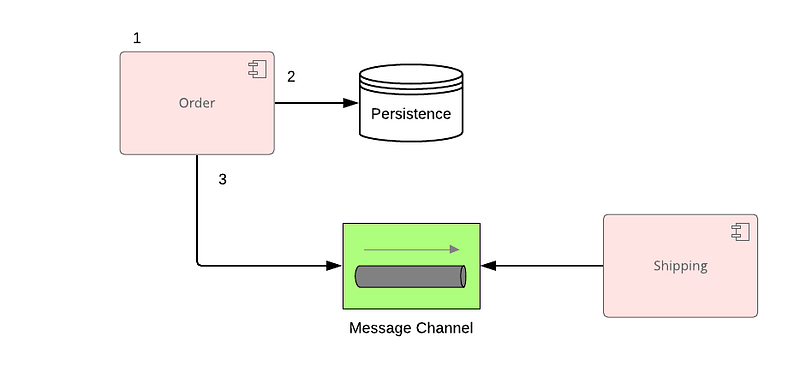
Problem solved, right? Well, not quite. The first fallacy of networking comes into play: “The network is reliable”.
Consider that at any given point in time the communication with your external dependencies will fail. Depending on which step this happens in, you may end up in an inconsistent state.
Referring back to Figure 2, if the order processing fails, usually no harm is done. You just fail the operation. If the order processing succeeds but publishing its message fails, you will have a situation where the order has been placed but no items will be shipped.
As a solution, you can try to add checks and compensation actions for all failures: processing succeeded but publishing the event failed? Retry publishing. Although valid, this can lead to a convoluted implementation that it is hard to follow, especially when you add more and more dependencies.
In our case we want to solve the problem by guaranteeing that if I am able to persist the order, an event is fired. You want them to be part of an atomic operation.
From a solution space, the usual choices are: implement a 2-phase commit solution or rely on a process manager/saga. While valid, they are usually more complex to implement, and for the persistence issue we are trying to solve, a simpler alternative called the transactional outbox pattern can help.
Transactional Outbox
The concept of the transactional outbox is simple. Instead of using two different technologies where there is no transaction support, we use just one to save the state and the event. Within this medium, you have the atomic guarantee that either the entire content is persisted, or none of it is.
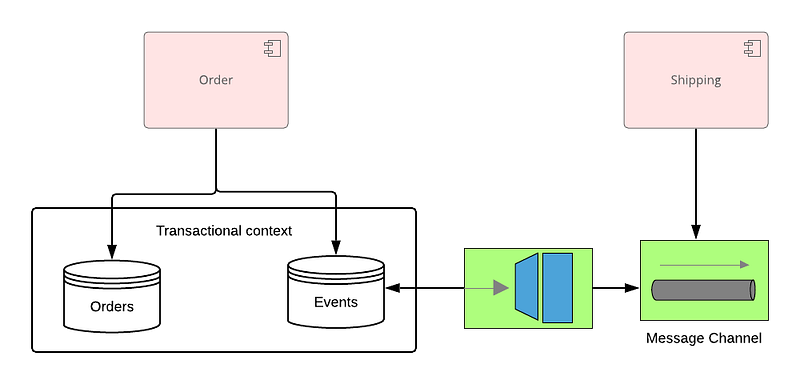
The next step is to use a mechanism, push or pull, to take those events and publish them into the selected messaging solution.
A common choice would be to use an RDBMS — such as MySQL or PostgreSQL — and use a Change Data Capture (CDC) tool, such as debezium, that reads the transaction log to send your events. In our case, I decided to use a managed service that provides all the necessary pieces: DynamoDB, Streams, and Lambda functions.
DynamoDB Streams
DynamoDB provides support for creating a stream of events to track every time a change happens in a table. So when an item gets inserted, updated, or deleted.
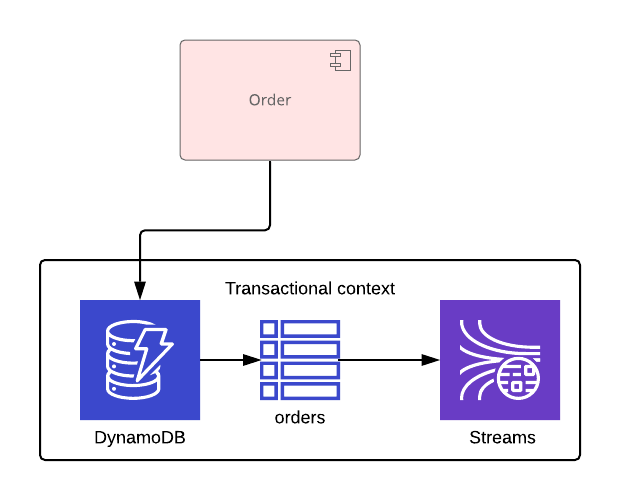
Our solution could be in the form of a task that keeps polling this stream for new entries and publishes to SQS or SNS. Instead of having to do this task, I opted to leverage another DynamoDB integration: Lambdas.
DynamoDB streams can be configured to trigger the execution of Lambdas for every entry. This helps reduce the number of moving parts that I have to write and manage on my own.
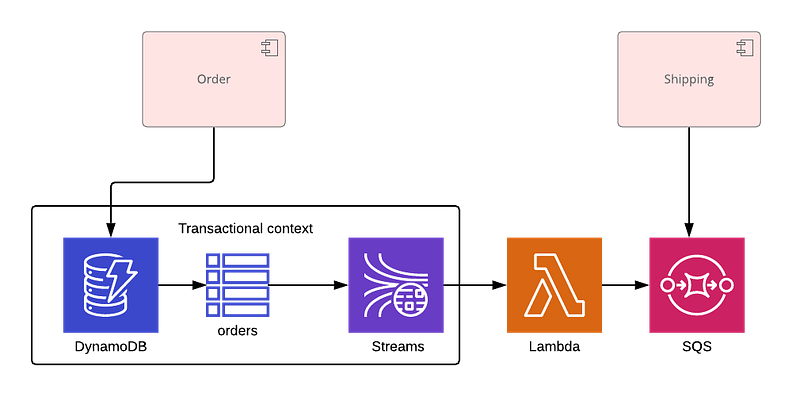
The final setup can be seen in Figure 5. The nice aspect of this is that the infrastructure takes care of the CDC aspect, as it handles triggering the Lambda whenever the changes appear on the stream, and automatically retries upon failure. Less code for us to write and worry about.
Practical Aspects
Setup
Before we go over the code itself, you have to set up the necessary infrastructure. Fortunately, AWS provides a detailed set of instructions here. In summary, it involves creating the following steps:
- Create the DynamoDB table with stream enabled;
- Configure the IAM role that your Lambda will use to execute. Be careful to add the resources you want it to access, such as the stream created on step 1 and the SQS queue or SNS topic you want to publish your events;
- Create the Lambda associated with the role and connected to the stream.
In our case this is what it looks like after the setup has been completed.

In Figure 6 we see that DynamoDB will trigger our Lambda, which in turn is connected to SNS.
Persisting Data in DynamoDB
Looking at our simplified Order model, represented in Figure 7, we can see that it contains the properties needed, and a list of the events collected. In our case, we are interested in exploring the first event, OrderCreated.
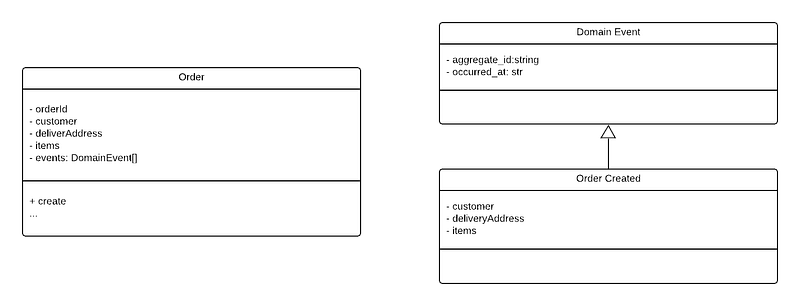
We have created a table in DynamoDB called orders with the key being the orderId. For simplicity, we will not model any sort or secondary indexes.
When persisting an instance of an Order, you would be saving the event you want published.
The previous snippet shows a json representation of the data that will be persisted in DynamoDB.
Receiving the Updates
When the Order was created and added to Dynamo, our Lambda will be called to process the new entries on the stream. You can configure it to receive these changes in batches, which means, the same Lambda will be called with many changes.
You will iterate through the Records, and for each one, look at the dynamodb property. This is where the properties of the item that has been changed will be accessible.
Your job at this point is to extract the event received and publish it to SNS.
Handling Failures
The key aspect of our Lambda is that it should not perform any complex operation, and act only as a router for events as far as possible.
This is because if you encounter a failure and the Lambda returns anything other than success, Dynamo will reattempt to send the entire batch of changes again, likely generating duplicate messages in your messaging solution.
When you decide how to handle failures, such as if you try to publish an event to SNS/SQS and are unable to, please take into account the following options:
- Use a batch size of 1: This is the simplest option. If you fail before publishing the message, there is no problem and you have no risk of duplication. This may not be a valid option if you expect many changes to happen at the same time, and for latency to be a critical factor;
- Connect to a FIFO queue: If you are publishing messages to an SQS queue, you have the option to use a FIFO queue and set a deduplication ID. This can help you since it ignores all messages published by the Lambda that are considered to be duplicates;
- Handle on the consuming side: This is the most complex option but the most secure, since the consumer can handle the duplication by making it part of an idempotent operation.
Final Considerations
The use of DynamoDB Streams with Lambda allows you to delegate some of your concerns to the infrastructure layer. Although not perfect, it offers a solid alternative to solve the atomicity problem for your event-driven application, at least for the persistence and event publishing aspect of it.
Editorial reviews by Deanna Chow, Liela Touré, & Prateek Sanyal.
Want to work with us? Click here to see all open positions at SSENSE!