Summary
The web content describes the immersive space coordinate system used in Reality Composer Pro and Xcode for 3D object positioning.
Abstract
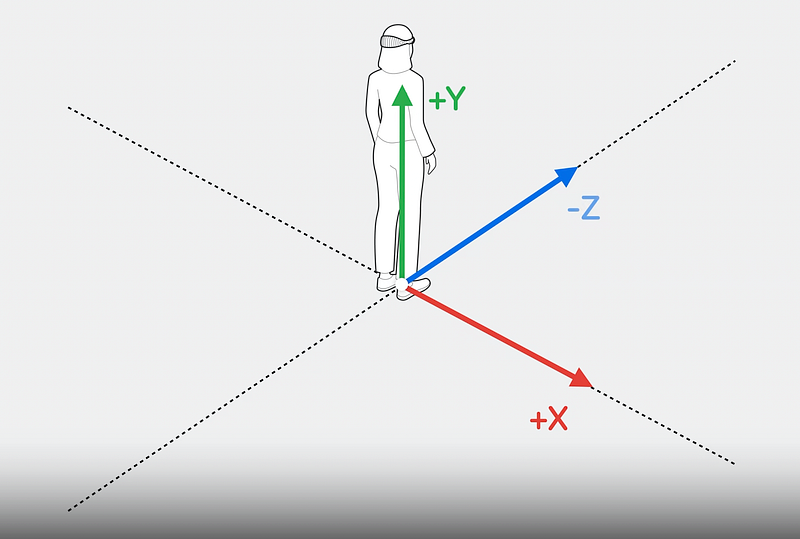
The immersive space coordinate system is defined with the origin at the user's feet, designated as (0,0,0). The X-axis represents the right direction, Y-axis the up direction, and the Z-axis the front direction, with negative values indicating the opposite directions. This coordinate system is utilized in Reality Composer Pro for placing 3D objects in a virtual space and can be manipulated programmatically in Xcode. An example is provided, demonstrating how to move an entity along the X and Z axes using Swift code, with a translation vector and a smooth transition animation over a duration of 3 seconds.
Opinions
- The coordinate system is designed to be intuitive for developers working with 3D environments, aligning with common spatial understanding.
- The system's compatibility with both Reality Composer Pro and Xcode suggests a seamless workflow for developers transitioning between visual and code-based 3D object manipulation.
- The inclusion of a code example with a smooth transition (
.easeInOut) indicates a preference for user-friendly motion in the immersive space, enhancing the user experience.
- The use of
SIMD3 in the code snippet reflects a focus on high-performance computing, leveraging Single Instruction, Multiple Data (SIMD) operations for efficient vector math in 3D transformations.