
Image interpolation in OpenCV
Some form of image interpolation is always taking place when manipulating digital images — whether it’s resizing them to increase or decrease the total number of pixels, correcting for lens distortion, changing perspective, or rotating an image.
Rephrase Interpolation is an approximation that may result in image degradation each time it’s performed. The image may vary significantly depending on the interpolation algorithm used.
In this post, i will provide an overview of the diffrent interpolation algorithm that OpenCV uses
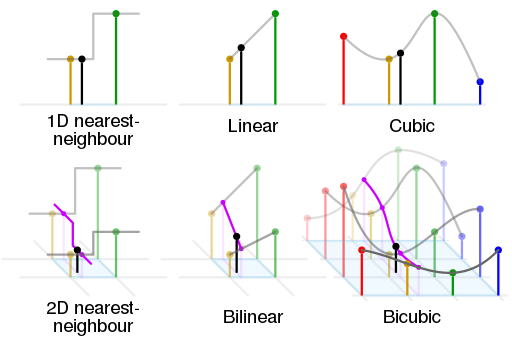
Nearest-neighbor interpolation
The nearest neighbour algorithm selects the value of the nearest pixel and does not interpolate between values from other neighbouring pixels. This algorithm does not create any pixel values that doesn’t exist on the original image. This type of interpolation is ideal for scaling images where precise pixel borders must be maintained (such when working with pixel art).
DisplayImageComparison1x3(original_im,
                          ScaleImageByRatio(original_im,2,2,cv2.INTER_LINEAR),
                          ScaleImageByRatio(original_im,.5,.5,cv2.INTER_LINEAR),
                          "2x scale",
                          ".5x scale")

DisplayImageComparison1x3(original_px_im,
                          ScaleImageByRatio(original_px_im,2,2,cv2.INTER_LINEAR),
                          ScaleImageByRatio(original_px_im,.5,.5,cv2.INTER_LINEAR),
                          "2x scale",
                          ".5x scale")
Bilinear interpolation
Bilinear interpolation is an algorithm that applies linear interpolation between pixel values in the x and y directions. As images are represented as a matrix, this is implemented as a two-step process; firstly pixels are interpolated in the x direction, then the y direction. This algorithm will generate new pixel values (that doesnt exist on the original) as the pixel values are calculated based on weighted averages of the surrounding pixels.
By default, OpenCV applies this interpolation algorithm unless oterwise defined. This is a good general purpose interpolation algrothim.
DisplayImageComparison1x3(original_im,
                          ScaleImageByRatio(original_im,2,2,cv2.INTER_LINEAR),
                          ScaleImageByRatio(original_im,.5,.5,cv2.INTER_LINEAR),
                          "2x scale",
                          ".5x scale")

DisplayImageComparison1x3(original_px_im,
                          ScaleImageByRatio(original_px_im,2,2,cv2.INTER_LINEAR),
                          ScaleImageByRatio(original_px_im,.5,.5,cv2.INTER_LINEAR),
                          "2x scale",
                          ".5x scale")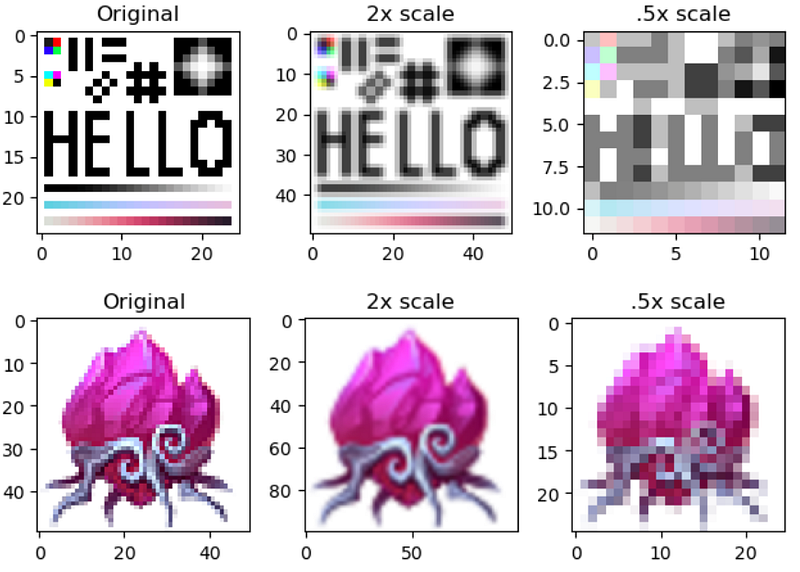
Pixel area relation resampling
This algorithm yields similar results to the Nearest-neighbor algorithm. According to OpenCV’s documentation, it preforms resampling using pixel area relation. It may be a preferred method for image decimation, as it gives moire’-free results.
As we can see in the compressions below, when upscaling, it had the same results as the nearest-neighbour algorithm, however, downscaling resulted in output similar to the bilinear algorithm.
DisplayImageComparison1x3(original_im,
                          ScaleImageByRatio(original_im,2,2,cv2.INTER_AREA),
                          ScaleImageByRatio(original_im,.5,.5,cv2.INTER_AREA),
                          "2x scale",
                          ".5x scale")

DisplayImageComparison1x3(original_px_im,
                          ScaleImageByRatio(original_px_im,2,2,cv2.INTER_AREA),
                          ScaleImageByRatio(original_px_im,.5,.5,cv2.INTER_AREA),
                          "2x scale",
                          ".5x scale")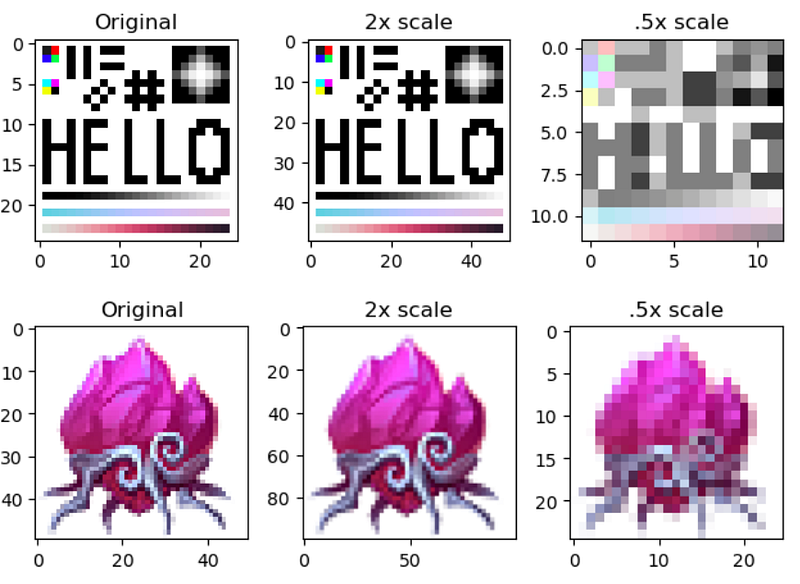
Bicubic interpolation
This method of resizing uses bicubic interpolation. It works by averaging the weights for each pixel adjacent to the current image location, then using that value as a new pixel in the image. This method is similar to the bilinear algorithm however instead of linear interpolation, the weighting favours the values closer to the source pixel (imagine a S curve between 2 points instead of a line). This method would result in a ‘sharper’ output compared to bilinear interpolation
DisplayImageComparison1x3(original_im,
                          ScaleImageByRatio(original_im,2,2,cv2.INTER_CUBIC),
                          ScaleImageByRatio(original_im,.5,.5,cv2.INTER_CUBIC),
                          "2x scale",
                          ".5x scale")

DisplayImageComparison1x3(original_px_im,
                          ScaleImageByRatio(original_px_im,2,2,cv2.INTER_CUBIC),
                          ScaleImageByRatio(original_px_im,.5,.5,cv2.INTER_CUBIC),
                          "2x scale",
                          ".5x scale")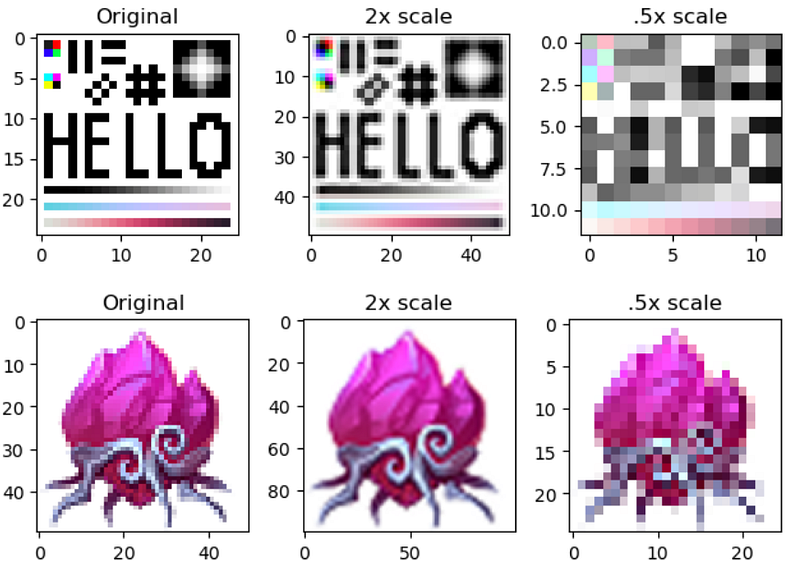
Lanczos interpolation
Uses Lanczos resampling over 8×8 pixel neighborhood and is quiet slow and resource-intensive. This is best used for images containing lots of intricate details (such as text)
DisplayImageComparison1x3(original_im,
                          ScaleImageByRatio(original_im,2,2,cv2.INTER_LANCZOS4),
                          ScaleImageByRatio(original_im,.5,.5,cv2.INTER_LANCZOS4),
                          "2x scale",
                          ".5x scale")

DisplayImageComparison1x3(original_px_im,
                          ScaleImageByRatio(original_px_im,2,2,cv2.INTER_LANCZOS4),
                          ScaleImageByRatio(original_px_im,.5,.5,cv2.INTER_LANCZOS4),
                          "2x scale",
                          ".5x scale")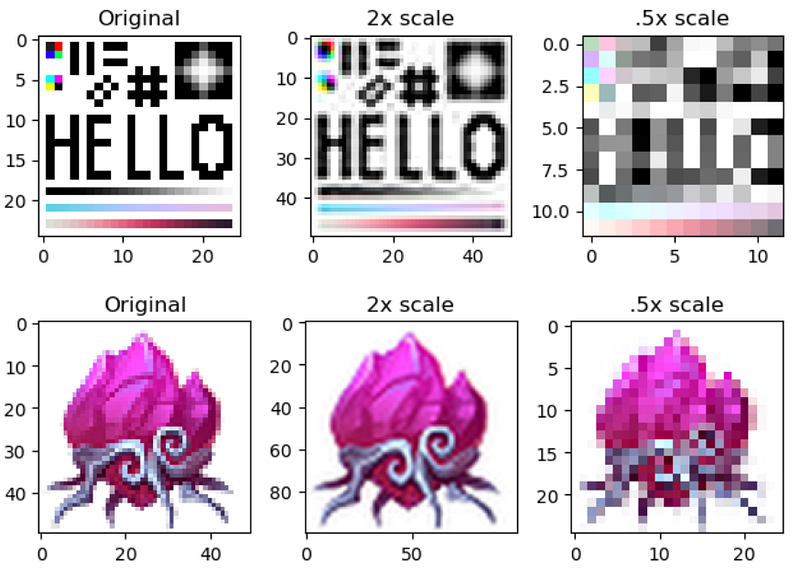
If you would like to get a copy of the code used in this article, it can be found here on Github.
Want to make use of your knowledge of image interpolation? check out Geometric Transformations using OpenCV (python)


