
Writing | Collaboration| Relationships
Slack Demystified
How to Get Started

On Medium, there are lots of different ways to connect with editors and other writers.
One great communication tool is Slack.
Why should I join Slack?
I don’t know about you but some of these online platforms can be daunting. Joining Slack was worth it for me.
Many businesses use it for collaboration. They also use it to work on special projects or share ideas.
At Illumination, we use Slack to get to know each other and provide support.
- Get publication news as it happens.
- You can ask questions in the #help channel.
- Meet other writers.
- There are currently 638 members on our Illumination Slack space. That’s a great networking opportunity. (Update Jan 2022 — there are now over 10,000 members on our Slack channel.)
- Connect with editors in a space outside of the publishing queue.
- Learn a new skill. Slack is a tool used by many other businesses and groups.
- Pick up some great tips from editors and other writers.
- Raise your profile.
- It’s free, and I found it to be very useful.
If you are interested in joining us, send a request via this link. Mention “Slack Request” in the message. Be sure to include your Medium ID.
You will receive an invitation link in reply. All you have to do is click on it.
If you don’t have a Slack account, you’ll be asked to create one.
It’s easy if you follow the instructions. You only have to do this once. If you add your Medium image, that will help people get to know you across both platforms.
Use your Medium account name to make it easier for writers to recognize you outside of Slack. I always find it frustrating when a person is @janedoe on Medium and @gloriousgirlfriend on Slack.
You can use Slack on your PC or tablet, or on your phone. These screenshots are from my PC but I use Slack a lot on my phone. (Download the App from the App store).
The first screen you will see is the main area, which is divided into two parts. There's a menu on the left and the conversation area, which is the larger area on the right.
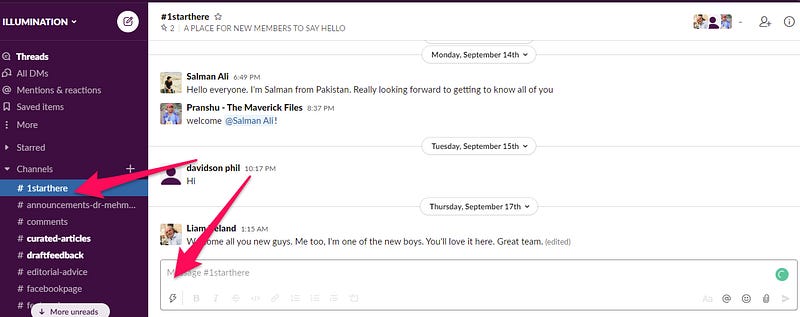
The first red arrow is pointing at the channel section.
The second red arrow is where you type a message. It’s easy.
If you want to reply to a comment, use an emoji or see other options, hover over the comment and a small box will come up on the right.
If you want to delete your comment, hover until the box comes up, select the three dots and then delete.
Start a conversation
In the Illumination Slack space, there is a channel called #1starthere. Click on it and introduce yourself.
Replying to a comment or question.
Use the @ symbol and the person's name to ensure they receive your message or reply.
Which channels should I use?
Don’t be overwhelmed. Often a Slack administrator will add a new person to all of the channels, which can be very overwhelming. They do this because they want to give you flexibility.
On the Illumination Slack Channel, I would start with #1starthere, and maybe one other channel such as #chosen-for-further-distribution. Poke around a bit and see what people are talking about. You will find something that interests you.
If you’re stuck, post a message in the #help channel. There are lots of helpful writers who may be able to answer your question.
As you can see below, some channels are brighter white. That indicates the channel has new messages on it. Don’t worry about reading all the messages in channels you aren’t participating in. Visit the channels that interest you.
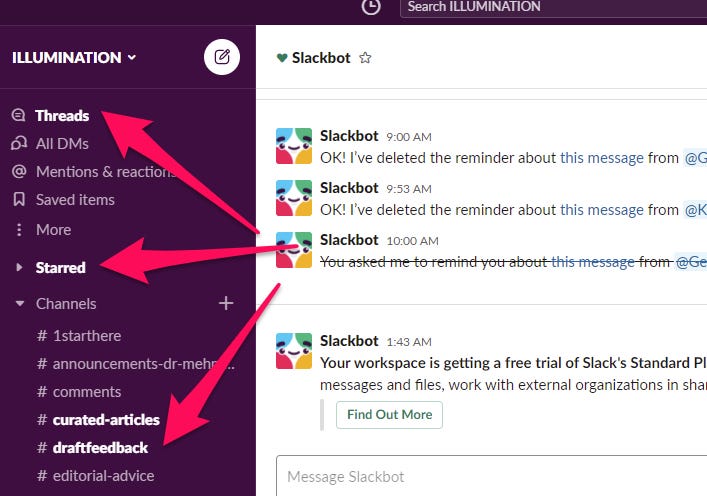
Threads
This indicates activity in conversations you have been having. If you click on Threads, it will bring up all the new conversations, no matter which channel they occurred in. It’s a quick and easy way to catch up.
Starred
You are able to star channels which groups the channels you often use together so you can easily find them. Click on a channel, right-click, and select ‘star channel’. This channel should now appear under Starred. You can remove the star in the same way if you no longer want to follow it.
One big no-no on Slack.
Please don’t post a link to your story on every channel.
We know you’re excited about your new story, but this will only turn people off.
You can post a link to your story in #post-your-own-writing-here, once a day, please.
Personally, I only read links that are posted in the #post-your-own-writing-here or #chosen-for-further-distribution.
If you have a special announcement or celebration use the #general channel.
Take your time, and get to know your fellow writers.
Direct Messaging on Slack
If you want to send someone a private message, go to the bottom of the menu on the left until you see Direct Messages. If you’ve never had a Slack conversation with them before, you may need to add them using the + symbol.
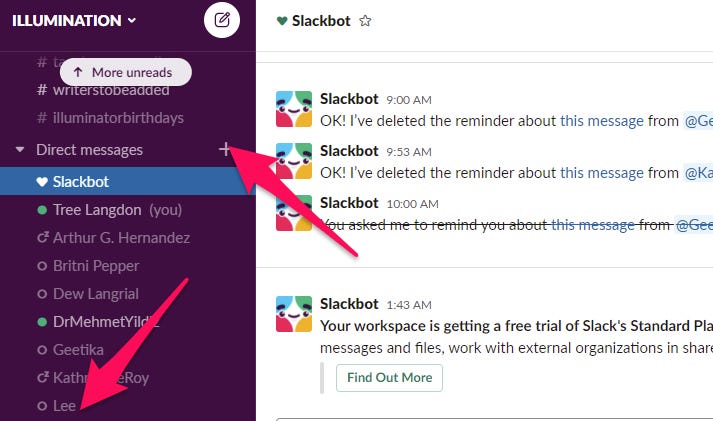
If you’ve had a previous discussion with someone, you can usually find their name on the list, click on it and then begin a conversation.
Another way to start a Direct Message conversation is to click on their name and their profile will come up. There’s an option to DM them.
Those are the Slack basics for now. If Slack is new to you, it may be difficult at first. You have to spend a bit of time getting to know how to use it. Join Slack and start communicating.
I look forward to seeing you there.
Curious About How to Join Slack?
We collaborate with published authors, bloggers, and other service providers to extend our network. Join us on our Slack channel to participate.
Slack is our main communication tool. You can send a request via this link to join. Mention “slack request” in the message.
My newsletter is free for anyone. I send it weekly, most of the time. If you also want to receive it, join the thousands of smart people who enjoy it today.
I hope you found something useful in this article. If you’re not already a Medium member, Join us here.
If you are a member, please share this story so more people can benefit from these wise words.