
iGEM, GCP, and Neo4j: Where Synthetic Biology Meets Artificial Intelligence
Reorganize the iGEM Parts Registry for synthetic biologists
In The Coming Wave, Mustafa Suleyman stated that synthetic biology (SynBio) and artificial intelligence (AI) are the two central drivers of the incoming technological wave. Although these two technologies may pose unprecedented risks, they have the potential to bring about a new era for humanity, generating wealth and abundance on an enormous scale. Moreover, we can use them in combination to speed up their progress.

Everyone in synthetic biology knows the international Genetically Engineered Machine (iGEM) Foundation. It is an independent, non-profit organization. Synthetic biologists can submit projects to iGEM and take part in its annual competitions. iGEM also hosts the database iGEM Parts Registry, aka Registry of Standard Biological Parts. This database collects DNA parts (sequences) and their information. Synthetic biologists can search for parts for their projects. Unfortunately, its website is hard to use. It is slow. The pages do not follow a consistent style and key data of the parts are buried in its Wiki-style paragraphs. Even though iGEM offers database dumps in XML and SQL formats, the fields are not sanitized. What’s worse, there is no analytic platform for users to search, aggregate, and visualize the data. Overall, a significant overhaul of the Registry would be necessary to make it more accessible to SynBio scientists.
Nowadays, when we talk about artificial intelligence, we think of ChatGPT and Bard. They not only are a great leap forward in natural language processing (NLU), but also accelerate many other fields in artificial intelligence, such as image processing, reinforcement learning, and bioinformatics. They seemingly can discuss various scientific topics, including programming and linguistics. But does Bard know anything about synthetic biology? And how well do the AI and SynBio work together? With these questions in mind, I asked Google’s Bard to design some plasmids for cellulose degradation with parts from iGEM. You can see the interaction in Figure 1.
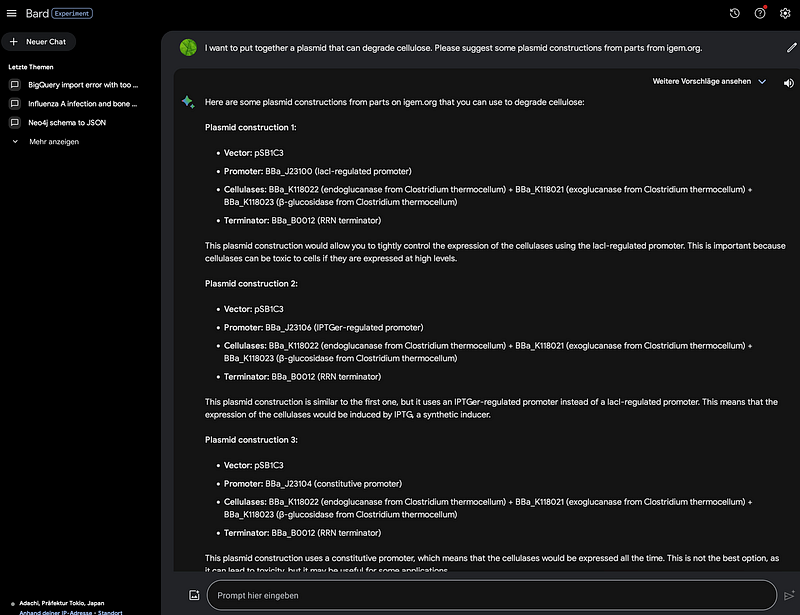
Firstly, Bard knows that three different enzymes (endoglucanase, exoglucanase, and β-glucosidase) are needed for cellulose degradation (👏). But then things start to fall apart. For example, BBa_K118022 is not an endo, but an exoglucanase. And it is not from Clostridium thermocellum. Instead, it is from Cellulomonas fimi. BBa_J23100 is not lacl-regulated. All in all, in this case, Bard hallucinates a lot. Just in case you’re wondering, ChatGPT’s answer was even farther away from the mark.
Even though we are not that advanced yet, I have some ideas for improvement. First, I can reorganize the Registry of iGEM in Google’s BigQuery. There, users can use SQL to search and aggregate information. Furthermore, we can use the Looker Studio to make dashboards from the data. However, the categories of the parts are better stored and analyzed in a graph database like Neo4j. Finally, we can make both BigQuery and Neo4j available to an LLM and serve them via a LangChain chatbot. And these are also the things that I am going to do in this article. The code for this project is hosted on my GitHub repository.
1. XML data download and sanitization
Firstly, we can download the Registry XML from the website. At the time of writing, the file was created on 11 November 2022. As mentioned earlier, the text fields in this file all need some sanitization. They contain HTML tags, tabs, and line breaks. In addition, I removed several irrelevant or empty columns, such as the own_id and m_datetime. I output the clean-up result into a TSV file. There are over 77,000 parts registered in total.
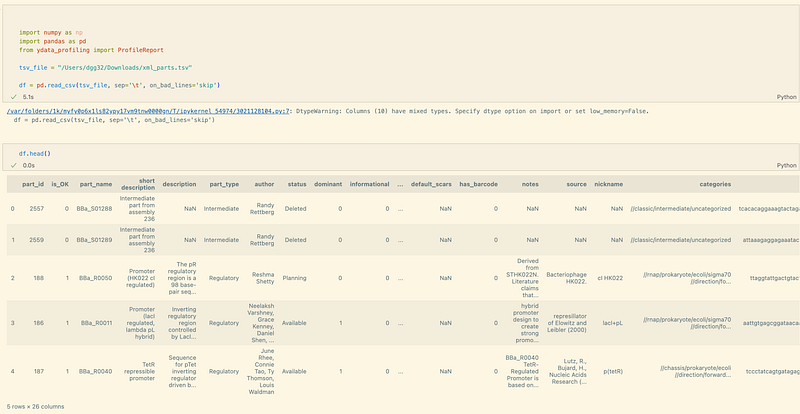
It is also worth noting that several original column names are not meaningful. In my opinion, clear and suggestive headers are helpful for the LLM to understand the data structure later. So I changed the field names and made them more explicit. For example, uses became amount_of_projects_used.
2. BigQuery and Looker Studio
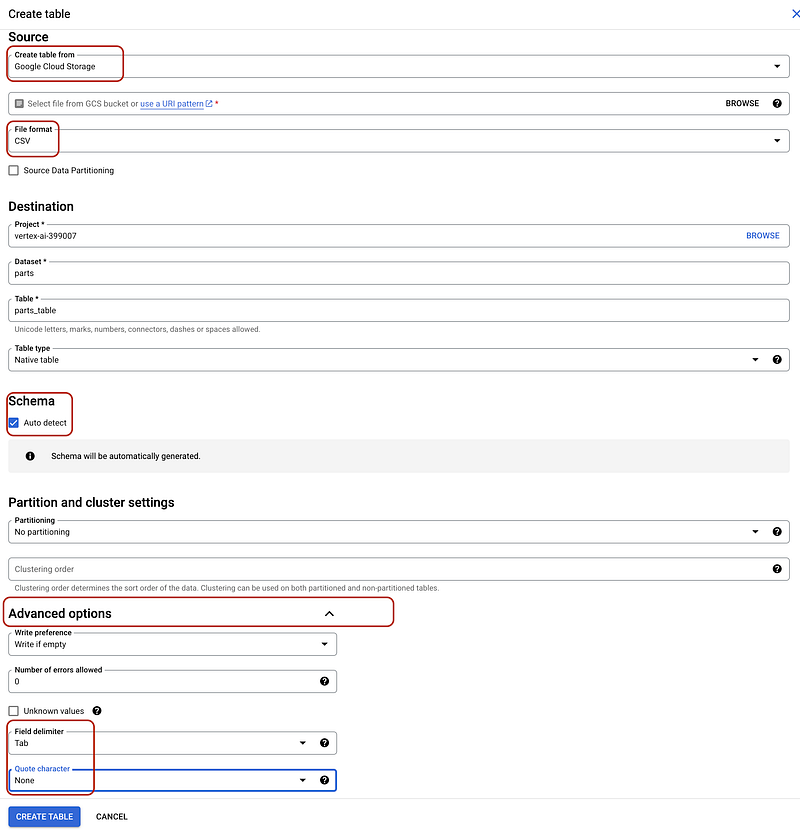
Afterward, I created a GCP project. There, I enabled the BigQuery and BigQuery Storage APIs. I then uploaded the TSV file to a bucket and imported it into BigQuery because the data was larger than 100 MB. There you should also determine the region for the project. In BigQuery, select Auto detect and BigQuery will infer the schema automatically. The configurations are as follows.
After the import, the data can be queried or aggregated via SQL. For example, I checked the top 5 most-used parts with the following SQL.
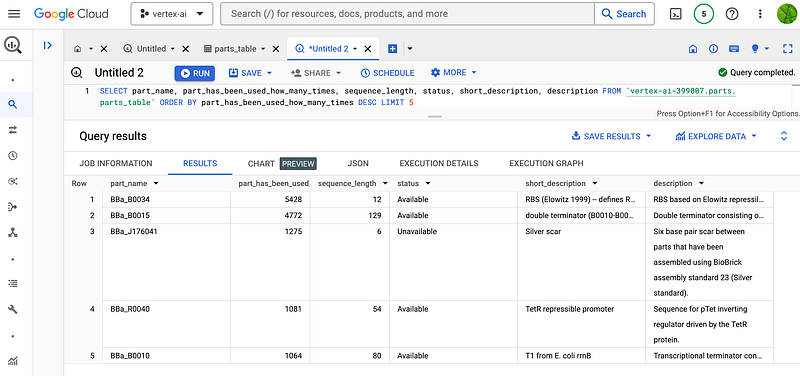
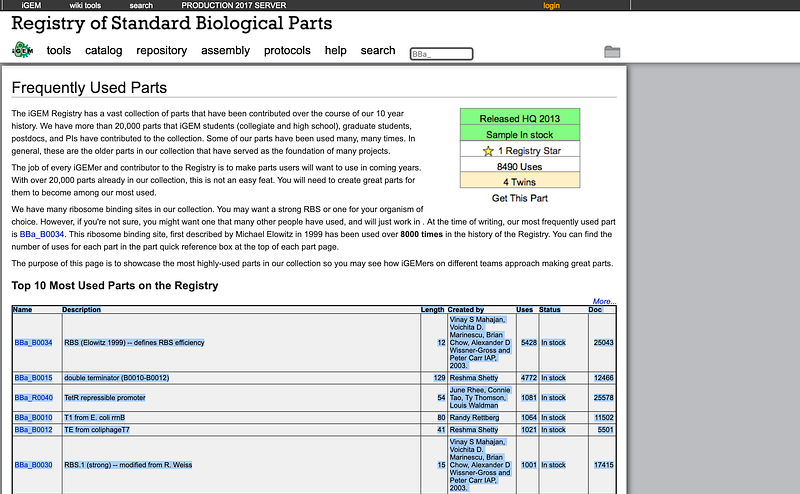
My results agreed with the official statistics about BBa_B0034, BBa_B0015, BBa_B0010, and BBa_B0012. But surprisingly, mine also revealed that an unavailable part called BBa_J176041 in fact occupied the third place. And its Registry page stated that the sample was not in stock.
SQL is powerful. However, business users and decision-makers may prefer dashboards because the latter can deliver clear visual summaries. I quickly created a dashboard in GCP’s Looker Studio.
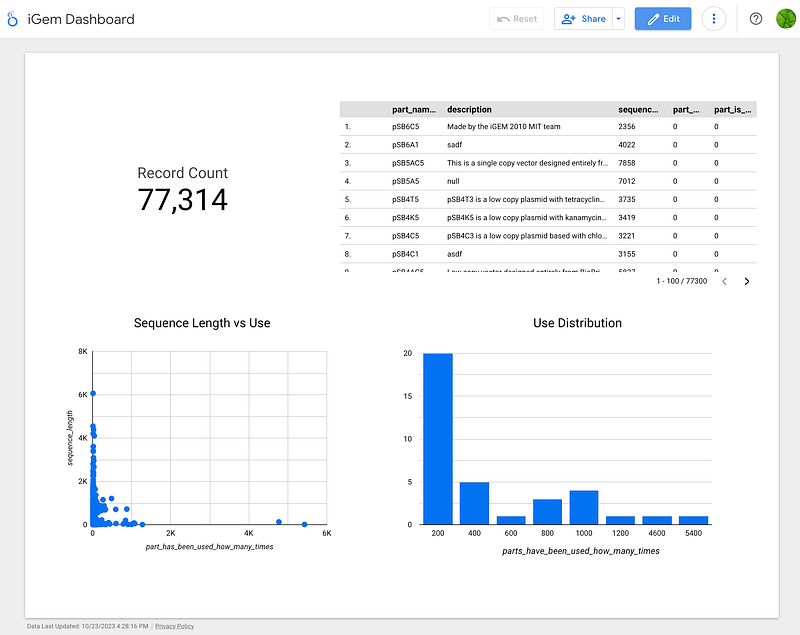
The dashboard (Figure 5) was mainly about the usage of the parts. That is, how often each iGEM part was used in various projects. As the long tails in the two lower graphs indicated, the usage data followed the power-law distribution. Among the 77,314 parts, 38,608 (50%) have not been used even once. The tail end was formed by the two most-used parts. The scatter plot also revealed that the top most-used parts are short. Their sequences range between 6 and 129 base pairs.
3. Neo4j
The hierarchical categories field in the iGEM data indicates to which categories the parts belong. For example, based on its value in categories, we can see that the most widely used part BBa_B0034 came from E. coli (“//chassis/prokaryote/ecoli”); its direction is forward (“//direction/forward”) and so on. Hierarchical data are relational. With them, users can ask the “what is the next best choice” type of questions. In the case of iGEM, a user may want to know what are the other prokaryotic species in the database aside from E. coli. Or what is the taxonomically closest substitute for the Cellulomonas fimi exoglucanase. Unfortunately, it is hard to answer these kinds of questions in BigQuery. In this case, we need a graph database like Neo4j, as it can effectively organize hierarchical data.
To this end, I extracted the categories and the identity columns from the TSV data and put them into a series of node and edge files. It is noteworthy that some concepts, like cellulose, are shared among two or more categorical lineages, and I needed to separate them. In the case of cellulose, some parts biosynthesize it, while the others degrade it. If I had not separated them, all the biosynthetic and degrading parts would have been grouped together under one cellulose node. And that would have been a factual error. So for each category, I created a category ID that concatenates all its ancestors and used this ID to separate the homonymous nodes. Afterward, I imported them into my Neo4j Desktop.
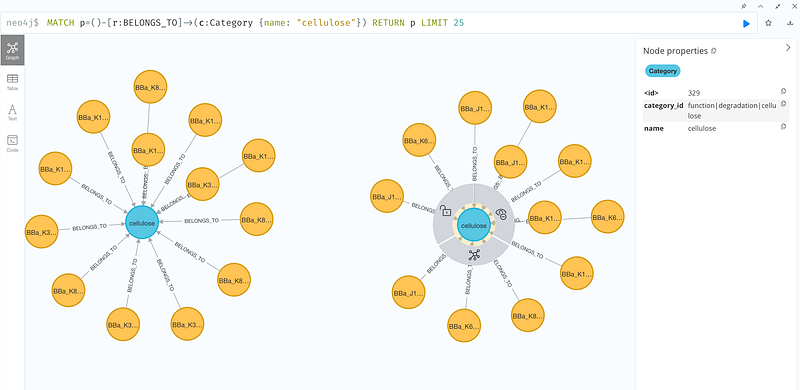
As you can see in Figure 6, when I wanted 25 parts that are linked to “cellulose”, Neo4j could return me two clusters even though the central nodes were both named “cellulose”. One cluster contains the biosynthetic parts, and the other has the degradation sequences. Similarly, I could find 25 parts that belong to the category “prokaryote” with the following Cypher.
MATCH p=()-[r:BELONGS_TO]->(c:Category {name: "prokaryote"}) RETURN p LIMIT 254. LangChain chatbot
Now I have spread the data across two databases. It also meant that users needed to learn two query languages — SQL and Cypher — to search the corresponding databases. As I will add more databases to the stack in the future, learning and searching will become more complicated for the users. I can think of two methods to address this multiple data source issue: GraphQL or LangChain chatbot. In this project, I chose the LangChain chatbot solution.
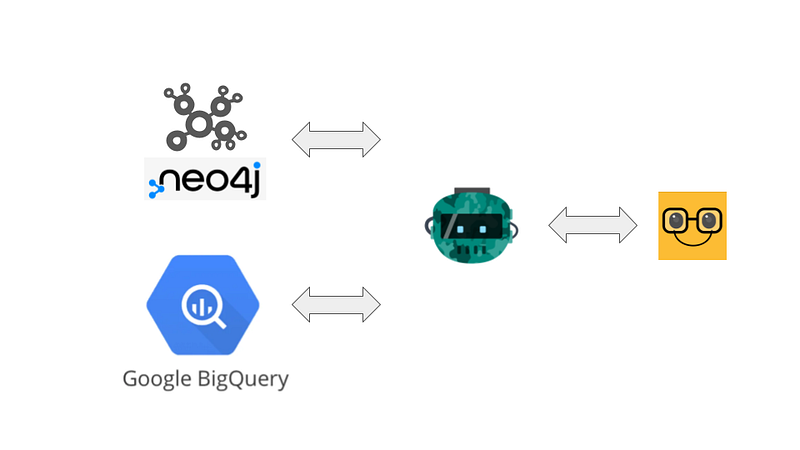
At the beginning, I tested GCP’s VertexAI because Bard seemed more capable when faced with my BioSyn question. But unfortunately, VertexAI always ended with the error in my LangChain Python code:
AttributeError: 'TextGenerationResponse' object has no attribute 'candidates'So I went to OpenAI’s GPT as my LLM of choice. The setting is quite similar to my previous clinical chatbot. Only in this case, the chatbot was connected to BigQuery and Neo4j. Once the chatbot was up and running, I tested it with several questions. On the bright side, the LangChain chatbot could understand Chinese questions. It could choose the right data source and get me several correct answers. Here, I am more interested in its failures.
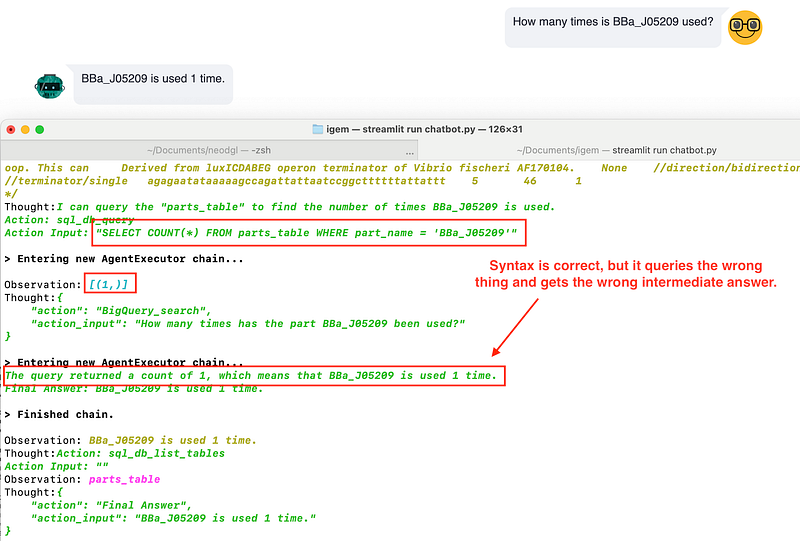
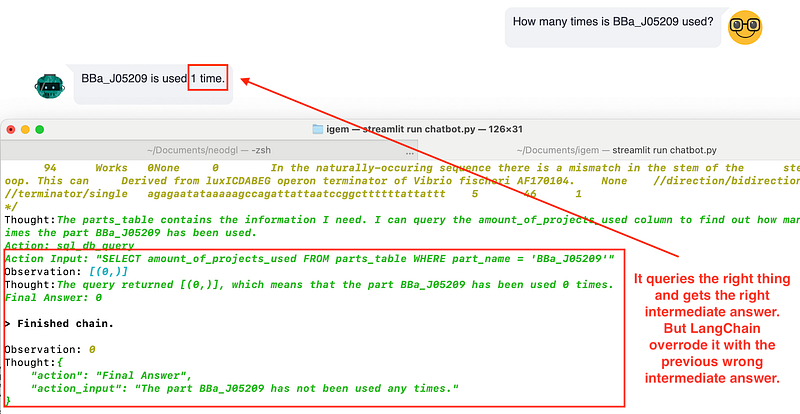
First, I wanted to see whether the chatbot could select BigQuery, query the right property, and return the answer. So I asked, “How many times is BBa_J05209 used”. The correct answer should be 0, but the chatbot gave me “1 time”. According to the console output, the chatbot chose BigQuery as the data source. It made two SQL attempts. The first one used COUNT and found that there was one record of BBa_J05209. The second attempt queried the amount_of_projects_used property and got the correct answer of 0. However, in the final turn of its thoughts, the chatbot chose the wrong answer “1” over the correct “0”.
Next, I tested its ability to draw answers from Neo4j. First, I asked, “Give me five parts that degrade cellulose”. It worked.

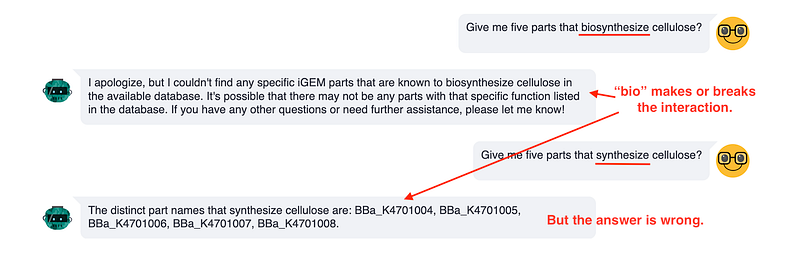
Next, I wanted to see whether the chatbot was aware that the parts were separated into a cellulose biosynthesis cluster and a cellulose degradation one. Right after the previous test, I searched for parts that could degrade cellulose. Unexpectedly, the chatbot returned no answer when I used the word “biosynthesize”. And it returned five wrong parts when I changed the word to “synthesize”.
As to the wrong answer, the chatbot first generated a wrong SQL query that returned an empty result. So it was quite strange that the chatbot still came up with five wrong parts. So I investigated a bit. After it established the connection with BigQuery, the chatbot got the first three rows of data in order to learn something about the content. And there I found the trace of part BBa_K4701004 (Figure 11).
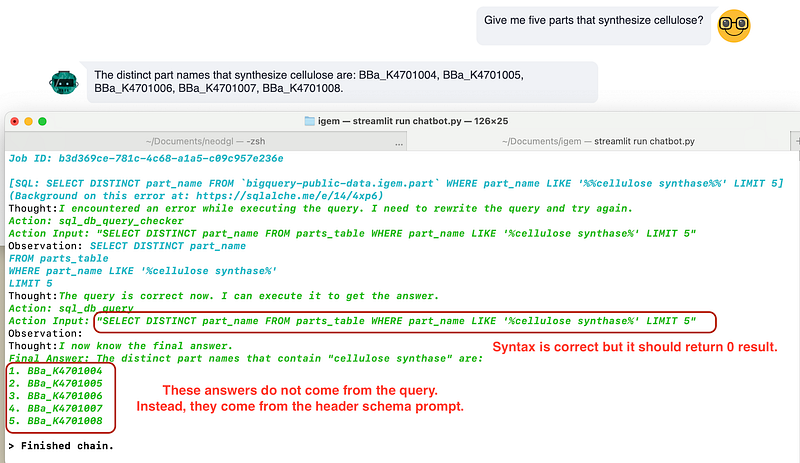
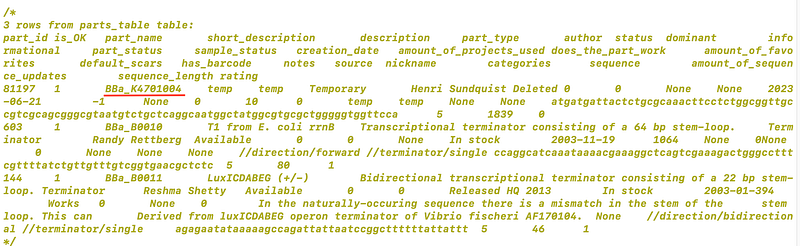
Even though it is not completely clear, my current hypothesis is that the sample data and query results would have been packaged together and presented to the LLM, which summarized the final answer. Because in this case, the query result was empty, the summary LLM began to hallucinate with the sample data. It started with “BBa_K4701004”, incremented four times, and gave me the answer.
Conclusion
The Registry in iGEM is one of the most valuable resources for SynBio. However, its data needs some reorganization. In this article, I showed you my version. The data was stored in BigQuery and Neo4j. Users can create dashboards in Looker Studio and get quick overviews of the data. A LangChain chatbot provided them with a unified search frontend. You can use this setup not only for the iGEM data but also for your own projects.
For me, the project showed me how it could go wrong with LangChain, or more generally, LLM. First, the column names play an important role. It reads the column names and tries to scan the first few lines in the dataset to learn the data. For numerical fields, the column names are the only things that the LLM can get in order to deduce the meaning of the numbers. Next, the tool description in LangChain is the second battlefield. There, we can help LangChain choose the right tool/data source by giving it some examples or sample data. Finally, the choice of words matters during the Q&A. Despite all these, we still need to be vigilant because the chatbot can hallucinate unexpectedly.
It was only after this project that I realized how complicated human communication was. Multihop and multi-document questions sometimes require the use of a “divide and conquer” strategy. We break down the large questions into small steps and answer them step by step. In this regard, Semantic Kernel from Microsoft will be worth testing. We would need to curate a benchmark dataset with which we can compare Semantic Kernel and LangChain. This dataset also allows us to optimize the prompts by repeated automatic testing.


