
If You Really Must Use SQL Distinct…
A Distinct is just like a group by (*)… except when it’s not!

Out of all SQL commands, Distinct is one of the easiest to understand conceptually: for a given set of rows, return only the unique ones.
Simple right? Think again…
Though useful in many situations where true duplication exists (like messages in streams), it is very often misused because users don’t always understand all its implications.
In my previous article SQL Like a Pro: Please Stop Using Distinct, I showed how Distinct is often misused. In this article, I will cover this topic from a different perspective: when one must use Distinct, one should do it with full knowledge and understanding. This article will try to provide you a fresh view on what the Distinct keyword really is, how it works, what makes it perform better or worse, and how to optimise it.
When training engineers, I always like to dig a bit deeper into the Distinct implementation to give trainees a more holistic understanding of how it works and hopefully reduce wrong use.
This article will give you a new perspective on how Distinct works under the hood, and will naturally lead to some optimisation techniques as well.
Curious to learn more? Read on…
Distinct = Group By (ALL)
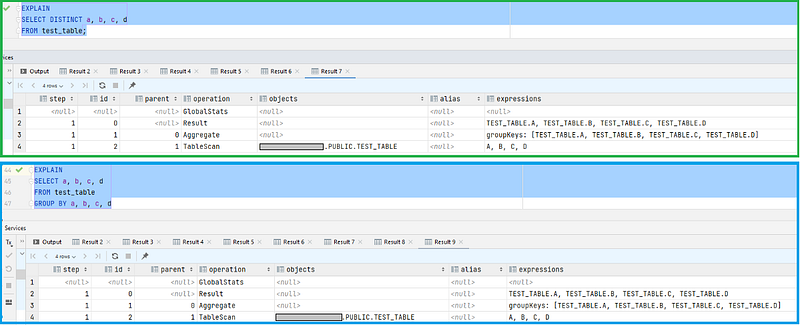
I always like to explain the Distinct behaviour as a “group by all columns”, ie:

And it truly is just that! So much so that the database execution plan is 100% the same, as you can see below:
But is that really always the case? Would you really always group by all the columns?
When Distinct Is Different From Group By (col1, col2)
One thing you may not have considered though, is how a Distinct can sometimes be different from a group by. Why?
Because a group by can be targeted, and a Distinct can’t (or usually isn’t).
A classic example is when a single column is used multiple times for different calculations/transformations. Let’s see an example:
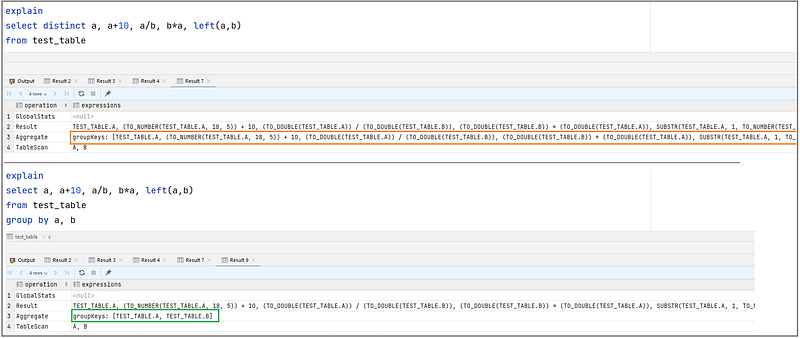
Truth is the database can’t understand whether the columns are co-dependent or not (in some situations it could, and might depending on the query optimiser… but you really don’t want to rely on it).
In reality, the database doesn’t want to care about that. If your query asks for a Distinct age, age*age, the database will perform that operation exactly. Why? Because only you understand there is no way age*age will be different for the same age; you know you can aggregate by age, and multiply AFTER the Distinct. Using the same age multiplication example, the difference between the two statements is:
- [BAD] for each one of the 10M rows, calculate calc=age*age, then find distinct age|calc records within the 10M rows
- [GOOD] Find all the distinct ages in the dataset (100 rows), and only then perform the calculation (100 times)
This difference can really impact your queries’ performance. Let’s see why.
Because Distinct Is a Very Expensive Operation
Running a Distinct on a large amount of columns can have a severe performance impact, and this is even worse for distributed databases. Why?
Because finding all the unique records within a dataset implies comparing all records with each other, and that means running through the full dataset before being able to offload records back to the user. Holding all these “records” (or records’ hashes) requires a lot of memory, and comparing them all to each other requires a lot of compute operations.
When running a Distinct on large volumes of big columns, the performance of your query will deteriorate due memory constraints (loads of memory access, and disk caching may be required) and computational requirements.
The performance of a Distinct is driven by the number of distinct items, and overall row size: the more and wider columns, the worst the query will perform.
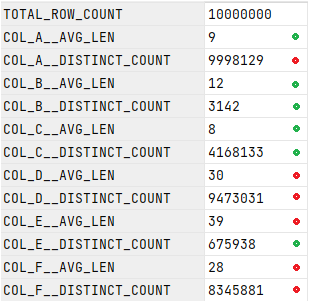
Let’s look at an example, using a table with 10 million rows. First, lets see what the data pattern in this table is when considering the column’s average length and distinct counts:
To compare performance, let us run a Distinct on the easy column set (columns a, b, c) and compare with the harder column set (columns c, d, e):

As you can tell by the execution time difference (7s vs 9s), varying the average column length and number of distinct values did influence the query performance, and it happens in different ways:
- Average Column Length influences:
- >>> Disk I/O operations required (extract data from disk)
- >>> compute required (the longer the column, the more operations are required to build a hash for comparison)
- Number of Distinct Values influences:
- >>> amount of memory required (to hold all distinct hashes in memory for comparison)
- >>> compute (more comparisons required)
NB: The above analysis is true for columnar store databases. The analysis would be slightly different for a row-based database though.
Using This Information To Improve Your Query Performance
Armed with this knowledge, you are now ready to look at your Distinct queries with different eyes, and understand how to optimise them.
TL;DR; The biggest tip here is the following:
when performing a Distinct, if any of the columns are used more than once, consider grouping by the columns explicitly, instead of performing a full group by.
Let’s see what this looks like in action. Using the same 10 million row dataset, I ran an exaggerated amount of calculations on all columns so we can really appreciate the difference between the two. Let’s start with the bad example:
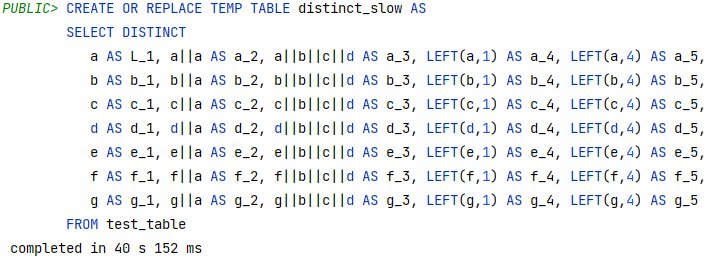
This query took 40 seconds. Not terrible, but bear in mind this is a small table, and the columns are really not that complex.
But what if we replace this with group by?
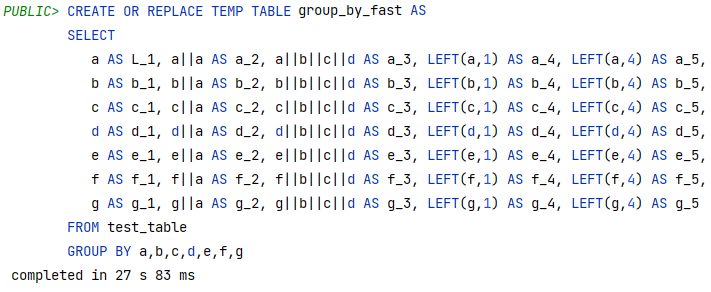
This new improved query now takes less than 28 seconds, producing the exact same output. By doing this small change, we have just told the database all those calculations can be done after the aggregation, and that they are not required for the grouping. As a consequence, the query runs in 67% of the time. That is what I call results!
Conclusion
During code reviews, the Distinct keyword is one of those that always makes me look twice. It’s really easy to misunderstand the intricacies of its use, and even from a performance perspective there is usually a lot to be gained there. This is why I felt a second article was so important, because the Distinct is very useful and needed, but it also must be well applied if you wish to produce good quality and well performing SQL.
Even if you already knew all about it, I hope this article has at least given you an extra perspective on how Distinct really works, and made you understand it a bit better.
And maybe you will look at the Distinct keyword in a different way the next time you come across it.
Thank you for reading my article! And now, for a couple of (shameless) “support me” words.
Are you thinking of subscribing to Medium? Maybe you would consider support my writing by using my referral link. Note: using my link will give me a small commission with no extra costs to you.