
If You Are Using Python and Google Cloud Platform, This Will Simplify Life for You (Part 2)
Manage your private packages with artifact registry and import them in Cloud Composer DAGs

If you use Python in a professional context, I can tell you already have looked for a way to deploy your python packages in a private repository. Well, let me introduce Artifact Registry, the artifact management service of Google Cloud Platform, which might be exactly what you need.
The 3 Issues that Artifact Registry Solve
Let’s say you have a python class (a logging class for instance) that is used both by an Airflow Directed Acyclic Graph (DAG) and by a Cloud Function.
Enforce the DRY Principle: Without a solution to manage your python packages, you end up deploying the python class along with the Airflow DAG, i.e you’ll have to copy the python class into the DAG folder.
Similarly you’ll need to deploy the python class packed together with the Cloud Function, duplicating the same code snippet. Artifact Registry repositories enable you to enforce the very important DRY (Don’t Repeat Yourself) principle by deploying the python class to a repository and pulling from that repository both from the Airflow DAG and from the Cloud Function. That gives you a single place to go when you need to modify or fix any bug in the python class.
Deploy Safe Releases: Each time you make a change to the python class, there is a risk to break the Airflow DAG and/or the Cloud Function. We refer to this as a regression. Although it’s possible to reduce the risk of breaking things with non regression tests, those tests are usually not enough. In addition, you’ll want to pinpoint every release with a working version of the python class. Wonderful! Python Artifact Registry repositories allow you to do just that.
Manage Access to Packages: If you don’t care about privacy, i.e if you’re okay with your python package being seen and used by anybody around the world, I encourage you to host them in the public python repository. But if you need to control who view your packages, as it’s often the case in a professional context, Artifact Registry repositories is the good tool because it gives you the ability to share your libraries with selected people only.
Enough talk ! Let’s build a python artifact registry repository, deploy some stuff inside and try pulling the repository from an Airflow DAG.
If what you need is to install the private python package into Cloud Function or Cloud Run, kindly refer to this article.
Create A Repository for your Packages
Assuming you have access to a GCP project and the cloud shell, creating a repository for python packages is straightforward.
- <your_repository_name> is the name you want to give to the python repository
- <your_repository_location> is the location for the repository. Something like ‘us-central1’ or ‘europe-west1’
- <your_repository_description> is some text that describes the usage or utility of the repository
Deploy A Simple Python Package
Now that our repository is created, let’s deploy a toy python package in it. We’ll be using a library that contains a function that computes the haversine distance between two points. The library can be found here. This is how you deploy the library to the previously created artifact registry repository:
After cloning the sample package repository, we build a wheel of out it and we upload that wheel to the artifact registry repository using the python library ‘twine’.
Notice how we use ‘gcloud auth’ to authenticate to the gcp account. This process also saves authentication credentials locally, which are then used by ‘twine’ while uploading to artifact registry.
Deploy a Simple Airflow DAG that Pulls from the Private Python Package
The quickest way to build a DAG in GCP is by creating a Cloud Composer environment. This is a lengthy process (20 minutes or so for the environment creation) which involves many operations including launching a bunch of resources in a Google Kubernetes Engine (GKE) cluster and deploying a Cloud SQL Postgres instance.The following command essentially creates a service account and installs Airflow on a GKE cluster.
As Airflow is now up and running, we can proceed installing the private python package which has already been pushed in Artifact Registry. To accomplish that, we need to do 2 things.
- Provide Cloud Composer with the python repository url
We get that information by running the gcloud artifacts print-settings command.
The output of that command shall look something like the following:
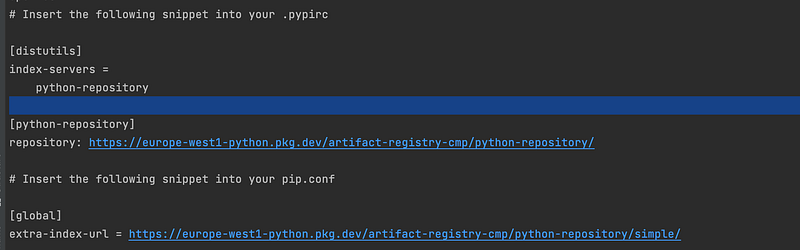
Copy the last 2 lines in a file named pip.conf and upload that file in the Cloud Composer bucket in the folder config/pip.
- Install the private python package
We use the update-pypi-package option and we provide the name and the version of the package to install.
And after a couple of minutes …
NOT WORKING …
You should’ve gotten an error message indicating that installing pypi packages has failed.
Hmm, let’s uncover what is going on here. When we run the gcloud composer environments update command with the update-pypi-package option, a Cloud Build instance is triggered and tries to build a custom Cloud Composer image with the python packages installed. This build appears in the build history (in the cloud console) less than 5 minutes after the update command is issued.
The build consists of 11 steps (at least in the version of Composer used in this article — composer-1.17.8-airflow-2.1.4) and it’s failing at step 7 which is where it tries to install the private python package.
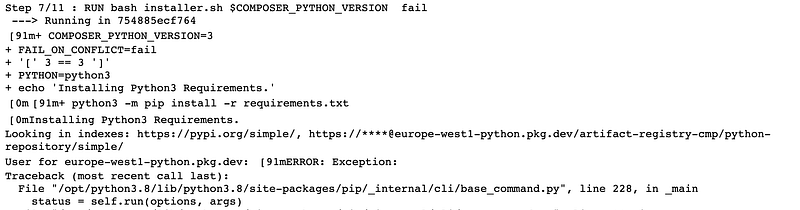
Reading through the error stack indicates the root cause of the issue. Actually, the build is having a hard time authenticating to artifact registry. Well, this is not something I would’ve expected since the build service account has the required permissions to read from the artifact registry.
Provide Cloud Build with an authentication key
After some test and learn iterations and also reading through Artifact Registry documentation, I came across a solution, which involves including a service account key in the pip.conf file we previously created. This does not comply with the security best practices and clearly looks like a workaround. However, at the date of this writing, it’s the only way to make Cloud Composer install packages from any artifact registry repository.
For that to work, the service account ought to have the permission to read from the artifact registry. Please, follow the next 7 steps:
- Create a service account (or use an existing one) and give it the artifact registry reader role
- Create a json service account key with the service account
- Generate the private python repository url with the gcloud artifacts print-settings command. This time around, use the json-key option and provide the path to the service account key
- Verify that the newly generated extra-index-url has the service account json key embedded into it, i.e the url should looks like
https://_json_key_base64:<KEY>@<LOCATION>-python.pkg.dev/<PROJECT>/<REPOSITORY>/simple/whereis the embedded service account key - Replace the content of the pip file with the newly generated url (--extra-index-url)
- Copy the modified pip.conf into the Cloud Composer bucket
- Run the package installation command
And after a couple of minutes … IT’S NOW WORKING
The last thing to do is to deploy the DAG by copying the dag.py file into the Cloud Composer bucket.
The DAG contains only one task that does nothing except printing the haversine distance between (1, 2) and (3, 4). The computation of the distance is done by importing the private python package — mypythonlib from the artifact registry.
End Notes
Embedding a service account key in the pip configuration file looks more like a workaround to compensate a Cloud Composer implementation defect. There is an open issue for the Cloud Composer team to make the authentication to Artifact Registry rely more directly on IAM roles.
Thank you so much for your time. Please, find the code for the sample python package here and the code for the airflow DAG here.
Until the next writing, bye bye.


