
IDORs: What are they and how do you test for them?
What is it
IDOR: Insecure Direct Object Reference

These types of vulnerabilities arise from acces control issues. We will devote another entire chapter to those types of vulnerabilities. The term IDOR was made popular in by appearing in the OWASP top 10 but in reality it’s simply another type of Broken Access Control issue. IDORs can manifest in both horizontal and vertical privilege escalation. To speak of an IDOR, the following conditions have to be met:
- An object identifier exists in the request, either as GET or POST parameter
- A Broken Access Control issue has to exist allowing the user access to data they should not be able to access
These terms may seem abstract so let’s look at an example:
- GET /invoice.php?id=12
- POST /personalInfo.php
{personId:23,name:”tester”}
- GET /invoices/1234.txt
In these examples we can see a POST and a GET request being made, both contain an identifier. In a normal situation, the user can only access invoices or personal data that belong to them. If we however change this identifier and get data returned that does not belong to our user, we have an IDOR.
This may seem like a simple interpretation of IDORs, but this is basically how it works. The complexity comes from how we can automate looking for this and from the different users in involved.
How do you look for IDOR vulnerabilities?
We can basically take a manual or semi-automated strategy for this.
Manually
Manually searching for IDORs is probably the easiest way. In a previous chapter we went over your main attack strategy. This stated that you should explore the website with your MitM proxy in the background. (See general attack strategy). Burp suite has an option to show parameterised requests:
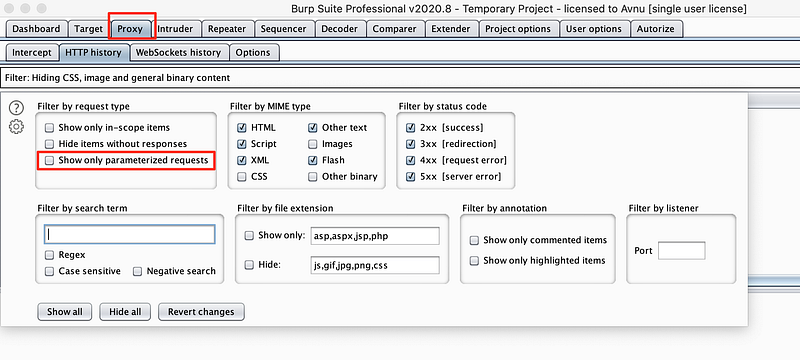
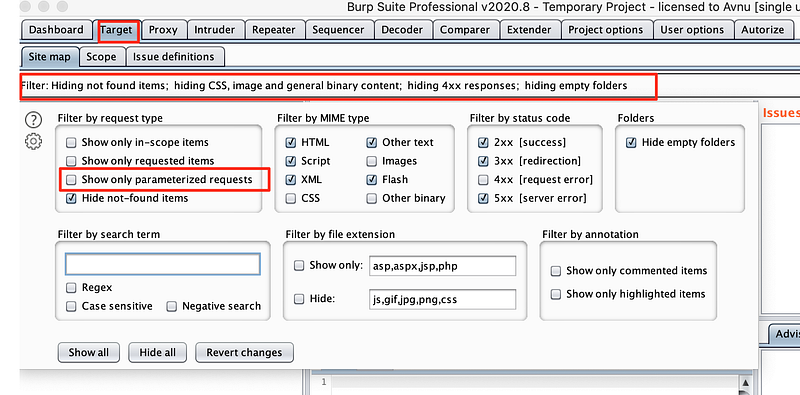
We can use this filter to show us any request that contains parameters. We will have to go through these requests manually and send the requests that contain identifiers to the repeater.
In the repeater we can replace the authentication methods the are expected by the server with some valid authentication tokens.
- JWT in authorisation header might need to be replaced
- Session cookies might need to be replaced
- Custom authentication methods may be in place
You will need to identify which authentication mechanism is being used and make sure you replace any expired authentication methods with valid ones. Grab new valid tokens by logging in and making similar requests.
Now that you have the request working in the repeater, we can try replacing the identifiers in the request.
BE CAREFUL: You are a bug bounty hunter, you are testing a live production environment. Do not fill in a random identifier. Instead create a new account. Log into that account and navigate to the same functionality.
Example:
- We have a request going to GET /invoice.php?id=12
- Send it to the repeater
- The request contains a JWT token in the authorization header that is expired
- When you launch the request, it will return a 500 because the JWT is expired
- Log in to the application and check the http history in your proxy tab
- One of the latest requests should contain a JWT token that’s valid
- Copy that JWT token
- Replace the expired JWT token in your repeater
- You should get a 200 OK response from the server now
- Create a new account
- Log into that account and check the http history in your proxy tab
- One of the latest requests should contain a JWT token that’s valid
- Copy that JWT token
- Replace the JWT token in your repeater
- If you are now receiving a 200 OK response from the server AND the content of the invoice, you have an IDOR
Semi-automated testing
Authorize
For Authorize we can follow the same principles as above, however there are some specifics to the tool we will discus now. This is a burp pro extension so if you do not have burp pro, you can skip this section.
Authorize will repeat any request you make with replaced authentication method (3) and with empty authentication in an attempt to emulate another user and an unauthenticated user. It will then compare the response of the modified request to the response of the request you sent.
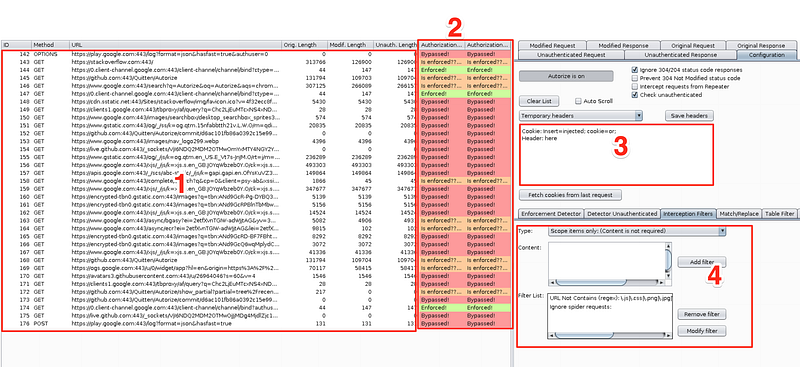
- All your requests will show up in here
- This will show if access control is properly implemented
- Fill in the request header here that takes care of the authentication
- There are some filters i recommend you set
- Scope items only (No text required): This will ensure you won’t see too many weird non scope related requests
- URL not contains (text): Any request that is supposed to be public information, i try to filter out in here
This is what the statuses for (2) mean:
ENFORCED: This means there is no IDOR. The modified request returns a 403 forbidden or any other error code.
Is Enforced?: This means the modified the modified response did not return an error code, but not the exact same response as the unauthenticated request
Bypassed: THIS DOES NOT AUTOMATICALLY GUARANTEE AN IDOR! This means that the modified response matches the original response. You still have to confirm whether or not this is intended behavior. More often than not, it will be intended behaviour. Whether or not it is, is up to your discretion and this is also part of the reason why i recommend you really know your target well by exploring it before you hack. Always confirm this manually by
- Right clicking the request
- Sending the modified request to the repeater
- Repeating the request and confirming you are seeing other peoples data that is not supposed to be public
Match and replace
Since authorize basically just matches the authorization headers and attempts to replace them with the ones the user supplied, we can set up a similar rule in the proxy.
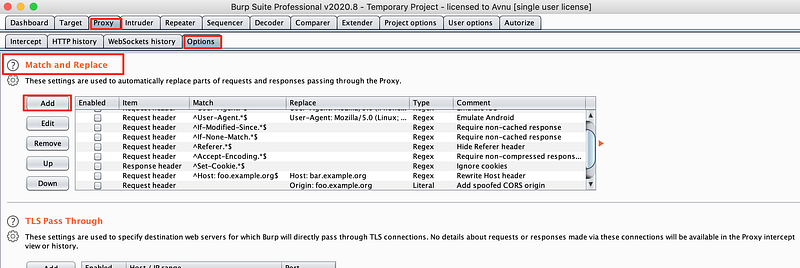
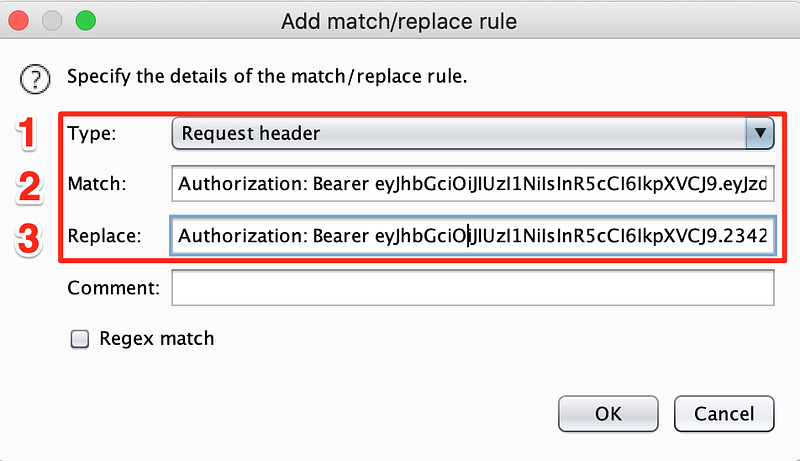
- Usually the request header will contain the authorization methods
- Fill in the tokens of the logged in user
- Fill in the tokens of a second user you want to use
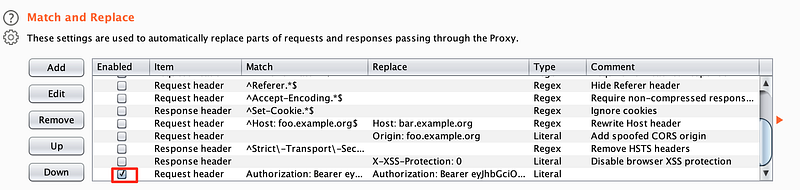
Now, as long as this rule is active you can click around in the application. If you can open any information that should not be public, we have an IDOR on our hands.
To disable this rule, simple uncheck the checkbox in front of it.
Questions
Can you think of other ways to automate IDOR hunting?
- Write your own proxy that repeats requests
- Use open source solutions
Can you think of other ways to test for IDORs manually?
- Copy and paste the links of sensitive information between logged in users
- Execute javascript functions with identifiers if possible


