avatarMarcel Badia Roig

Free AI web copilot to create summaries, insights and extended knowledge, download it at here

2613

Abstract

else. Let’s do a test, for example, a home fixer-upper company, and one of its keywords is a handyman.</p><p id="61f5">Knowing which keywords your potential customers use allows you to adjust content to the interest of your audience.</p><figure id="ee61"><img src="https://cdn-images-1.readmedium.com/v2/resize:fit:800/1*DTHMjHmAsv67VHZKaYIVWg.png"><figcaption>Image screenshot by Author</figcaption></figure><p id="e4c0">Google provides a few more options for which users usually accompany their search. With this alone, you already have at least two publications, one based on the services as and one with the city the company is located.</p><p id="fc5a">Without leaving this page, if you scroll to the end, Google offers more related searches, therefore, more ideas for creating posts that reference those searches.</p><figure id="af18"><img src="https://cdn-images-1.readmedium.com/v2/resize:fit:800/1*wnIOC82-kv1TSADnHyUEzQ.png"><figcaption>Image screenshot by Author</figcaption></figure><p id="b6ea">If you click on any of the options and go to the end of the page, related searches vary, offering more ideas. It’s worth you spend time collecting this information to create future content.</p><p id="68cf">In addition to this technique, I want to talk to you about <a href="https://neilpatel.com/ubersuggest/">Ubersuggest</a>, a free online tool that offers you new keywords related to your searches. It is very simple and does not require registration. On the home page, a table appears to indicate the keyword you want to study, country, and format.</p><figure id="ce35"><img src="https://cdn-images-1.readmedium.com/v2/resize:fit:800/1*P_dUSjkdY4BSA4Nu7-4dSg.png"><figcaption>Image screenshot by Author</figcaption></figure><p id="1a15">Once you have added the keyword and language, click “search”, a long list will appear alphabetically sorted with new keywords. This list would be enough to take new ideas for your blog, but to be even more precise and know when your users use more than each other, select all keywords by clicking “Select all keywords”. Next, click copy or export and save the keywords.</p><figure id="9bb0"><img src="https://cdn-images-1.readmedium.com/v2/resize:fit:800/1*k0KgtPbig7rg1s-aJKISKw.png"><figcaption>Image screenshot by Author</figcaption></figure><p id="e41c">Also, you can search the <a href="https://ads.google.com/">Google Adwords keyword Schedule</a>, you may need to add basic business information to get an example of keywords.</p><p id="da80">Then it will give you a chart where you can see the number of searches and what keywords are most used by your potenti

Options

al customers.</p><figure id="58fa"><img src="https://cdn-images-1.readmedium.com/v2/resize:fit:800/1*6jtawt7jDCqWwLp-ZcKWpg.png"><figcaption>Image screenshot by Author</figcaption></figure><p id="3a54"><b>Google Tools for Creating Content</b> <a href="https://trends.google.com/trends/?geo=US">Google Trends</a> It offers the possibility to see popular search lists, Google trends, Youtube trends, or explore.</p><p id="fea5">In the “Compare” option you can make comparisons of different keywords and see which of them are used most, where, and related searches of the given keyword.</p><figure id="0e9f"><img src="https://cdn-images-1.readmedium.com/v2/resize:fit:800/1*Ix_xSncBHw_x8c77gUz2qw.png"><figcaption>Image screenshot by Author</figcaption></figure><p id="bc3d"><b>Google News</b> Keeping yourself informed and up to date puts you in a privileged situation, and you can give your view of that news or create a comparative if it is a product, application, or service.</p><p id="72d2"><b>Google Alerts</b> I have to recognize this, I am a fan of Google alerts because they help me optimize my time. And today the time factor is the most valuable thing we have. Alerts are going to teach you what media it appears on and what kinds of content are created.</p><p id="8681"><b>Ideas for Writing Content for Your Blog</b> Ask your friends where they would look for you online. Ask your audience through a newsletter or through social networks. Do an interview. The more influential the person you interview, the more outreach he will have. Collaborate with other bloggers. Invite them to write on your blog, while creating links with other professionals, you will feed third-party content that allows you to take a break in creating content. Publish a study a company has carried out and is relevant. You can also echo other studies and make your conclusions. Write a post of errors that should be avoided. Explain the success of a project.</p><p id="32e9"><b>Top Google Searches</b> How to use. How to know. Learn how. How to be. What to do when.</p><p id="e059"><b>Top takeaways</b> Avoids improvisation in content creation, developing and planning an annual content strategy. Study your keywords and determine which ones your potential customers use to create relevant content. Create content that responds to the needs of your audience. I hope that these tools and ideas will help you in the writing of your content.</p><p id="2dd4" type="7">“Discovery consists of seeing what everybody has seen and thinking what nobody has thought.”</p><p id="b9f6" type="7">— Albert von Szent-Gyorgy</p></article></body>

Ideas, Tools, And Resources to Boost Your Blog Popularity

The battle to create an innovative stream of content creation and trustworthy flow of information never stops

Photo by nappy from Pexels

Good informative content on a particular topic helps build trust among your audience, position yourself in your industry and Google, make it easy for your potential customers to find you, and above all it helps them know your customers’ needs and concerns to improve and create products or services by thinking about them.

Keeping a blog requires effort and study. Many companies are driven by the desire to win web traffic just because, launch without a strategy and without conducting a previous positioning study.

Today I want to take one more step and offer you resources, tools, and ideas to create creative content for your blog.

“It’s easy to come up with new ideas; the hard part is letting go of what worked for you two years ago, but will soon be out of date.”— Roger von Oech

Before creating a blog Starting to create content for a blog can be easy, but creating quality and relevant content requires three fundamental aspects:

What audience do you want to lead to? What is the purpose of the content you are going to publish: teach, convince, promote, capture an audience, or entertain. What keywords do you want to position your company?

In this article, I will explain how to locate the best keywords for the positioning of your website and how to create creative content for your blog.

You’ll probably have at least three keywords you want to position yourself with. Once identified, the next step is to find out how your audience looks for you on the Internet.

“No great discovery was ever made without a bold guess.”

— Sir Isaac Newton

How to know which keywords your potential customers use to find you Simple and very effective is to indicate your keyword in the search engine and let Google do everything else. Let’s do a test, for example, a home fixer-upper company, and one of its keywords is a handyman.

Knowing which keywords your potential customers use allows you to adjust content to the interest of your audience.
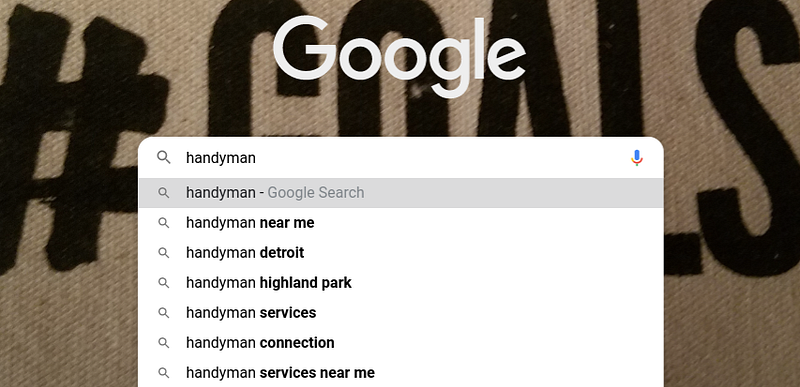
Image screenshot by Author

Google provides a few more options for which users usually accompany their search. With this alone, you already have at least two publications, one based on the services as and one with the city the company is located.

Without leaving this page, if you scroll to the end, Google offers more related searches, therefore, more ideas for creating posts that reference those searches.
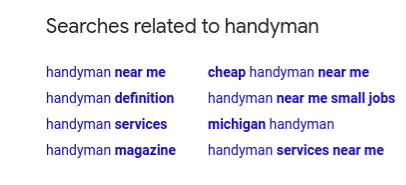
Image screenshot by Author

If you click on any of the options and go to the end of the page, related searches vary, offering more ideas. It’s worth you spend time collecting this information to create future content.

In addition to this technique, I want to talk to you about Ubersuggest, a free online tool that offers you new keywords related to your searches. It is very simple and does not require registration. On the home page, a table appears to indicate the keyword you want to study, country, and format.
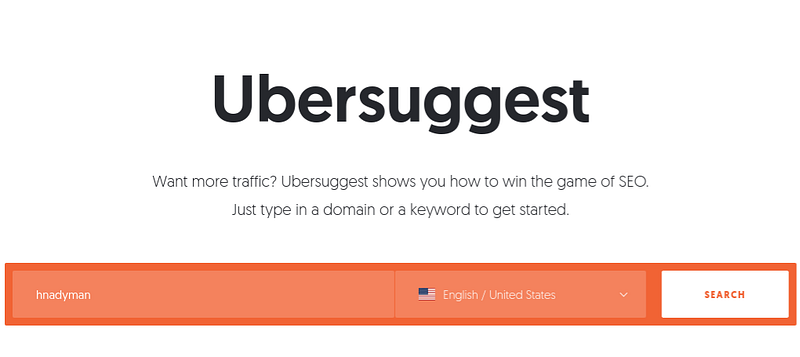
Image screenshot by Author

Once you have added the keyword and language, click “search”, a long list will appear alphabetically sorted with new keywords. This list would be enough to take new ideas for your blog, but to be even more precise and know when your users use more than each other, select all keywords by clicking “Select all keywords”. Next, click copy or export and save the keywords.
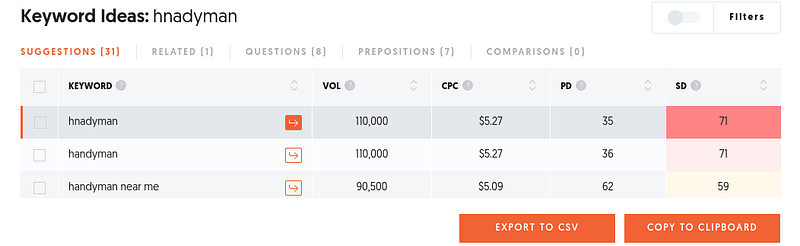
Image screenshot by Author

Also, you can search the Google Adwords keyword Schedule, you may need to add basic business information to get an example of keywords.

Then it will give you a chart where you can see the number of searches and what keywords are most used by your potential customers.
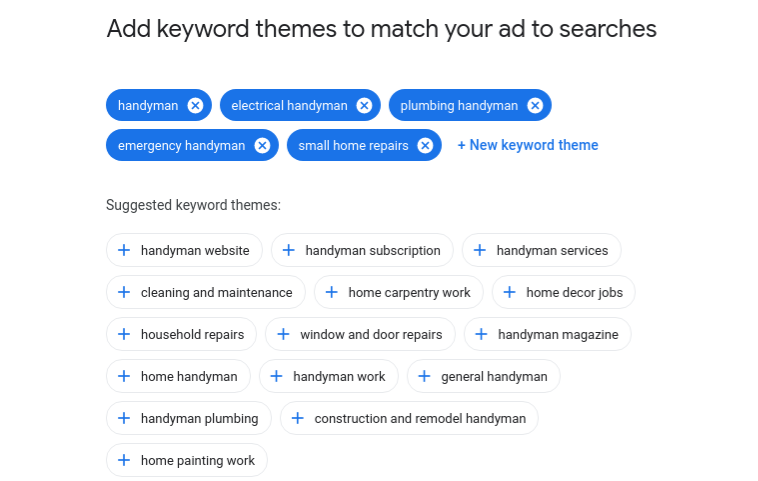
Image screenshot by Author

Google Tools for Creating Content Google Trends It offers the possibility to see popular search lists, Google trends, Youtube trends, or explore.

In the “Compare” option you can make comparisons of different keywords and see which of them are used most, where, and related searches of the given keyword.
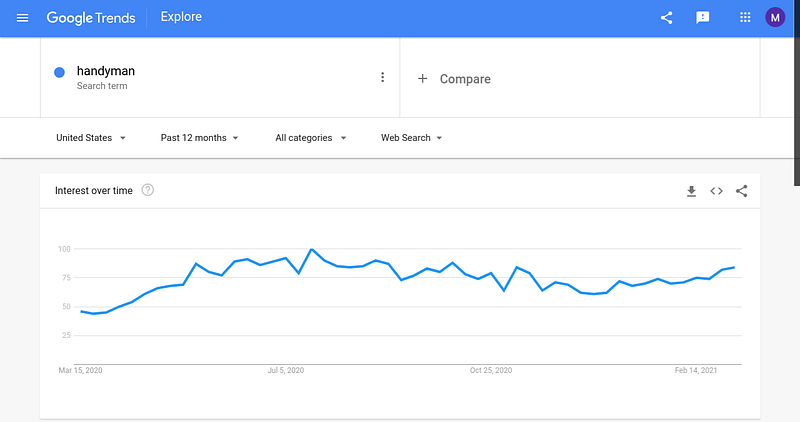
Image screenshot by Author

Google News Keeping yourself informed and up to date puts you in a privileged situation, and you can give your view of that news or create a comparative if it is a product, application, or service.

Google Alerts I have to recognize this, I am a fan of Google alerts because they help me optimize my time. And today the time factor is the most valuable thing we have. Alerts are going to teach you what media it appears on and what kinds of content are created.

Ideas for Writing Content for Your Blog Ask your friends where they would look for you online. Ask your audience through a newsletter or through social networks. Do an interview. The more influential the person you interview, the more outreach he will have. Collaborate with other bloggers. Invite them to write on your blog, while creating links with other professionals, you will feed third-party content that allows you to take a break in creating content. Publish a study a company has carried out and is relevant. You can also echo other studies and make your conclusions. Write a post of errors that should be avoided. Explain the success of a project.

Top Google Searches How to use. How to know. Learn how. How to be. What to do when.

Top takeaways Avoids improvisation in content creation, developing and planning an annual content strategy. Study your keywords and determine which ones your potential customers use to create relevant content. Create content that responds to the needs of your audience. I hope that these tools and ideas will help you in the writing of your content.

“Discovery consists of seeing what everybody has seen and thinking what nobody has thought.”

— Albert von Szent-Gyorgy

Google Analytics
Search Engine Marketing
Startup
Keywords Tool
Keyword Research Tool
Recommended from ReadMedium