avatarTeri Radichel

Free AI web copilot to create summaries, insights and extended knowledge, download it at here

6643

Abstract

ivilege in a prior post. This is a very powerful privilege as is all access to Route 53.</p><div id="63e4" class="link-block"> <a href="https://readmedium.com/dns-security-d7e88bde9d7d"> <div> <div> <h2>DNS Security</h2> <div><h3>Articles on DNS Security by Teri Radichel</h3></div> <div><p>medium.com</p></div> </div> <div> <div style="background-image: url(https://miro.readmedium.com/v2/resize:fit:320/1*cQq3z3H2FQkGXk4JFzNn3A.png)"></div> </div> </div> </a> </div><p id="6cf4">Full EC2 access includes changing any network configuration in the account.</p><figure id="f508"><img src="https://cdn-images-1.readmedium.com/v2/resize:fit:800/1*7riJ-_EA-XLV60UouK2O5g.png"><figcaption></figcaption></figure><p id="6918">There’s KMS and oh by the way RDS IAM authentication.</p><figure id="0a1a"><img src="https://cdn-images-1.readmedium.com/v2/resize:fit:800/1*tWkwQ6-erwbMkBaq0x3YJg.png"><figcaption></figcaption></figure><p id="7e14">I would say the CodeCommit Power User is not specific to CodeCommit permissions at all. You should definitely consider creating your own policies for AWS CodeCommit with only what is required.</p><h2 id="b862">What permissions are actually required?</h2><p id="5c7c">For a complete list of required permission check out this list:</p><div id="20bb" class="link-block"> <a href="https://docs.aws.amazon.com/codecommit/latest/userguide/auth-and-access-control-permissions-reference.html"> <div> <div> <h2>CodeCommit permissions reference</h2> <div><h3>Describes the CodeCommit API operations and the corresponding actions that you can grant permissions to perform.</h3></div> <div><p>docs.aws.amazon.com</p></div> </div> <div> <div style="background-image: url(https://miro.readmedium.com/v2/resize:fit:320/)"></div> </div> </div> </a> </div><p id="7b08">For example for Git commands:</p><figure id="92df"><img src="https://cdn-images-1.readmedium.com/v2/resize:fit:800/1*UjXsMophpRo0DC296kN8Gg.png"><figcaption></figcaption></figure><p id="2aed">The nice thing here is that you can restrict the action to particular resources. So for example, I prefixed the name of the repository in a prior post with the environment name:</p><figure id="816e"><img src="https://cdn-images-1.readmedium.com/v2/resize:fit:800/1*EMFdHkUeWPTwKHX_Cho14A.png"><figcaption></figcaption></figure><p id="89fc">What that means is that I could create a policy for developers that allow them to access all repositories that have a name starting with the developer environment the same way we restricted access to various CloudFormation resource stacks based on a prefix. If you have a large company with different teams, departments, or lines of business you could make the prefix a department or line of business to simplify your policies.</p><h2 id="7a73">Design for the expectation of organizational changes</h2><p id="7ad5">In my experience, companies tend to move projects and teams around which can complicate your pristine policies. Suddenly you have a team that typically works on back-office financial applications working on a sales project. (This happened to me when I was a team lead.) So I would be wary of prefixing projects with team names for this reason. Even department names are tricky.</p><p id="2152">My preference, as a team lead, was also to generally switch projects to different teams rather than to switch people to different teams once you got a good team working smoothly. But often people ignored that request in the particular organizational where I worked.</p><p id="a70c">Sometimes, in a financial organization, it’s good to switch people around to avoid collusion in system designs, processes, and support. Consider all these potential changes as you map out the structure of your code repositories, permissions and policies.</p><h2 id="86e2">Branches and Merging</h2><p id="fc2c">As mentioned I find branches and merging to be a bit complex. You can set permissions such that only certain people are allowed to create or merge a branch to avoid the related pitfalls.</p><h2 id="3156">Leveraging Approval Rules</h2><p id="e5da">You can also set permissions to allow certain people to associate approval rules with repositories.</p><div id="8c35" class="link-block"> <a href="https://docs.aws.amazon.com/codecommit/latest/userguide/auth-and-access-control-permissions-reference.html#aa-art"> <div> <div> <h2>CodeCommit permissions reference</h2> <div><h3>Describes the CodeCommit API operations and the corresponding actions that you can grant permissions to perform.</h3></div> <div><p>docs.aws.amazon.com</p></div> </div> <div> <div style="background-image: url(https://miro.readmedium.com/v2/resize:fit:320/)"></div> </div> </div> </a> </div><figure id="6be6"><img src="https://cdn-images-1.readmedium.com/v2/resize:fit:800/1*uvruFspottSTwpqg5UoadA.png"><figcaption></figcaption></figure><p id="a6f1">I wrote about code reviews here. They are beneficial but need to also allow developers to get things done.</p><div id="94c7" class="link-block"> <a href="https://readmedium.com/making-code-reviews-easier-3894189411ea"> <div> <div> <h2>Making Code Reviews Easier</h2> <div><h3>Why you might want to keep using them — with some changes</h3></div> <div><p>medium.com</p></div> </div> <div> <div style="background-image: url(https://miro.readmedium.com/v2/resize:fit:320/1*I5LMJ7LJ29mllgK2txNwtA.png)"></div> </div> </div> </a> </div><p id="72c4">The nice thing about creating separate repositories for Dev, QA, and Production would be the ability to easily assign different reviewers and templates in each environment. Though perhaps you could create a single template that works for each individual environment as well.</p><h2 id="ea21">IAM Roles</h2><p id="6ee9">You could assign your code commit permissions directly to users. The credentials we created for AWS CodeCommit are associated directly with a user. However, that is generally not a best practice.</p><p id="0775">We could also use assign the permissio

Options

ns to a group and allow the developers in a particular group to access certain repositories.</p><p id="0519">But remember how I said I wanted to enforce MFA to access a repository when checking in code? I don’t see a good way to do that with GitHub. Once I create a developer access token you can login with that without MFA. Perhaps when you use OIDC you can enforce MFA to get a token. I’m not sure.</p><p id="05c5">What I do know is that if you grant access to GitHub through an AWS IAM role, then you can enforce requiring MFA to assume a role. That’s something we will try out when we grant access to our new repository to the web admin user role.</p><p id="cd6c">The other thing you can do is grant access to repositories using federated access and third-party Identity Providers.</p><figure id="372f"><img src="https://cdn-images-1.readmedium.com/v2/resize:fit:800/1*ziBmMDDMjrJYSAnHVodRdQ.png"><figcaption></figcaption></figure><p id="9857">I was setting up Okta so we can try that out later when I get back to completing the Okta setup. You can also use SCIM and Okta with Github.</p><div id="7fa7" class="link-block"> <a href="https://docs.github.com/en/enterprise-cloud@latest/organizations/managing-saml-single-sign-on-for-your-organization/configuring-saml-single-sign-on-and-scim-using-okta"> <div> <div> <h2>Configuring SAML single sign-on and SCIM using Okta - GitHub Enterprise Cloud Docs</h2> <div><h3>undefined</h3></div> <div><p>undefined</p></div> </div> <div> <div style="background-image: url(https://miro.readmedium.com/v2/resize:fit:320/0*emOCsimCYZvcjzZ3)"></div> </div> </div> </a> </div><p id="fc40">I wrote about SCIM here and had some concerns about using it with AWS SSO. I’ll have to review GitHub and see if the same concerns exist.</p><div id="1271" class="link-block"> <a href="https://readmedium.com/scim-system-for-cross-domain-identity-management-ce3cbf8c9a0e"> <div> <div> <h2>SCIM (System for Cross-domain Identity Management)</h2> <div><h3>ACM.150 Automated management of identities across systems</h3></div> <div><p>medium.com</p></div> </div> <div> <div style="background-image: url(https://miro.readmedium.com/v2/resize:fit:320/0*HMv8ub8lGkpwwVUg.png)"></div> </div> </div> </a> </div><p id="f0e0">You can also use STS to get temporary permissions and set up cross-account access, as I have been demonstrating recently with our web deployment.</p><figure id="057d"><img src="https://cdn-images-1.readmedium.com/v2/resize:fit:800/1*N18WoBwXDwZoN_h65Y2H7w.png"><figcaption></figcaption></figure><p id="b844"><b>Access to Clone our GitHub Repo to AWS Code Commit</b></p><p id="4aa8">OK, what I need now is to populate GitHub, check in a change and trigger a deployment. The web admin user has permission to check code changes into GitHub. This user can also trigger a deployment but how?</p><p id="d3ac">I don’t want to have a separate deployment process for every website so we’ll probably set up a job that has permission to pull the code from GitHub into some kind of compute resource and then push it to AWS Code Commit.</p><p id="d776">Thinking this through it’s not clear that the web admin even needs access to AWS Code Commit at all, but the role running the deployment process does. However, if we want to enforce MFA then we need to have a person with an MFA device involved. So I’m back to where I started with batch jobs and MFA for automated processes. Now that I know what my options are in terms of permissions and roles, I’ll ponder that and continue on in future posts with implementation of this idea.</p><p id="8158">Follow for updates.</p><p id="bbde">Teri Radichel | <i>© <a href="https://2ndsightlab.com/?source=post_page---------------------------">2nd Sight Lab</a> 2023</i></p><p id="86b1"><i>The best way to support this blog is to sign up for the <b>email list</b> and <b>clap</b> for stories you like. If you are interested in <b>IANS Decision Support services </b>so you can schedule security consulting calls with myself and other IANS faculty, <b>please reach out on LinkedIn via the link below. </b>Thank you!</i></p><div id="a3cb" class="link-block"> <a href="https://2ndsightlab.medium.com/subscribe"> <div> <div> <h2>Get an email whenever Teri Radichel publishes.</h2> <div><h3>Get an email whenever Teri Radichel publishes. By signing up, you will create a Medium account if you don’t already…</h3></div> <div><p>2ndsightlab.medium.com</p></div> </div> <div> <div style="background-image: url(https://miro.readmedium.com/v2/resize:fit:320/0*fjWIo-Np_47AWPAn)"></div> </div> </div> </a> </div><div id="8334"><pre><span class="hljs-section">About Teri Radichel:

Author: Cybersecurity for Executives in the Age of Cloud
Presentations: Presentations by Teri Radichel
Recognition: SANS Difference Makers Award, AWS Security Hero, IANS Faculty
Certifications: SANS
Education: BA Business, Master of Software Engineering, Master of Infosec
Company: Cloud Penetration Tests, Assessments, Training ~ 2nd Sight Lab</pre></div><div id="46f6"><pre><span class="hljs-section">Like this story? Use the options below to help me write more!
~~~~~~~~~~~~~~~~~~~~~~~~~~~~~~~~~~~~~~~~~~~~~~~~~~~~~~~~~~~~~</span>
❤️ Clap
❤️ Referrals
❤️ Medium: Teri Radichel
❤️ Email List: Teri Radichel
❤️ Twitter: @teriradichel
❤️ Mastodon: @[email protected]
❤️ Facebook: 2nd Sight Lab
❤️ YouTube: @2ndsightlab
❤️ Buy a Book: Teri Radichel on Amazon
❤️ Request a penetration test, assessment, or training
<span class="hljs-code"> via LinkedIn: Teri Radichel </span>
❤️ Schedule a consulting call with me through IANS Research</pre></div><p id="5a42">My Cybersecurity Book: <a href="https://www.amazon.com/Cybersecurity-Executives-Cloud-Teri-Radichel/dp/1652474811/ref=as_li_ss_tl?_encoding=UTF8&amp;qid=1601801560&amp;sr=1-1&amp;linkCode=ll1&amp;tag=2ndsightlab-20&amp;linkId=3204d6389211538a20eabff16973183e&amp;language=en_US">Cybersecurity for Executives in the Age of Cloud</a></p><figure id="faf5"><img src="https://cdn-images-1.readmedium.com/v2/resize:fit:800/0*H9Ew1KCl-29nZiPR.jpeg"><figcaption></figcaption></figure></article></body>

IAM Policies for AWS CodeCommit

ACM.263 Creating granular permissions for AWS CodeCommit and cross-account options

Part of my series on Automating Cybersecurity Metrics. Git. Also Deploying a Static Website. The Code.

Free Content on Jobs in Cybersecurity | Sign up for the Email List

In the last post we took at look at network restrictions available for AWS CodeCommit and contrasted that with the network restrictions available for a publicly hosted GitHub repository.

In this post I want to see what we can do to restrict and grant access to AWS CodeCommit repositories.

Encryption for AWS CodeCommit Repositories

We’ve already looked at networking which is one of the primary security controls for preventing data breaches. The next is encryption. Unfortunately I don’t see the option to protect your AWS CodeCommit repositories with a customer managed KMS key. That would be a great feature to add. #awswishlist

However, as I was reviewing all the documentation for AWS CodeCommit (and yes I mean all), I noticed is that CodeCommit requires KMS permissions. If the user trying to access a CodeCommit responsitory does not have KMS permissions, then they won’t be able to access the repository.

What KMS permissions exactly? It doesn’t say.

My intention was to manage all KMS keys from a single account with cross-account access (presuming some errors with logging cross-account access have been resolved). Will this impact my plan? Does the user need the ability to create or just use KMS keys? Encrypt and decrypt? I presume this is managed by AWS and I cannot limit access to specific keys in this case?

You can find some details in this documentation:

Luckily key creation is not required. We need to allow some access to AWS but not the ability to create and administer KMS keys so that’s good.

Here we find explicit documentation stating what already seems obvious based on the CloudFormation documentation.

You cannot use a customer managed key in AWS KMS to encrypt or decrypt data in CodeCommit repositories.

But you can see the key that AWS is using for your repositories.

Head over to KMS and look at the AWS Managed Keys:
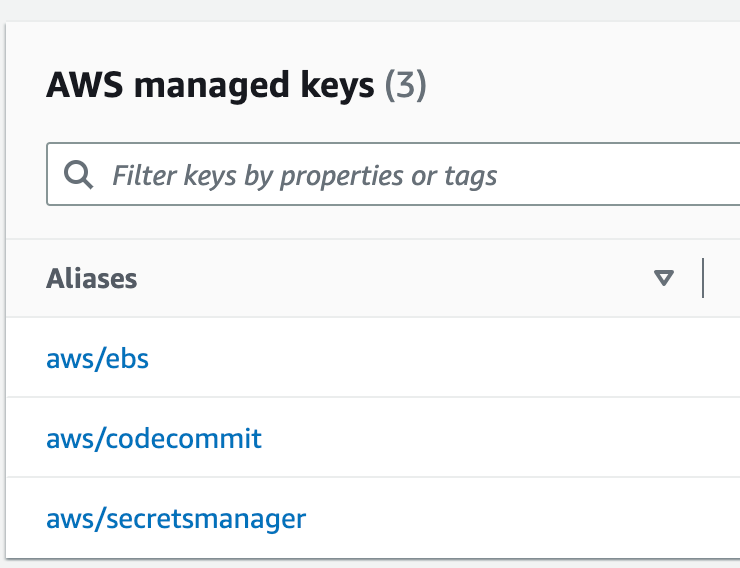
There you can see that a key exists for aws/codecommit. One key. For all your repositories in that account.

In a prior post I was pondering whether to deploy repositories. Presumably we can create a policy that only grants access to the above key to specific principals. Since there is one key for the whole account, if we want to use different keys and permissions for Dev, QA, and Prod, then we need to create repositories in three separate accounts.

You may have certain individuals that need to review the code across all environments and be able to decrypt the encrypted code to review it. Perhaps security teams or architects or senior developers or DevOps engineers need such access. But does every junior developer need access to production code? Perhaps you have a mechanism to allow access to the code when needed using some just-in-time mechanism.

This aspect of AWS CodeCommit must be taken into consideration as you architect your AWS account structure and deployment systems if you are going to use AWS CodeCommit and want to restrict access to production encyrption keys.

What other permissions are required for AWS CodeCommit?

Let’s look at the built in roles for AWS CodeCommit in the IAM dashboard. When I filter on codecommit three come up.
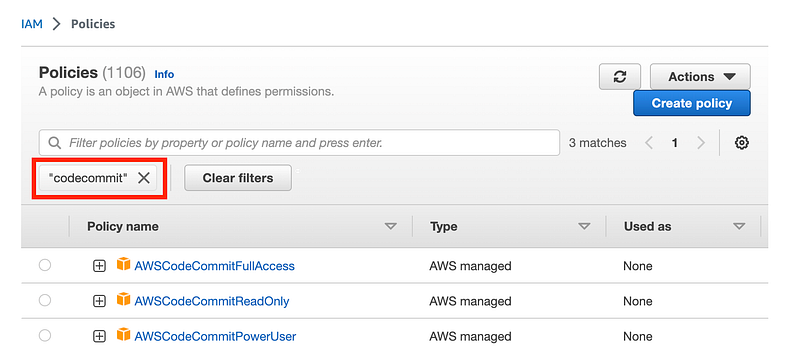
The read only user has access to list a lot of resources in the account. This is all read only access but this policy does grant access to all resources, not only those related to AWS CodeCommit.
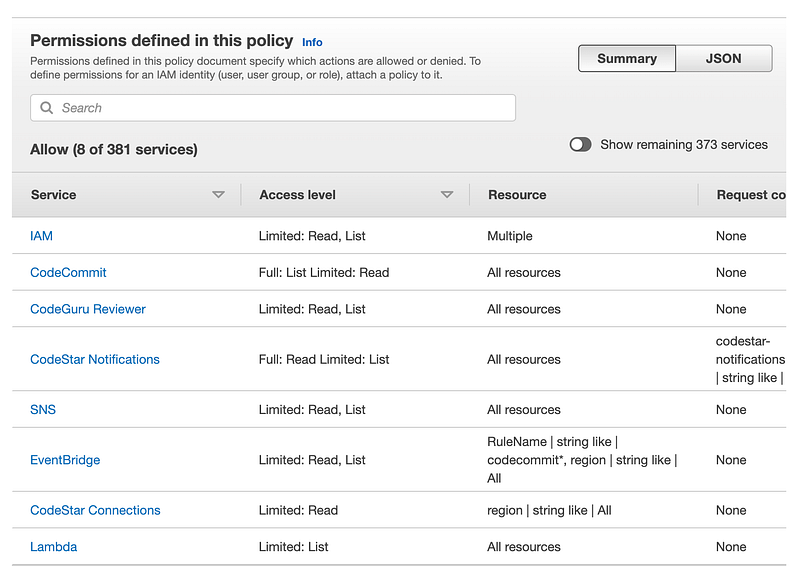
A PowerUser can check in code, I presume. Well, actually, the list of permissions that the AWS CodeCommit power user is so long I can’t capture it all in a screen shot.

It includes Route 53 domains.
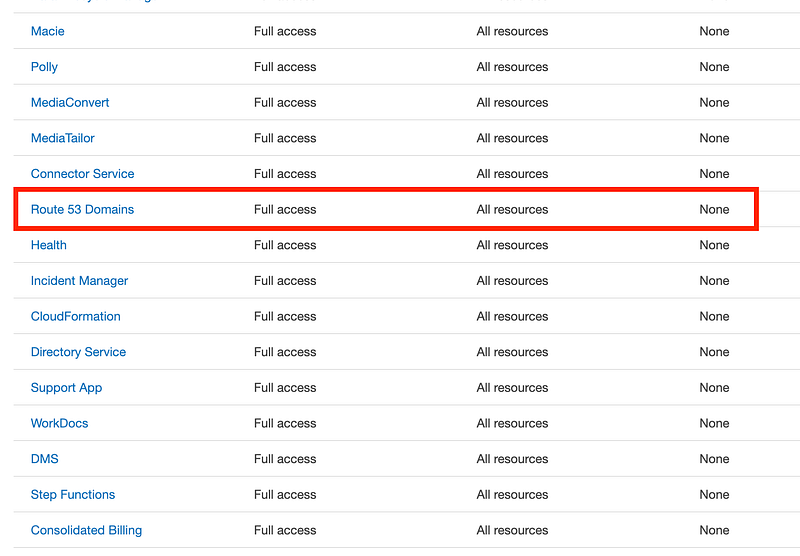
I warned you about the security issues with that privilege in a prior post. This is a very powerful privilege as is all access to Route 53.

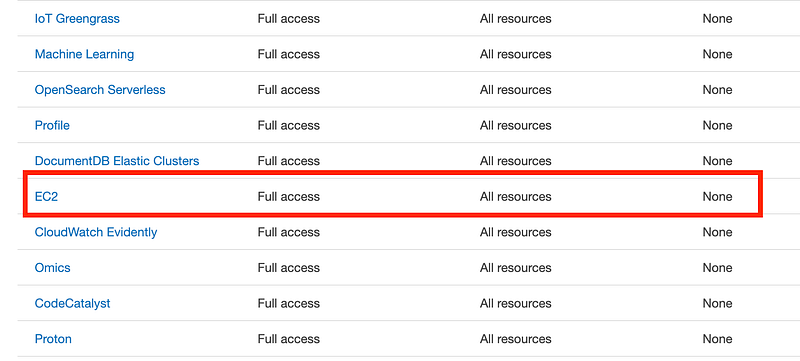
Full EC2 access includes changing any network configuration in the account.
There’s KMS and oh by the way RDS IAM authentication.
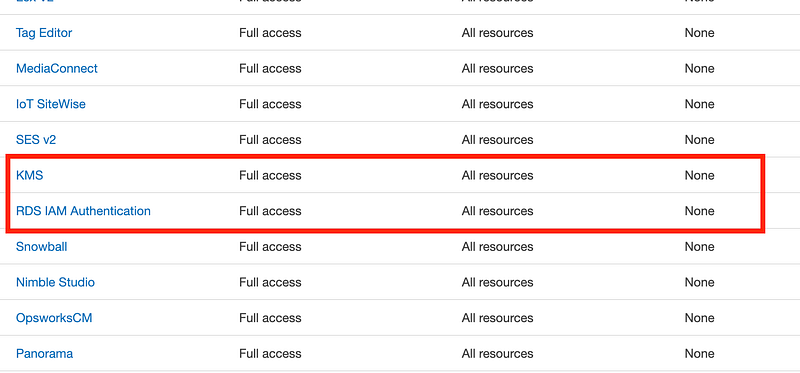
I would say the CodeCommit Power User is not specific to CodeCommit permissions at all. You should definitely consider creating your own policies for AWS CodeCommit with only what is required.

What permissions are actually required?

For a complete list of required permission check out this list:

For example for Git commands:
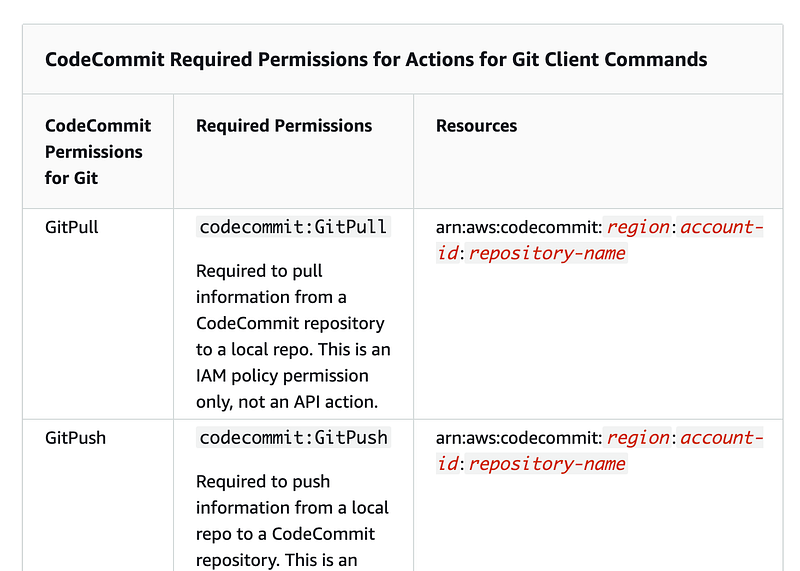
The nice thing here is that you can restrict the action to particular resources. So for example, I prefixed the name of the repository in a prior post with the environment name:
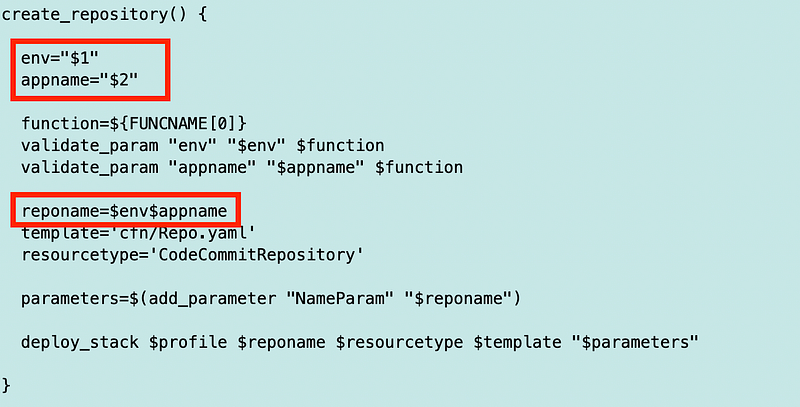
What that means is that I could create a policy for developers that allow them to access all repositories that have a name starting with the developer environment the same way we restricted access to various CloudFormation resource stacks based on a prefix. If you have a large company with different teams, departments, or lines of business you could make the prefix a department or line of business to simplify your policies.

Design for the expectation of organizational changes

In my experience, companies tend to move projects and teams around which can complicate your pristine policies. Suddenly you have a team that typically works on back-office financial applications working on a sales project. (This happened to me when I was a team lead.) So I would be wary of prefixing projects with team names for this reason. Even department names are tricky.

My preference, as a team lead, was also to generally switch projects to different teams rather than to switch people to different teams once you got a good team working smoothly. But often people ignored that request in the particular organizational where I worked.

Sometimes, in a financial organization, it’s good to switch people around to avoid collusion in system designs, processes, and support. Consider all these potential changes as you map out the structure of your code repositories, permissions and policies.

Branches and Merging

As mentioned I find branches and merging to be a bit complex. You can set permissions such that only certain people are allowed to create or merge a branch to avoid the related pitfalls.

Leveraging Approval Rules

You can also set permissions to allow certain people to associate approval rules with repositories.
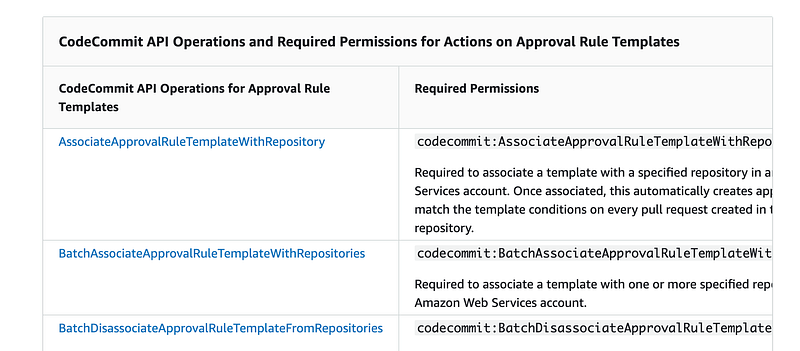
I wrote about code reviews here. They are beneficial but need to also allow developers to get things done.

The nice thing about creating separate repositories for Dev, QA, and Production would be the ability to easily assign different reviewers and templates in each environment. Though perhaps you could create a single template that works for each individual environment as well.

IAM Roles

You could assign your code commit permissions directly to users. The credentials we created for AWS CodeCommit are associated directly with a user. However, that is generally not a best practice.

We could also use assign the permissions to a group and allow the developers in a particular group to access certain repositories.

But remember how I said I wanted to enforce MFA to access a repository when checking in code? I don’t see a good way to do that with GitHub. Once I create a developer access token you can login with that without MFA. Perhaps when you use OIDC you can enforce MFA to get a token. I’m not sure.

What I do know is that if you grant access to GitHub through an AWS IAM role, then you can enforce requiring MFA to assume a role. That’s something we will try out when we grant access to our new repository to the web admin user role.

The other thing you can do is grant access to repositories using federated access and third-party Identity Providers.
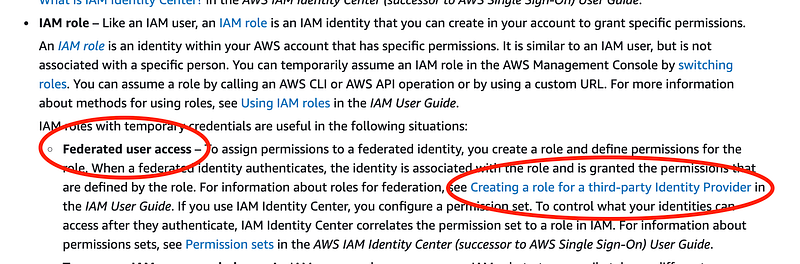
I was setting up Okta so we can try that out later when I get back to completing the Okta setup. You can also use SCIM and Okta with Github.

I wrote about SCIM here and had some concerns about using it with AWS SSO. I’ll have to review GitHub and see if the same concerns exist.

You can also use STS to get temporary permissions and set up cross-account access, as I have been demonstrating recently with our web deployment.

Access to Clone our GitHub Repo to AWS Code Commit

OK, what I need now is to populate GitHub, check in a change and trigger a deployment. The web admin user has permission to check code changes into GitHub. This user can also trigger a deployment but how?

I don’t want to have a separate deployment process for every website so we’ll probably set up a job that has permission to pull the code from GitHub into some kind of compute resource and then push it to AWS Code Commit.

Thinking this through it’s not clear that the web admin even needs access to AWS Code Commit at all, but the role running the deployment process does. However, if we want to enforce MFA then we need to have a person with an MFA device involved. So I’m back to where I started with batch jobs and MFA for automated processes. Now that I know what my options are in terms of permissions and roles, I’ll ponder that and continue on in future posts with implementation of this idea.

Follow for updates.

Teri Radichel | © 2nd Sight Lab 2023

The best way to support this blog is to sign up for the email list and clap for stories you like. If you are interested in IANS Decision Support services so you can schedule security consulting calls with myself and other IANS faculty, please reach out on LinkedIn via the link below. Thank you!

About Teri Radichel:
~~~~~~~~~~~~~~~~~~~~
Author: Cybersecurity for Executives in the Age of Cloud

Presentations: Presentations by Teri Radichel
Recognition: SANS Difference Makers Award, AWS Security Hero, IANS Faculty
Certifications: SANS
Education: BA Business, Master of Software Engineering, Master of Infosec
Company: Cloud Penetration Tests, Assessments, Training ~ 2nd Sight Lab
Like this story? Use the options below to help me write more!
~~~~~~~~~~~~~~~~~~~~~~~~~~~~~~~~~~~~~~~~~~~~~~~~~~~~~~~~~~~~~
❤️ Clap
❤️ Referrals
❤️ Medium: Teri Radichel
❤️ Email List: Teri Radichel
❤️ Twitter: @teriradichel
❤️ Mastodon: @[email protected]
❤️ Facebook: 2nd Sight Lab
❤️ YouTube: @2ndsightlab
❤️ Buy a Book: Teri Radichel on Amazon
❤️ Request a penetration test, assessment, or training
 via LinkedIn: Teri Radichel 
❤️ Schedule a consulting call with me through IANS Research

My Cybersecurity Book: Cybersecurity for Executives in the Age of Cloud

Git
Codecommit
Iam
Permissions
Repositories
Recommended from ReadMedium