avatarTara Purswani

Free AI web copilot to create summaries, insights and extended knowledge, download it at here

2324

Abstract

%2F10%2F03%2Famazon-alexas-secret-function-helped-bust-cheating-boyfriend%2F&refer=embed&embed_source=71169334%2C121331973%2C120811592%2C120810756%3Bnull%3Bembed_masking&referer_video_id=7149481303396650245">TikTok by Jessica Lowman</a> about how to catch your boyfriend cheating by accessing Alexa commands. Of course, I clicked on the article out of curiosity…</p><p id="da55">(I love me a good “here’s how I caught him” story)</p><p id="09ad">It took me a minute, but then it struck me like lightning! — I could possibly hear Sergey’s voice again! Did he use my Alexa? My mind was reeling.</p><p id="7bf4">I go through my Google Calendar and make note of all the dates when we chilled at my place. I head straight over to my Alexa account and follow the instructions from the TikTok.</p><p id="74ce">I was so happy to discover Sergey’s commands, asking Alexa to play his favorite songs — melodic death metal? My mind was blown.</p><p id="9de7">During my darkest days, I could have heard his voice!</p><p id="6793">It took me a while to find each command. Then I needed to find a way to save them, so I made a screen recording and placed it on Vimeo to share with his family.</p> <figure id="e531"> <div> <div> <img class="ratio" src="http://placehold.it/16x9"> <iframe class="" src="https://cdn.embedly.com/widgets/media.html?src=https%3A%2F%2Fplayer.vimeo.com%2Fvideo%2F756941130%3Fh%3De830a09fcd%26app_id%3D122963&amp;dntp=1&amp;display_name=Vimeo&amp;url=https%3A%2F%2Fvimeo.com%2F756941130%2Fe830a09fcd&amp;image=https%3A%2F%2Fi.vimeocdn.com%2Fvideo%2F1582839320-1d6f615ce17e336b38b4fe2842df9c1f76b850ee87ba6f58c1dfc9f1c6bbe0d5-d_1280&amp;key=a19fcc184b9711e1b4764040d3dc5c07&amp;type=text%2Fhtml&amp;schema=vimeo" allowfullscreen="" frameborder="0" height="864" width="864"> </div> </div> </figure></iframe></div></div></figure><h1 id="2284">Retrieve audio recordings of Alexa voice commands</h1><p id="605e">Here is how you can hear your loved one’s voice again, given they have used your Alexa, Echo Dot, or Echo Fire TV Stick. I hope it helps you and brings you comfort:</p><p id="a50c">It can be done on a mobile device but I recommend using the desktop version since it will be easier to keep track

Options

of multiple tabs and record them.</p><h2 id="3489">Step-by-step from desktop</h2><ol><li>Go to Amazon.com</li><li>Pass your cursor over <b>Hello, Your Name/Accounts and Lists Menu</b></li><li>Select <b>Account</b></li><li>Scroll all the way down to <b>Digital Content and Devices</b></li><li>Click <b>Manage Content and Devices</b></li><li>Choose the <b>Privacy Settings</b> tab</li><li>Click <b>Manage Settings</b> for <b>Alexa Privacy</b></li><li>Select <b>Review Voice History</b></li></ol><figure id="a4e0"><img src="https://cdn-images-1.readmedium.com/v2/resize:fit:800/1*E44Se10QNitprw9vfXYvKQ.png"><figcaption></figcaption></figure><h2 id="6c0f">Step-by-step on Android</h2><ol><li>Open the Alexa app</li><li>Tap the <b>More</b> tab</li><li>Tap <b>Settings</b></li><li>Tap <b>Alexa Privacy</b></li><li>Opt to <b>Review Voice History</b></li></ol><p id="d652">From the review voice history page, you can filter, sort, or delete audio recordings saved from Alexa commands. Tap “Displaying” and it will expand for the option to filter by date, device, or profile.</p><h2 id="51cf">Make a screen recording</h2><p id="463f">Place a thumbs up on any recordings you want to come back to. It will make it easier to spot them later.</p><p id="78fc">On desktop duplicate your tab reach the same destination and search for more recordings.</p><p id="62e9">Figure out how to create a screen recording on your device or browser (Google is your friend) and record yourself toggling through the tabs, playing each significant audio file.</p><p id="7461">I hope this was helpful!</p><h1 id="39d7">How did it make me feel?</h1><p id="3a13">I am satisfied now. I can reimagine how he ended phonecalls with long drawn-out goodnights or how he used to tease me or joke simply based on hearing his song requests.</p><p id="f078">It did give me a little bit of peace.</p><p id="d3f3">It’s an awful feeling to lose or forget dear memories, especially if you don’t have media to jog your memory. Have you ever tried to recreate a moment in your mind from scratch? Or forget what someone looks like? Maybe you went on a vacation and lost all the photos before the cloud days.</p><figure id="fa74"><img src="https://cdn-images-1.readmedium.com/v2/resize:fit:800/1*QCQqlZr6doDP-cszzpaSpw.png"><figcaption></figcaption></figure></article></body>

I Was Desperate To Hear My Boyfriend’s Voice Again

How to listen to Alexa commands from lost loved ones

Photo by Darina Belonogova

Ladies and Gentlemen, you can also follow these instructions if you need proof your partner is cheating on you.

It’s an awful feeling to lose or forget dear memories, especially if you don’t have media to jog your memory. Have you ever tried to recreate a moment in your mind from scratch? Or forget what someone looks like? Maybe you went on a vacation and lost all the photos before the cloud days.

I lost my boyfriend in April 2022. And when it happened, I scrambled to find anything that would make him feel any level of tangible again — images, objects, smells, and sounds.

Turns out I could not find a single recording of his voice.

I scoured our WhatsApp exchange hoping to find at least one voice recording. I was learning Russian, one of his native languages. We did a majority of our flirting in Russian, but it was all text. No audio message, no voicemail.

I missed his voice so badly.

I had this one stupid Turkey video. Yes, a turkey video. It was close to Thanksgiving and he worked in the suburbs of NJ as a mail carrier. He saw a turkey in someone’s front yard and he chased it around babbling some jibberish in Russian. I played it repeatedly.

Each person has a unique voice. Like a fingerprint.

And if a person speaks a second or third language it can feel even more distinct. Sergey’s voice was special. He had an East Ukrainian/Russian accent weathered by his experience of living in the U.S. for many years.

I needed his voice in coherent words! — his accent, his syntax, his word choices, the rhythm and pace of his speech.

Alexa saves a recording of each command

Well, one day I saw a TikTok by Jessica Lowman about how to catch your boyfriend cheating by accessing Alexa commands. Of course, I clicked on the article out of curiosity…

(I love me a good “here’s how I caught him” story)

It took me a minute, but then it struck me like lightning! — I could possibly hear Sergey’s voice again! Did he use my Alexa? My mind was reeling.

I go through my Google Calendar and make note of all the dates when we chilled at my place. I head straight over to my Alexa account and follow the instructions from the TikTok.

I was so happy to discover Sergey’s commands, asking Alexa to play his favorite songs — melodic death metal? My mind was blown.

During my darkest days, I could have heard his voice!

It took me a while to find each command. Then I needed to find a way to save them, so I made a screen recording and placed it on Vimeo to share with his family.

Retrieve audio recordings of Alexa voice commands

Here is how you can hear your loved one’s voice again, given they have used your Alexa, Echo Dot, or Echo Fire TV Stick. I hope it helps you and brings you comfort:

It can be done on a mobile device but I recommend using the desktop version since it will be easier to keep track of multiple tabs and record them.

Step-by-step from desktop

  1. Go to Amazon.com
  2. Pass your cursor over Hello, Your Name/Accounts and Lists Menu
  3. Select Account
  4. Scroll all the way down to Digital Content and Devices
  5. Click Manage Content and Devices
  6. Choose the Privacy Settings tab
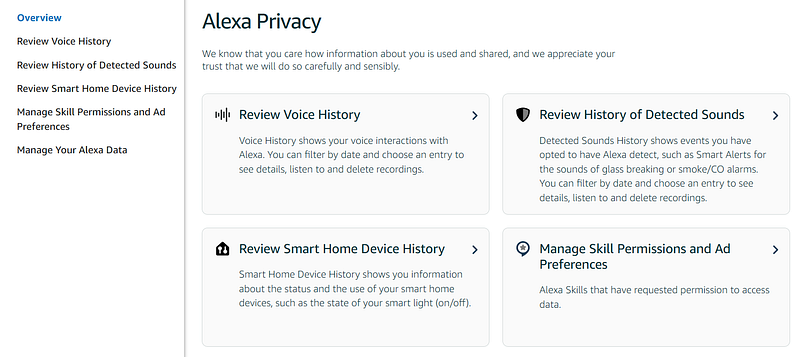
  7. Click Manage Settings for Alexa Privacy
  8. Select Review Voice History

Step-by-step on Android

  1. Open the Alexa app
  2. Tap the More tab
  3. Tap Settings
  4. Tap Alexa Privacy
  5. Opt to Review Voice History

From the review voice history page, you can filter, sort, or delete audio recordings saved from Alexa commands. Tap “Displaying” and it will expand for the option to filter by date, device, or profile.

Make a screen recording

Place a thumbs up on any recordings you want to come back to. It will make it easier to spot them later.

On desktop duplicate your tab reach the same destination and search for more recordings.

Figure out how to create a screen recording on your device or browser (Google is your friend) and record yourself toggling through the tabs, playing each significant audio file.

I hope this was helpful!

How did it make me feel?

I am satisfied now. I can reimagine how he ended phonecalls with long drawn-out goodnights or how he used to tease me or joke simply based on hearing his song requests.

It did give me a little bit of peace.

It’s an awful feeling to lose or forget dear memories, especially if you don’t have media to jog your memory. Have you ever tried to recreate a moment in your mind from scratch? Or forget what someone looks like? Maybe you went on a vacation and lost all the photos before the cloud days.

Grief
Grief And Loss
Love
Memories
Dating
Recommended from ReadMedium