
I used to read books but never retain information. Here’s what I changed.

As I’ve grown older, my reading habits have changed. While I grew up reading fiction and adventure stories, I now find myself reading non-fiction and self-development books.
While the type of books that I’ve read might have changed, my reading style hadn’t. I’d finish one book, decide whether I’d enjoyed it or not and move on to the next one.
That worked fine with fiction books, but I soon found that reading in this way was a big waste of time when it came to reading non-fiction books. After all, if I hadn’t taken the time to retain and consider the information that I had been provided, I wasn’t able to take action on any of it to improve my life.
That felt like it defeated the whole purpose of reading a self-development book.
Therefore, a few years back I made some changes to the way that I read non-fiction. Today, when I read a book, I follow four steps:
1. Read digitally
There are lots of pros and cons to doing your reading on a digital device when compared to reading a “real book.”
I love having books around the place — I think they brighten up any room — but there’s no doubting that, when you do a lot of reading, it’s easier to collect notes and highlight passages that resonate using ebooks. Plus, I love being able to carry a library around in my pocket.
I try and strike a balance between the two — when it comes to reading fiction (where I don’t take notes), I do so with b a proper paperback.
When I need to concentrate on extracting information from non-fiction books, though, I read a digital version which is connected to Readwise.
2. Highlight anything that resonates
Seeing as we’re focusing on non-fiction books here, let’s have a look at my process for reading digitally.
The main thing is here that I use the highlighting function to mark any passage of text that resonates with me. It doesn’t have to be anything in particular and I don’t need to necessarily know why I’m highlighting it — if something resonates with me, I mark it up quickly and carry on with my reading.
By the end of a book, I might have made a couple of hundred highlights.
My Kindle account is integrated into Readwise — an app that pulls any highlights I make into a central location where I can tag and categorise them alongside highlights that have been made from other books.
I have configured the app to send me through five quotes each morning. This has been a great way of discovering quotes that I’ve long forgotten about as well as becoming a journaling prompt for me to think about when I sit down at my desk each day.
If you haven’t tried Readwise yet, you can get an extended trial here. You’ll be given full access to the app for sixty days, rather than thirty.
3. Export highlights into my PKM
As well as importing highlights, Readwise also has export capabilities. This allows highlights to be broken down by book and exported to a range of note-taking and PKM apps including Rome Research, Obsidian and Notion.
I’m currently using Tana for my PKM and have a dedicated “Book Notes” template for each book that I’m reading. These pages are then automatically updated by Readwise with new highlights as I make them.
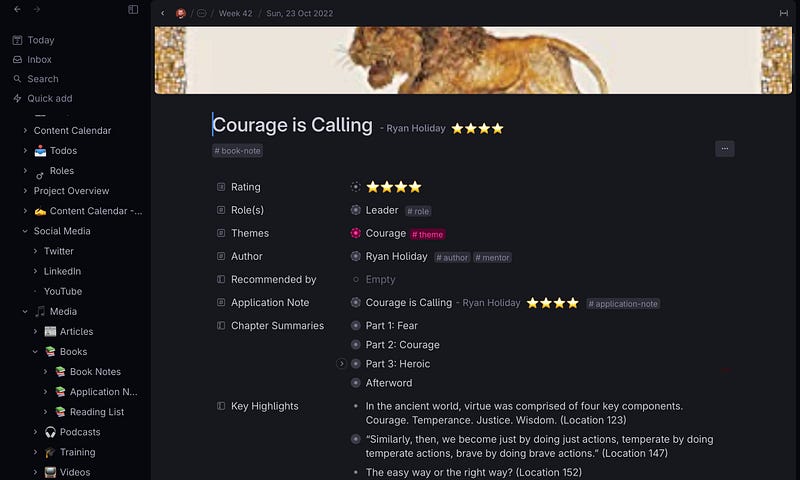
Once I’ve finished a book, I tend to leave it a week and then go through the notes page to delete any highlights that no longer resonate with me.
This is almost a second sweep of the book — even though I’m not going through the ebook again. It cuts down the large number of highlights that I’ve originally made and leaves me with highlights that stand up on their own and make sense without the support of the rest of the book.
I’ll include these highlights alongside brief chapter summaries that I make as I’m doing my initial read-through. That way, I can come back to the book and get a feel for the key themes of each chapter at a later date.
4. Take the time to make the book relevant to me
Once, I’ve gone through the highlights, I make a second note that I call an “Application Note.” This is based on a template which is designed to make what I’ve read relevant to my circumstances.
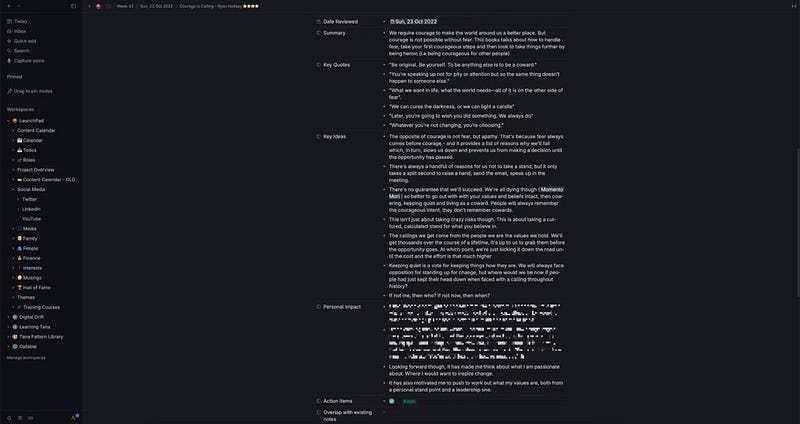
This template includes:
- A summary of the book. No longer than three sentences and in my own words.
- Key Quotes. Out of the edited highlights on my notes page, I select six quotes that speak the most to me. No more. If I come up with seven or eight highlights, I really have to think about which are the most important to me. Once I’ve finished the application note, I’ll create separate notes for each of these quotes to explain why they’re important to me and why I chose them in my top six.
- Key Ideas. The key themes from the book with links to any other notes or books in my PKM which echo the same themes.
- Personal Impact. This is a quick summary of how the book resonates with my own life experiences and any areas of my life that I thought about while reading the book.
- Action Items. Anything from the book that I’m going to try to implement in my own life.
Only when I’ve completed all of this will I consider a book to be ‘read.’ It might sound like a hassle compared to just reading a book cover to cover, but I’ve found the whole process to be therapeutic and (dare I say) fun.
It has certainly enlightened me a lot and, keeping relevant topics linked together in a PKM, has really helped to improve my knowledge and understanding of particular topics.
If you have any questions at all, then drop me a line in the comments below or on Twitter. I love talking about this stuff!
One last thing
If you found the article above useful, then you’ll be pleased to know that you can sign up for my weekly newsletter.
The newsletter is free and focuses on the technology and writing skills that I’m using to grow my content business.
If that’s not for you at the moment, you can also catch me on Twitter/X or Mastodon