
I Turned My Medium Stories Into YouTube Videos and You Can Too!
Here’s how I did it.
A Medium article is basically a ready-to-go script for a video. So why not turn it into one and post it on YouTube? That is just what I did, and you can too.
Growing presence on other platforms is always a good idea. Especially on platforms that are still growing like YouTube.
I will show you how I did it. But there is also an easier way. More on that later.
What you will need:
- A script (You already got your Medium story)
- Footage
- Audio (some kind of voice-over)
- Video editing software
- Some basic editing skills
1. The Script
There's nothing much to add here. Use your Medium articles. In my experience, I needed to change very little in the actual text of the stories I chose to make them work for videos.
But there will be some differences. For example, you probably won’t read out the links in your stories. Instead, you can put them in the description box and replace the text with: “Link down below”.
2. Footage
For the videos, I’ve made so far I used Pexels. There is a wide range of high-quality stock videos, you can use. And this is not the only platform where you can find free quality stock footage.
But Pexels was more than enough for me. I first created a voice-over from the script. And then searched for stock footage that I could somehow relate to the script on Pexels.
3. Audio
The best way to go about this would be to simply record your own voice. A microphone on most mobile phones these days would be enough to get the job done. But if like me you don’t want to use your own voice there are plenty of text-to-speech programs to do this for you.
I used Amazon's Polly which is free up to a certain amount of characters (which is way higher than you will need for some videos). But there are plenty of other software options out there.
4. Editing
I used Adobe Premiere Pro. Because I had some previous experience using it. But all I did was stitch together some stock footage clips with a simple voiceover. I believe anyone could do this. If not instantly then after a couple of youtube tutorials.
The Result
Here’s what I came up with:
And this is the story I used as the script:
But earlier I mentioned that there is an easy way.
The Easy Way
There are loads of amazing tools available to us these days, and today I will show you one that does what I did here manually, automatically and in a fraction of time.
The tool I am talking about is Pictory.AI (Affiliate link).
It has some amazing features and is quite easy to use.
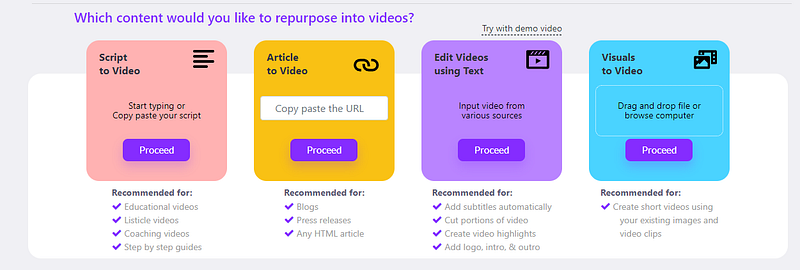
Not only does it turn your scripts or articles into videos, but it also offers generating a text-to-speech voice over with the exactly same quality as the one in my video.
And you can try it for free. The stock footage will have watermarks when using the free version. But you can check out how the tool works.
If you decide to get a subscription use this coupon code to get 20% off: TDWIZ20
If you found this useful, you might want to check out more stories from the list below:
One Last Thing
If you enjoy reading my work Sign up Here to get all of my future posts directly to your inbox.
Join Medium for just $5 and read an unlimited amount of informative stories from me and thousands of other great writers. You can do that by clicking the link below.


