usflickeringleafbird&image=https%3A%2F%2Fthumbs.gfycat.com%2FDisastrousFlickeringLeafbird-size_restricted.gif&key=a19fcc184b9711e1b4764040d3dc5c07&type=text%2Fhtml&schema=gfycat" allowfullscreen="" frameborder="0" height="254" width="364">
</div>
</div>
</figure></iframe></div></div></figure><p id="bf09">So using a shared web app RSS reader like Feedly (what I was using before) will not work for Reddit. Although I believe there’s now a way around this. Not that it matters. I stopped using Feedly because you can only see up to 30 days worth of feed items. Like WTF.</p><p id="995a">So what was wrong with the FreshRSS web interface before? Nothing. That is on a computer. You get tons of space on a computer and can see a lot of stuff. The problem is when you try to view it on a phone. It’s… not great.</p><figure id="a440"><img src="https://cdn-images-1.readmedium.com/v2/resize:fit:800/1*SmHwnbldIh2TWG6D5jjDgQ.jpeg"><figcaption></figcaption></figure><p id="f720">Like look at all that wasted space. With an unread indicator and a star. Like, who stars things anymore? What is this? 2004?</p><p id="9899">Anyways, I thought I could do better. I actually had this idea for an RSS app for quite some time. But I thought it would be really hard. Because I’d have to interact with APIs. Never worked with APIs before. But then I thought… hey, ChatGPT could help me work with APIs.</p><h2 id="bd32">ChatGPT</h2><p id="5f6b">Now I was thinking about this as early as my last post. You could see one of the images I asked ChatGPT about this. So I decided to try. This is what ChatGPT told me to do to access the API.</p><figure id="a314"><img src="https://cdn-images-1.readmedium.com/v2/resize:fit:800/1*h3qCNVIzRY6AOGRqInUIoQ.png"><figcaption></figcaption></figure><p id="f1bb">But there’s a problem. This doesn’t work. And what’s more, when I called it out on it it tried to gaslit me into thinking it was my fault.</p><figure id="9d45"><img src="https://cdn-images-1.readmedium.com/v2/resize:fit:800/1*Gp-bXTSPGN2qH-yDsCR4DA.png"><figcaption></figcaption></figure><p id="4247">OK, maybe it was my fault. But it definitely didn’t explain the FreshRSS API to me very clearly. So I finally looked into it and apparently, there are way easier to follow guides on it.</p><div id="cc38" class="link-block">
<a href="https://freshrss.github.io/FreshRSS/en/developers/06_GoogleReader_API.html">
<div>
<div>
<h2>FreshRSS - Google Reader compatible API implementation</h2>
<div><h3>See Mobile access for general aspects of API access. See also the page
Options
about our Fever compatible API for another…</h3></div>
<div><p>freshrss.github.io</p></div>
</div>
<div>
<div style="background-image: url(https://miro.readmedium.com/v2/resize:fit:320/)"></div>
</div>
</div>
</a>
</div><p id="5537">And they don’t say anything about a ‘freshrss/api/v1-alpha/entries’ or ‘api/index.php/articles’ so I have no idea how it’s getting those. Now, in all fairness there is a second API that FreshRSS uses. The Fever API. I don’t know about that one but I do know that if you get a 404 error on an API call you did something really wrong.</p><h2 id="2b46">So I Gave Up</h2><p id="83f4">Not on the app, I’m still making that app, but on ChatGPT helping me. I’m quite disappointed with ChatGPT. Now I see it as a glorified Wikipedia. Except I’m wondering if I should use it like this. Because Wikipedia, despite everyone in school saying not to use it, is pretty accurate. ChatGPT is a lot simpler, but is much more often wrong.</p><p id="faad">So I’m sort of in an existential crisis for ChatGPT now. Yeah, it’s really cool. But if it can lie to you with no way of knowing… what is it really good for?</p><p id="7f88">Well I guess it’s not too bad for coding because for code it either works or it doesn’t. I guess it can teach you bad practices but coding your entire app with ChatGPT will lead to spaghetti code anyways so it’s not really a downside.</p><p id="09a6">So anyways, I’m now using the official documentation to access the API. No more ChatGPT. And it’s actually surprisingly easy to use the API. I mean, once you figure out some simple things like how to send a header in your API request it’s surprisingly simple.</p><p id="3719">Well, I guess the morale of the story is don’t fear API requests. But you should fear ChatGPT telling you the wrong answer.</p><p id="a12b">If you liked this article be sure to give it a few claps. It helps out a lot with the algorithm.</p><div id="f5f9" class="link-block">
<a href="https://andrewzuo.com/membership">
<div>
<div>
<h2>Join Medium with my referral link - Andrew Zuo</h2>
<div><h3>Read every story from Andrew Zuo (and thousands of other writers on Medium). Your membership fee directly supports…</h3></div>
<div><p>andrewzuo.com</p></div>
</div>
<div>
<div style="background-image: url(https://miro.readmedium.com/v2/resize:fit:320/0*FffdZyGPtgdBxczf)"></div>
</div>
</div>
</a>
</div></article></body>
And in that post I didn’t really think that ChatGPT was going to revolutionize programming. Because the code that ChatGPT writes is… not great if you ask it to do anything complicated.
But I still thought that ChatGPT could be a really cool way to assist in coding. Like I said in my original post that ChatGPT was really good at helping people learn things. And I still think that. But only learning simple things. Because well…
The App
So I had this idea for an app. An RSS reader. So RSS is a way to get articles from websites without having to manually go to the website. It’s really great. Basically how it works is there’s a page with XML of the most recent few articles from the website. At least I think it’s XML, I never checked.
This allows you to use a program that takes a bunch of RSS feeds and puts all the articles in one place. This ‘feed’ can then be sorted chronologically and you can mark things as read. Finally, free from the clutches of the algorithm!
In my opinion, everyone should be using RSS. Don’t get me wrong, I still like being recommended stuff, but there are some feeds where I never want to miss a thing and that’s a job for RSS.
Anyways, making an RSS reader isn’t entirely correct. I wanted to make a front end app for another RSS reader, FreshRSS. This is a self hosted RSS reader that I started experimenting with because I found that Reddit will IP ban anyone who accesses their RSS feeds too much.
So using a shared web app RSS reader like Feedly (what I was using before) will not work for Reddit. Although I believe there’s now a way around this. Not that it matters. I stopped using Feedly because you can only see up to 30 days worth of feed items. Like WTF.
So what was wrong with the FreshRSS web interface before? Nothing. That is on a computer. You get tons of space on a computer and can see a lot of stuff. The problem is when you try to view it on a phone. It’s… not great.
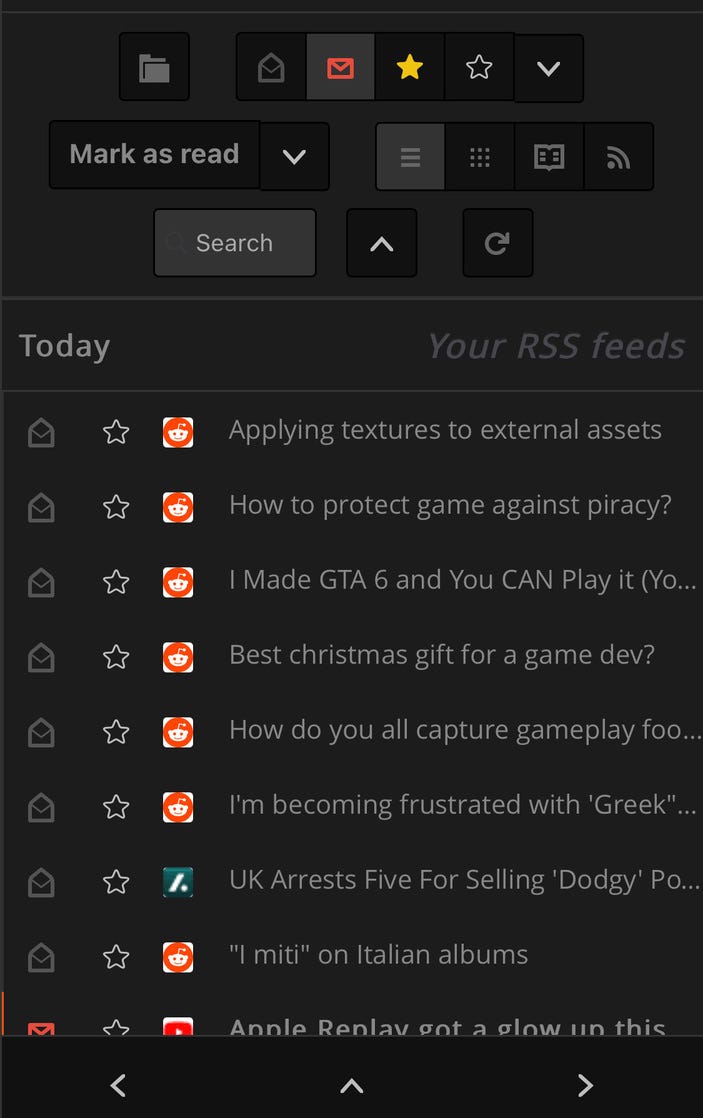
Like look at all that wasted space. With an unread indicator and a star. Like, who stars things anymore? What is this? 2004?
Anyways, I thought I could do better. I actually had this idea for an RSS app for quite some time. But I thought it would be really hard. Because I’d have to interact with APIs. Never worked with APIs before. But then I thought… hey, ChatGPT could help me work with APIs.
ChatGPT
Now I was thinking about this as early as my last post. You could see one of the images I asked ChatGPT about this. So I decided to try. This is what ChatGPT told me to do to access the API.
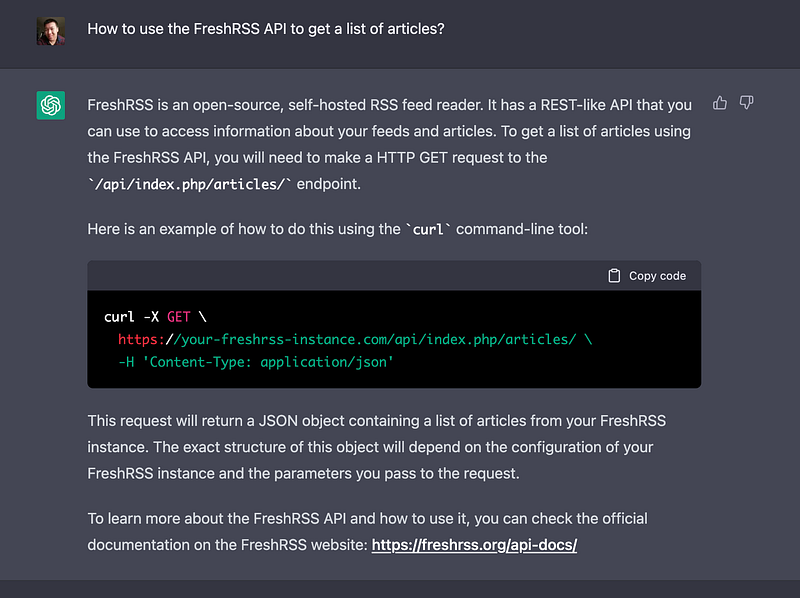
But there’s a problem. This doesn’t work. And what’s more, when I called it out on it it tried to gaslit me into thinking it was my fault.
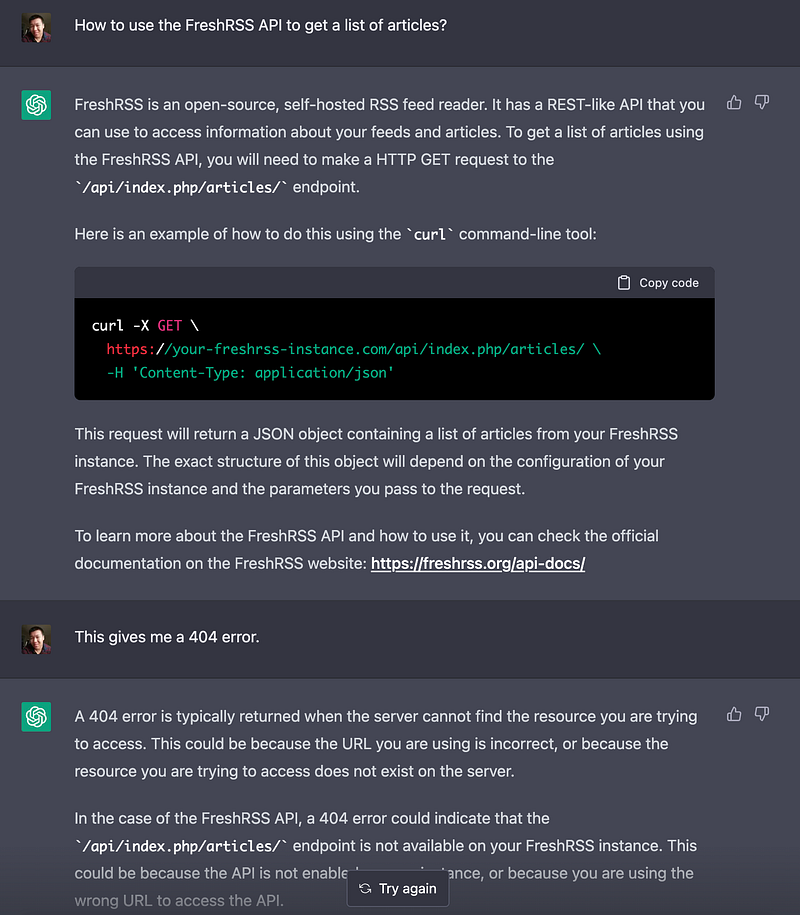
OK, maybe it was my fault. But it definitely didn’t explain the FreshRSS API to me very clearly. So I finally looked into it and apparently, there are way easier to follow guides on it.
And they don’t say anything about a ‘freshrss/api/v1-alpha/entries’ or ‘api/index.php/articles’ so I have no idea how it’s getting those. Now, in all fairness there is a second API that FreshRSS uses. The Fever API. I don’t know about that one but I do know that if you get a 404 error on an API call you did something really wrong.
So I Gave Up
Not on the app, I’m still making that app, but on ChatGPT helping me. I’m quite disappointed with ChatGPT. Now I see it as a glorified Wikipedia. Except I’m wondering if I should use it like this. Because Wikipedia, despite everyone in school saying not to use it, is pretty accurate. ChatGPT is a lot simpler, but is much more often wrong.
So I’m sort of in an existential crisis for ChatGPT now. Yeah, it’s really cool. But if it can lie to you with no way of knowing… what is it really good for?
Well I guess it’s not too bad for coding because for code it either works or it doesn’t. I guess it can teach you bad practices but coding your entire app with ChatGPT will lead to spaghetti code anyways so it’s not really a downside.
So anyways, I’m now using the official documentation to access the API. No more ChatGPT. And it’s actually surprisingly easy to use the API. I mean, once you figure out some simple things like how to send a header in your API request it’s surprisingly simple.
Well, I guess the morale of the story is don’t fear API requests. But you should fear ChatGPT telling you the wrong answer.
If you liked this article be sure to give it a few claps. It helps out a lot with the algorithm.