

I tried to learn how to make lo-fi music — Part 1
Note: I don’t know anything about music production
Update: I wrote a follow-up piece about how things went 8 months later. You can read it here.
If you spend any time on the internet, you probably heard about ChilledCow’s “lofi hip hop radio — beats to relax/study to”, a 24/7 LoFi hip-hop stream on YouTube. At the time it went live, people looking for non-intrusive music to listen to while doing focus-heavy activities flocked to the channel. Soon after, other equally good channels popped up and, for a moment, LoFi hip-hop music was popular. Not that it isn’t anymore, but people seem to talk about it less than they did some time back.
So, I was listening to a lo-fi hip hop radio on Spotify a few weeks ago while working and noticed something: although I enjoy the songs and their warm and nostalgic feel, some of them had too many effects on top of each other, which sounded (to me) somewhat annoying when trying to focus on my job. Then, on my lunch break, I started searching about these effects, so I could filter the music I didn’t like from the playlist. I didn’t find the names of those effects; instead, I found a lot of people talking about how to make lo-fi music. Then, an idea lit up in my head: I don’t have to listen to things I don’t like if I make my own music.
First, some context about me: I’m not a music producer nor a musician. I studied music in music schools, intermittently, for about 10 years in total. The studies never went far because of the interruptions between them (after all, life happens and some hobbies suffer for this). I consider myself a pretty decent guitarist, a long time ago I knew a thing or two about music theory, and that’s it. I’m not a composer, an audio engineer or anything like that.
Knowing the little I know and seeing the comments people made about lo-fi music production, the investment required (time and money-wise) didn’t seem that high. After all, lo-fi means low fidelity, so imperfections in the process wouldn’t be undesirable, as opposed to hi-fi (or hi-fidelity) music, where the sound has to be perfectly balanced.
So there I went, searching for the tools required to make lo-fi music. It’s important to say here that there are two ways to make lo-fi tunes (as far as I know): either composing everything through a MIDI editor; or sampling a song, a beat, a voice, anything like that, editing it and synchronizing with other samples. Some people use only MIDI, some use only samples, some mix both. Since I didn’t know anything about music production, the sample route was off-limits for me, since it requires knowledge about sound editing.
A MIDI editor is a tool where you can manually put the notes to be played, like a digital music sheet, but easier to understand for people that never learned how to read music (at least it was for me).
A sample is a portion of a song that already exists, and someone records it to use on another song, usually after editing it.
The next day I started fiddling with some DAWs, or Digital Audio Workstations, the tools people use to record, edit, mix and master music. There are a lot of them out there, and most are very, very expensive for a hobbyist, but luckily a few are free to use. And that’s how I made my first lo-fi song.
The first DAW I used is called Soundtrap, and it runs on the browser. This means that advanced options, like plugins and such, couldn’t be used, but also means it wouldn’t be too complex for a novice like me.
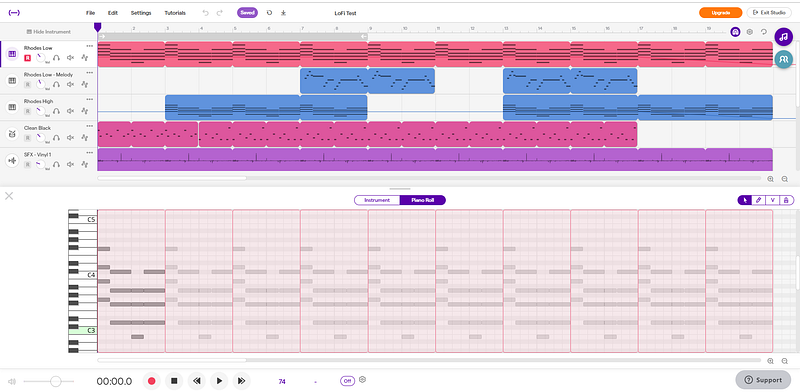
Soundtrap allows you to search for an instrument or sample from their library, and just drag and drop it in a track. What I did was just look for a piano that sounds good, a drum set and some static noise from vinyl. Then I conjured some of that knowledge about music theory from the back of my mind and made some chord progression using the laptop keyboard. All DAWs allow to use the computer keyboard to play, but this input method has some limitations.
I started hitting some notes and marked those that I thought sounded good. After that, I added some effects from Soundtrap’s own library, trying to recreate that lo-fi quality-feel. On the pianos, I used a guitar amp (seriously) with tremolo and an equalizer, and the drums have a fuzz effect.
After a few hours fiddling with it, this is the result:
The volume is all over the place, nothing is properly equalized, but at least I learned the basics.
It was time to try something more advanced.
Having decided to learn how to use a fully-featured DAW, I downloaded and installed Cakewalk by BandLab. From what I could gather, this is a professional DAW that used to be very expensive, but the company closed and BandLab bought some of their intellectual property, including the DAW.
Now the DAW is free, all that is needed is to set up an account on BandLab’s social network (which apparently has a browser-based DAW too, like SoundTrap), and then Cakewalk is available for download.
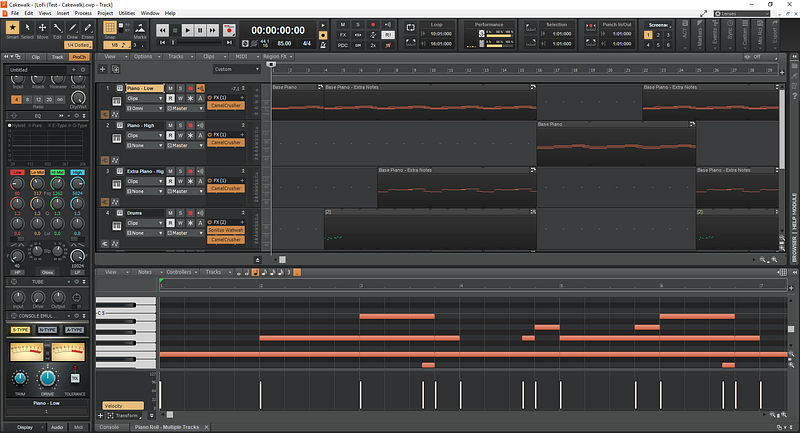
I had to spend a few days trying to understand how everything works, since I never even got close to a professional DAW before. As soon as I learned how to open and load instruments, the basic stuff started to click. I was able to put a basic song, but since I don’t know anything about mixing and mastering, it didn’t sound lo-fi enough.
After some searching on the internet, I saw someone saying to use a “bitcrusher” to emulate lo-fi effects. I didn’t know what a bit crusher is, but downloaded what seemed a popular free choice: Camel Crusher. And well… it worked. More or less. The drums still weren’t like I wanted, so I added some effects randomly with Camel Crusher, to see how it would sound. In the end, the combination that worked for me was using Camel Crusher with… a wah-wah effect.
I still don’t know how mixing works, so I just fiddled with some faders until it sounded “ok”. Listen to the result:
It’s a bit too loud and the sound is very distorted, so the result was… passable, I think. I kinda liked this song, so I’ll revisit it once I understand how proper mixing works.
However, I still made one more song in another DAW.
Ableton Live seems to be a popular choice for people making electronic music, but a lot seems to use it to record instruments and produce all kinds of music. Its interface is very different from Cakewalk. It’s very minimalistic, so it felt way less intuitive. However, armed with the knowledge I had learned with Cakewalk, I found my way around and was able to come up with another song.
This time I had way more plugins installed, but decided to use only instruments provided by Ableton. Keep in mind that Ableton isn’t free, I was running a trial version that lasts for 30 days. This trial gives access to everything Ableton has. In the end, I was just exploring a new software to see how it works.
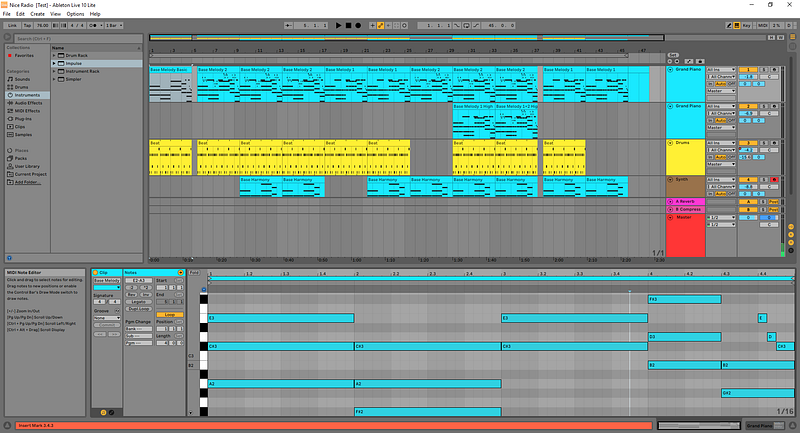
After understanding how the interface and instruments worked, I started to work on the song. The MIDI editor isn’t as easy to learn as the other DAWs, but once the basic functionalities became obvious, the workflow was pretty smooth. I also tried, again, to learn how to mix, and even though the result still wasn’t that good, all the instruments seemed more balanced. I finally understood why compressors are used too, which might have benefited the slightly better quality over the previous song (but I don’t really know if it’s objectively better). I was also using an external free plugin from iZotope to emulate that vinyl quality most lo-fi songs try to achieve. Just listen to the result:
This is the only song that I thought worthy of naming, just for the fun of it. It sounds, overall, way better than the previous ones, but still not quite there. I know lo-fi songs are supposed to be imperfect, but I still want to achieve some better balance among the instruments.
So, my conclusion after a few weeks learning how to use DAWs and make music digitally: it’s fun! So fun that I just bought a basic MIDI keyboard from Arturia and plan to make more songs. There’s also a few other DAWs that I want to try, including FL Studio and Reaper, which also seem pretty popular.
(However, note that I didn’t call my songs “lo-fi hip hop” because my beats are pretty weak.)
I still have a guitar right by my side and play it sometimes, but most of my free time is when other people are sleeping. However, with a MIDI keyboard and a computer, I can play music at any time (and easily record it) without bothering other people. It’s also possible to easily create music. And that lo-fi feel I can give songs is awesome. I love “warm” instruments and songs, and the “vinyl imperfections” I can emulate really do sound nostalgic (even though I’m not that old).
This started as an experiment, but now I think I just found a new hobby. Let’s see where it will lead.