avatarJenn Leach

Free AI web copilot to create summaries, insights and extended knowledge, download it at here

5791

Abstract

7156">I covered user-specific secrets here:</p><div id="744d" class="link-block"> <a href="https://readmedium.com/create-a-per-user-secret-in-secrets-manager-part-1-bb97b66e2a2d"> <div> <div> <h2>User-Specific Secrets on AWS: IAM Policies</h2> <div><h3>ACM.82 IAM Policies to allow users to describe their own secrets</h3></div> <div><p>medium.com</p></div> </div> <div> <div style="background-image: url(https://miro.readmedium.com/v2/resize:fit:320/1*PcniDpBJq2db0jbdryc_Nw.png)"></div> </div> </div> </a> </div><h2 id="aada">Create the user-specific Secret to store the automation credentials</h2><p id="a515">Next I create <b>SandboxDevAutomationSecret</b> in Secrets Manager, encrypted with my <b>Sandbox KMS key</b>.</p><figure id="e15e"><img src="https://cdn-images-1.readmedium.com/v2/resize:fit:800/1*DQonCyF8UzPnZZoiGOKD9w.png"><figcaption></figcaption></figure><figure id="f7b3"><img src="https://cdn-images-1.readmedium.com/v2/resize:fit:800/1*zITxEtD__wFDwpPrBpqv4w.png"><figcaption></figcaption></figure><h2 id="2e63">Create a user-specific EC2 instance role for the SandboxDev user</h2><p id="3417">Next I create an EC2 instance role that the developer is allowed to pass to EC2 instances named <b>SandboxDevEC2Role</b>.</p><figure id="44ef"><img src="https://cdn-images-1.readmedium.com/v2/resize:fit:800/1*__fohZeTWjwdYrS__B4imQ.png"><figcaption></figcaption></figure><p id="eee9">The role will have a prefix with the username:</p><figure id="7afa"><img src="https://cdn-images-1.readmedium.com/v2/resize:fit:800/1*7dKW5KiQMivtKqjgzA_1Gw.png"><figcaption></figcaption></figure><p id="a338">This role is granted access to:</p><ul><li>Read the<b> SandboxDevSecret.</b></li><li>Pull containers from the <b>sandbox Elastic Container Repository.</b></li><li>Use the <b>sandbox KMS key </b>to access decrypt the secret and the container in the repository</li></ul><h2 id="df90">Create the Automation user</h2><p id="b752">Create the <b>SandboxDevAutomation</b> user. Do not give this user console access.</p><figure id="ddeb"><img src="https://cdn-images-1.readmedium.com/v2/resize:fit:800/1*QWVvQMA9aDCtmiVxSR61iw.png"><figcaption></figcaption></figure><p id="c19e">Remember that I already have a role (<b>CloneGitHubtoCodeCommitRole</b>) used by my batch job from prior posts. Create a policy that allows the SandboxDevAutomation user to use STS to assume that role.</p><p id="559f">The <b>SandboxDev</b> user needs permission to change the <b>credentials</b> <b>and</b> MFA device of the <b>SandboxDevAutomation</b> user.</p><h2 id="0f53">Edit the batch job role trust policy to allow the SandboxDevAutomation role to assume it</h2><p id="7f1d">We need to modify the trust policy to allow the <b>SandboxDevAutomation</b> <b>user</b> to assume the <b>CloneGitHubtoCodeCommitRole</b> role with MFA.</p><figure id="6ad1"><img src="https://cdn-images-1.readmedium.com/v2/resize:fit:800/1*xAHGslW3SSbv6c5NO8mhzg.png"><figcaption></figcaption></figure><p id="7ad0">Edit the trust policy:</p><figure id="cfaf"><img src="https://cdn-images-1.readmedium.com/v2/resize:fit:800/1*Vna71G_F2e-8Vdtw4yBwFw.png"><figcaption></figcaption></figure><p id="6a5a">Change the user to SandboxDev:</p><figure id="f788"><img src="https://cdn-images-1.readmedium.com/v2/resize:fit:800/1*vpSqEqjFa_qg59v_dnPCzQ.png"><figcaption></figcaption></figure><h2 id="49b3">Add permissions to KMS Key Resource Policy</h2><p id="8cf1">Next I need to allow the <b>SandboxDev</b> user to encrypt and decrypt and the <b>SanboxDevEC2Role</b> to decrypt with the <b>sandbox KMS Key.</b> I edit my automation to add those two roles to the encrypt and decrypt users.</p><figure id="380f"><img src="https://cdn-images-1.readmedium.com/v2/resize:fit:800/1*UkzCt10p0iqCR4OpMs6uhQ.png"><figcaption></figcaption></figure><h2 id="d015">Login as SandboxDev</h2><p id="725d">Log into the AWS Console with the SandboxDev user. If you’ve been following along, you have an account with a prefix specific to your organization and -Dev at the end if you used my deployment scripts.</p><figure id="13d5"><img src="https://cdn-images-1.readmedium.com/v2/resize:fit:800/1*5L-3C9ORVXOWv6KRdCkBLg.png"><figcaption></figcaption></figure><h2 id="d260">Add MFA devices</h2><p id="5cca">Add a Hardware MFA device to the SandboxDev User.</p><figure id="21f0"><img src="https://cdn-images-1.readmedium.com/v2/resize:fit:800/1*8s8rTuyWOsLAQUEqfwTtOQ.png"><figcaption></figcaption></figure><p id="c0e6">Add a Virtual MFA device to the SandboxDevAutomation User.</p><p id="5cec">I explain why I do not use a Yubikey to generate MFA codes here:</p><div id="1308" class="link-block"> <a href="https://readmedium.com/the-yubikey-cli-and-aws-mfa-50e6be0698a7"> <div> <div> <h2>The Yubikey CLI and AWS MFA</h2> <div><h3>ACM.11 Considering the attack surface and MFA choices for our Security Batch Jobs</h3></div> <div><p>medium.com</p></div> </div> <div> <div style="background-image: url(https://miro.readmedium.com/v2/resize:fit:320/1*SFAKbcK__GlbJbJJJVXK9w.png)"></div> </div> </div> </a> </div><figure id="5893"><img src="https://cdn-images-1.readmedium.com/v2/resize:fit:800/1*iFl4DTQNuplt-SGONHpNYw.png"><figcaption></figcaption></figure><h2 id="d7df">Create automation credentials</h2><p id="b9e4">Create an <b>Access key</b> for the <b>SandboxDevAutomation</b> user.</p><figure id="7f1e"><img src="https://cdn-images-1.readmedium.com/v2/resize:fit:800/1*KoVfxp-aJvzBiacPyFeMlA.png"><figcaption></figcap

Options

tion></figure><p id="217e">I have explained before that I disagree with the verbiage on this page. The CLI in the browser has a much larger attack surface and it depends how you are using the keys.</p><figure id="0423"><img src="https://cdn-images-1.readmedium.com/v2/resize:fit:800/1*_CCe4xu8AcNLloUHgvF5Aw.png"><figcaption></figcaption></figure><h2 id="8caa">Store the credentials in the SandboxDevAutomationSecret</h2><p id="24aa">Head to the Secrets Manager dashboard.</p><p id="432d">Click on the SandboxDevAutomationSecret.</p><figure id="6893"><img src="https://cdn-images-1.readmedium.com/v2/resize:fit:800/1*cz9jnYSnBsGXf9Y8VZjGPQ.png"><figcaption></figcaption></figure><p id="f616">Store the secret key id and secret access key.</p><figure id="4b95"><img src="https://cdn-images-1.readmedium.com/v2/resize:fit:800/1*-G9eR929nKSsGWrsOuzucg.png"><figcaption></figcaption></figure><h2 id="5496">Test Launching an EC2 Instance with the SandboxDev role</h2><p id="8907">Head over the EC2 dashboard and test launching an EC2 Instance. Recall that the Instance name needs to match what we specified in the policy above.</p><figure id="a1c7"><img src="https://cdn-images-1.readmedium.com/v2/resize:fit:800/1*FqCLLp7V854JJZa88TIdvA.png"><figcaption></figcaption></figure><p id="2bc8">If you need to decode any error messages I explained how to do that here:</p><div id="bb13" class="link-block"> <a href="https://readmedium.com/decoding-aws-error-messages-db0e0cbecf0d"> <div> <div> <h2>Decoding AWS Error Messages</h2> <div><h3>Free Content on Jobs in Cybersecurity | Sign up for the Email List</h3></div> <div><p>medium.com</p></div> </div> <div> <div style="background-image: url(https://miro.readmedium.com/v2/resize:fit:320/1*4oxP4LXk8l8c3mpRvO7ejg.png)"></div> </div> </div> </a> </div><p id="bd85">Choose the existing networking created for EC2 instances from prior posts.</p><div id="a149" class="link-block"> <a href="https://readmedium.com/automating-cybersecurity-metrics-890dfabb6198"> <div> <div> <h2>Automating Cybersecurity Metrics (ACM)</h2> <div><h3>A series of blog posts on cybersecurity metrics and security automation</h3></div> <div><p>medium.com</p></div> </div> <div> <div style="background-image: url(https://miro.readmedium.com/v2/resize:fit:320/1*L9lEIsaWt6xm2Op2ww-G5w.png)"></div> </div> </div> </a> </div><p id="2937">Choose the role we created under Advanced details.</p><figure id="8870"><img src="https://cdn-images-1.readmedium.com/v2/resize:fit:800/1*oHJior3Ueea6woDB1zqqKQ.png"><figcaption></figcaption></figure><p id="a822">One note that took me a bit to resolve. The message when your user does not have permission to pass the IAM role to the EC2 instance is a bit ambiguous.</p><div id="a0fb" class="link-block"> <a href="https://readmedium.com/ambiguous-error-message-when-a-user-doesnt-have-permission-to-pass-a-specific-iam-role-to-an-ec2-b005f338b6df"> <div> <div> <h2>Ambiguous Error Message When a User Doesn’t Have Permission to Pass a Specific IAM Role to an EC2…</h2> <div><h3>This error message needs to be more specific and doesn’t show up in CloudTrail for the User Name</h3></div> <div><p>medium.com</p></div> </div> <div> <div style="background-image: url(https://miro.readmedium.com/v2/resize:fit:320/1*4oxP4LXk8l8c3mpRvO7ejg.png)"></div> </div> </div> </a> </div><p id="51b2">Getting the resources setup took some time because I realized I had to revise my approach. I didn’t automate any of this but I will in the future. For now I just want to make sure it works. I can also figure out what permissions each policy requires.</p><p id="1fb5">I will test the initialization script in the next post.</p><p id="2c31">Follow for updates.</p><p id="4a3a">Teri Radichel | <i>© <a href="https://2ndsightlab.com/?source=post_page---------------------------">2nd Sight Lab</a> 2023</i></p><div id="8b5f"><pre><span class="hljs-section">About Teri Radichel:

⭐️ Author: Cybersecurity Books
⭐️ Presentations: Presentations by Teri Radichel
⭐️ Recognition: SANS Award, AWS Security Hero, IANS Faculty
⭐️ Certifications: SANS ~ GSE 240
⭐️ Education: BA Business, Master of Software Engineering, Master of Infosec
⭐️ Company: Penetration Tests, Assessments, Phone Consulting ~ 2nd Sight Lab</pre></div><div id="caae"><pre><span class="hljs-section">Need Help With Cybersecurity, Cloud, or Application Security?
~~~~~~~~~~~~~~~~~~~~~~~~~~~~~~~~~~~~~~~~~~~~~~~~~~~~~~~~~~~~~</span>
🔒 Request a penetration test or security assessment
🔒 Schedule a consulting call
🔒 Cybersecurity Speaker for Presentation</pre></div><div id="530b"><pre>Follow <span class="hljs-keyword">for</span> more stories like <span class="hljs-keyword">this</span>:

❤️ Sign Up my Medium Email List ❤️ Twitter: <span class="hljs-meta">@teriradichel</span> ❤️ LinkedIn: https:<span class="hljs-comment">//www.linkedin.com/in/teriradichel</span> ❤️ Mastodon: <span class="hljs-meta">@teriradichel</span><span class="hljs-meta">@infosec</span>.exchange ❤️ Facebook: 2nd Sight Lab ❤️ YouTube: @2ndsightlab</pre></div><figure id="eecf"><img src="https://cdn-images-1.readmedium.com/v2/resize:fit:800/0*H9Ew1KCl-29nZiPR.jpeg"><figcaption></figcaption></figure></article></body>

I Tried Link Whisper — Honest Review

Link Whisper Review: Tried and Tested

Photo by Iewek Gnos on Unsplash

Have you heard of the internal linking SEO tool Link Whisper? I tried it for a year. I was so drawn to it at the time. Unsure if it would truly help my SEO, I splurged and ended up buying it on the AppSumo marketplace.

Here’s my honest opinion about it including:

  • How it works
  • How much it costs and,
  • If I’d recommend it to others

Let’s go!

What’s Link Whisper?
Link Whisper

Link Whisper is an internal linking tool. Powered by AI, it scans your WordPress blog post draft and makes suggestions for internal links you can use in your content.

When I first heard about the tool, I did think it was problem-solving for bloggers like myself. But honestly, I can internally link my content to eachother myself.

Why would I invest in a tool to do it?

My struggle with internal linking was thinking about the hundreds of blog posts on my site (I have over 400 blog posts published to date) and trying to figure out which post would be an excellent fit to link to the current blog post I was writing.

It was taking me a long time to do internal linking on my blog posts and sometimes I came up empty-handed.

So I thought, what the heck, I’ll invest and see what it does.

At the time, it was about $50 on AppSumo.
Link Whisper

How does Link Whisper work?

You get automatic link suggestions as you write your draft in WordPress via a WordPress plugin.

  • See the suggestions
  • Check the box
  • Hit Save

How to buy Link Whisper?

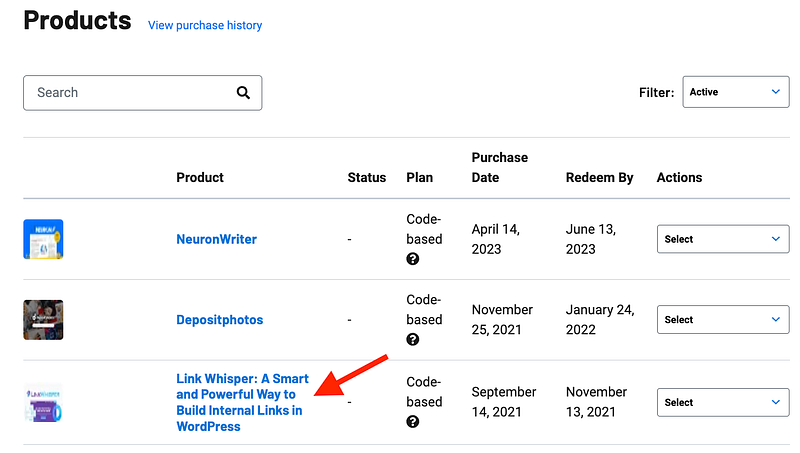
Visit the Link Whisper site here and make your purchase. Once you buy, you’ll have instant access to the plugin download.

The price ranges from $77 to $167 per year, based on the number of site licenses you need.

Right now, they are running a $30 off promo for Black Friday, which takes 30 bucks off those prices.

After you buy, download Link Whisper and upload it on plugins in WordPress.

Click Upload Plugin
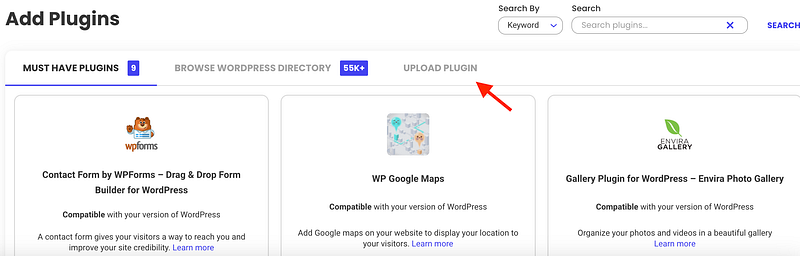
WordPress Add Plugins

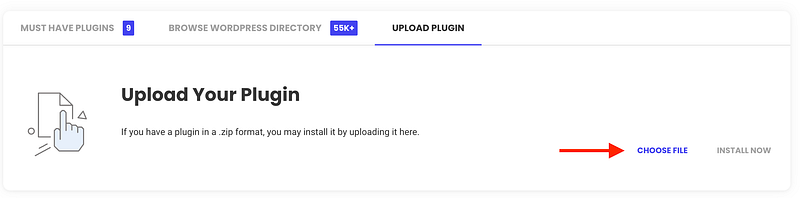
Then, click Choose File

WordPress Add Plugins

Install Now

WordPress Add Plugins

You’re done!

Now, go to Link Whisper to add your site. Get your license key and connect it to your WordPress site.

On WordPress, you’ll see Link Whisper in the left navigation.
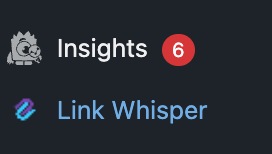
WordPress

Click it to add your license key and you’re set.

When you’re done, it’ll look like this (on your WordPress site)
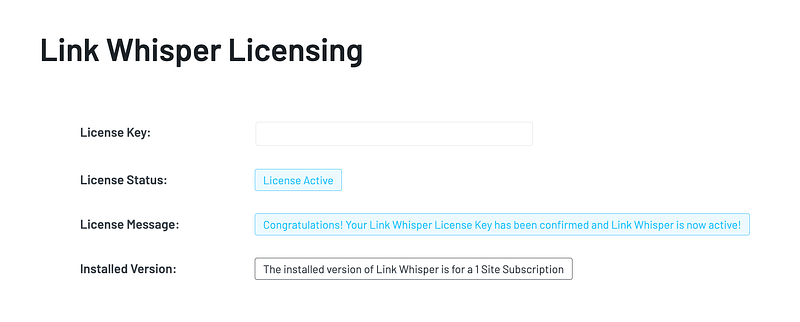
WordPress

From here, when you create your WordPress blog post, you’ll have Link Whisper available to add/approve/edit your internal links.

On your WordPress blog post, at the bottom where your plugins hang out, you’ll see this for Link Whisper, based on the post you’re adding links to…
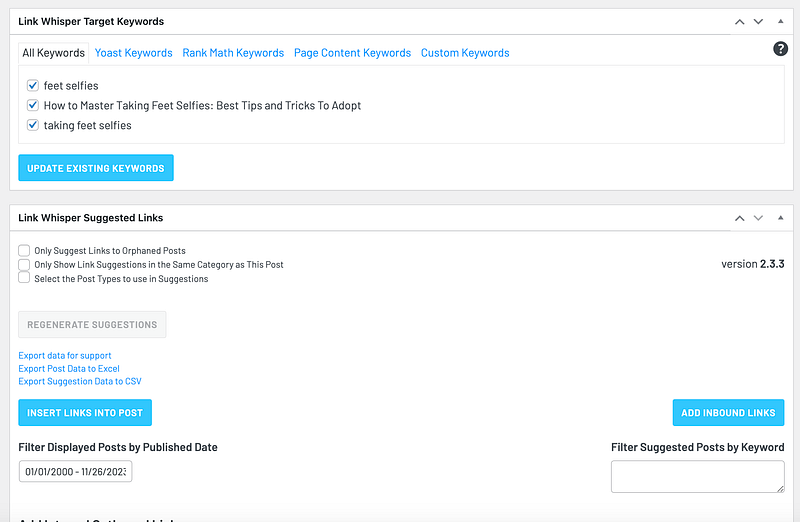
WordPress

You’ll need to review each of the internal link suggestions, as they are all not a fit, 100% of the time. You can see this example, where the link suggestion makes sense for the anchor text suggested.
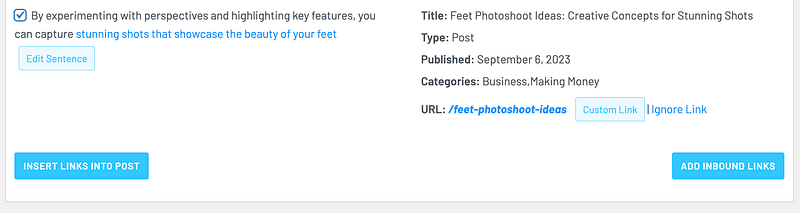
Link Whisper example

Checkmark the box for the internal links you want to place then click “Insert Links Into Post” button.

Done.

Is Link Whisper worth it?

Yes, 100%.

I bought it originally back in 2021. It was for a year license, which I didn’t realize until much later.

For Black Friday 2023, they ran a $30 off sale so I bought it again for another year license.

I remember when I first bought it a few years ago, I did see a big difference in my SEO and traffic. My DA also rose by a few points.

Internal linking is part of SEO. It makes a difference in how Google and other search engines see your content. It’s also an effective way to grow your traffic.

I don’t know how many times I stayed on a blog a lot longer than I originally thought I would because of the awesome internal links that kept leading me to more gems within the blog!

This was my experience with Link Whisper. Interested in trying it out? Click this link to buy Link Whisper today.

Note: Affiliate links are in this post.

Want to read more stories like this? Check out my Substack where I talk about side hustles, social media, content creation and business.

SEO
Seo Tips
Link Building
Blogging
Blogging Tips
Recommended from ReadMedium